
On this page
Start here
Quick answer
A warm Hotpoint refrigerator cabinet is not automatically overheating. Official refrigerator guidance says warm or hot air from the bottom, sides, or rear can be normal on fan-cooled, auto-defrost designs, and warmth around or between doors can come from the heat-rejection system that prevents condensation. First identify the exact model and region, note where the heat is and whether food is holding its set temperature, then check for blocked ventilation, a nearby heat source, a dirty accessible condenser on models that have one, a damaged door gasket, blocked internal vents, or a light that stays on. Hotpoint support says to disconnect the appliance before part replacement; do not remove covers or perform live electrical or sealed-system tests. Stop using the refrigerator and arrange qualified appliance service if there is smoke, a burning or melting odor, a hot or damaged plug or cord, repeated breaker trips, water near electrical parts, an unstable cabinet, an alarm with warming food, or heat that is worsening rather than a stable warm case.
Before you begin
Safety first
- The user may identify the model, observe accessible surfaces, check food loading and visible clearances, clean an accessible gasket, and perform only manual-permitted external cleaning with power disconnected. Qualified service must handle cabinet panels, hidden condensers and fans, wiring, controls, sensors, compressor, refrigerant, live testing, heavy or built-in movement, and electrical-supply faults.
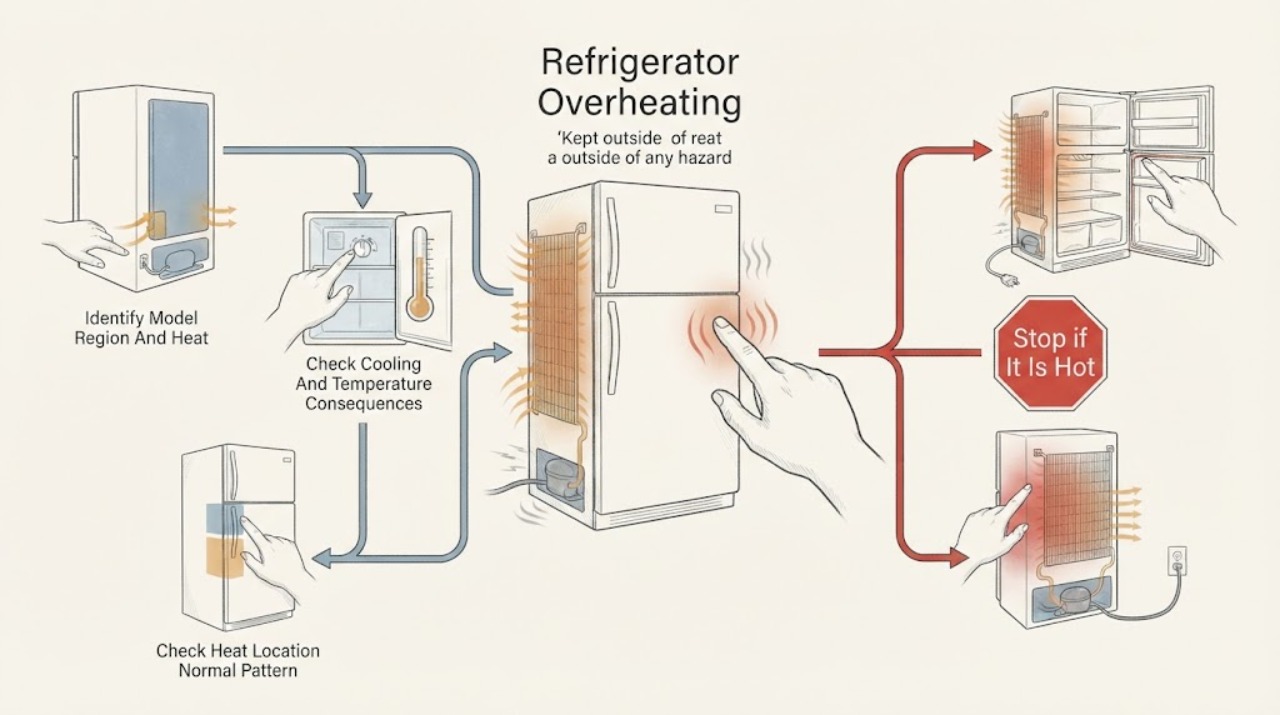
Work through in order
Diagnostic checks
Use only checks that match the exact appliance or system and its official guide.
-
Check 1
Record the complete Hotpoint model and region, then map where the heat is felt: side walls, the strip between doors, front edge, underside, rear, or one small localized spot. Note whether the surface is steadily warm, cycles with the compressor, or is rapidly becoming hotter.
Expected result: The heat is spread over a case area or between doors, occurs during a cooling cycle, or is a localized worsening hot spot accompanied by odor, noise, alarm, or electrical symptoms.
Next step: Follow the location-specific checks below and use the exact model manual for clearances. If there is smoke, scorching, a melting smell, exposed wiring, or a hot damaged cord, stop and arrange service without further testing.
Stop if: Do not remove a rear cover, touch a compressor or exposed terminal, move a built-in unit, or use a surface temperature result as permission for live electrical work.
Why this matters
Why: A broad warm case or door divider can match normal heat rejection, while a new localized hot spot or heat with another symptom requires a more cautious fault path. Model and region determine which surfaces, fans, coils, and clearances are expected.
-
Check 2
Check the refrigerator and freezer displays or alarms, and compare the compartment temperature with the exact model's stated target using a suitable appliance thermometer if the manual recommends one. Note whether food remains properly cold, the compressor cycles normally, or the appliance runs continuously while the compartment warms.
Expected result: The compartments hold their targets and there is no alarm, or the temperature is rising, food is warming, an alarm is active, or the compressor runs without recovering.
Next step: If cooling is stable, continue to location, airflow, and installation checks. If food is warming or an alarm persists, protect perishable food and arrange qualified Hotpoint refrigerator service rather than increasing settings repeatedly.
Stop if: Do not remove food for an extended open-door test, bypass a temperature sensor, or open the sealed system to measure refrigerant pressure.
Why this matters
Why: Stable internal temperature with a warm exterior supports normal heat rejection. A warm compartment or persistent alarm makes a cooling-system, airflow, control, gasket, or fan problem more likely than harmless case warmth.
-
Check 3
For heat at the sides, bottom, rear, front edge, or between doors, compare the location with the model manual and observe whether the heat follows normal compressor or fan operation. Do not press on panels or reach behind the appliance.
Expected result: Warmth is broad and corresponds to a known condenser or heat-rejection area, or one area is newly much hotter than the rest and is accompanied by odor, abnormal noise, poor cooling, or a control alarm.
Next step: Treat stable, model-consistent warmth as an operating characteristic and continue with airflow checks. Treat a worsening localized hot spot or any hazardous companion symptom as a service call; turn off the unit if it is electrically unsafe.
Stop if: Do not remove insulation, panels, fan guards, or condenser covers to identify the hot component.
Why this matters
Why: Official support describes warm or hot exterior air and a warm door-divider area as normal on applicable designs. A change in pattern or a second symptom is more concerning and cannot be diagnosed safely by touch alone.
-
Check 4
Without pulling or tilting the refrigerator, check that the model-required space around its cabinet and vents is not blocked, that the appliance is not pressed against a wall, and that a cooker, heater, direct sun, or other heat source is not warming it. For an integrated unit, inspect only the visible ventilation grille and surrounding cabinetry.
Expected result: Clearances or ventilation openings are blocked, the cabinet is in a hot location, or the installation matches the manual and the surrounding air path is clear.
Next step: Remove only loose items that visibly block an external grille and improve the room arrangement where safe. Do not create an unapproved opening or alter built-in cabinetry; arrange service if the unit must be moved or cabinetry modified.
Stop if: Do not drag a loaded refrigerator, lift an integrated appliance, block a required grille, or rely on a generic clearance copied from another model.
Why this matters
Why: Restricted heat rejection or a nearby heat source can make the compressor run longer and increase cabinet warmth. A clear, model-compliant installation shifts suspicion away from the room and toward a component or cooling fault if performance is also poor.
-
Check 5
Only if the exact manual identifies an accessible condenser or external grille, inspect it from the outside for visible dust or blockage and clean it using the manual's unplugged procedure. Also check that internal freezer air vents are not covered by food; do not remove interior panels.
Expected result: An applicable accessible condenser or grille is visibly clogged, internal vents are blocked, or the manual identifies a sealed or hidden condenser with no owner-cleaning step.
Next step: Restore only the documented external airflow path, then allow the appliance to stabilize while monitoring cooling. If heat or poor cooling persists, arrange service for fan, condenser, control, or sealed-system diagnosis.
Stop if: Disconnect power before any permitted cleaning; do not spray liquid, insert tools, remove panels, touch fan blades, or clean a hidden condenser by guesswork.
Why this matters
Why: Official support lists dirty accessible condenser coils on models that do not have a self-cleaning design and blocked freezer vents as factors in increased runtime. The absence of an accessible owner-cleanable part means this check cannot be generalized.
-
Check 6
Check that doors close fully, the gasket is continuous and clean, packages are not holding a door open, internal vents are not covered, and the interior light goes out when the door is closed if the model provides an observable indication. Do not hold a door switch down with a tool.
Expected result: A door gasket is dirty, torn, folded, or not contacting the frame; a package blocks closure or airflow; the light remains on; or the doors and vents are clear and the light behaves normally.
Next step: Remove only the package or loose obstruction, clean an accessible gasket with the method in the manual, and repeat a normal closure check. Replace a gasket or diagnose a switch only with model-specific qualified service if the symptom persists.
Stop if: Do not glue or stretch a gasket, bypass a door switch, remove an interior control, or continue operating with a wide gap and warming food.
Why this matters
Why: Air leakage, blocked vents, or an interior light that stays on can increase heat load and runtime. A clear gasket and normal light make those causes less likely, but do not prove a compressor or control fault.
-
Check 7
Stop owner troubleshooting when heat is worsening, the compartment is warming, the compressor or fan behaves abnormally, or any electrical or fire warning appears. If it is safe to do so, switch the appliance off and unplug it; otherwise leave it alone and keep people away until qualified help arrives.
Expected result: There is smoke, a burning or melting odor, scorching, a hot or damaged plug or cord, repeated breaker trips, water near electrical parts, exposed wiring, an unstable cabinet, a persistent alarm, or no improvement after model-permitted airflow checks.
Next step: Arrange qualified Hotpoint appliance service and provide the exact model, region, heat location, cooling/alarm result, runtime pattern, airflow findings, and any odor or electrical symptom. Move vulnerable food to another cold appliance when safe.
Stop if: No repeated breaker resets, larger fuse or breaker, cabinet opening, live testing, compressor or refrigerant work, wiring repair, or operation after smoke, arcing, melting, or water near electrical parts.
Why this matters
Why: These observations can indicate an electrical, motor, control, fan, compressor, sealed-system, or installation fault. The visible heat does not identify a safe part to replace, and continued operation can risk food loss or equipment damage.
Use your observations
Decision map
Find the observation that best matches what you see, then follow the next safe action.
-
PATH 01Safety boundary
What you see
The case or door-divider warmth is broad or model-consistent, cooling is stable, and there is no odor, alarm, abnormal noise, or electrical symptom.
Do this next
Confirm model-specific clearance and continue normal maintenance; monitor for a change in cooling or safety symptoms.
Why this path and its safety boundary
Why it matters: Normal heat rejection is more likely than overheating. Official support describes warm or hot exterior air and warmth around doors as normal on applicable refrigerator designs.
Safety stop: Do not open the cabinet simply to find the warm component.
-
PATH 02Safety boundary
What you see
The refrigerator is near a heat source, has blocked visible ventilation, is tightly enclosed, or has an applicable accessible condenser or vent with visible dust.
Do this next
Restore only manual-permitted external airflow and room conditions, then allow normal stabilization; call service if cooling remains poor or heat stays excessive.
Why this path and its safety boundary
Why it matters: Heat rejection is being challenged, so longer runtime and warmer surfaces are more likely. This does not justify cleaning hidden parts or changing the installation by guesswork.
Safety stop: Do not move a heavy or built-in refrigerator alone or alter cabinetry without the installation procedure.
-
PATH 03Safety boundary
What you see
A door is not sealing, a package or vent is blocking airflow, or the interior light remains on with the door closed.
Do this next
Restore visible clearance and clean the accessible gasket; protect food and arrange service if the door or light symptom persists.
Why this path and its safety boundary
Why it matters: Extra warm-air or light heat load can make the compressor run longer and increase cabinet warmth. A gasket or switch symptom still requires model-specific diagnosis if a simple obstruction is not the cause.
Safety stop: Do not bypass the door switch or keep using the refrigerator with a persistent gap and warming food.
-
PATH 04Safety boundary
What you see
The cabinet is increasingly hot or a localized area is abnormal and the refrigerator is not holding its target, shows an alarm, runs continuously without recovery, or has abnormal fan or compressor behavior.
Do this next
Protect perishable food and arrange qualified Hotpoint refrigerator service; do not open the sealed system or test internal parts.
Why this path and its safety boundary
Why it matters: A cooling, airflow, control, motor, or sealed-system problem is more likely than normal case warmth. Touch cannot distinguish those faults safely.
Safety stop: Stop immediately for smoke, scorching, melting, water near electrical parts, or exposed wiring and disconnect power only if safe.
-
PATH 05Safety boundary
What you see
There is a burning or melting odor, smoke, scorch mark, hot or damaged plug or cord, repeated breaker trip, arcing, water near electrical parts, or cabinet instability.
Do this next
Keep clear, switch off or unplug only from a safe position, and arrange qualified appliance or electrical service. Preserve the model and symptom details for the technician.
Why this path and its safety boundary
Why it matters: The immediate priority is electrical and fire safety, not identifying a refrigerator part. Repeated resets or continued operation could worsen damage.
Safety stop: No repeated reset, larger protective device, wet-area access, cabinet opening, live measurement, or operation until the hazard is assessed.
Helpful context
Understand the symptom
Warm is often part of refrigeration, but context matters
Refrigeration removes heat from the food compartment and rejects it through parts of the cabinet and the surrounding air path. Official support says a warm or hot case, bottom, sides, rear, or the area between doors can be normal depending on the design. Judge the symptom with location, cooling performance, runtime, airflow, and safety signs rather than touch alone. There is no single surface-temperature cutoff that applies to every Hotpoint model.
Use the exact model and region before changing anything
Hotpoint's support structure differs by market: its Americas support page directs Hotpoint appliance questions through GE Appliances, while the European Hotpoint service site supplies separate fridge-freezer guidance and manuals. Record the complete model number and use the matching manual for cabinet clearances, condenser access, controls, and safety instructions. Do not import a clearance or a cleaning step from a different model family.
Long runtime can be a heat symptom or a normal response
A refrigerator may run for much of the time, especially in hot weather, after warm food is loaded, or when doors are opened often. The same support guidance lists dirty or damaged gaskets, blocked freezer vents, and a dirty accessible condenser on applicable models as causes of increased runtime. If the compartment is not holding its target temperature, the cabinet heat is increasing, or the compressor never recovers after airflow and loading checks, stop short of internal diagnosis and arrange service.
Heat plus an electrical warning is a stop condition
A warm cabinet with stable cooling and no odor can be normal; smoke, scorching, a melting plug, repeated trips, exposed wiring, water near electrical parts, or a rapidly worsening hot spot is different. Switch the appliance off and unplug it only if the plug and surrounding area are safe to reach. Do not open the cabinet, bypass a control, replace a fuse with a larger one, or handle refrigerant or compressor wiring as a homeowner check.
Safety boundary
Stop conditions
- Treat stable warmth on a documented heat-rejection area differently from worsening heat with poor cooling, alarms, odor, or abnormal noise.
- Stop immediately for smoke, arcing, scorching, a burning or melting odor, a hot or damaged plug or cord, repeated breaker trips, water near electrical parts, exposed wiring, or an unstable cabinet.
- Disconnect power only from a safe, dry position. Do not repeat resets, install a larger fuse or breaker, open the cabinet, perform live tests, or handle compressor wiring or refrigerant.
- Use the exact model and regional manual for clearances, condenser access, controls, and any cleaning step; protect perishable food if cooling is not stable.
Only after diagnosis
Potential parts
- door gasket or seal
Consider this category only when the exact model's gasket is torn, permanently deformed, or not sealing after visible loading and cleaning checks, and cooling load is increased.
Door seals vary by model and region. Confirm the complete model and manufacturer fit information before ordering or replacing one. - condenser fan or airflow service
Consider this service category only when model-permitted external airflow checks are clear but abnormal heat, fan behavior, or long runtime remains.
Some models use hidden or self-cleaning condenser arrangements and different fan systems. Do not select a fan from the symptom alone. - temperature sensor or control service
Consider this category only after the exact model shows a persistent temperature, alarm, or runtime problem that is not explained by airflow, loading, or a gasket.
Sensors, boards, alarms, and diagnostic procedures are model-specific and require qualified diagnosis rather than live owner testing. - compressor or sealed-system service
Consider this service category only when the refrigerator cannot hold its target after safe external checks and qualified diagnosis points to compressor or sealed-system performance.
Refrigerant circuits and compressors require qualified service. Do not open the sealed system or infer a part from cabinet warmth. - power cord, plug, or electrical service
Consider this service category only when a qualified inspection finds cord, plug, outlet, or supply damage after the appliance is made safe.
A hot, melted, scorched, wet, or repeatedly tripping supply is a stop condition; do not replace protective devices or wiring as a casual repair.
When checks do not resolve it
Need a professional?
Arrange qualified Hotpoint refrigerator service when safe model-permitted airflow and loading checks do not restore normal cooling or runtime, when heat is worsening or localized, or when a fan, control, sensor, compressor, sealed system, gasket, cord, plug, or built-in installation needs access. Stop and isolate the appliance if safe for smoke, burning or melting odor, scorching, repeated breaker trips, water near electrical parts, exposed wiring, a hot or damaged cord, or an unstable cabinet.
Safety scope: The user may identify the model, observe accessible surfaces, check food loading and visible clearances, clean an accessible gasket, and perform only manual-permitted external cleaning with power disconnected. Qualified service must handle cabinet panels, hidden condensers and fans, wiring, controls, sensors, compressor, refrigerant, live testing, heavy or built-in movement, and electrical-supply faults.
Common questions
FAQ
Is it normal for a Hotpoint refrigerator to feel hot on the sides?
Often, yes. Official refrigerator support says warm or hot air can come from the bottom, sides, or rear on fan-cooled auto-defrost designs, and that a refrigerator case can feel very warm around the doors. Stable compartment temperature and the absence of odor, alarms, or electrical symptoms support normal heat rejection; worsening heat or poor cooling needs service.
Why is the area between my Hotpoint refrigerator doors warm?
On applicable designs, the sealed system circulates warm liquid around the front edge between the freezer and fresh-food sections to reduce exterior condensation. It can feel warmer when the compressor runs longer, including during hot or humid conditions. If the area is newly worsening and the refrigerator is warming or showing an alarm, arrange service.
Can blocked ventilation make a Hotpoint refrigerator overheat?
Restricted ventilation or a nearby heat source can make the appliance run longer and reject heat less effectively. Check only the clearances and grilles identified by the exact model manual; official support also lists blocked freezer vents and dirty accessible condenser coils on applicable models as runtime factors. Do not move a built-in unit or remove panels yourself.
Should I unplug a Hotpoint refrigerator that feels extremely hot?
If there is smoke, a burning or melting odor, scorching, a hot or damaged plug or cord, repeated breaker trips, arcing, water near electrical parts, or exposed wiring, stop using it and disconnect power only if the plug and area are safe to reach. Otherwise keep clear and arrange qualified service. A merely warm case with stable cooling and no hazard is not by itself proof that unplugging is required.
Does long compressor runtime mean my Hotpoint refrigerator is overheating?
Not necessarily. Official refrigerator guidance says compressors can run much of the time and lists hot weather, warm loads, frequent door openings, dirty or damaged gaskets, blocked vents, and dirty accessible coils as runtime factors. Long runtime becomes a service concern when the compartment cannot hold its target, an alarm persists, the heat is worsening, or normal external checks do not help.
Read the exact guide
Official sources
- Appliance Support - HotpointHotpoint / GE Appliances · Official Hotpoint support routing page. It establishes regional ownership/support context; it is not a substitute for an exact refrigerator model manual or a diagnosis.
- Refrigerator or Freezer - Normal Run TimeGE Appliances · Official GE Appliances support article. Runtime guidance and listed factors are general support information; exact controls, clearances, and cleaning steps remain model-specific.
- Refrigerator - Warm / Hot AirGE Appliances · Official GE Appliances support article. Apply the normal-warm-air explanation only where the Hotpoint model's region and design are covered by GE Appliances support or the matching manual.
- Hotpoint Service Fridge Freezer Repair - HotpointHotpoint UK Appliances Limited · Official European Hotpoint service page. Use its disconnect-before-part-replacement and professional-service boundaries for supported Hotpoint UK appliances; model instructions take precedence.
- Refrigerator - Area Between Doors Warm or HotGE Appliances · Official GE Appliances support article. Its heat-rejection and condensation explanation is conditional on the model's design; it does not define an overheating temperature cutoff.
Community feedback
Share a repair observation
Share a plain-text repair observation. Accepted observations are published automatically; this page may take a moment to update.