
On this page
Start here
Quick answer
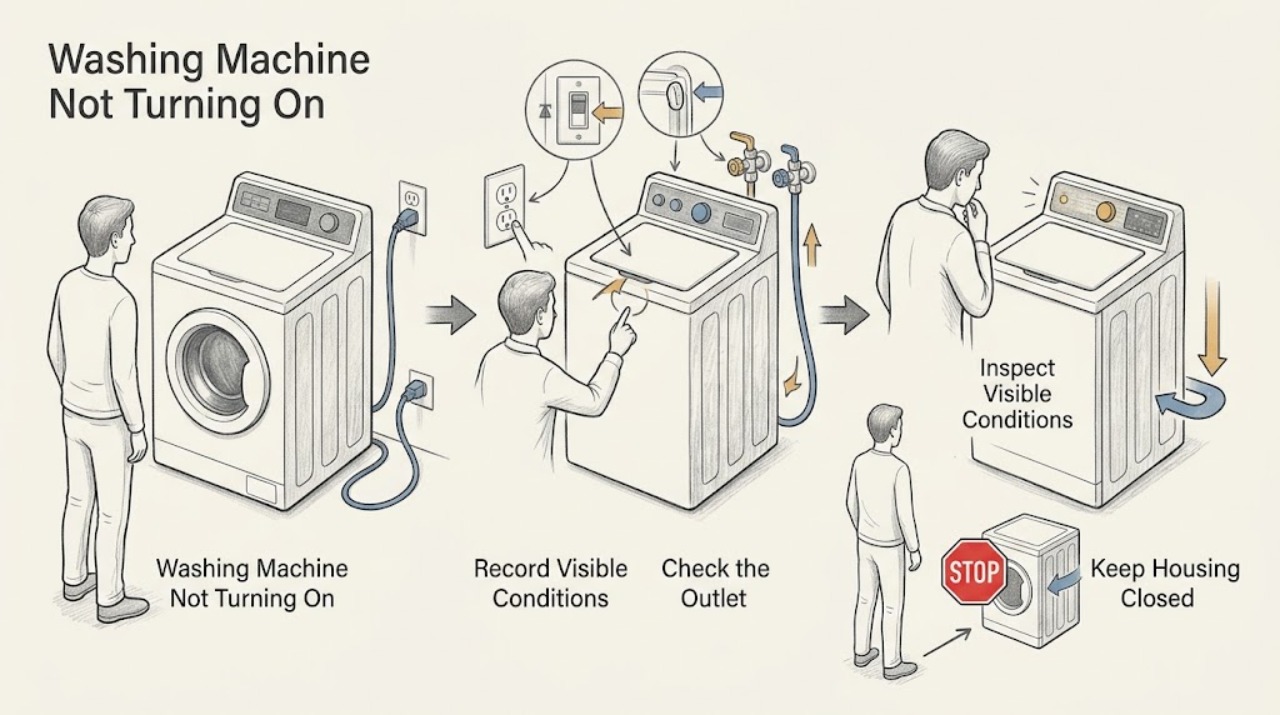
When a Crosley washer appears dead, first separate a completely dark panel from a washer that lights but will not start. Check the cord and outlet, then the household breaker or fuse, using only normal external controls. Crosley manuals note that some models perform automatic checks after power is connected and can take a short time before operation, while a lid or door must be closed and latched before the machine runs. If the panel has power but Start does nothing, check the exact model's door or lid and cycle procedure; if the breaker trips, the cord or outlet is hot, there is smoke, water near electrical parts, or the panel remains dead after a known-good supply, stop and arrange qualified service. Do not bypass the lid or door lock, use an extension cord, open the console, or repeatedly reset a breaker.
Work through in order
Diagnostic checks
Use only checks that match the exact appliance or system and its official guide.
-
Check 1
Press Power or the normal start control once and record whether the display or status lights illuminate, whether the panel beeps, whether a lock indicator changes, and whether any information code appears. Do not repeatedly press controls or change the cycle while observing.
Expected result: The panel is completely dark, the panel lights but Start does nothing, the washer begins a delayed check, or a code or warning appears.
Next step: Follow the matching branch and record the exact model before interpreting a code. Stop immediately for electrical warning signs or a recurring fault.
Why this matters
Why: A dark panel points to power delivery or an internal electrical path. A lit panel with no start points to the lid or door, control operation, selected cycle, water path, or a model-specific interlock. A startup delay can be normal on some Crosley models.
-
Check 2
Inspect the power cord and plug externally for looseness, cuts, crushed insulation, discoloration, or heat. Confirm the plug is fully seated in a grounded wall outlet; do not use an extension cord, adapter, or a power strip for the test.
Expected result: The plug is loose or disconnected, the cord or plug is damaged or hot, the outlet is dead, or the external supply appears normal.
Next step: If the cord, plug, or outlet is damaged or hot, leave the washer disconnected and arrange qualified electrical service. If the outlet is simply switched off or dead, have the household supply checked; do not alter wiring yourself.
Why this matters
Why: Crosley troubleshooting directs users to secure the cord and verify a working outlet. Damage or heat can indicate an electrical hazard and is not a reason to plug the washer into another outlet repeatedly.
-
Check 3
Check the household breaker or fuse for the washer circuit using the normal panel procedure. Look for other appliances that lost power, and note whether the breaker trips again immediately after a single safe reset; do not remove the panel cover or replace a fuse with an incorrect type.
Expected result: The breaker is tripped or fuse is blown, the breaker holds and the washer panel returns, or the breaker trips again.
Next step: After one normal reset, retry the washer once only if no warning signs are present. If it trips again, keep the washer unplugged and call a qualified electrician or appliance technician; do not keep resetting it.
Why this matters
Why: Crosley lists a tripped breaker or blown fuse as a possible no-power cause. A repeated trip indicates a fault or overload rather than a button-reset problem and may expose the user to shock or fire risk.
-
Check 4
If the control panel has power, close the lid or front door firmly and check that no clothing or object is caught in the latch or seal. Select a normal cycle and press the model-specific Start or Start/Pause control once; do not bypass the lock.
Expected result: The lid or door was not latched, the lock indicator changes and the washer starts, the latch stays open, or the panel remains on but unresponsive.
Next step: Remove only a visible external obstruction when the machine is stopped. If the latch will not engage, the door or lid is damaged, or Start remains unresponsive, stop and arrange model-specific service rather than forcing or bypassing the lock.
Why this matters
Why: Crosley models require a closed lid or locked door before operation, and some front-load models perform a short system check before water enters. A failed or obstructed interlock can prevent start even when the panel is lit.
-
Check 5
If the washer powers on but does not begin filling or advancing, verify both water faucets are open and the inlet hoses are not kinked. Observe whether the washer performs its initial checks before water enters; do not disconnect a pressurized hose for this diagnosis.
Expected result: A faucet is closed, an inlet hose is kinked, the washer is performing a normal startup delay, or the supply path is normal but the cycle still does not start.
Next step: Restore only an obvious external faucet or hose condition and retry once. If no water enters with normal external supply, do not open the valve or console; arrange qualified service.
Why this matters
Why: Crosley manuals identify water supply conditions and automatic self-checks as reasons a washer may appear to pause after Start. A normal supply and completed self-check shift attention to the lock, valve, sensor, or control path.
-
Check 6
After the external power, lock, and water checks, run one short supervised cycle only if the washer starts normally. Stop immediately if it goes dead, the breaker trips, the cord heats, the cabinet leaks, smoke or burning odor appears, or an information code returns.
Expected result: The washer starts and remains stable, starts then loses power, or remains dead or unresponsive with a known-good external supply.
Next step: Use the washer only when it completes normally without electrical or water warnings. Otherwise leave it unplugged when safe, record the model and symptoms, and arrange qualified Crosley appliance service.
Why this matters
Why: A single successful cycle after correcting a loose plug, breaker, latch, faucet, or startup delay supports that condition as the immediate cause. A recurring loss of power or a dead panel with normal supply points to an internal wiring, control, sensor, or interlock fault.
Use your observations
Decision map
Find the observation that best matches what you see, then follow the next safe action.
-
PATH 01Next step
What you see
The display and status lights are completely dark.
Do this next
Check the external cord, grounded outlet, and breaker or fuse once using normal household controls. If the supply is good but the panel remains dark, keep the washer unplugged and arrange service.
-
PATH 02Next step
What you see
The breaker trips again, the fuse fails again, or the cord, plug, or outlet is hot or damaged.
Do this next
Stop immediately, disconnect power only if safe, and seek qualified electrical or appliance service. Do not repeatedly reset the breaker or use an extension cord.
-
PATH 03Next step
What you see
The panel is lit but the lid or door will not latch or the lock indicator does not behave normally.
Do this next
Remove only a visible obstruction and close the lid or door normally. If the lock remains faulty, keep the washer out of use and arrange service; never bypass the interlock.
-
PATH 04Next step
What you see
The washer is in an initial system check or has a normal startup delay after power or Start is pressed.
Do this next
Allow the model-described check to finish without repeatedly changing controls. Escalate if the delay does not end or an alert returns.
-
PATH 05Next step
What you see
The washer has power and a locked lid or door but does not fill or advance after the external water check.
Do this next
Keep it off and arrange qualified service for a possible inlet valve, sensor, control, or wiring issue. Do not open the console or disconnect pressurized hoses.
-
PATH 06Next step
What you see
Smoke, burning odor, sparks, water near electrical parts, abnormal heat, visible wiring damage, or repeated loss of power occurs.
Do this next
Stop immediately, disconnect power only if safe, keep clear of water and damaged wiring, and seek qualified electrical or appliance service. Do not run another test.
Helpful context
Understand the symptom
Start by distinguishing no power from no start
Look at the display, status lights, lock indicator, and any sound when Power or Start is pressed. A completely dark panel follows the supply path; a lit panel that will not begin follows the lid or door, control, water, or cycle path. Note whether the washer stopped during a previous cycle and whether water remains before changing settings.
Use the electrical stop boundary
Keep hands and water away from the outlet and controls. Unplug before moving the washer or doing any permitted external inspection. Never use an extension cord, defeat the ground connection, bypass a lid or door lock, open the console, or continue testing after a burning smell, smoke, sparks, a hot cord, water near electrical parts, or repeated breaker trips.
When checks do not resolve it
Need a professional?
Book service for a recurring no-start condition, dead panel after supply checks, failed lid or door interlock, repeated breaker trip, recurring information code, or any repair beyond the exact Crosley user manual.
Common questions
FAQ
Why is my Crosley washer completely dead?
Check the cord, grounded outlet, and breaker or fuse using normal external controls. If the outlet is good but the display remains dark, unplug the washer and arrange qualified service rather than opening the console.
Why does my Crosley washer have lights but not start?
Check the exact model's lid or door latch, selected cycle, Start control, and normal startup check. Do not bypass the interlock; a lit panel with a normal supply can still have a lock, valve, sensor, or control fault.
Can a Crosley washer take time to start after I press Start?
Some Crosley models perform automatic system checks or briefly delay water entry. Allow the exact model's normal sequence to finish once; if it never advances or an alert returns, arrange service.
When should I stop using a Crosley washer that will not turn on?
Stop for a repeated breaker trip, hot or damaged cord, smoke, burning odor, sparks, water near electrical parts, visible wiring damage, or a panel that stays dead after a known-good supply. Disconnect power only if safe and seek qualified help.
Read the exact guide
Official sources
- Crosley CWM41154DW Washer User ManualCrosley Home Products · Official Crosley top-load manual for the linked model family; exact model instructions take priority.
- Crosley Washer Use and Care GuideCrosley Home Products · Official Crosley front-load washer guide; use the exact model manual for controls and procedures.
- Crosley YFW450 Washer Owner's Manual and Installation InstructionsCrosley Home Products · Official Crosley front-load washer manual; exact model controls and safety instructions take priority.
Community feedback
Share a repair observation
Share a plain-text repair observation. Accepted observations are published automatically; this page may take a moment to update.