
On this page
Start here
Quick answer
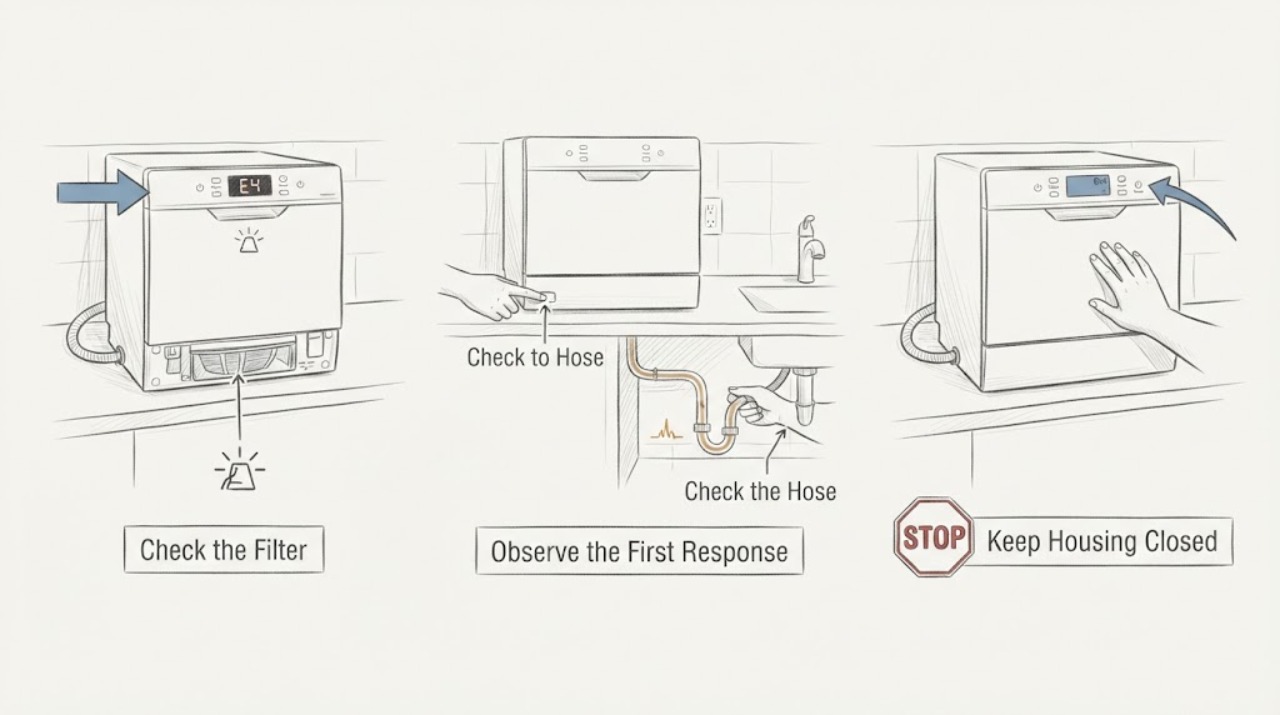
On the Danby DDW631SDB countertop dishwasher, the owner’s manual defines E4 as water overflow and lists a drain malfunction or drain clog as possible causes. Turn off the water supply, stop the cycle and unplug the unit before cleaning. Check the accessible coarse and fine filters, the drain area and the drain hose for a kink or obstruction, then restore the correct hose connections. Only after the water path is clear should you reconnect the unit and use the manual’s approximately 5-minute power reset. If E4 returns, water remains in the base, the pump cannot drain, or a hose/connection leaks, stop using the dishwasher and arrange qualified Danby service; do not tilt the filled appliance or open the pump/control enclosure as a reset method.
Work through in order
Diagnostic checks
Use only checks that match the exact appliance or system and its official guide.
-
Check 1
Confirm the rating label reads DDW631SDB and note whether E4 appears with standing water inside, water in the base, a slow drain, or a visible hose/faucet leak. Stop the cycle, turn off the water source and unplug the countertop dishwasher before touching filters or hoses.
Expected result: The model matches and E4 is present with water/drain symptoms, or the model/symptom differs from the assigned problem.
Next step: If the label differs, use that model’s manual and stop this E4 path. If it matches, keep the water supply off and proceed to the accessible filter and drain checks.
Why this matters
Why: The DDW631SDB manual defines E4 as water overflow, while a different model may use another E4 definition. Water in the tub, base or connection helps distinguish an overflow/drain event from a display-only problem but does not identify the failed component.
-
Check 2
With power and water disconnected, remove and rinse the coarse and fine filter pieces described in the DDW631SDB manual. Inspect the accessible sump/drain area for food, glass or other debris; do not put hands into a hidden pump or use a sharp tool to reach it.
Expected result: The coarse/fine filters or drain area contain debris, or they are clear while water remains or E4 returns.
Next step: Rinse and reinstall the filters as shown in the manual. If the path is clear but water remains or E4 returns, inspect the external drain hose and arrange service rather than opening the base.
Why this matters
Why: The manual says the coarse filter traps larger pieces that could block the drain and recommends emptying/cleaning the filters after each wash. Clearing an accessible blockage supports a drain-path explanation but does not prove the pump or overflow sensor is good.
-
Check 3
Inspect the external drain hose and quick-connect routing for kinks, crushing, loose connections or an incorrect port. Keep the water source off; if disconnecting the faucet quick-connect is necessary, first release residual inlet pressure with its pressure-relief valve as the manual directs.
Expected result: The drain hose is kinked/blocked or connected incorrectly, the quick-connect is leaking, or the external routing is normal.
Next step: Correct only an accessible routing/connection issue, ensure the water source remains off until ready to run a cycle, and replace damaged hose parts only with exact model guidance. If routing is normal or E4 persists, stop and request Danby service.
Why this matters
Why: The DDW631SDB manual identifies a kinked drain hose as a possible cause of water not draining and specifies the longer quick-connect port for the drain hose. A pressurized or leaking connection can add a water hazard independent of the E4 sensing state.
-
Check 4
After the filters and drain path are clear and all connections are secure, reconnect the appliance and perform the manual’s approximately 5-minute power reset. Do not use tipping, shaking or repeated breaker cycling as a reset technique.
Expected result: E4 clears and the unit drains normally, or E4 returns immediately/after water enters.
Next step: If the code clears, observe one attended empty/rinse operation for leaks and normal drain-out. If E4 returns, stop the cycle, turn off water and power, and arrange qualified Danby service.
Why this matters
Why: Danby says a power reset may resolve a displayed error, but the reset does not remove a continuing overflow, clog, pump or hose condition. A recurring E4 after a clear path requires diagnosis beyond the reset.
-
Check 5
If a test cycle is run after the reset, keep it attended and stop immediately for a leak, water collecting in the base, a pump that only hums, a burning smell or an E4 recurrence. Do not remove enclosure panels or probe the pump/control wiring.
Expected result: The unit completes the attended test without E4 or leakage, or any warning/overflow symptom returns.
Next step: If normal, continue routine filter care and monitor. If abnormal, leave the water supply off, unplug the appliance when safe, and contact Danby or an authorized service technician.
Why this matters
Why: A clean attended cycle shows only that the symptom did not recur during that observation; it does not authorize unattended operation. A returning E4 or water hazard is consistent with an unresolved drain/overflow fault that the manual routes to qualified service.
Use your observations
Decision map
Find the observation that best matches what you see, then follow the next safe action.
-
PATH 01Next step
What you see
The DDW631SDB filters or accessible drain area contain debris, and E4 stays cleared after cleaning and the documented reset.
Do this next
Keep the filters clean and monitor an attended cycle. Stop using the unit and request service if E4 or standing water returns.
Why this path and its safety boundary
Why it matters: An accessible drain obstruction is the best-supported explanation for that event; the result does not prove the pump or sensor will never fail.
-
PATH 02Next step
What you see
The filters and drain hose are clear and correctly routed, but E4 returns as soon as water enters or water remains in the base.
Do this next
Turn off the water supply, unplug the appliance when safe and arrange qualified Danby service. Do not tilt the filled unit or open its enclosure.
Why this path and its safety boundary
Why it matters: The overflow/drain condition remains unresolved; the manual does not support selecting a pump, sensor or control board from this observation alone.
-
PATH 03Next step
What you see
E4 clears after the documented power reset and one attended rinse/empty test completes without a leak.
Do this next
Monitor the next use with the filters installed and the drain hose routed correctly; stop immediately if E4, slow draining or water leakage returns.
Why this path and its safety boundary
Why it matters: The code is no longer active during that test, but a reset alone does not establish why the overflow state occurred.
-
PATH 04Next step
What you see
The faucet quick-connect sprays, a hose connection leaks, the base contains water, or a burning smell/electrical warning appears.
Do this next
Do not continue testing. Turn off the water source and unplug only when safe, release pressure before any approved hose disconnection, and obtain qualified service.
Why this path and its safety boundary
Why it matters: There is an active water or electrical safety issue beyond code clearing.
Helpful context
Understand the symptom
E4 is an overflow/drain state on this exact model
The official DDW631SDB manual does not define E4 as a generic control-board code: its error table says E4 means water overflow and names drain malfunction or drain clog. That makes the order of work important. Clear standing water and the accessible drain path first, then try the documented power reset; replacing a control or repeatedly restarting the dishwasher does not establish that the overflow condition is gone.
Protect against hot water and pressurized quick-connect spray
Danby says to turn off the water source and unplug the appliance before disconnecting it, and to release remaining inlet pressure at the quick-connect before removing the faucet connection. E4 troubleshooting should stay at the filter, drain-area and hose level. Do not tip a water-filled countertop dishwasher, reach into a running pump or open the enclosure to force a reset.
Common questions
FAQ
What does E4 mean on the Danby DDW631SDB?
The exact DDW631SDB owner’s manual defines E4 as water overflow and lists a drain malfunction or drain clog. It is not a generic code to interpret from another Danby dishwasher.
Will unplugging the DDW631SDB clear E4?
Danby says a power reset may resolve a displayed error and specifies waiting approximately five minutes before reconnecting. Clear the filters and drain path first; if E4 returns, the underlying overflow/drain condition still needs service.
Should I tip the countertop dishwasher to clear E4?
No. A Reddit commenter reported that tilting appeared to help, but that is not Danby’s procedure and can move water or the appliance unsafely. Turn off water and power, inspect the accessible drain path and obtain service if E4 persists.
Read the exact guide
Official sources
- Countertop Dishwasher SilverDanby Appliances Canada · Opened the Danby Canada product page. It identifies DDW631SDB as a countertop dishwasher and links the owner’s manual used for the E4 definition.
- Dishwasher error code clearingReddit r/Appliances · Opened the exact Reddit post. It identifies the countertop Danby model, reports E4 after a drain obstruction and says the code persisted after the obstruction was removed and power was disconnected; later comments report an unsafe tilting workaround.
- OWNER’S MANUALDanby Products Limited / Danby Products Inc. · Opened the exact PDF through the Owners Manual link on Danby’s DDW631SDB product page. The cover lists model DDW631SDB1 alongside DDW631WDB; the error table and operating instructions are used for the assigned DDW631SDB family identity.
Community feedback
Share a repair observation
Share a plain-text repair observation. Accepted observations are published automatically; this page may take a moment to update.