
On this page
Start here
Quick answer
Some heat is expected: a warming plate or cup tray can remain hot after brewing, steam can appear during brewing or a steam cycle, and a fully automatic machine may make small puffs after shutdown. The safe distinction is whether the heat is tied to an active function and cools normally. Stop the active function, switch the machine off normally, let hot parts cool, and unplug from a dry safe position before inspecting only visible, removable parts. Do not use it again for persistent heating after shutdown, a burnt or electrical odor, smoke, scorching, an unusually hot or damaged cord or plug, water near electrics, repeated trips, or an appliance-too-hot message that returns. Internal heater, thermostat, thermal protection, pump, control, wiring, or sealed water/steam faults require qualified De’Longhi service; do not open the housing or test live circuits.
Before you begin
Safety first
- This article covers classification of normal hot surfaces or steam, safe shutdown, visible cord/outlet checks, and model-directed external cleaning or cooldown. A qualified technician must handle the housing, heating system, thermostat/thermal protection, pump, valve, thermoblock, pressure circuit, controls, and wiring.
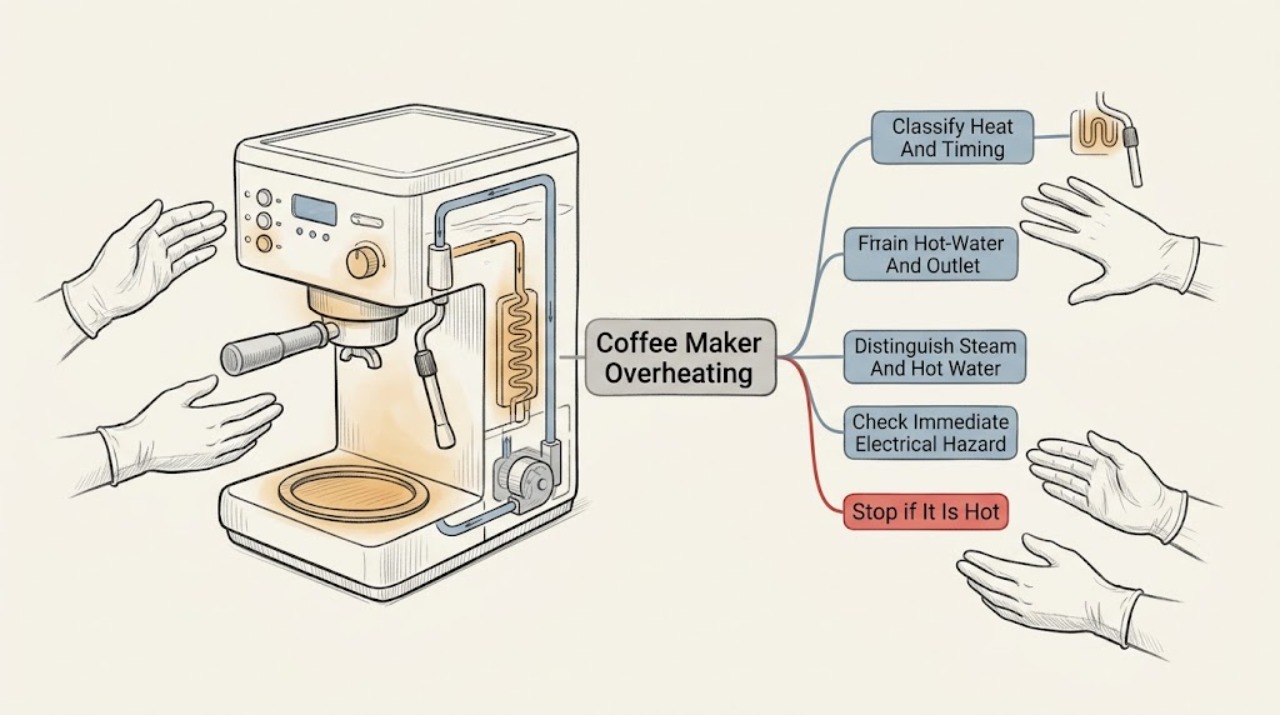
Work through in order
Diagnostic checks
Use only checks that match the exact appliance or system and its official guide.
-
Check 1
Stop the current cycle and note what is hot: warming plate or cup tray, brew head/portafilter, hot-water outlet or steam wand, top vents, sides, underside, cord, or plug. Record whether the heat occurs during brewing/steaming, immediately after several drinks, during an automatic rinse or shutdown, while idle, or after the machine has been switched off. Let the machine cool before touching any removable part.
Expected result: Heat is limited to the tray, plate, brew head, or wand during or shortly after a normal function; a small puff follows a recent cycle; or the body, cord, or plug remains abnormally hot while idle.
Next step: For an expected, cooling heat source, continue only with the model-specific external checks below. For idle or escalating heat, keep the machine off and unplugged and arrange qualified service without restarting it to reproduce the symptom.
Stop if: Do not touch hot metal or steam, measure internal temperature, remove covers, or keep the machine energized for observation.
Why this matters
Why: A function-linked hot surface or brief steam event can be normal on the applicable model. Heat that continues while idle, is concentrated at the cord/plug, or comes with odor, smoke, scorching, or repeated trips is an abnormal safety symptom rather than a temperature preference.
-
Check 2
After switching off and cooling, look only at the accessible plug, cord, outlet face, and surrounding counter. Check for discoloration, melted plastic, looseness, moisture, scorch marks, a hot plug, or a breaker/GFCI trip. Do not remove an outlet cover, use a meter, or energize the machine to test it.
Expected result: The cord or plug is hot, damaged, wet, discolored, or smells electrical; the outlet is scorched or loose; water reached the controls or outlet; or power has tripped more than once.
Next step: Leave the machine disconnected and keep clear of wet or damaged electrical parts. Have the appliance assessed by qualified service and have a damaged outlet checked by a qualified electrician; do not substitute a different cord or repeatedly reset protection.
Stop if: Do not reconnect, use an extension or timer to retry, bypass a breaker/GFCI, or conduct a live electrical test.
Why this matters
Why: These signs can indicate a fire or shock hazard at the appliance or supply. They cannot be distinguished safely by a user-level coffee-machine check, and a reset would not prove the appliance is safe.
-
Check 3
For a pump espresso, combination, or fully automatic model, identify whether steam or hot water was selected and whether the visible vapor came from the wand, outlet, drip tray, or top vent. Do this from a safe distance after the machine cools; do not open a steam valve or deliberately run a hot cycle while investigating an overheating complaint.
Expected result: Steam is produced only during a selected steam/hot-water function, comes from the documented outlet or drip-tray discharge hole, or is a small puff shortly after shutdown; or steam escapes from an unexpected body joint while no function is selected.
Next step: Let normal residual heat or steam dissipate and follow the exact model manual for shutting down and cleaning the visible outlet. Keep an unexpected or persistent steam source unplugged and arrange service.
Stop if: Do not touch steam, probe the nozzle, defeat a steam control, remove a pressurized holder, or run the machine to locate an internal steam leak.
Why this matters
Why: De’Longhi says steam from a combination machine’s drip tray can be normal in steam mode, and small puffs after a recent cycle can be condensate entering a hot vaporiser on applicable fully automatic models. Uncommanded, forceful, persistent, or body-originating steam suggests an internal valve, water circuit, heater, or control fault.
-
Check 4
Once fully cool and unplugged, inspect only the user-accessible water tank, drip tray, filter basket or portafilter, visible steam-wand tip, and removable filter or brewing accessories that the exact manual allows. Check that the tank has water, the tray is not full, vents are not covered, and removable passages are not visibly blocked. Follow only the model’s approved cleaning, rinsing, filter, and descaling procedure; use the manufacturer’s specified descaler rather than improvising a chemical.
Expected result: The tank is empty or mis-seated, the drip tray is full, the outlet or filter has visible residue, the machine’s maintenance prompt is active, the machine was covered or crowded, or all visible parts are clear and correctly seated.
Next step: Correct only the visible condition permitted by the exact manual, allow the appliance to cool, and monitor from outside during a normal future use only if there was no safety symptom. If overheating persists or the machine was already unsafe, do not retry; arrange service.
Stop if: Do not pour water into the housing, cover vents, use unapproved descaler, force an infuser or tank valve, or disassemble the pump, heater, thermostat, or steam circuit.
Why this matters
Why: Low water, blocked user-removable flow parts, a full tray, poor ventilation, or overdue model-directed maintenance can make a cycle abnormal or prolong normal heat. A clear external path does not rule out a heater, thermostat, pump, thermoblock, sensor, or control fault.
-
Check 5
Use the normal power control once, without repeatedly cycling it, and observe whether the model completes its documented rinse or shutdown. For a De’Longhi model that reports an appliance-too-hot condition, leave it off for the model’s prescribed cooling period; for the Magnifica Evo cup-tray guidance, five minutes is the stated wait after several drinks. Never unplug a fully automatic machine mid-shutdown unless an immediate hazard requires disconnection from a safe dry position.
Expected result: The machine cools and becomes ready after a normal high-use pause; a model-specific too-hot message clears once; or it stays hot, continues a pump/heater sound, shows the message again, or heats while switched off.
Next step: If the symptom clears completely with no odor, smoke, electrical sign, leak, or recurrence, follow the exact manual’s use limits. If it recurs or the machine remains hot while idle, keep it unplugged and contact an authorized service center.
Stop if: Do not restart repeatedly, bypass a thermal cutoff, leave the appliance unattended while abnormal, or assume a temporary cooldown is a repair.
Why this matters
Why: A short, model-documented cooldown can follow heavy beverage or steam use. Failure to cool, a repeated too-hot message, or continued heating after the normal control is off is not established as normal by these general checks and may involve thermal protection, a heater, thermostat, pump, sensor, or control.
-
Check 6
Write down the exact product/model number, machine type, what became hot, timing, number of drinks or steam use, shutdown behavior, indicator or error text, water/steam location, odor or smoke, cord/plug condition, and any electrical trip. Keep the machine unplugged and give this record to De’Longhi support or a qualified coffee-machine technician.
Expected result: Overheating persists after cooling, returns on the next use, occurs while idle, follows a thermal or appliance-too-hot message, or is accompanied by a burnt smell, smoke, scorching, abnormal noise, water leak, hot plug, or repeated trip.
Next step: Stop use and arrange De’Longhi or qualified service. Provide the exact model and symptom record, and ask the technician to inspect the cause before any replacement part is chosen.
Stop if: Do not open the housing, run with covers removed, test live circuits, reset a protection device repeatedly, or repair internal heating, pump, pressure, control, or wiring parts yourself.
Why this matters
Why: The pattern is no longer a user-facing hot-surface or normal steam explanation. Internal heater/thermoblock, thermostat or thermal protection, pump, valve, sensor, control, water circuit, cord, or wiring access may be required, and a component cannot be selected safely from the symptom alone.
Use your observations
Decision map
Find the observation that best matches what you see, then follow the next safe action.
-
PATH 01Safety boundary
What you see
Only the warming plate or cup tray is hot during or shortly after brewing, especially after several beverages, and it cools without odor, smoke, electrical symptoms, or recurrence while idle.
Do this next
Keep hands and heat-sensitive items away until cool and follow the exact model’s normal use and shutdown instructions. Escalate if the tray stays hot while idle or any stop symptom appears.
Why this path and its safety boundary
Why it matters: Residual heat is more likely than a failed heater; De’Longhi documents a hot warming plate after use and a hot cup tray after rapid successive beverages for applicable models.
Safety stop: Do not cover the appliance or try to cool it with liquid.
-
PATH 02Safety boundary
What you see
Steam appears during a selected steam/percolation function, from the documented drip-tray discharge path, or as a small puff soon after a recent cycle, with no smoke or burning odor.
Do this next
Let the machine cool, keep the wand/outlet directed safely as the manual specifies, empty the drip tray if directed, and monitor only normal operation. Persistent or uncommanded body steam requires service.
Why this path and its safety boundary
Why it matters: Normal steam discharge or condensate is more likely on the applicable combination or fully automatic model; steam location and timing matter.
Safety stop: Do not touch the vapor or open a pressure path.
-
PATH 03Safety boundary
What you see
An appliance-too-hot message appears, the machine becomes too hot after extended stirring or beverage use, or heat returns after the documented cooldown.
Do this next
Switch off, allow the exact model’s cooldown, and arrange authorized service if the message or overheating returns. Do not keep using it to see whether it eventually resets.
Why this path and its safety boundary
Why it matters: A use-related cooldown may be sufficient once, but recurrence or failure to cool shifts concern to thermal protection, motor/pump, heater, sensor, or control behavior that needs model-specific assessment.
Safety stop: Do not bypass a thermal cutoff or repeatedly restart.
-
PATH 04Safety boundary
What you see
There is a burnt or electrical odor, smoke, scorching, a hot/discolored plug or cord, water near the outlet or controls, or repeated breaker/GFCI trips.
Do this next
Stop immediately, disconnect only from a dry safe position if it can be done without contact with a wet or damaged part, keep clear, and arrange qualified appliance service; have a damaged outlet checked by an electrician.
Why this path and its safety boundary
Why it matters: This is an electrical or fire hazard, not a descaling or ventilation experiment. The appliance and, potentially, the supply require qualified inspection.
Safety stop: Do not reconnect, reset repeatedly, move a hot/wet appliance, or open it.
-
PATH 05Safety boundary
What you see
The machine is hot while water flow is weak or absent, the tank is empty/mis-seated, an outlet or filter is blocked, or water/steam comes from an unexpected body location.
Do this next
Switch off and cool; correct only visible removable conditions under the model manual. Keep the appliance unplugged and arrange service if the body leak, overheating, or poor flow persists.
Why this path and its safety boundary
Why it matters: A visible tank, tray, or removable outlet condition may be user-correctable only when the exact manual says so. Heat combined with unexpected water, a body leak, or persistent poor flow can involve an internal pump, valve, heater, thermoblock, seal, or water circuit.
Safety stop: Do not run dry, probe passages, force valves, or remove internal panels.
Helpful context
Understand the symptom
First decide whether the heat is expected for this machine
“Coffee maker” covers different De’Longhi designs. A filter brewer normally heats a warming plate and may emit steam while percolating; a pump espresso or combination machine has a hot-water outlet and steam wand; a fully automatic machine may rinse and discharge condensate into a drip tray. A warm tray, hot spout after use, or a brief puff tied to a recent cycle is not the same symptom as heating that continues while idle, a burning smell, smoke, a hot plug, or repeated breaker trips. Find the product number and use its exact manual for controls, cooldown behavior, and maintenance.
Stop before heat, steam, water, and electricity overlap
Stop brewing, steaming, or heating; press the normal power control, allow any normal shutdown or rinse to finish, and unplug from a dry safe position once it is safe to reach the plug. Keep hands away from hot water, steam, the warming plate, cup tray, portafilter, and wand. Stop immediately for smoke, scorching, a burning or electrical odor, a hot/discolored plug or cord, water at the outlet or controls, repeated electrical trips, or heat that does not fall after the machine is off. Do not cover the appliance, bypass a thermal or interlock device, open the housing, or perform a live-voltage test.
Safety boundary
Stop conditions
- Stop immediately for smoke, scorching, burning or electrical odor, a hot/discolored cord or plug, water near the outlet or controls, repeated electrical trips, unexpected pressurized steam, or a body leak.
- Switch off with the normal control, allow any documented shutdown/rinse and cooling to finish, and unplug from a dry safe position before user-level inspection; do not open the housing even after unplugging.
- Do not bypass a thermal cutoff or interlock, cover the appliance, run it dry, restart repeatedly, test live circuits, or operate it with covers removed.
- Persistent heating while idle, a recurring appliance-too-hot message, or overheating with internal water, pump, heater, thermostat, control, cord, or wiring symptoms requires De’Longhi or qualified service.
When checks do not resolve it
Need a professional?
Safety scope: This article covers classification of normal hot surfaces or steam, safe shutdown, visible cord/outlet checks, and model-directed external cleaning or cooldown. A qualified technician must handle the housing, heating system, thermostat/thermal protection, pump, valve, thermoblock, pressure circuit, controls, and wiring.
Common questions
FAQ
Is it normal for a De’Longhi coffee maker to feel hot?
Often, yes: a filter brewer’s warming plate remains hot after use, and an applicable fully automatic model’s cup tray can heat up after several beverages. The machine should cool normally, with no smoke, burning odor, hot plug, repeated trips, or heat while idle. Persistent or escalating heat requires service.
Why is my De’Longhi coffee machine releasing steam?
Steam during percolation or an active steam cycle can be normal. De’Longhi also documents steam from a combination machine’s drip-tray discharge hole and small post-use puffs on an applicable PrimaDonna model. Unexpected, forceful, persistent, or body-originating steam is a reason to stop and arrange service.
What should I do if my De’Longhi says appliance too hot?
Stop the active use and follow the exact model’s cooling instruction. De’Longhi’s PrimaDonna Elite guidance says to wait for the machine to cool after continuous stirrer use. If the message returns, the machine will not cool, or there is an odor, smoke, scorching, leak, hot plug, or electrical trip, keep it unplugged and contact authorized service.
Can limescale or a blocked water path make a De’Longhi run hot?
A restricted or poorly maintained water path can change how a coffee machine behaves, but this general article cannot identify an internal cause. With the machine cool and unplugged, perform only the exact model’s visible cleaning, filter, and descaling procedure, using the manufacturer-specified product. Persistent overheating or poor flow needs service.
When should I stop using an overheating De’Longhi coffee maker?
Stop for heat while idle or after shutdown, a recurring too-hot message, burnt or electrical odor, smoke, scorching, a hot or damaged cord/plug, water near electrics, unexpected steam, or repeated breaker/GFCI trips. Switch off, cool, unplug only from a dry safe position, and arrange qualified service. Do not open or live-test the machine.
Read the exact guide
Official sources
- Instructions for use COFFEE MAKER ICM14011De’Longhi · Official De’Longhi manual for the ICM14011 drip coffee maker; hot-surface and steam behavior is model-specific and does not describe every De’Longhi machine.
- The machine emits noises or small puffs of steam while not in useDe’Longhi Coffee Machines Help Center · Official De’Longhi Help Center article for PrimaDonna Class; it describes a brief model-specific post-use behavior, not persistent heating or smoke.
- Why is there steam and smoke coming from the drip tray of my combination coffee maker?De’Longhi US · Official De’Longhi US FAQ for combination coffee makers; it applies only when the machine’s steam-mode design has the described discharge path.
- De’Longhi Customer ServiceDe’Longhi · Official De’Longhi US support page; contact channels and service terms vary by region.
- The cup tray on top of the machine is hotDe’Longhi Coffee Machines Help Center · Official De’Longhi help article for the listed Magnifica Evo models; the five-minute cooldown is not a universal setting for all De’Longhi machines.
- Common Issues - Fully Automatic Coffee MachineDe’Longhi US · Official De’Longhi US FAQ for fully automatic machines; exact maintenance prompts and removable parts vary by model.
- Message: APPLIANCE TOO HOTDe’Longhi Coffee Machines Help Center · Official De’Longhi Help Center article for PrimaDonna Elite; it supports the message/cooldown distinction but not a universal cause for every coffee maker.
Community feedback
Share a repair observation
Share a plain-text repair observation. Accepted observations are published automatically; this page may take a moment to update.