
On this page
Start here
Quick answer
Treat F12 on a De'Longhi oven as a model-specific fault code, not as proof of a particular failed part. The De'Longhi oven alert guidance reviewed here says an F-number is a fault code and directs the owner to an approved service centre; a separate official compact-oven manual says to record an ERR message, use its documented START/STOP reset, and disconnect the plug before consulting troubleshooting. Because the assigned topic has no complete model number, first record the exact display text and model, then use only that model's manual for a single authorized reset. If F12 returns, the exact manual does not match, the oven will not start, or there is smoke, burning odor, sparking, abnormal heat, or a damaged cord, keep it off and arrange qualified De'Longhi or electrical service.
Work through in order
Diagnostic checks
Use only checks that match the exact appliance or system and its official guide.
-
Check 1
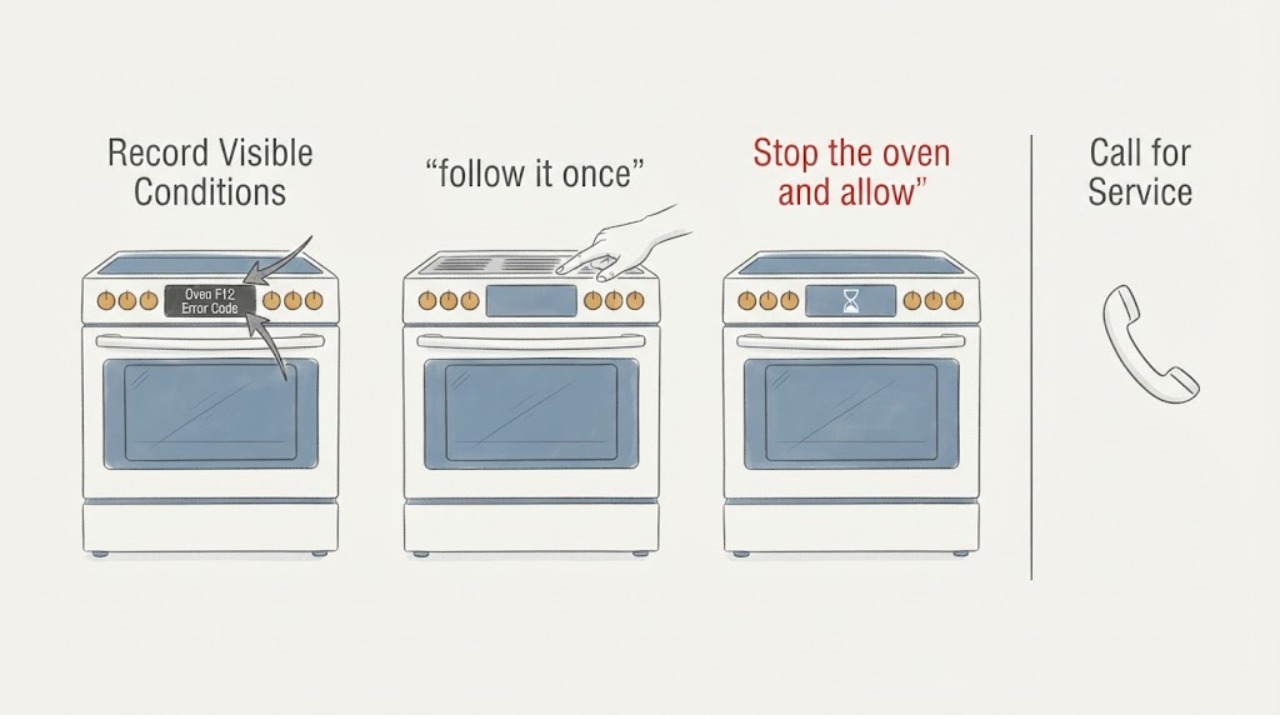
Record the complete De'Longhi model, full display text, and when F12 appeared: at power-up, after a control was used, when a cooking mode started, or after the oven became hot.
Expected result: The model and code are complete, or the model is unknown, the display uses a different prefix, or another warning appears with F12.
Next step: Find the manual for the complete model through De'Longhi support. If the model cannot be identified, preserve the display record and arrange qualified service rather than using a guessed F12 table.
Stop if: Do not enter a service mode, substitute a control or sensor, or apply a reset sequence from another De'Longhi oven.
Why this matters
Why: De'Longhi documentation treats F-number displays as fault codes, but the meaning and reset depend on the product manual. An incomplete model or different display prefix makes a cross-model diagnosis unreliable.
-
Check 2
Stop the oven and allow the cavity and cooling system to become completely cool. Inspect only ordinary-access external areas from a dry, safe position for smoke, odor, sparking, abnormal heat, a damaged cord, liquid, or a tripped protective device.
Expected result: A safety hazard is present, or the oven is cool and there is no visible external hazard.
Next step: For a hazard, keep the oven off and obtain the appropriate electrical or appliance response. If cool and apparently safe, continue only with the exact manual's documented reset decision.
Stop if: Do not touch hot or wet controls, remove covers, operate switches near smoke or gas, or keep resetting a tripped protective device.
Why this matters
Why: A hazard changes F12 from a model-specific troubleshooting question into an immediate electrical or fire-safety event. No visible damage does not make internal controls safe to access.
-
Check 3
If the exact model manual documents a reset for the displayed error, follow it once; for the compact-oven manual reviewed here, that means using the documented START/STOP reset and disconnecting the plug before troubleshooting.
Expected result: The display returns normally, F12 remains, F12 returns after power is restored, or the manual does not document a reset for this model.
Next step: If the code remains or returns, leave the oven off and provide the model, code, timing, and reset result to qualified service. If no reset is documented, skip repeated power cycling and do the same.
Stop if: Do not repeat resets, change fuse ratings, bypass an interlock, or open the control panel to clear the code.
Why this matters
Why: A one-time recovery can indicate a temporary control state but does not prove the oven is repaired. A persistent or returning code, or an unavailable model-specific procedure, requires service.
-
Check 4
After a documented reset clears F12 and the exact manual permits use, make one supervised normal start and record whether the code returns at power-up, function selection, heating start, or later in the cycle.
Expected result: The oven operates normally, F12 returns, the oven will not start, or another electrical, thermal, door, or control symptom appears.
Next step: Stop use for a returning code or abnormal symptom and arrange qualified De'Longhi appliance service. Provide the full model and exact timing.
Stop if: Do not run multiple modes to compare them, leave the oven unattended, or continue after smoke, burning odor, sparking, abnormal heat, or a hot cord.
Why this matters
Why: A successful supervised run supports a temporary event only. A returning code or no-start condition is a persistent fault, and timing helps service without requiring the owner to reproduce a dangerous failure.
Use your observations
Decision map
Find the observation that best matches what you see, then follow the next safe action.
-
PATH 01Next step
What you see
The exact De'Longhi manual confirms F12 as an F-number fault code, the oven is cool and undamaged, and its documented single reset clears the code.
Do this next
Use the oven only as the exact manual permits, supervise one normal operation, and stop if F12 or another abnormal symptom returns.
Why this path and its safety boundary
Why it matters: The immediate display fault may have been a temporary control state, but the code has not been diagnosed to a replaceable component.
-
PATH 02Next step
What you see
F12 returns after the authorized reset, remains on the display, prevents the oven from starting, or appears with another code or abnormal control behavior.
Do this next
Keep the oven off and arrange approved De'Longhi or qualified appliance service with the full model, code, timing, and reset result.
Why this path and its safety boundary
Why it matters: The fault is persistent or model-specific and cannot be safely assigned to a board, sensor, heater, fuse, or wiring from the display alone.
-
PATH 03Next step
What you see
Smoke, burning odor, sparking, abnormal heat, a hot or damaged cord, liquid near electrical controls, repeated breaker trips, or a suspected gas hazard accompanies F12.
Do this next
Stay clear, isolate power only from a dry safe position if possible, leave the area for a suspected gas event, and obtain qualified emergency, electrical, or appliance help before reuse.
Why this path and its safety boundary
Why it matters: The appliance has reached an immediate electrical, fire, water, or gas-safety boundary.
Helpful context
Understand the symptom
Record F12 and the complete De'Longhi model
Photograph or write down the full display text, including any prefix such as F or ERR, and record the complete product model from the rating label or paperwork. De'Longhi's support centre provides manuals and service resources by product, while the alert guidance treats an F-number as a fault code rather than a user setting. Do not apply a code list from another De'Longhi oven or assume that F12 names a control board, sensor, heater, or other part.
Stop and cool the oven before any reset
Stop cooking and wait until the oven and cooling fan have completely stopped and the cavity is cool. From a dry, safe position, check only for an obvious external hazard such as smoke, burning odor, sparking, a hot or damaged cord, liquid near electrical controls, or a tripped protective device. Do not open the housing or touch an energized or hot appliance while trying to clear F12.
Use one model-authorized reset only
If the exact De'Longhi manual documents a reset for an error display, follow that sequence once. The compact-oven manual reviewed here uses a two-second START/STOP reset followed by disconnecting the plug and checking troubleshooting; that procedure is not automatically valid for another model. If the manual gives no reset, skip this step and go to service.
Interpret the result without guessing a part
If F12 clears and the exact manual permits continued use, make at most one supervised normal operation and note whether the code returns. A code that returns immediately, returns when a function or heat begins, or prevents the oven from starting is a persistent fault. The code alone does not identify a safe replacement part; qualified service must match the diagnosis to the exact model.
Keep electrical work with qualified service
Arrange approved De'Longhi or qualified appliance service when F12 persists, the model-specific manual cannot be found, or the oven needs a cover, wiring, control, sensor, heater, or internal fuse accessed. Use qualified electrical help when the outlet, breaker, isolation switch, or supply is implicated. Do not bypass protection, probe live wiring, or continue operating through smoke, burning odor, sparking, abnormal heat, or a damaged cord.
When checks do not resolve it
Need a professional?
Request qualified service if F12 persists or returns, the exact model manual is unavailable, the oven will not start, or internal controls, wiring, sensors, heaters, or fuses would need to be accessed. Stop immediately for smoke, sparking, burning odor, abnormal heat, a hot or damaged cord, liquid near electrical parts, repeated breaker trips, or suspected gas.
Common questions
FAQ
What does F12 mean on a De'Longhi oven?
De'Longhi's official alert guidance classifies an F-number as a fault code and directs the owner to an approved service centre. The exact F12 meaning and reset depend on the complete oven model, so do not use a code definition from another series.
Can I reset a De'Longhi oven showing F12?
Only if the exact model manual documents a reset. One official compact-oven manual uses a START/STOP reset followed by disconnecting the plug, but that sequence is not automatically valid for another model. If F12 returns, stop and arrange service.
Should I replace a control board or temperature sensor for F12?
No. F12 alone does not identify a safe replacement part. Record the model and display behavior and have qualified service diagnose the appliance before ordering an internal component.
Read the exact guide
Official sources
- EO12012 Compact Cavities 12 Litres Electric Oven Support CenterDe'Longhi · Official De'Longhi support-centre example showing manuals, product registration, contact, and authorised-service resources; the assigned model is not specified.
- Oven display is showing an ‘Alert’ code what does it mean?De'Longhi Cooking Appliances / Elba Italy SpA · Official De'Longhi cooking-appliance support page; its table groups F+Number, including F12, as a fault code and directs the owner to an approved service centre.
- EO241255MC Electric Oven Instruction ManualDe'Longhi Group · Official De'Longhi compact-oven manual used only as an example of a model-authorized ERR reset; it does not establish the F12 meaning for an unspecified De'Longhi oven.
Community feedback
Share a repair observation
Share a plain-text repair observation. Accepted observations are published automatically; this page may take a moment to update.