
On this page
Start here
Quick answer
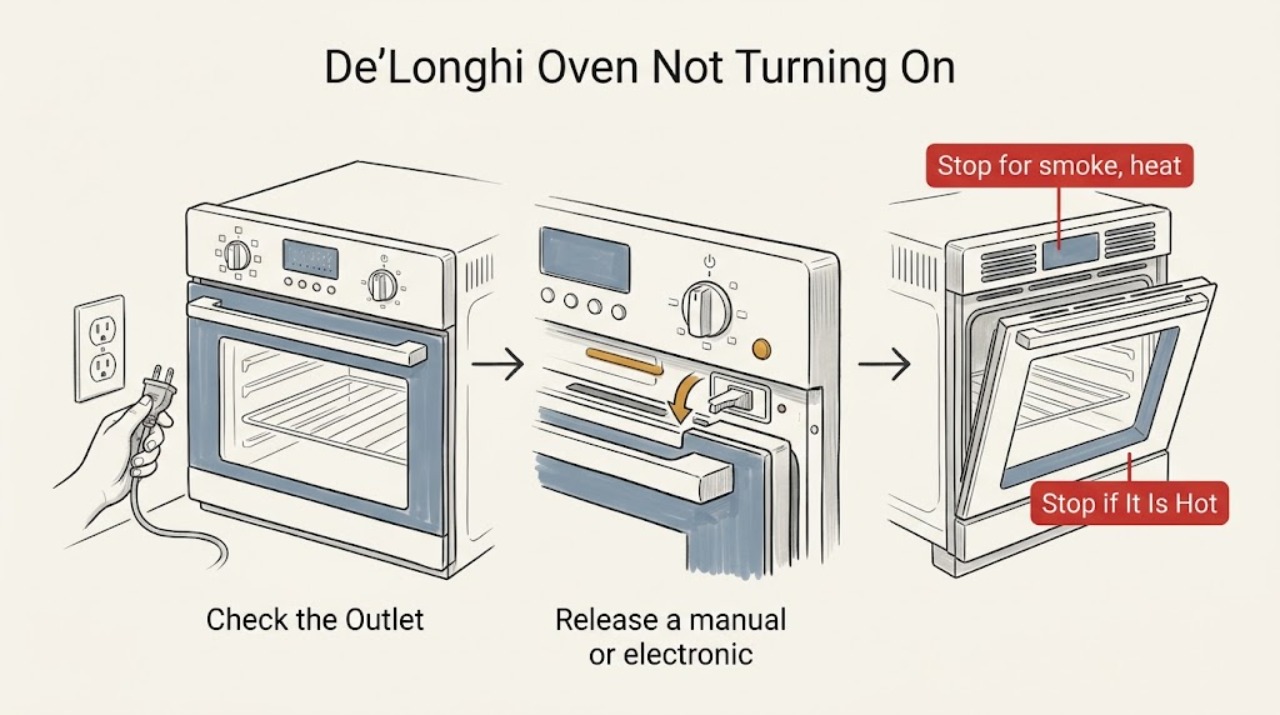
If a De'Longhi oven is not turning on, stop for smoke, a burning or melting smell, a hot or damaged cord, arcing, water near the controls, or a breaker that trips again. If the appliance is cool and dry, check the plug and working outlet, then confirm the power switch, selector, thermostat, timer, clock, and manual or electronic start state are set as the model manual requires. A De'Longhi oven with a display showing SOFT can be unplugged for five seconds and reconnected without pressing buttons during the reset. If the display remains dark with a working outlet, the oven still will not start after the documented settings and one reset, a fault message returns, or the cord, controls, door, or heating system is damaged, stop using it and arrange authorized service. Do not open the housing or test live wiring.
Work through in order
Diagnostic checks
Use only checks that match the exact appliance or system and its official guide.
-
Stop for smoke, heat, or electrical damage
From outside the oven, look at the plug, cord, outlet area, control panel, door glass, and cabinet exterior without opening anything. Stop immediately for smoke, a burning or melting smell, a hot or damaged cord, arcing, water at electrical parts, a cracked glass panel, or a breaker that trips again.
Expected result: A fire, shock, heat, glass, or power hazard is present, or the oven is cool and dry with no damage, odor, smoke, or repeated trip.
Next step: For smoke, arcing, burning odor, or a damaged electrical part, stop using the oven, isolate power only if safe, and arrange qualified service. If there is no hazard, continue without removing panels or touching internal components.
Why this matters
Why: A hazard is not a timer or setting issue and makes further user testing unsafe. A cool, intact oven can proceed to external power and control checks.
-
Verify the plug, outlet, breaker, and primary controls
Make sure the plug is fully seated in a dry, working outlet and check the accessible household breaker or fuse. Confirm the oven's power switch, function selector, and temperature or thermostat control are not in an off position. Test the outlet with a safe low-power device rather than opening the receptacle or touching wiring.
Expected result: The outlet is dead, the breaker is tripped or will not stay on, the plug is loose, a selector or thermostat was off, or the outlet and controls are correct but the oven remains dark or inactive.
Next step: Have a qualified electrician check a dead or repeatedly tripping circuit. Correct an accessible control position once and retry only when the oven is safe. If the supply is sound but the oven remains dark or inactive, stop and arrange De'Longhi service.
Why this matters
Why: A dead outlet or repeated trip points to the household supply. An off selector can make a working oven appear dead. A working supply and correctly positioned controls shift suspicion to the timer, display, control, cord, or an internal fault.
-
Release a manual or electronic timer lock
If the display works but the oven does not start, check the exact model manual for the timer mode. A manual-timer oven may need the timer set to a cooking period or placed in the manual position; an electronic-timer oven may not operate until its clock is set. Set only the documented time or manual state and then select the desired function and temperature.
Expected result: The timer was not in a cooking or manual state, the electronic clock was unset, the oven starts after the documented correction, or the controls were already correct and the oven still does not operate.
Next step: Monitor one normal start after correcting the timer or clock. If the oven still will not start, the setting will not save, the display is inconsistent, or the fault returns, stop repeated attempts and request service.
Why this matters
Why: A timer or unset clock can intentionally block operation without indicating a failed heating component. If the documented timer state is correct and the oven remains inactive, a control or power fault is more likely.
-
Handle the documented SOFT display reset
If the display specifically reads SOFT, switch the oven off if possible and unplug it from the wall. Wait five seconds, reconnect it, and do not press any buttons while plugging or unplugging. Do not use this reset for smoke, overheating, a damaged cord, a repeated breaker trip, or an unrelated display message.
Expected result: The SOFT message clears and the controls respond, the message remains, another fault appears, or the oven stays dark or will not start after reconnection.
Next step: If the reset clears the message, set the model-approved function and temperature and make one supervised start. If the message returns or the oven remains inactive, unplug it when safe and arrange De'Longhi service.
Why this matters
Why: De'Longhi describes SOFT as the unit's software programme and provides this one reset procedure. A message or no-start condition that remains after the documented reset is not a reason to keep cycling power.
-
Make one supervised start attempt and stop on a persistent fault
After the outlet, controls, timer, and any applicable SOFT reset are correct, select the model's normal oven function and temperature once. Stay nearby and observe the display, indicator, fan, and heat response without opening the housing. Stop for smoke, abnormal noise, a burning smell, a repeated trip, an error message, or a cord or plug that becomes hot.
Expected result: The oven starts normally, the display works but no heat or response follows, the display goes dark, an error returns, or a safety symptom appears.
Next step: If the oven starts, monitor one cycle. If it does not start or any safety symptom appears, stop using it, unplug it when safe, and arrange authorized service. Do not remove the rear cover or test live parts.
Why this matters
Why: A successful start supports a timer or control-state issue. A persistent no-start with a sound outlet points to the appliance power path, control, thermostat, safety protection, or heating system and needs model-specific diagnosis.
Use your observations
Decision map
Find the observation that best matches what you see, then follow the next safe action.
-
PATH 01Safety boundary
What you see
There is smoke, a burning or melting smell, arcing, a hot or damaged cord, water near electrical parts, cracked glass, or a breaker that trips again.
Do this next
Stop using the oven, isolate power only if safe, keep clear, and arrange qualified service. Do not restart, open the housing, or keep resetting the breaker.
Why this path and its safety boundary
Safety stop: True
-
PATH 02Safety boundary
What you see
The outlet is dead or the breaker will not stay on.
Do this next
Leave the oven disconnected and have the household circuit checked by a qualified electrician. If the circuit is sound but the oven remains dark, arrange De'Longhi service.
Why this path and its safety boundary
Safety stop: True
-
PATH 03Next step
What you see
The display works and the manual or electronic timer was unset, but the oven starts after the documented timer or clock correction.
Do this next
Monitor one normal cycle. If the timer will not save, the oven stops again, or the no-start symptom returns, request service.
-
PATH 04Next step
What you see
The display specifically showed SOFT and the one documented five-second power reset clears it.
Do this next
Set the model-approved function and temperature and make one supervised start. If SOFT returns or the oven remains inactive, arrange service.
-
PATH 05Safety boundary
What you see
The outlet and controls are correct, but the oven remains dark, does not respond, produces no heat, or returns an error after the applicable checks.
Do this next
Stop using the oven and request an authorized De'Longhi service assessment. Provide the complete model, display message, timer state, and result of the outlet and reset checks.
Why this path and its safety boundary
Safety stop: True
Helpful context
Understand the symptom
Make the oven safe before checking the controls
Turn the oven off and stop for smoke, a burning or melting smell, a hot or damaged cord, arcing, water near electrical parts, a cracked door or glass, or a breaker that trips again. Isolate power only from a dry, safe position. Do not keep trying to start a hot or damaged appliance, remove panels, bridge a switch, or test live wiring.
A dark display is different from a timer-blocked start
A completely dark appliance begins with the plug, outlet, breaker, and the appliance's accessible power switch. A lit display with no heating or no response often points to the clock, manual timer, electronic timer, selector, thermostat, or another model-specific control state. De'Longhi's oven support pages list separate guidance for manual and electronic timers, so use the exact model manual rather than guessing a button sequence.
Record the model and display message
Before contacting support, record the product name, complete model number, serial number, display message, selector position, and whether another appliance works from the same outlet. De'Longhi's support and manual pages use the model to locate the correct guide; do not infer compatibility or an internal fault from a generic oven symptom.
Only after diagnosis
Potential parts
- De'Longhi oven timer or control module
Consider this only after a qualified technician confirms that the outlet, selector, thermostat, timer state, and documented reset are correct but the control or timer fails.
Confirm the complete De'Longhi model and manufacturer-approved fit before ordering; timer and control assemblies vary by model. - De'Longhi oven thermostat or thermal protection component
Consider this only when service diagnosis identifies a thermostat or thermal-protection fault rather than a setting or power issue.
Thermal components are safety-related and model-specific; do not bypass or replace them without qualified service. - De'Longhi oven heating element
Consider this only if a qualified technician confirms that the oven has correct power and controls but a heating element has failed.
Confirm the exact model, element position, and manufacturer-approved part before replacement; do not test the element while energized.
When checks do not resolve it
Need a professional?
A technician is required for persistent no-power or no-start, timer or display faults, recurring error messages, a suspected thermostat or thermal protection issue, damaged controls or cord, or any electrical or heat hazard.
Common questions
FAQ
Why will my De'Longhi oven not turn on even though it is plugged in?
Check the working outlet, breaker, power switch, selector, thermostat, and the manual or electronic timer state. If the supply is sound and the oven remains dark or inactive, stop and arrange authorized De'Longhi service.
Can the timer prevent a De'Longhi oven from starting?
Yes. A manual-timer model may need a cooking period or manual position, while an electronic-timer model may not operate until its clock is set. Use the exact model manual and request service if the timer will not save or the oven still does not start.
What should I do if my De'Longhi oven displays SOFT?
If the display specifically says SOFT and there is no safety hazard, unplug the oven, wait five seconds, and reconnect it without pressing buttons during the connection. If SOFT returns or the oven remains inactive, arrange service.
When is a De'Longhi oven no-start problem unsafe?
Stop immediately for smoke, burning or melting smell, arcing, a hot or damaged cord, water near electrical parts, cracked glass, or a repeated breaker trip. Isolate power only if safe and arrange qualified service; do not open the housing or test live wiring.
Read the exact guide
Official sources
- Oven with electronic timer wont work.De'Longhi · Electronic-timer De'Longhi oven no-start and clock-setting requirement
- Contact UsDe'Longhi · De'Longhi service escalation, model and serial information, manuals, authorized support, and repair contact
- Manual timer oven wont turn on.De'Longhi · Manual-timer De'Longhi oven no-start and the required cooking-period or manual timer position
- Instruction ManualsDe'Longhi · De'Longhi oven model identification, model-specific instruction manuals, and support routing
- OvensDe'Longhi · De'Longhi oven support topics including no-start, manual and electronic timer, fan, door, and manuals or service routing
- What does it mean when the display on my oven shows "SOFT"?De'Longhi · De'Longhi oven SOFT display, five-second unplug reset, and no-button handling during reconnection
Community feedback
Share a repair observation
Share a plain-text repair observation. Accepted observations are published automatically; this page may take a moment to update.