
On this page
Start here
Quick answer
First decide whether the dryer has no power at all or has a display and lights but will not start. If there is no smoke, burning smell, gas odor, sparking, water, or abnormal heat, check the plug, dedicated breaker or fuse, dry control panel, Control Lock, cycle selector, Start or Hold-to-Start input, and fully latched door. Record the complete error message and the dryer type before applying any model-specific step. Electric, gas, ventless, and heat-pump dryers use different supply and cycle controls; use the exact manual for the appliance. Stop immediately for smoke, fire, gas odor, hot or damaged wiring, a repeated breaker trip, or overheating. Do not open the cabinet, bypass a door switch, or keep resetting protection; persistent no-start needs qualified appliance or electrical service.
Before you begin
Safety first
- This article covers safe external observation and one model-documented reset only when no hazard is present. Do not touch hot or wet electricity, bypass a door or thermal safety device, open panels, adjust gas fittings, or perform live work.
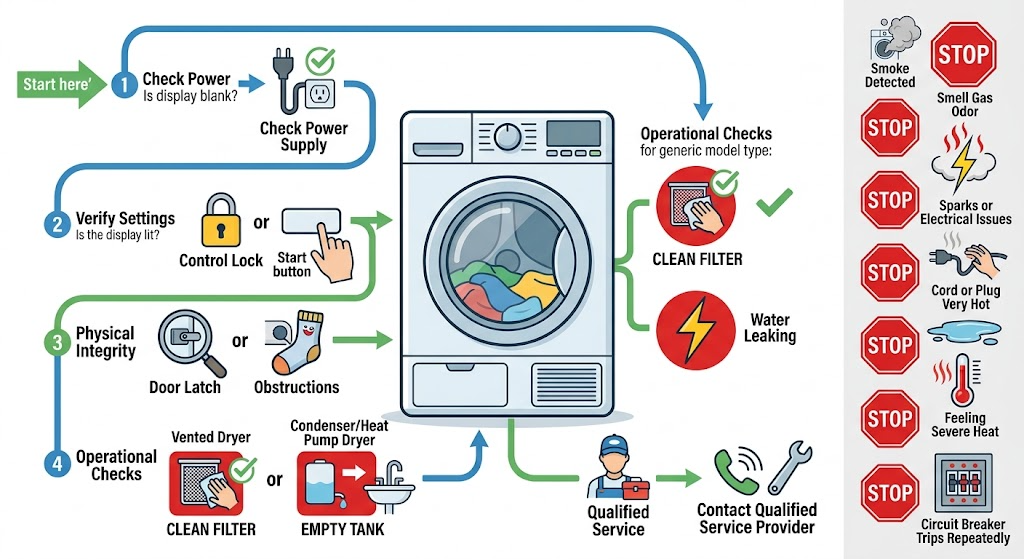
Work through in order
Diagnostic checks
Use only checks that match the exact appliance or system and its official guide.
-
Check 1
With the dryer stopped and controls off, note whether the drum light, display, and indicators are completely dark, partly active, or fully active but unresponsive. Identify whether the appliance is electric, gas, ventless, or heat-pump from its label or manual; do not remove a panel to identify it.
Expected result: The dryer is completely dark, only the display is dark, the controls are lit but ignore input, or the machine responds but will not begin tumbling.
Next step: Follow the matching power, control, door, or motor branch and the exact manual. Do not restart a machine with smoke, odor, heat damage, water, or arcing.
Stop if: Stop for a hot or damaged cord or outlet, smoke, burning smell, gas odor, visible spark, water near electricity, or abnormal heat.
Why this matters
Why: A dark machine points toward supply or control power, while a lit but unresponsive panel points toward Control Lock, moisture, input, or a control fault. A dryer that accepts settings but does not start points toward door, cycle, motor, or safety sensing.
-
Check 2
From a dry, safe position, inspect the plug and accessible cord for looseness, pinching, scorch marks, or damage and check the dedicated breaker or fuse. For a gas dryer, remember that electrical controls still need their documented supply; for a ventless or heat-pump model, use its own manual rather than assuming a large electric-dryer circuit.
Expected result: The plug is loose or damaged, the breaker or fuse is open, the supply is shared through an extension or strip, the connection is inaccessible, or the visible supply appears normal.
Next step: If the appliance manual and household conditions allow one safe protection reset and there is no damage, restore it once. If protection opens again, leave the dryer off and request qualified electrical or appliance service.
Stop if: Do not repeatedly reset protection, increase a fuse or breaker rating, use an extension or strip, remove a terminal cover, or touch a wet or hot connection.
Why this matters
Why: An open protection device or loose connection can prevent starting. A damaged cord, overloaded connection, or uncertain circuit is an electrical service condition. A normal-looking supply does not clear an internal fault.
-
Check 3
If the panel is dry and undamaged, check the exact manual for Control Lock, Delay Start, a required cycle-selector position, and whether Start, Push to Start, or Hold to Start must be pressed for a stated interval. Dry your hands and the panel; do not press through a cracked or hot control.
Expected result: Control Lock is indicated, a delay or wrong selector position is present, the Start input was too brief, moisture is on the panel, or the panel is ready but still does not respond.
Next step: Clear only the identified control state with the model instructions and make one normal start attempt if no hazard is present. If controls remain unresponsive, keep the dryer off and arrange service.
Stop if: Do not bypass Control Lock, repeatedly press a faulting panel, spray cleaner into controls, or operate with a cracked, wet, scorched, or hot panel.
Why this matters
Why: A lock, delay, selector position, or touch-control moisture can make a working dryer appear dead. A ready panel with no response after the documented input points toward a control, door, or power fault.
-
Check 4
After the drum has stopped and the area is cool, inspect the door opening, latch, strike, and gasket for clothing, packing material, lint, or visible damage. Close the door normally without slamming and note whether the latch engages; do not insert tools or hold the switch closed.
Expected result: A garment or packing item blocks the latch, the door is not fully aligned, the latch clicks normally, the strike or gasket is damaged, or the door closes but the dryer still will not start.
Next step: Remove only a plainly accessible loose item, then follow the manual for one start attempt. Keep the dryer off for damaged hardware, a door that needs force, or a latch that never engages.
Stop if: Do not force or prop the door, bypass the door switch, pull a trapped garment, or operate with damaged glass, gasket, hinge, or latch.
Why this matters
Why: A loose obstruction or incomplete closure can prevent the dryer from starting. A damaged latch, strike, gasket, hinge, or switch can prevent a safe closed signal even when the door looks shut.
-
Check 5
Record the exact display message or light pattern, cycle selected, delay or wrinkle option, load size, recent outage, installation or move, and whether the dryer stopped after a long or heavy load. For a heat-pump or ventless model, record any water-tank, filter, condenser, or airflow indicator shown by the manual; do not guess meanings across brands.
Expected result: A model-specific code or filter/tank indication is present, the motor stopped after a heavy load, the machine was recently moved or installed, or no message is shown.
Next step: Follow only the applicable manual instruction. If the code returns, the motor does not recover after a documented cool-down, or the dryer remains silent, keep it off and request qualified service.
Stop if: Do not run an unrecognized code, bypass a filter or tank sensor, keep restarting after an overload or thermal stop, or operate with smoke, odor, or overheating.
Why this matters
Why: The message and timing can distinguish a user setting, filled collection system, airflow or filter condition, overload or thermal event, installation issue, and a component fault. An unrecognized code requires the exact manual.
-
Check 6
When safe external checks do not restore starting, prepare the model and serial label, dryer type, display state, code, breaker history, door and latch observations, cycle and delay setting, recent move or outage, load history, and any filter, tank, or vent indicators. Keep the dryer disconnected or switched off while arranging qualified service.
Expected result: The dryer starts after a clearly corrected setting or obstruction, or it remains dead, silent, locked, repeatedly faulting, or stopped after a thermal or electrical event.
Next step: Provide the record to qualified appliance service, and use qualified electrical or gas service when the supply path requires it. The technician should verify the exact model before selecting any component.
Stop if: Do not open the cabinet, perform live measurements, bypass a door or thermal switch, open a gas path, or replace a component as a trial.
Why this matters
Why: A corrected setting or obstruction may explain a one-time no-start. Persistent failure can involve the supply, door switch, motor, thermal limiter, control, gas ignition system, or model-specific ventless circuit.
Use your observations
Decision map
Find the observation that best matches what you see, then follow the next safe action.
-
PATH 01Safety boundary
What you see
There is smoke, fire, gas odor, a burning smell, visible sparking, a hot or damaged cord or outlet, exposed wiring, water near electricity, or a rapidly overheating cabinet.
Do this next
Stop using the dryer, keep people away, leave the area when needed, and use local emergency procedures. Qualified personnel must isolate and inspect the appliance before reuse.
Why this path and its safety boundary
Why it matters: This is an immediate fire, gas, or electrical safety event, not a start diagnosis.
Safety stop: Do not operate controls, use water on an electrical fire, reset protection, or restart the dryer to locate the source.
-
PATH 02Safety boundary
What you see
The display and drum light are dark, the breaker or fuse is open, or the cord, outlet, or circuit is damaged or uncertain.
Do this next
Check protection only once if safe and permitted by the manual. If it opens again or the connection is damaged or uncertain, leave the dryer off and arrange qualified electrical service.
Why this path and its safety boundary
Why it matters: The dryer may lack supply power or have a wiring fault; gas, ventless, and heat-pump models still have model-specific electrical requirements.
Safety stop: Do not use an extension, strip, adapter, larger fuse, or live terminal test.
-
PATH 03Safety boundary
What you see
The panel is lit but Control Lock, Delay Start, a non-start selector position, moisture, or a model-specific indicator is present.
Do this next
Use the exact manual to clear the identified state and make one normal start attempt. If the state returns or the panel remains unresponsive, request service.
Why this path and its safety boundary
Why it matters: The dryer may be preventing a start by design or because the control input is not being accepted.
Safety stop: Do not guess a code or button sequence from another brand, bypass Control Lock, or repeatedly press a faulty panel.
-
PATH 04Safety boundary
What you see
A garment, packing item, lint, or debris blocks the door latch, the door is misaligned, or the latch does not engage.
Do this next
Remove only a loose accessible item after the drum stops, then close the door normally once. Arrange service for a damaged latch, strike, gasket, hinge, or door that needs force.
Why this path and its safety boundary
Why it matters: The dryer cannot receive a safe closed-door signal and should not be operated until the obstruction or hardware issue is resolved.
Safety stop: Do not pry, slam, prop, tape, or bypass the door switch, and do not run with damaged glass or sealing parts.
-
PATH 05Safety boundary
What you see
The dryer stopped after a heavy load, shows a thermal or filter indicator, or a ventless or heat-pump collection or airflow warning is present.
Do this next
Follow the exact manual for load reduction, filter or tank care, and any documented cool-down. If the warning returns or the dryer is hot or smells scorched, keep it off and request service.
Why this path and its safety boundary
Why it matters: An overload, motor heat, lint or airflow restriction, full tank, or model-specific safety state may be preventing a start.
Safety stop: Do not bypass a filter or tank sensor, operate with restricted airflow, or keep restarting an overheated dryer.
-
PATH 06Safety boundary
What you see
Power, controls, cycle state, door, and model-specific external checks appear normal, but the dryer remains silent or repeatedly fails to start.
Do this next
Keep the dryer out of use and request qualified appliance service, with electrical or gas expertise as appropriate. Provide the full symptom record.
Why this path and its safety boundary
Why it matters: A motor, thermal limiter, control, door switch, gas ignition path, wiring, or another model-specific component may have failed.
Safety stop: Do not open the cabinet, perform live tests, bypass safety devices, or replace a component as a trial.
Helpful context
Understand the symptom
No power and no start are different paths
A blank control panel and no drum light suggest supply or control power. A lit display with no cycle response more often points to Control Lock, moisture, Start input, cycle selection, door-latch sensing, delay settings, or an error state. Do not assume a procedure for a vented electric dryer applies to a gas, ventless, or heat-pump design.
A closed-looking door may not be latched
Manufacturer support pages note that the door can look shut without engaging its latch, and some dryers use more than one latch. Check only for a loose garment, packing material, or visible debris after the drum has stopped. Do not force the door, defeat the switch, or operate the appliance with an unsecured door.
Do not turn a safety symptom into a test cycle
Smoke, a hot plug, burning odor, gas odor, sparking, lint fire, or a repeated protection trip is an end point. Leave the area when needed and use local emergency procedures. A motor that stopped after overload or a thermal limiter event may need service; cooling the machine is not permission to keep restarting an unsafe appliance.
Safety boundary
Stop conditions
- Stop immediately for smoke, fire, gas odor, burning smell, visible sparks, exposed wiring, a hot or damaged cord or outlet, water near electricity, or rapidly rising cabinet heat.
- Stop if a breaker or fuse opens again; do not repeatedly reset protection or bypass it.
- Stop for a blocked or damaged vent, hot lint, a filter or tank warning that cannot be safely cleared, or a dryer that stopped after overheating.
- Do not open the cabinet, bypass a door or thermal switch, perform live measurements, open a gas path, or use an extension or power strip.
- Keep the dryer out of use when it remains silent or repeatedly fails to start after safe model-specific checks; arrange qualified service.
Only after diagnosis
Potential parts
- dryer door switch or latch assembly
Consider this category only when the door closes and aligns but qualified diagnosis confirms that the latch or switch does not report a safe closed state.
Confirm the exact dryer model and switch design; never bypass the door interlock or install a part as a start test. - dryer motor or thermal safety device
Consider this category only when qualified testing links a persistent no-start or thermal stop to the motor or safety device after load and airflow causes are addressed.
Confirm the exact model, electrical design, and safety rating; do not bridge or replace a thermal device without diagnosis. - dryer electronic control or gas ignition component
Consider this category only for the verified dryer type when qualified diagnosis identifies a control or gas ignition fault after supply, door, and safety checks.
Confirm exact model and fuel configuration; gas and live electrical work require qualified service.
When checks do not resolve it
Need a professional?
Request qualified appliance service when a dryer remains silent or will not start after safe checks of supply, Control Lock, cycle and delay settings, Start input, door latch, and model-specific indicators. Use qualified electrical service for damaged connections or repeated protection trips, and qualified gas service for any gas-side uncertainty. Use local emergency procedures for smoke, fire, or gas odor.
Safety scope: This article covers safe external observation and one model-documented reset only when no hazard is present. Do not touch hot or wet electricity, bypass a door or thermal safety device, open panels, adjust gas fittings, or perform live work.
Common questions
FAQ
Why is my dryer not starting at all?
First determine whether the display and drum light are dark. If safe, check the dedicated breaker or fuse, plug, and cord. If the panel is lit, check Control Lock, the cycle selector, Start input, door latch, delay setting, and any exact-model message. Persistent failure needs service.
Why does my dryer have power but not start?
A locked control, damp touch panel, wrong cycle or delay setting, Start button timing, door latch, or model-specific error can prevent a start. Use the exact manual for one documented correction and keep the dryer off if the fault returns or a hazard is present.
Can a dryer door look closed but still prevent starting?
Yes. Clothing, packing material, lint, misalignment, or a worn latch can keep the closed-door signal from engaging. Remove only a loose accessible obstruction after the drum stops; never force the door or bypass its switch.
Do electric, gas, ventless, and heat-pump dryers start differently?
They can. Supply, control, filter, water-tank, vent, and cycle behavior vary by design. Identify the exact type and model first; do not apply a gas, vented electric, or heat-pump procedure to another design without matching manual guidance.
What if my dryer stopped after a large load?
An overload can heat the motor or activate a thermal safety device. Follow the exact manual for a documented cool-down and load reduction only when there is no smoke, odor, abnormal heat, or electrical damage. If it remains silent or the condition returns, arrange service.
When should I stop using the dryer and call for help?
Stop for smoke, fire, gas odor, burning smell, sparks, hot or damaged wiring, water near electricity, a blocked or damaged vent, abnormal heat, or a repeated breaker trip. Keep the dryer off for unexplained no-start after safe external checks.
Read the exact guide
Official sources
- Not Starting or Not Operating - Dryer - Product HelpWhirlpool Product Help · Official Whirlpool support guidance used as a clearly labeled generic manufacturer example; controls and sequences vary by brand and model.
- Overheated Clothes Dryers Can Cause FiresU.S. Consumer Product Safety Commission · Official U.S. consumer safety guidance for household dryers; it is general safety information, not a model repair manual.
- Control Panel Symbols and Usage - Compact Heat Pump Dryer - Product HelpWhirlpool Product Help · Official Whirlpool support guidance for a compact heat-pump dryer; use only as an example and follow the exact model manual.
- Appliance and Electrical Fire SafetyU.S. Fire Administration · Official U.S. Fire Administration general appliance-safety guidance; exact dryer requirements come from the model manual and local code.
- What should I do if my dryer stops operating?Electrolux · Official Electrolux support guidance used as a generic example; apply only where the dryer design and manual match.
- What should I do if my dryer does not start?Electrolux · Official Electrolux support guidance used as a generic manufacturer example; exact dryer design and controls vary.
Community feedback
Share a repair observation
Share a plain-text repair observation. Accepted observations are published automatically; this page may take a moment to update.