
On this page
Start here
Quick answer
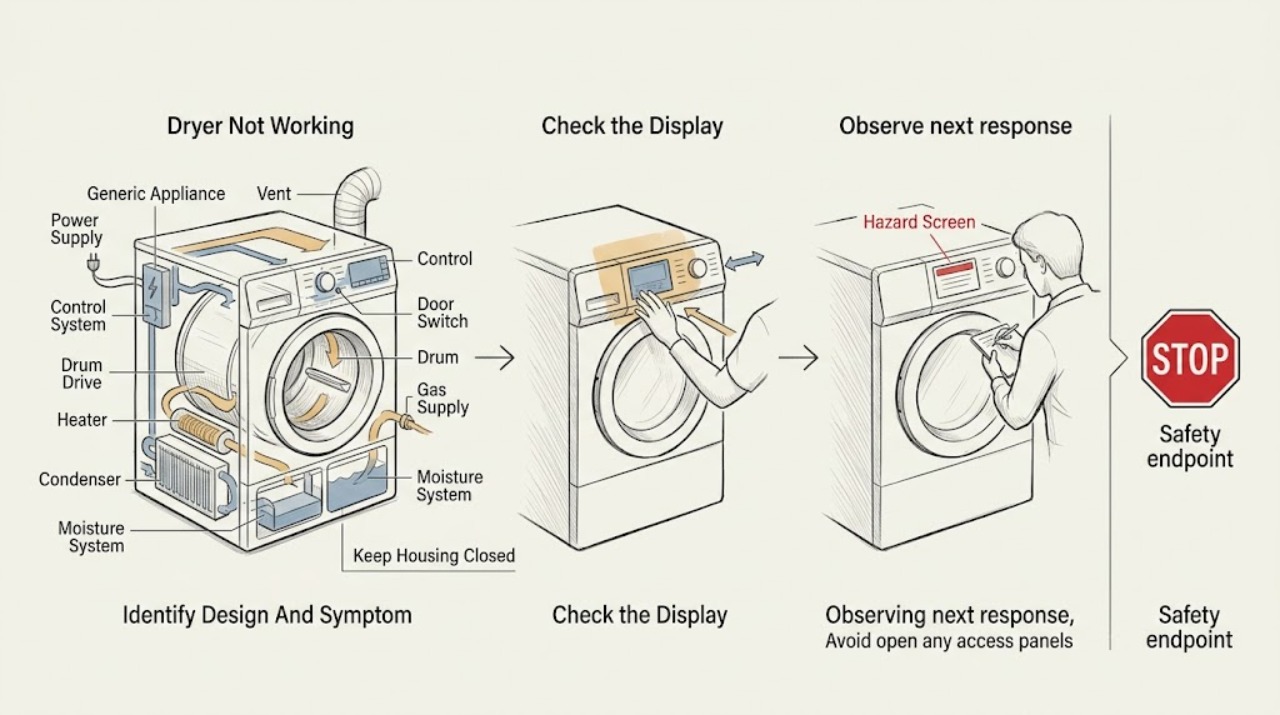
Dryer not working is a symptom, not one diagnosis. First record whether the display or drum light is dead, the dryer has power but will not start, the drum does not turn, it turns without heat, clothes stay damp, or a cycle stops or never finishes. Identify electric, gas, vented, condenser, or heat-pump design before applying a check. Use the model manual for Start, door, Control Lock, cycle, code, water-tank, and reset instructions. Clean the lint filter only as directed and inspect a vented exhaust path with power disconnected; heat-pump models may use a condenser and water tank instead of an outside vent. Stop for gas odor, smoke, burning smell, overheating, arcing, a hot cord, water near electricity, repeated breaker trips, or a drum that binds or makes severe noise. Do not open panels, bypass a door switch, test live voltage, or keep running a hazardous dryer.
Before you begin
Safety first
- This article covers identification and ordinary-access checks only. Do not open panels, test live wiring, open gas or refrigerant systems, bypass safety switches, or operate a hazardous dryer.
Work through in order
Diagnostic checks
Use only checks that match the exact appliance or system and its official guide.
-
Check 1
Stop the dryer and observe from a safe position for gas odor, smoke, burning smell, overheating, a hot plug or outlet, sparks or arcing, water near electricity, repeated breaker trips, a binding drum, or severe mechanical noise.
Expected result: Record whether the dryer is merely inactive or damp-drying, or whether a fire, gas, water, electrical, heat, or mechanical hazard is present.
Next step: Cancel operation if safe, isolate power or gas only when safe to reach the accessible control, and arrange qualified appliance, electrical, gas, or emergency help as appropriate.
Stop if: Do not operate switches near gas odor, touch wet electrical equipment, reset protection repeatedly, open panels, or keep running a smoking, sparking, overheating, or severely binding dryer.
Why this matters
Why: A nonhazardous symptom permits low-risk identification and control checks. Any listed hazard is a stop-and-service condition; additional cycles can increase fire, shock, flood, or mechanical damage risk.
-
Check 2
Read the model label and record electric or gas fuel, vented or condenser or heat-pump design, display or drum-light state, selected cycle, exact code, and whether the drum turns, produces heat, removes moisture, or stops mid-cycle.
Expected result: Classify the complaint as no power, controls active but no start, no tumble, no heat, long or damp cycles, water-tank or condenser warning, cycle stopping, or an error code.
Next step: Open the exact owner's manual or manufacturer support page and follow only its matching branch; record the model and code for service if the manual does not resolve it.
Stop if: Do not infer fuel type, bypass a door switch, remove a panel, or treat an unrecognized code as permission to continue operation.
Why this matters
Why: The design determines which checks apply: electric supply and heater, gas supply, external vent, condenser and tank, moisture sensing, or a model-specific code. A generic dryer procedure cannot establish a part or code meaning across brands.
-
Check 3
With the dryer empty and safe, confirm the door closes and latches, no clothing blocks the latch, Control Lock is cleared as the model directs, the selected cycle can run, and Start or Hold to Start is pressed as specified; dry any moisture from a touch panel.
Expected result: Record whether the controls respond, the door latch engages, the cycle starts, a lock light or code remains, or the dryer still does nothing with stable power.
Next step: Correct only the model-documented setting or loose visible clothing, then make one normal start attempt; arrange service if the dryer remains inactive or the code returns.
Stop if: Do not force the door, bypass the switch, repeatedly press Start, use an extension lead, or continue with a damaged latch, door, or control.
Why this matters
Why: A door, control-lock, moisture-on-panel, Start, or cycle-selection state can prevent operation without a failed motor or heater. A persistent no-start with a correctly latched door and stable power needs service.
-
Check 4
Inspect only the accessible plug, display or drum light, household breaker or fuse status, and any model-specified external gas-supply control; for an electric dryer, note whether both supply poles are present without opening the terminal connection.
Expected result: Record a dead display, partial power, a breaker or fuse that is open, a repeat trip, a missing or unclear gas supply, a recently installed appliance, or stable power with no operation.
Next step: Reset an accessible breaker once only when there is no hazard and the model instructions permit it; if it trips again or supply is uncertain, leave the dryer off and arrange licensed electrical or appliance service.
Stop if: Do not measure live voltage, remove the terminal cover, tighten wiring while energized, use an adapter or extension cord, or repeatedly reset protection.
Why this matters
Why: Electric dryers can use separate supply paths for motor and heater, and gas dryers still need electrical controls plus gas. A repeat trip, uncertain wiring, or incomplete supply is not a reason to test the dryer again.
-
Check 5
With power disconnected and the drum stopped, inspect the door opening and accessible drum area for a trapped item, severe obstruction, or visible damage; rotate the drum only as the owner's manual permits and never remove a panel or reach into a running machine.
Expected result: Record no movement, a drum that turns freely, binding or scraping, a loose object, a damaged seal, or severe noise when a cycle is selected.
Next step: Remove only a plainly accessible loose item if the manual permits; stop and arrange service for binding, repeated noise, a damaged seal, or a drum that will not turn.
Stop if: Do not reach through moving parts, bypass the door switch, remove the drum or belt, open panels, or run a machine that binds, strikes, smokes, or overheats.
Why this matters
Why: A door or control issue can prevent start, while binding, scraping, or severe noise can indicate a drive, support, or foreign-object fault. An accessible object does not justify internal dismantling.
-
Check 6
Only when the dryer is stable, empty, odor-free, and the model permits it, run one short heated-cycle check from a safe position; classify whether there is warmth, no warmth, a gas ignition attempt, an air-only cycle, or an immediate stop, without touching the heater or reaching inside while it runs.
Expected result: Record warmth at the door opening after the documented test, selected Air Only or Fluff mode, gas supply and ignition behavior if applicable, and any code, smoke, odor, or abnormal heat.
Next step: Use the exact model's heat, gas, condenser, or heat-pump guidance; arrange service for no heat after a correct cycle or for any abnormal ignition or temperature result.
Stop if: Stop immediately for gas odor, delayed ignition, abnormal flame, smoke, burning smell, arcing, overheating, or a breaker trip; do not repeat the test.
Why this matters
Why: Air-only modes intentionally add no heat. An electric dryer can tumble while its heater supply is absent; a gas dryer can turn while its gas supply or ignition system fails. A heat-pump dryer may feel cooler than a conventional dryer and must be judged by its manual and moisture result.
-
Check 7
With the dryer unplugged and cool, clean the lint screen as directed; for a vented model inspect the accessible hose for crushing and the outside hood for free airflow, while for a condenser or heat-pump model check only the manual-approved filter, condenser, water tank, and drain status.
Expected result: Record a blocked lint screen, weak outside exhaust, crushed or disconnected vent, warm damp load, full water tank, blocked condensate path, or no obvious airflow or moisture fault.
Next step: Restore only the model-approved filter, tank, drain, or accessible vent connection and make one normal check; arrange qualified vent or appliance service for persistent restriction, internal lint, leaks, or no improvement.
Stop if: Do not operate without the lint filter, disconnect a vent while the dryer runs, enter the chassis, use compressed air near wiring, or continue with smoke, overheating, or water near electricity.
Why this matters
Why: Restricted exhaust can lengthen drying and raise internal heat. A heat-pump dryer has no conventional outside vent by default and may stop or underperform when its filter, condenser, tank, or drain path needs attention. A clean path with no drying improvement needs service.
-
Check 8
If the dryer remains inactive, stops mid-cycle, shows a code, or produces no heat after the safe checks, stop using it and prepare a service record with the model, fuel and design, cycle, exact code, load result, and all checks already performed.
Expected result: Record whether the fault is repeatable, which stage fails, whether the drum and blower run, whether heat or moisture changes, and whether any hazard occurred.
Next step: Arrange qualified appliance service, licensed electrical or gas service when applicable, or professional vent cleaning; do not run more cycles to collect evidence.
Stop if: Do not open the chassis, bypass a safety switch, replace a fuse or heater by guesswork, or continue operating a dryer with a safety symptom.
Why this matters
Why: A repeatable stage-specific symptom is useful evidence, but a generic code or symptom cannot identify a compatible part without the model. Persistent failure after settings and accessible path checks needs qualified diagnosis.
Use your observations
Decision map
Find the observation that best matches what you see, then follow the next safe action.
-
PATH 01Safety boundary
What you see
Gas odor, smoke, burning smell, overheating, electrical arc, hot cord or outlet, water near electricity, repeated breaker trips, or severe mechanical binding or noise is present.
Do this next
Cancel if safe, leave the area for gas, smoke, or fire concerns, isolate power or gas only when safe, and contact appropriate emergency, gas, electrical, or appliance professionals.
Why this path and its safety boundary
Why it matters: The dryer may present fire, gas, shock, flood, or mechanical danger; no further home test is appropriate.
Safety stop: Do not operate switches near gas odor, touch wet electrical equipment, reset protection repeatedly, bypass a safety device, or restart the dryer.
-
PATH 02Safety boundary
What you see
The display and drum light are off or the dryer has partial power, with no smoke, odor, water, or other hazard.
Do this next
Check accessible power and reset protection once only if safe; arrange licensed electrical or appliance service for partial power, uncertain wiring, a repeat trip, or persistent no power.
Why this path and its safety boundary
Why it matters: An accessible breaker, fuse, supply, plug, or model-specific connection may be involved; electric and gas designs have different supply requirements.
Safety stop: Do not open the terminal area, measure live voltage, use an adapter or extension cord, or keep resetting protection.
-
PATH 03Safety boundary
What you see
The dryer has power but does not start, and a lock light, wet control panel, unlatched door, blocked latch, wrong cycle, or incomplete Start command is observed.
Do this next
Dry the panel, clear only loose visible clothing, clear Control Lock and select an allowed cycle using the model instructions, then make one start attempt.
Why this path and its safety boundary
Why it matters: A control, door, or cycle state can prevent operation without establishing a motor or heat-system failure.
Safety stop: Do not force the door, bypass the switch, repeatedly press Start, or operate with damaged controls or latch.
-
PATH 04Safety boundary
What you see
The dryer has stable power and a valid start command but the drum does not turn, binds, scrapes, or makes severe noise.
Do this next
Stop using the dryer and arrange qualified appliance service after only a safe visible-object check.
Why this path and its safety boundary
Why it matters: A foreign object, drive, support, motor, drum, or safety-switch fault may be involved; the symptom does not identify a replaceable part.
Safety stop: Do not reach into moving parts, open panels, remove the belt or drum, bypass a switch, or continue a binding or noisy cycle.
-
PATH 05Safety boundary
What you see
The dryer tumbles but a correct heated cycle produces no warmth, or a gas model turns without ignition, with no current hazard.
Do this next
Confirm fuel-specific accessible supply and correct cycle once, then arrange qualified appliance or electrical or gas service for persistent no heat.
Why this path and its safety boundary
Why it matters: Electric supply, heater, gas supply, igniter, control, sensor, or model-specific heat system may be involved; an Air Only cycle is not a heat test.
Safety stop: Do not open the heater or burner area, test live wiring, repeatedly ignite, or keep running a dryer that smells hot, burns, smokes, or arcs.
-
PATH 06Safety boundary
What you see
The dryer heats but clothes remain damp or cycles are long, with a lint, vent, airflow, full tank, condenser, or drain-path warning.
Do this next
Clean the lint screen and inspect the applicable external vent or manual-approved tank and filter path with power disconnected; arrange professional vent or appliance service if airflow or drying remains poor.
Why this path and its safety boundary
Why it matters: Restricted exhaust can reduce drying and raise heat in a vented design; a condenser or heat-pump design instead needs its model-approved moisture path and may not have an outside vent.
Safety stop: Do not run without a lint filter, disconnect a vent while operating, dismantle a condenser, enter the chassis, or continue with overheating or smoke.
-
PATH 07Safety boundary
What you see
The dryer starts but stops mid-cycle, never finishes, displays an exact code, or has a full tank or sensor-related message after the basic checks.
Do this next
Record the exact code and stage, follow the model manual for one documented reset or tank/filter action, then arrange service if the condition returns.
Why this path and its safety boundary
Why it matters: The code and stopping stage are model-specific and may reflect a door, airflow, moisture, control, motor, temperature, or supply condition.
Safety stop: Do not keep restarting to clear a code, bypass a sensor or door switch, or operate if heat, odor, smoke, water, or electrical symptoms are present.
Helpful context
Understand the symptom
Define what not working means
A dead display is different from a dryer that starts but does not turn, heat, dry, or finish. Write down the model, fuel type, vented or closed-loop design, display code, cycle, and exact point of failure. A gas dryer still needs electrical controls and a gas supply; an electric dryer can have separate supply paths for the motor and heater. A condenser or heat-pump dryer can have a tank or drain path that a vented dryer does not.
Start with controls, door, and safe power
Confirm the door is latched, the selected cycle is a drying cycle rather than an option that only tumbles or prevents starting, Control Lock is cleared as the model directs, and Start is pressed or held as required. Check only accessible breaker or fuse status. Electric dryers may use more than one breaker, while gas dryers use a different supply arrangement; do not open a terminal block or guess at a rating.
Separate no heat from poor airflow and moisture handling
A dryer that tumbles but leaves clothes damp may have no heat, a wrong cycle, a blocked lint screen or vent, an overloaded load, a moisture-sensor issue, or a condenser or tank problem. A brief model-approved heated-cycle check can show whether heat exists, but never touch a heater or reach inside a running drum. Vented machines need unobstructed exhaust; heat-pump machines move moisture to a condenser and tank or drain instead.
Treat airflow and heat symptoms as fire-safety clues
CPSC links lint and restricted exhaust with increased heat and fire risk. Warm damp clothes, long cycles, weak outside airflow, lint around the cabinet, a hot laundry area, smoke, or a burning smell should not be solved by adding heat or repeatedly restarting. Clean accessible filters and vents only by the model and installation instructions; leave internal chassis cleaning to qualified service.
Safety boundary
Stop conditions
- Stop immediately for gas odor, smoke, burning smell, overheating, a hot cord or outlet, electrical arcing, water near electricity, repeated breaker trips, or severe drum binding or noise.
- Do not operate switches near gas odor, repeatedly ignite a gas dryer, test for leaks with a flame, or continue a cycle after delayed ignition or abnormal flame.
- Do not bypass the door or moisture safety switch, remove panels, test live voltage, open gas components, or replace a fuse, heater, motor, or control by guesswork.
- Do not run without the lint filter, disconnect a vent while operating, use an adapter or extension cord, or keep restarting a dryer that stops or shows a recurring code.
- Do not treat a condenser or heat-pump dryer as a conventional vented dryer; follow the exact manual for its filters, condenser, tank, and drain path.
Only after diagnosis
Potential parts
- door latch or door switch
Consider this category only after qualified diagnosis confirms that the latch or switch fails with a correctly closed door and stable supply.
Confirm the exact dryer model, switch arrangement, connector, and manufacturer's fit information; never bypass the safety switch. - heater or thermal protection component
Consider this category only after qualified diagnosis confirms an electric heat circuit or thermal component fault rather than an Air Only cycle, supply issue, or restricted airflow.
Confirm the exact model, fuel type, rating, and manufacturer's fit information before ordering; internal replacement requires qualified service. - gas igniter or gas valve component
Consider this category only after qualified gas-appliance diagnosis confirms an ignition or valve fault with safe gas isolation.
Confirm the exact model, fuel configuration, component type, and manufacturer's fit information; do not open gas tubing or repeat ignition attempts. - drum drive, belt, or support component
Consider this category only after qualified diagnosis confirms a no-tumble, binding, or speed-related mechanical fault.
Confirm the exact model and diagnosis before ordering; do not remove the drum, belt, or chassis parts as a first check.
When checks do not resolve it
Need a professional?
Arrange qualified appliance service when a dryer remains dead or will not start after the exact model's accessible control, door, cycle, and power checks; when the drum will not turn, binds, or makes severe noise; when a correct heated cycle produces no heat; when gas ignition fails; when a cycle stops or a code returns; or when vent, condenser, tank, or drain checks do not restore drying. Use licensed electrical or gas service for uncertain supply, wiring, regulator, or repeat breaker trips, and professional vent cleaning for persistent restricted exhaust.
Safety scope: This article covers identification and ordinary-access checks only. Do not open panels, test live wiring, open gas or refrigerant systems, bypass safety switches, or operate a hazardous dryer.
Common questions
FAQ
What should I check first when a dryer is not working?
First screen for gas odor, smoke, burning smell, overheating, sparks, water near electricity, severe noise, or repeated breaker trips. If safe, identify the model, electric or gas fuel, vented or heat-pump design, and whether the symptom is no power, no start, no tumble, no heat, poor drying, a stopped cycle, or a code. Then use the exact manual for door, controls, cycle, and power checks.
Why does my dryer have power but not start?
Check the door latch, clothing or debris at the latch, Control Lock, selected cycle, moisture on a touch panel, and the required Start or Hold-to-Start command. If those are correct and the dryer still will not start, stop repeated attempts and arrange service rather than bypassing the door switch.
Why does my dryer tumble but not heat?
Confirm that the selected cycle adds heat rather than Air Only or Fluff. Electric dryers may have separate supply paths for motor and heater; gas dryers need both electrical controls and gas supply. Check only accessible supply status and follow the model guide. Persistent no heat requires qualified service.
How do I tell a blocked vent from a dryer that is not heating?
If a correct heated cycle produces warmth but clothes remain damp, check the lint screen and applicable vent airflow with power disconnected; weak outside exhaust and a warm damp load support a restricted vent. If the dryer produces no heat at all, use the fuel-specific no-heat branch. A heat-pump dryer may not have an outside vent and instead uses a condenser, tank, or drain path.
Why does a heat-pump dryer seem cooler than a conventional dryer?
Heat-pump dryers use a closed-loop air path and generally lower heat while a condenser removes moisture into a tank or drain. Judge the model by its drying result and manual, and check its filters, condenser, tank, and drain only as directed. Do not diagnose it by expecting the same vent or temperature behavior as a conventional dryer.
When should I stop using a dryer and call service?
Stop for gas odor, smoke, burning smell, overheating, a hot cord or outlet, electrical arcing, water near electricity, repeated breaker trips, severe noise, or a binding drum. Also call when no-start, no-heat, no-tumble, code, cycle-stop, vent, tank, condenser, or drying problems persist after the exact model's safe checks.
Read the exact guide
Official sources
- Dryer is Not Heating - Product HelpWhirlpool Product Help · Whirlpool dryer guidance used as a manufacturer example; fuel and cycle details vary by dryer model.
- Clothes DryersENERGY STAR · ENERGY STAR product information used to distinguish dryer designs; a particular model manual controls service and operation.
- ERR - Error Code - Dryer - Product HelpWhirlpool Product Help · Whirlpool dryer ERR guidance; an unbranded dryer must use its own manual and code table.
- Overheated Clothes Dryers Can Cause FiresU.S. Consumer Product Safety Commission · CPSC consumer safety guidance for clothes dryers; follow the installed manufacturer's instructions for maintenance.
- CPSC Publication 5022 - Overheated Clothes Dryers Safety AlertU.S. Consumer Product Safety Commission · CPSC safety alert for residential clothes dryers; the appliance manufacturer's manual controls exact maintenance access.
- Dryer is not Drying or Experiencing Long Dry Times - Product HelpWhirlpool Product Help · Whirlpool dryer guidance used as a manufacturer example; vent and moisture systems vary by design.
- No Power - Electric Dryer - Product HelpWhirlpool Product Help · Whirlpool electric dryer guidance used as a manufacturer example; electric supply and installation vary by model and jurisdiction.
- Not Starting or Not Operating - Dryer - Product HelpWhirlpool Product Help · Whirlpool dryer guidance used as a manufacturer example; exact brand and model instructions control an unbranded dryer.
- Not Tumbling or Spinning - Dryer - Product HelpWhirlpool Product Help · Whirlpool dryer guidance used as a manufacturer example; internal drive diagnosis is model-specific.
- Heat Pump DryerENERGY STAR · ENERGY STAR heat-pump dryer information; model-specific filter, tank, drain, and control procedures apply.
- Controls are Not Working - Dryer - Product HelpWhirlpool Product Help · Whirlpool dryer guidance used as a manufacturer example; controls vary by brand and model.
Community feedback
Share a repair observation
Share a plain-text repair observation. Accepted observations are published automatically; this page may take a moment to update.