
On this page
Start here
Quick answer
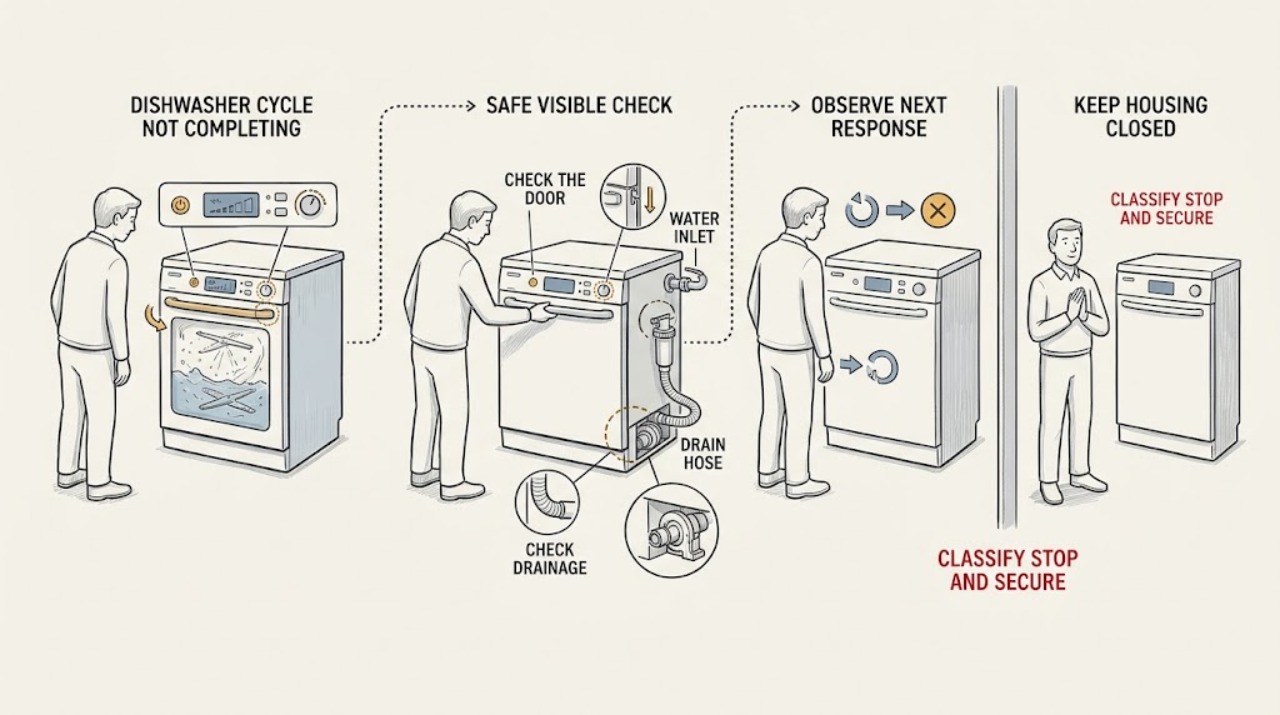
A dishwasher that appears not to finish may be paused by an unlatched door, delay start, control state, or a power interruption rather than failed. Check the door closure, visible delay or lock indication, and exact model reset procedure first. Then note whether water remains in the tub, whether the unit stopped during filling, washing, draining, or drying, and whether the panel shows a code or flashing pattern. Electrolux says a stuck programme can be cancelled with the model's RESET/CANCEL control, but button layouts differ; its support also separates drain faults, door-latch indications, low-voltage PF interruptions, and flashing-light conditions. Clear only an obvious external hose kink or documented filter obstruction, and use a single model-supported reset when the area is dry and safe. A cycle that repeatedly stops after normal door, control, inlet, drain, and accessible filter checks can involve the pump, inlet valve, heater, sensor, keypad, or control board and needs qualified service. Stop for smoke, burning odor, damaged cord, a leak near electrical parts, abnormal heat, or repeated breaker operation.
Before you begin
Safety first
- The user may observe the panel and phase, close the door normally, remove an obvious loading obstruction, follow model-specific delay/reset instructions, and inspect or clean only documented accessible filters and visible hose paths. Door internals, pumps, valves, heater, sensors, wiring, control boards, base removal, and energized testing belong to qualified service.
Work through in order
Diagnostic checks
Use only checks that match the exact appliance or system and its official guide.
-
Check 1
Stop and observe the dishwasher safely. Note whether the panel is lit, whether the door is open or latched, whether the tub contains standing water, where in the programme it stopped, and whether there is smoke, burning odor, abnormal heat, a leak near the plug or controls, a damaged cord, or a breaker trip. Keep hands out of hot water and isolate power only from a safe, dry location if a hazard is present.
Expected result: There is an electrical, heat, or water hazard; the panel is dark; the panel is active and the door is not latched; water remains; or the tub is empty and the panel indicates a paused or incomplete programme.
Next step: Leave the dishwasher out of service for any hazard, repeated breaker operation, or water near electrics. Otherwise record the exact model and continue with the door and control-state checks.
Stop if: Do not reach into hot water, restart a leaking machine, reset a breaker repeatedly, or pull a built-in dishwasher out by its door.
Why this matters
Why: A hazard ends user diagnosis. A dark panel suggests power or control loss. An unlatched door can pause a cycle, while standing water points toward drain or water-level handling. An active panel with an empty tub leaves door, delay, power-outage, heating, or control states to distinguish.
-
Check 2
With the dishwasher safe to approach, remove only an obvious rack, dish, utensil, or gasket obstruction. Close the door with normal pressure and listen for the latch; check for a CL/Cd or similar door indication, a delay countdown, a lock symbol, or a flashing cycle light. If the exact model documents RESET/CANCEL or a specific delay-cancel sequence, use it once rather than guessing another model's buttons.
Expected result: The door latches and the indicator clears; the door will not latch; a delay or lock state remains; the programme resets and drains; or the same incomplete cycle returns.
Next step: Clear only the external obstruction and follow the exact model's documented delay, lock, or reset instruction. If the door cannot latch normally or the cycle returns to the same state, stop and arrange service.
Stop if: Do not force the door, tape or hold the latch, remove the inner door, or run a cycle with a damaged gasket or latch.
Why this matters
Why: A door or user-selectable state can pause a cycle without a failed pump or heater. Electrolux states CL/Cd means the door was not successfully closed and latched, and that reset controls and button layouts vary. A repeat after a correct reset makes a physical latch/interlock or internal fault more likely.
-
Check 3
If the door and programme state are normal, inspect only accessible water paths. Note whether the tub is overfull or has water left after the stop, whether the visible drain hose is kinked or displaced, whether the accessible filter or glass trap is clogged, and whether a newly installed disposer connection still has its knockout plug. Check the visible water inlet only for an obvious closed shutoff or kink; do not disconnect a pressurized line.
Expected result: Water remains, the drain hose or filter is obstructed, the disposer knockout plug is present, the visible supply is closed or kinked, or all visible paths are clear and the tub is empty.
Next step: With power isolated when required and water handled safely, correct only an obvious hose kink or clean only the model-documented accessible filter/trap. Make one model-supported reset or drain attempt; if water remains or the stop returns, arrange service.
Stop if: Do not reach under the machine, remove the pump or valve, disconnect a hose under pressure, use chemical drain cleaner, or probe the filter housing with tools.
Why this matters
Why: Standing water or a blocked visible drain path can prevent a cycle from finishing or starting the next step. A supply restriction can prevent filling. A clear visible path with a repeat stop shifts suspicion toward the drain pump, inlet valve, pressure sensing, heater, or control rather than a user setting.
-
Check 4
Record the exact display code or flashing-light pattern and the phase where the cycle stopped. Compare it with the exact Electrolux manual or official model support, not a generic code list. If the dishwasher stopped after a power interruption, check whether it presents a power-outage acknowledgement or PF condition; if it stops in heating or drying, do not open the base or test the heater.
Expected result: A documented door, delay, drain, or power code appears; the panel flashes a model-specific sequence; the stop consistently occurs during heating/drying; or no code appears and the cycle stops at different phases.
Next step: Follow only the exact model's documented user action. Leave the dishwasher switched off for PF or an electrical-supply concern, and arrange qualified service for a persistent code, repeat heating stop, keypad behavior, or an unexplained sequence.
Stop if: Do not generalize codes, bypass the door or water-level sensor, open electrical covers, or perform live tests on the heater, pump, valve, or control.
Why this matters
Why: Electrolux documents PF as low operating voltage on applicable models and says the programme can be temporarily stopped, while other model families use different flashing patterns for power failure, door closure, or keypad faults. A repeat heating-phase stop makes heater, temperature sensing, circulation, or control faults possible, but a code alone does not establish a part.
-
Check 5
Only when there is no leak, hot water exposure, odor, heat damage, or electrical warning, perform at most one reset using the exact model instructions. Observe whether the unit returns to programme selection, drains, resumes, or stops again at the same phase. Document model, programme, door result, delay/lock indication, water level, filter and hose findings, code, and reset result rather than repeating cycles to reproduce the fault.
Expected result: The dishwasher completes or resumes normally; it resets but cannot drain; it stops again at the same phase; it becomes unresponsive; or a hazard appears.
Next step: Use the dishwasher only if it completes a stable cycle without a hazard. Otherwise leave it out of service and arrange qualified Electrolux or appliance service with the recorded observations.
Stop if: Do not keep resetting, run repeated cycles with standing water, leave the appliance unattended after a fault, or continue after smoke, arcing, burning odor, abnormal heat, leak, or breaker operation.
Why this matters
Why: A one-time recovery may clear a paused, delayed, or power-outage state, but a recurring phase-specific stop is evidence of a component or control problem. Failure to drain after reset keeps the drain branch active; any hazard ends the test.
Use your observations
Decision map
Find the observation that best matches what you see, then follow the next safe action.
-
PATH 01Safety boundary
What you see
The panel is active, the door is not fully latched, CL/Cd or a lock indication appears, a delay countdown is active, or a model-supported reset returns the dishwasher to programme selection.
Do this next
Close the door normally, cancel the documented delay/lock or programme state, and select a cycle using the exact model instructions. Escalate if the door will not latch or the state returns.
Why this path and its safety boundary
Why it matters: A door, delay, lock, or already-started programme state is more likely than a failed pump or heater.
Safety stop: Do not bypass or hold the latch, force the door, or copy a reset combination from another model.
-
PATH 02Safety boundary
What you see
The cycle stops with water in the tub, fails during or after drain, flashes a model-specific drain indication, or the visible hose, filter, glass trap, or disposer connection is obstructed.
Do this next
Correct only a visible hose kink or model-documented accessible filter/trap obstruction with power and water handled safely. Reset once; if water remains or returns, arrange service for the pump, pressure sensing, hose, or control path.
Why this path and its safety boundary
Why it matters: A drain restriction or drain-state fault is more likely than a heating or delay issue; Electrolux notes that some flashing lights during a mid-cycle stop signal drainage trouble.
Safety stop: Do not remove the pump, reach under the base, disconnect a pressurized hose, or use chemical drain products.
-
PATH 03Safety boundary
What you see
The dishwasher stopped after an outage, shows PF on an applicable model, or displays a power-failure indication while the panel otherwise appears normal.
Do this next
Follow the exact model's power-outage acknowledgement or resume instructions only when the supply is stable. Leave the appliance off and arrange electrical or appliance service if PF returns or protection operates.
Why this path and its safety boundary
Why it matters: A power interruption or low operating voltage is more likely than a failed wash pump; Electrolux says PF can temporarily stop the programme and recommends leaving the dishwasher switched off until voltage is acceptable.
Safety stop: Do not repeatedly reset a breaker, operate during suspected low voltage, or open the electrical compartment.
-
PATH 04Safety boundary
What you see
The dishwasher consistently stops during heating, hot rinse, or drying with normal door closure, programme state, water supply, and drain path, or a model-specific heating/temperature indication appears.
Do this next
Stop repeated testing and arrange qualified appliance service with the exact model, programme, phase, water level, and code or flashing pattern.
Why this path and its safety boundary
Why it matters: A heater, temperature sensor, circulation condition, level sensing, or control fault is more likely; the stop phase does not identify a compatible part.
Safety stop: Do not remove the base, test the heater or sensor live, bridge a level switch, or replace a heating component by symptom alone.
-
PATH 05Safety boundary
What you see
The cycle repeatedly stops at varying or identical phases after door, delay/lock, visible inlet, drain, filter, and one model-supported reset check, or the controls become unresponsive.
Do this next
Leave the dishwasher out of service and arrange qualified Electrolux or appliance service. Provide the exact model, phase, water level, lights/code, and what changed after the single reset.
Why this path and its safety boundary
Why it matters: An internal pump, inlet valve, pressure sensor, heater, keypad, wiring, or control-board fault is more likely than a user-selectable state.
Safety stop: Do not pull out a built-in unit, remove panels, perform live tests, bypass safety devices, or keep running cycles to locate an internal fault.
Helpful context
Understand the symptom
Define what 'not completing' means
Record the point at which the machine stops: before filling, during wash circulation, while draining, during heating or drying, or after a power interruption. A quiet period is not automatically a failed cycle, and a timer that pauses can reflect heating or water-level conditions. Open the door only when it is safe and do not reach into hot water. If the control panel is still active, note its lights, message, and whether water remains in the tub before choosing a reset.
Door and control states can pause a healthy programme
Electrolux documents CL or Cd as a door that has not successfully closed and latched, and its general stuck-cycle guidance says a programme already in progress can prevent a new selection. Delay start, a control lock, or a power-outage acknowledgement can look like a stopped cycle. Use the exact model's button labels; do not use a reset sequence copied from a different fascia.
Water left inside changes the branch
A cycle that stops with standing water or fails at the end of drain is a drain-path problem until shown otherwise. Electrolux recommends checking the visible drain hose for kinks and the accessible glass trap/filter, and notes that a missing disposer knockout plug can block drainage on newly connected installations. A clean visible path does not authorize pump, valve, pressure-switch, heater, or control disassembly.
Safety boundary
Stop conditions
- Stop the dishwasher for smoke, burning odor, abnormal heat, damaged cord, a leak near electrical parts, water in the base, or repeated breaker operation; isolate power only from a safe, dry location.
- Do not reach into hot water, remove a built-in unit by the door, disconnect pressurized water, or run repeated cycles with standing water.
- Do not bypass the door latch, control lock, water-level sensor, overflow protection, or any other safety device.
- Do not remove the base, pump, inlet valve, heater, sensor, control cover, or wiring, and do not perform live electrical tests.
- Do not generalize Electrolux PF, CL/Cd, flashing-light, delay, reset, or error-code behavior to another model; use the exact manual.
Only after diagnosis
Potential parts
- door latch or interlock assembly
Consider this only when the exact model is identified and qualified diagnosis confirms normal door alignment but a latch/interlock fault remains after the visible obstruction check.
Verify the full model and manufacturer fit information; do not bypass the interlock or infer compatibility from the Electrolux brand alone. - drain pump or drain hose
Consider this only after the visible hose, accessible filter/trap, and household drain path are clear and qualified diagnosis confirms a persistent drain failure.
Match the exact model and documented fit; pump and hose layouts vary and internal access is service work. - water inlet valve or level-sensing component
Consider this only when qualified diagnosis links a repeat fill or water-level stop to the valve or sensing path after the visible supply and hose are verified.
Confirm exact model, electrical rating, and manufacturer fit information; do not disconnect a pressurized line or test live. - heating element or temperature sensor
Consider this only when a repeat heating/drying stop is confirmed and qualified service identifies the heater or sensor as the cause.
Heating and sensing parts are model-specific and safety-critical; no user live test or generic replacement is appropriate. - keypad or control board
Consider this only when the exact model shows persistent control or flashing-light behavior after safe door, programme, drain, and power checks and qualified diagnosis confirms the control path.
Use the exact model's service information; control components are not interchangeable by brand or symptom.
When checks do not resolve it
Need a professional?
Arrange qualified service when the cycle repeatedly stops after the exact model's door, delay/lock, visible inlet, drain, filter, and one-reset checks; when a door will not latch, water remains, PF or another code recurs, the panel is unresponsive, or the stop consistently occurs during heating or drying. Stop immediately for smoke, burning odor, abnormal heat, damaged cord, water near electrical parts, leak into the base, or repeated breaker operation.
Safety scope: The user may observe the panel and phase, close the door normally, remove an obvious loading obstruction, follow model-specific delay/reset instructions, and inspect or clean only documented accessible filters and visible hose paths. Door internals, pumps, valves, heater, sensors, wiring, control boards, base removal, and energized testing belong to qualified service.
Common questions
FAQ
Why does my Electrolux dishwasher stop before the cycle is complete?
First note the phase, door state, panel message, and whether water remains. A door, delay, lock, power interruption, or drain problem can pause a cycle; a repeat stop after those checks needs qualified diagnosis of the inlet, pump, heater, sensor, or control path.
How do I reset an Electrolux dishwasher stuck mid-cycle?
Use RESET/CANCEL only as the exact model manual or Electrolux support article describes. Button layouts differ between models and built-in/freestanding controls. Reset once, observe whether it drains and returns to programme selection, and escalate if the stop returns.
What does CL or Cd mean on an Electrolux dishwasher?
On models using that indication, Electrolux says CL or Cd means the door was not successfully closed and latched. Close it normally and check for an obstruction; if it will not latch or the indication returns, arrange service rather than bypassing the latch.
Why is there water left in my Electrolux dishwasher when the cycle stops?
Check only the visible drain hose for a kink and the model-documented accessible filter or glass trap for debris. A disposer knockout plug can also block drainage after installation. Persistent standing water can involve the pump, pressure sensing, hose, or control and needs service.
What does PF mean on an Electrolux dishwasher?
For the applicable models covered by Electrolux's support article, PF indicates low operating voltage and temporarily stops the programme. Leave the dishwasher switched off until the supply is stable; if PF returns, arrange electrical or appliance service. Do not generalize PF to every model.
Should I replace the heater or pump when a cycle does not finish?
Not from this symptom alone. A cycle can stop because of the door, programme state, power, inlet, drain, heating, sensing, or control path. A qualified technician should identify the phase-specific fault and verify the exact model before selecting a part.
Read the exact guide
Official sources
- Dishwashers - Not DrainingElectrolux · Supports visible drain-hose, filter/trap, disposer knockout, mid-cycle stop, and reset observations; internal pump diagnosis remains professional.
- Dishwashers Flashing LightsElectrolux · Power-failure, door, and keypad light patterns apply to the applicable model family; other control panels differ.
- Dishwasher is stuck mid-cycle and won't allow me to select a different programmeElectrolux UK · General dishwasher guidance; reset controls vary by model and built-in/freestanding layout.
- Dishwashers - Resume the wash after power outageElectrolux · The acknowledgement and resume behavior is model-specific to the dishwasher family covered by the article.
- Dishwasher Error Code CL or Cd - Door is openElectrolux · The CL/Cd meaning applies to models using this indication; other models may use different door messages.
- SupportElectrolux UK · Supports using model-specific articles and manuals; it does not diagnose an unspecified internal component.
- Program not starting and cycle indicator light flashing on dishwasherElectrolux UK · Supports door, delay, reset, filter, spray-arm, and model-manual checks; exact controls remain model-specific.
- PF error code is displayed on the dishwasher's displayElectrolux UK · PF indicates low operating voltage only for models covered by this article; it is not a universal Electrolux code.
Community feedback
Share a repair observation
Share a plain-text repair observation. Accepted observations are published automatically; this page may take a moment to update.