
On this page
Start here
Quick answer
Start with the visible, model-safe causes: confirm the display or power, make sure the door is fully latched, cancel Delay Start or Child Lock, select a cycle, press START/CANCEL, and close the door promptly. Electrolux says a dishwasher will not start unless the door is securely shut and latched, water is available, and the control is not waiting for a delayed start. A 01-24 display means the delay option is active on applicable models; a flashing light or other code should be matched to the exact owner's manual. If the unit has no power, the breaker trips again, water is near electrical parts, the latch or control remains unresponsive, or it still will not start after the external checks, stop and arrange qualified service rather than opening the door panel or testing the interlock, pump, valve, or wiring.
Before you begin
Safety first
- The owner may check visible power status from a dry position, close an unobstructed door, use model-specific lock/delay/start controls, confirm the external water valve, and inspect visible hose routing. Qualified service must handle the latch/interlock, control, pump, motor, inlet valve, wiring, sensors, and any live or panel-access diagnosis.
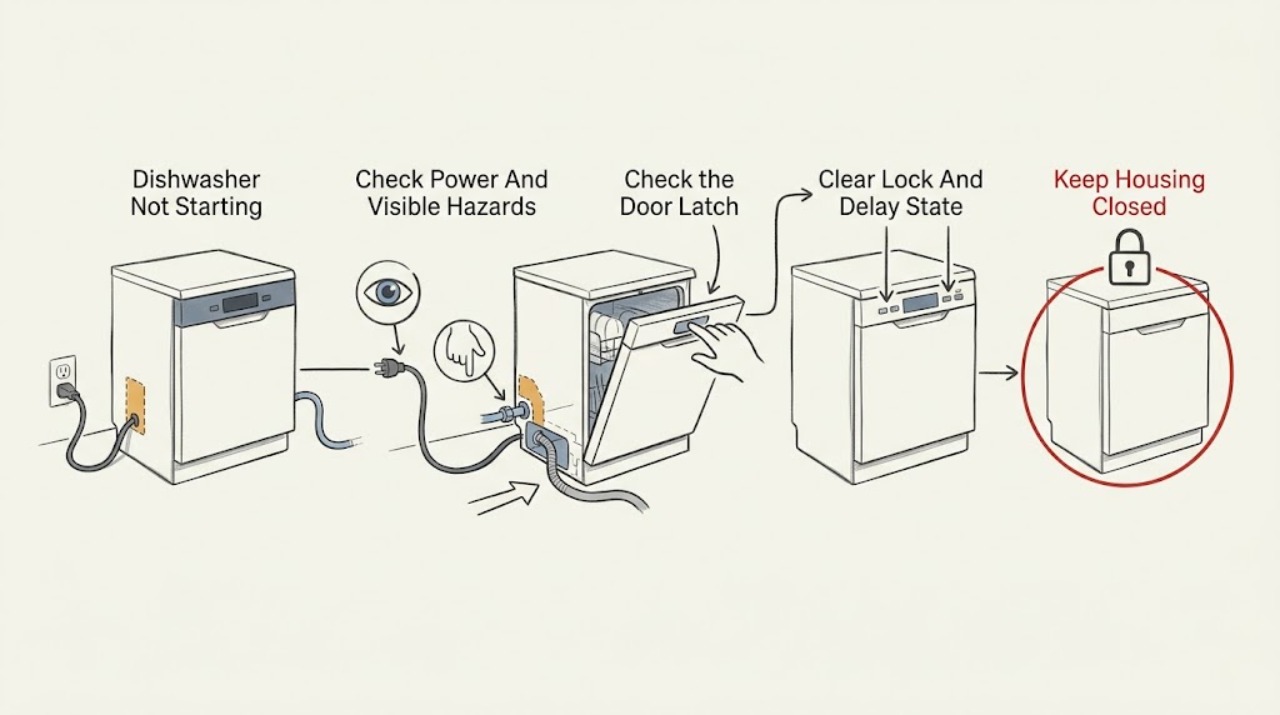
Work through in order
Diagnostic checks
Use only checks that match the exact appliance or system and its official guide.
-
Check 1
From a dry position, check whether the dishwasher display or status lights illuminate. Look at the plug and cord without touching a wet connection, and check whether the household breaker has tripped after a recent outage or interruption.
Expected result: The display is dark, the cord or outlet is visibly damaged or wet, the breaker is tripped, the breaker trips again, or the display is lit with no electrical hazard.
Next step: If safe and dry, restore a tripped breaker once and check the dishwasher. If it trips again or any electrical part is wet/damaged, leave the dishwasher off and arrange an electrician or qualified appliance service. If the display is lit, continue to the door and control checks.
Stop if: Do not handle a wet plug or outlet, remove panels, use an extension cord to test the appliance, or repeatedly reset a tripping breaker.
Why this matters
Why: A dark display points first to supply power, while a lit display moves the diagnosis toward door, controls, settings, water, or drain conditions. A wet or damaged electrical area or recurring trip is not a normal reset situation.
-
Check 2
Remove anything visibly blocking the door or racks, close the door firmly until it latches, select a cycle and any desired option, press START/CANCEL, and close the door immediately. If you interrupted a cycle, press START again after closing it as the model instructions require.
Expected result: The cycle begins, the door will not align or latch, the controls accept selections but the machine stays silent, or the start light continues flashing.
Next step: If the door cannot latch or the start command remains unrecognized after a clean, unobstructed close, stop using the dishwasher and request service. Do not defeat or hold the latch closed to make the unit run.
Why this matters
Why: Starting after the proper sequence supports a selection or latch-state issue rather than a failed motor. A door that cannot latch or a start command that is not recognized can involve alignment, the latch assembly, or its sensing circuit, which is not an owner test point.
-
Check 3
Inspect the display and lock/delay indicators. If loc or a lock icon is shown, use the exact Electrolux instructions for the tub and panel type; if Delay Start or 01-24 is shown, cancel the delay using the documented Cancel or delay-button sequence.
Expected result: The lock indicator clears and buttons respond, the delay countdown clears and the dishwasher starts, a Cancel action begins a drain routine, or the controls remain locked/unresponsive without a documented indicator.
Next step: Select the cycle again, press START/CANCEL, and close the door promptly after clearing the state. If the lock or delay returns by itself, record the display and arrange service rather than repeatedly canceling.
Why this matters
Why: Child Lock and Delay Start are intentional control states, not proof of a failed board. On applicable models, 01-24 identifies an enabled delay option, and Cancel may run a drain routine before shutoff. An unresponsive panel after the correct model-specific sequence needs service.
-
Check 4
Confirm the dishwasher's water supply valve is open. From outside the cabinet, look for an obviously kinked or disconnected inlet hose, a visible leak, or a drain hose that is kinked or has lost its required high-loop routing; do not loosen fittings or remove the toe-kick panel.
Expected result: The water valve is closed, a hose is visibly kinked/disconnected/leaking, the tub contains standing water, or the external supply and drain paths look correct.
Next step: Correct only an obvious external valve or hose-routing issue that can be handled without opening the appliance, then follow the model's documented reset/start procedure. If a hose, connection, pump, valve, or internal leak needs access, keep the unit off and arrange service.
Stop if: Do not operate with a leak, reach into a pump or sump, remove the base, or perform a water-valve or drain-pump test.
Why this matters
Why: Electrolux identifies water availability as a run condition and says an improperly installed or clogged drain hose can prevent starting. Standing water or a drainage symptom can leave the previous cycle uncleared, but it does not identify a failed inlet valve or drain pump.
-
Check 5
Photograph or transcribe every flashing light, code, and displayed number before pressing Cancel. Match the exact model and code to the Electrolux owner's manual or official code guide; do not combine meanings from different generations or panel types.
Expected result: The code or light pattern has a documented user action, the code is absent from the matching manual, or the indication returns after the documented action.
Next step: Perform only the documented external action for the exact model. For an unknown or recurring code, leave the machine off, preserve the photo, and contact Electrolux support or qualified service.
Stop if: Do not bridge the door switch, probe connectors, enter service mode, or use live electrical measurements to identify a code.
Why this matters
Why: A model-matched code can point to a delayed option, drainage condition, or another documented state. An unknown or recurring indication cannot safely be reduced to a generic reset and may represent an internal lock, control, pump, valve, or sensor fault.
-
Check 6
After the dry external checks, one model-authorized reset, and a correct start sequence, note whether the unit fills, drains, makes a brief motor sound, or remains completely silent. Record the model, panel type, code, lock/delay state, power result, door result, and water/drain observations.
Expected result: The dishwasher starts normally, starts then stops with a code or leak, or remains silent despite power, latch, settings, water, and drain conditions being correct.
Next step: Keep a persistent no-start, returning code, leak, or abnormal electrical symptom off and schedule qualified Electrolux service. Give the technician the recorded sequence instead of opening the appliance.
Stop if: Do not remove the door or base panels, bypass the interlock, test the pump/valve/control live, or continue operating with water near electrical components.
Why this matters
Why: Normal starting after the documented checks supports a control-state or installation condition. A persistent silent unit or a start-then-stop pattern can involve the door interlock, control, inlet valve, drain pump, motor, wiring, or a protection circuit, none of which can be distinguished safely from the outside.
Use your observations
Decision map
Find the observation that best matches what you see, then follow the next safe action.
-
PATH 01Next step
What you see
The display is dark, the breaker is tripped, the breaker trips again, or a cord, plug, outlet, or nearby floor is wet or damaged.
Do this next
Leave the dishwasher off; isolate power only from a dry, safe point and arrange qualified electrical or appliance service. Do not handle a wet connection or remove panels.
Why this path and its safety boundary
Why it matters: The immediate issue is more consistent with supply power or an electrical hazard than with a door selection. A recurring trip or moisture exposure cannot be confirmed by repeatedly restoring power.
-
PATH 02Next step
What you see
The display is lit, but loc/lock, Delay Start, 01-24, a flashing Start indicator, or an interrupted cycle is present and the door otherwise latches.
Do this next
Clear the lock or delay with the model-specific procedure, select the cycle again, press START/CANCEL, and close the door promptly. If the state returns or the controls stay unresponsive, arrange service.
Why this path and its safety boundary
Why it matters: A deliberate control state or an uncleared cycle is more likely than a failed motor. The exact panel type determines the unlock and cancel sequence, and some Cancel actions begin draining before shutdown.
-
PATH 03Next step
What you see
The door cannot latch, the start command is accepted but no fill begins, the water valve is closed, a hose is visibly kinked, or standing water and a drain symptom remain.
Do this next
Correct only a clear external obstruction, valve, or hose-routing issue and use the exact manual's reset/start procedure. If the latch, leak, pump, valve, or internal hose needs access, stop and request service.
Why this path and its safety boundary
Why it matters: A door-state, water-supply, or previous-drain condition is more likely than a generic control failure. External observations cannot establish whether the internal latch, inlet valve, drain pump, or sensor is at fault.
-
PATH 04Next step
What you see
Power, latch, lock/delay, cycle selection, water supply, and visible hose checks are correct, but the unit remains silent, a code returns, the breaker trips, or the dishwasher starts and stops abnormally.
Do this next
Keep the dishwasher off and schedule qualified Electrolux service. Provide the model, exact code or light pattern, sequence of button presses, door result, water/drain observations, and any electrical symptom.
Why this path and its safety boundary
Why it matters: The pattern makes an internal interlock, control, motor, pump, inlet valve, wiring, or protection fault more likely; it cannot be safely narrowed by bypassing a control or by live testing.
Helpful context
Understand the symptom
The door and start sequence are part of the command
A lit control panel does not prove that a cycle has been accepted. Electrolux says the door must be properly closed and latched, and its start instructions put START/CANCEL before closing the door immediately. If you opened the door to add an item or interrupt a cycle, select or resume the cycle as the manual for that model requires and press START again after closing it. Do not hold the latch closed with an object or remove the inner door panel to test the switch.
Lock, delay, and a stale cycle can look like a dead control
Child Lock can make the buttons appear unresponsive, and Delay Start intentionally prevents an immediate fill. Electrolux's stainless-steel guidance uses a loc display, while plastic-tub models use a lock indicator and a model-specific button hold. A 01-24 display on applicable models means delayed start is enabled; canceling it may also begin a drain routine before the dishwasher shuts off. Use the exact panel instructions for your model instead of repeatedly pressing random buttons.
Water and drainage are start conditions
Electrolux's not-starting guidance says the water hoses must be turned on and that a drain hose installed incorrectly or clogged can prevent the unit from starting. Inspect only the accessible supply valve and external hose for a closed valve, kink, or obvious leak. If water remains in the tub or the unit stopped mid-cycle, a drain issue may need a model-approved Cancel/reset and new cycle; do not reach into the pump area or remove the door or base panels.
Treat power and error indications as separate branches
If the display is dark, first distinguish a supply problem from a control problem by checking the plug and household breaker from a dry, safe position. If the display is lit but a code or flashing light appears, preserve the exact code and use the matching owner's manual; Electrolux publishes model-specific code and alarm guidance. A returning code, repeated breaker trip, failed latch response, or water near electrical parts is a service boundary, not an invitation to perform a live test.
Safety boundary
Stop conditions
- Do not handle a wet plug, outlet, cord, or control panel; isolate power only from a dry, safe point and arrange qualified help.
- Do not hold, defeat, bridge, or bypass the door latch/interlock, and do not open the door panel or base to test it.
- Do not perform live tests or replace the control, pump, motor, inlet valve, sensor, or wiring as a user troubleshooting step.
- Do not operate with a visible leak, water near electrical parts, a damaged cord, smoke, burning odor, arcing, or a breaker that trips again.
- Do not transfer a delay, lock, error-code, or reset instruction from another Electrolux model; preserve the exact model and display information for service.
When checks do not resolve it
Need a professional?
Schedule qualified Electrolux service when the door will not latch, the control remains unresponsive after clearing the model-specific lock or delay, a code or flashing light returns, the dishwasher remains silent after the external checks, a hose or internal pump/valve needs access, or the unit starts and stops abnormally. Stop immediately for smoke, burning odor, arcing, a repeated breaker trip, a damaged cord, or water near electrical parts, and do not restart until assessed.
Safety scope: The owner may check visible power status from a dry position, close an unobstructed door, use model-specific lock/delay/start controls, confirm the external water valve, and inspect visible hose routing. Qualified service must handle the latch/interlock, control, pump, motor, inlet valve, wiring, sensors, and any live or panel-access diagnosis.
Common questions
FAQ
Why does my Electrolux dishwasher have power but not start?
Check that the door latches, a cycle is selected, START/CANCEL was pressed, and the door was closed immediately. Then clear Child Lock or Delay Start, confirm the water supply is on, and check for a drain problem or code. A persistent silent unit after those model-specific checks needs service.
What does 01-24 mean on an Electrolux dishwasher?
On applicable Electrolux models, 01-24 means Delay Start is enabled, so the cycle waits until the displayed time reaches zero. Use the documented Cancel sequence for the exact model; some models start a drain routine before shutting off.
How do I know whether Child Lock is preventing my dishwasher from starting?
Look for a lock indicator or loc. Electrolux uses different unlock behavior for plastic-tub and stainless-steel dishwashers, so follow the panel-specific DELAY START instructions rather than guessing a button combination.
Can a drain problem stop an Electrolux dishwasher from starting?
Yes. Electrolux says an incorrectly installed or clogged drain hose can prevent starting, and standing water after an interrupted cycle may require a documented reset and new cycle on some models. Do not access the pump or base; arrange service if the external path is correct but the problem persists.
When should I stop troubleshooting an Electrolux dishwasher that will not start?
Stop for smoke, burning odor, arcing, a repeated breaker trip, damaged or wet electrical parts, a leak, an unlatched door that needs internal access, or a returning code. Leave the dishwasher off and contact qualified service; do not bypass the interlock or perform live tests.
Read the exact guide
Official sources
- Dishwashers - How do I set the child lock feature?Electrolux Owner Support · Opened official Electrolux support article; it explicitly distinguishes the lock indicator/button sequence for plastic-tub and stainless-steel dishwashers.
- Dishwasher Not StartingElectrolux Owner Support · Opened official Electrolux support article for dishwashers; it covers display power, breaker, door latch, delayed start, flashing lights/codes, water supply, and drain hose conditions.
- Dishwashers - Not DrainingElectrolux Owner Support · Opened official Electrolux support article; it covers kinked or incorrectly installed drain hoses, standing water, accessible filter/trap cleaning, and model-dependent Cancel/reset behavior.
- What should I do if my dishwasher is not starting?Electrolux Owner Support · Opened official Electrolux support article; it covers Delay Start, Child Lock, START/CANCEL, prompt door closure, water supply, and household power.
- Dishwasher Error Code 01-24 - Delayed option has been activatedElectrolux Owner Support · Opened official Electrolux support article; it applies to models using the 01-24 delay indication and explicitly describes the Cancel sequence.
Community feedback
Share a repair observation
Share a plain-text repair observation. Accepted observations are published automatically; this page may take a moment to update.