
On this page
Start here
Quick answer
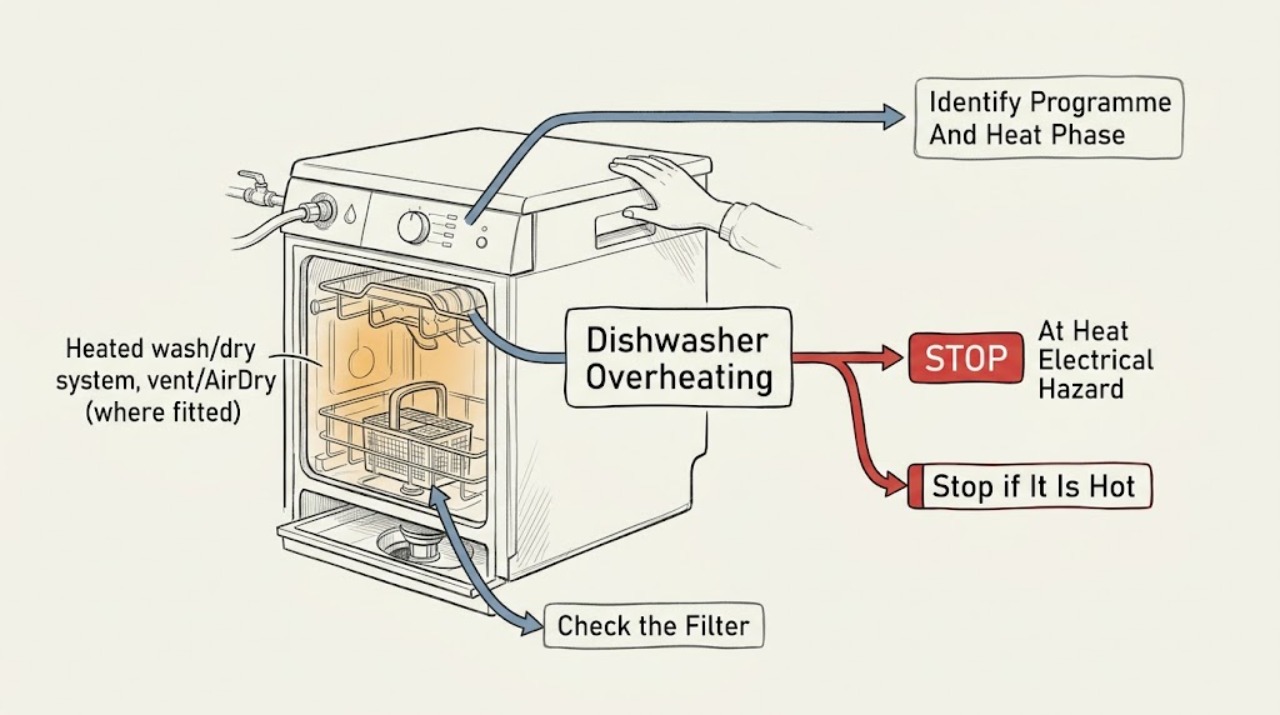
A warm tub, hot dishes, or some vapor at the vent can be normal during a heated wash or drying phase, and some Electrolux programmes intentionally use heat while others use passive or air drying. First note whether the heat appears only in the documented wash/dry stage, whether the programme and options are correct, and whether the door, controls, cord, and surrounding cabinets remain normal. Stop using the dishwasher immediately for a burning or electrical smell, smoke, melting or discolored plastic, a hot plug or cable, sparking, repeated tripping, a door or control panel that is unusually hot, a leak near electrical parts, or an overheating/temperature/heater error. Switch off the appliance and isolate power from a safe dry location; close the water tap if there is an overflow or water leak. After it has cooled and power is disconnected, clean only the user-accessible filters and sump area as the exact model manual permits, and check for excess foam or a wrong programme. Electrolux documents over-temperature, heater, and heater-sensor faults as service conditions and does not recommend using the product until a heating problem is fixed. Do not open the base, test live voltage, bypass thermal protection, or replace the heater, sensor, control, or wiring yourself.
Before you begin
Safety first
- The user may identify the programme and code, stop the appliance, isolate power from a safe dry location, close the water tap for an overflow, and clean only permitted accessible filters/spray arms after cooling and disconnecting power. Heater, temperature sensor, thermal protection, pump, control, wiring, base, and energized testing are for qualified personnel.
Work through in order
Diagnostic checks
Use only checks that match the exact appliance or system and its official guide.
-
Check 1
From outside the dishwasher, check for smoke, flames, burning/electrical odor, melted or discolored plastic, a hot plug or cable, sparking, repeated breaker trips, uncontrolled steam, a hot control/door, or water near electrical parts. Do not touch a hot or wet connection; isolate power only from a safe dry location and keep the door closed if there is smoke or fire.
Expected result: One or more hazard signs are present, or the dishwasher is simply warm during a documented wash/dry phase with no odor, damage, leakage, or error.
Next step: For any hazard, leave the dishwasher off and arrange qualified electrical/appliance service; close the water tap too if there is an overflow or water leak. If only normal warmth is present, continue with cycle and model checks after cooling.
Stop if: Do not restart a smoking, sparking, melting, wet, or repeatedly tripping dishwasher, and do not unplug through standing water.
Why this matters
Why: Smoke, electrical heat, melting, water near electrics, and repeated trips indicate a stop-use safety event, not an adjustment. Normal warmth or vapor without those signs can belong to a model-specific heated wash or drying stage.
-
Check 2
Read the exact model manual and note the selected programme, options, remaining time, and whether the heat or dry phase is active. Record whether vapor appears at the vent, whether the tub/dishes are warm only near the expected end of the programme, and whether a message such as heat delay, heater-on, over-temperature, heater, or temperature-sensor fault is displayed.
Expected result: The programme normally uses heated washing/drying or a documented heat-delay status; it uses passive/air drying; or the heat is excessive, occurs outside the phase, or is accompanied by an error.
Next step: If the behavior matches the manual and there are no hazards, monitor the cycle without opening it. If it does not match, record the code and stop use; do not change hidden settings or force the programme onward.
Stop if: Do not override a temperature warning, repeatedly reset a heater error, or use another model's programme chart as proof of normal operation.
Why this matters
Why: Electrolux says drying method depends on the programme/model and that certain heat-delay indications represent the appliance heating water. Excessive/out-of-phase heat or a temperature/heater error is more consistent with a control, sensor, heater, or protection fault.
-
Check 3
After switching off, disconnecting the main plug, and allowing the dishwasher to cool, inspect for excess foam, a wrong detergent or rinse-aid spill, blocked user-accessible filters, or food/debris around the sump. Clean and refit only the filters and spray arms permitted by the exact manual; use gloves because broken glass may be present.
Expected result: Foam, residue, or a blocked filter/sump is visible; or the accessible area is clean and correctly refitted.
Next step: Remove only safe accessible residue, eliminate detergent/rinse-aid spill as the manual directs, and make at most one attended cycle check only if no stop condition exists. If overheating or the code returns, keep the dishwasher off and call service.
Stop if: Do not clean while connected to power, reach into the heater or pump, scrape wiring, run without filters, or use cleaning as a test after an electrical/thermal event.
Why this matters
Why: Electrolux links over-foaming and blocked filters/sump areas with poor wash or drying results and recommends cleaning those user-accessible areas. These conditions can affect water circulation but do not explain away a burning smell, melted part, temperature error, or persistent abnormal heat.
-
Check 4
With the appliance off and cool, inspect only the accessible cord, plug, surrounding cabinet, door edge, visible vents, and floor for heat damage, moisture, blocked airflow, or a loose installation condition. Do not pull out a built-in dishwasher or remove panels. Note whether the heat is localized at the plug/control area or spread through the normal tub and dishes.
Expected result: The cord/plug or cabinet is hot/damaged, water is present, ventilation or installation is visibly abnormal, or only the normal tub/dishes become warm during the documented phase.
Next step: Stop and arrange electrical/appliance service for any damage, moisture, localized heat, or installation concern. Do not alter the installation yourself; use the exact model manual or installer for safe external corrections.
Stop if: Do not touch wet wiring, move a built-in dishwasher, change a breaker, use an extension, or continue operation with a hot/damaged plug or cable.
Why this matters
Why: Localized electrical heat, moisture, or installation damage is a higher-risk external condition. Warm dishes/tub during a documented heated phase are not by themselves proof of overheating; a model-specific abnormal temperature still needs service.
-
Check 5
If abnormal heat remains after the model-matched programme and safe external checks, write down the exact model/PNC, error code, programme/option, when the heat begins, whether the cycle completes, and any odor, smoke, melting, trip, leak, or control symptom. Keep the dishwasher off and provide this record to an Electrolux-authorized service agent or qualified appliance technician.
Expected result: An over-temperature/heater/sensor code appears, heating continues out of phase, the cycle stops during heating, or heat is accompanied by damage, odor, smoke, leakage, or repeated power loss.
Next step: Do not use the product until the heating issue is assessed and repaired. Follow the technician's recommendation and do not order a heater, sensor, thermostat, control board, or wiring from the symptom alone.
Stop if: Do not remove the base or kick plate, test live voltage/resistance, bridge a thermal device, bypass a sensor, or reconnect solely to reproduce overheating.
Why this matters
Why: These patterns can involve the heater, temperature sensor, thermal protection, circulation conditions, control, or wiring. The symptom does not safely identify a part and should not be treated as a resettable nuisance.
Use your observations
Decision map
Find the observation that best matches what you see, then follow the next safe action.
-
PATH 01Safety boundary
What you see
The tub or dishes are warm, a small amount of vapor appears at the vent, and the heat occurs only during a programme/model-documented heated wash or drying phase with no odor, damage, error, leak, or control abnormality.
Do this next
Monitor the complete cycle and follow the exact manual. Do not compare temperatures or drying behavior with a different Electrolux model.
Why this path and its safety boundary
Why it matters: Normal heated washing or model-specific heated/air drying is more likely than a thermal fault.
Safety stop: Stop if the heat becomes new, excessive, localized, out of phase, or is joined by an odor, damage, error, leak, or power symptom.
-
PATH 02Safety boundary
What you see
The selected programme has passive/air drying or no drying phase, or a heat-delay/heater-on status is shown on a model that documents it.
Do this next
Use the exact model manual to select the intended programme and allow the documented phase to complete. If the display indicates over-temperature or the behavior is outside the manual, stop and call service.
Why this path and its safety boundary
Why it matters: Programme selection or a documented heating delay can explain why the appliance feels different or takes longer without proving overheating.
Safety stop: Do not override a heat warning or select an option solely to force more heat.
-
PATH 03Safety boundary
What you see
Water/foam remains in the tub, detergent or rinse aid was spilled, filters/sump are dirty, or the programme has poor wash/dry results without burning or electrical symptoms.
Do this next
Disconnect power and clean only the accessible filters/sump and spray arms according to the manual; correct detergent/rinse-aid use. Escalate if heat remains abnormal or any safety sign appears.
Why this path and its safety boundary
Why it matters: Excess foam, blocked filters, or circulation conditions may affect the cycle and apparent heat distribution, but do not explain a temperature warning or melted component.
Safety stop: Do not reach into hidden pump/heater areas, run without filters, or keep using the dishwasher after a thermal/electrical event.
-
PATH 04Safety boundary
What you see
An over-temperature, heater, heater-sensor, or heating error appears; the cycle stops during heating; or heat continues outside its expected phase.
Do this next
Switch off, isolate power safely, close the water tap if there is an overflow/leak, and contact an authorized service agent. Do not use the dishwasher until fixed.
Why this path and its safety boundary
Why it matters: A heater, temperature sensor, thermal protection, control, or related wiring fault is possible and cannot be separated safely by external observation.
Safety stop: Do not reset repeatedly, test components, bypass protection, or replace a heater/sensor/control based on the code alone.
-
PATH 05Safety boundary
What you see
There is smoke, burning/electrical odor, melted/discolored plastic, a hot plug or cable, sparking, repeated tripping, water near electrics, or a control/door area that is dangerously hot.
Do this next
Stop immediately and keep clear. Isolate power only from a safe dry position, keep the door closed for smoke/fire, close the water tap for an overflow, and obtain qualified emergency/electrical/appliance help as appropriate.
Why this path and its safety boundary
Why it matters: The immediate fire, shock, scald, or equipment-damage risk overrides all troubleshooting.
Safety stop: Do not touch wet/hot electrical parts, open a smoking machine, restart to test, or continue a cycle after melting or arcing.
Helpful context
Understand the symptom
Warm is not the same as unsafe overheating
Dishwashers deliberately heat wash water and, on selected programmes, use heated drying. Electrolux also notes that water vapor from a vent can be normal on a heat or air-dry system, and that an Hd or HO indication on applicable models can mean heat delay or heater-on mode. The useful distinction is a new or excessive heat pattern: burning odor, melting, smoke, a hot electrical connection, a control/door that is abnormally hot, an error, leakage, or loss of normal programme control is not a normal drying observation.
Check the programme and the accessible water path after cooling
A quick or passive-dry programme may not use a heated drying phase, while AUTO, Intensive, Heat Dry, or model-specific options can use heat. Follow the exact manual rather than comparing one model with another. Once the dishwasher is off, cool, and disconnected, inspect the filters and sump for food or debris, and check for excessive foam or a visibly wrong programme. These checks can address circulation and cleaning conditions; they cannot prove that a heater, temperature sensor, thermal cutout, control, or wiring is healthy.
An over-temperature indication is a service boundary
Electrolux manuals and support pages map over-temperature, heater, and heater-sensor indications to customer care or an authorized service route. The same boundary applies when the dishwasher becomes hotter than its normal cycle, repeatedly stops during heating, or heats while the controls are off. Do not remove the kick plate to reach the heater or pump, bridge a sensor, reset repeatedly, or make a live measurement. Record the code and conditions, keep the machine off, and have a qualified technician diagnose it.
Safety boundary
Stop conditions
- Stop immediately for smoke, flames, burning/electrical odor, melted or discolored plastic, a hot plug/cable, sparking, repeated trips, dangerous localized heat, or water near electrical parts.
- Do not use the dishwasher after an over-temperature, heater, heater-sensor, or heating error until qualified service confirms it is safe.
- Disconnect the main plug before cleaning filters or spray arms; do not reach into the base, heater, pump, wiring, or sump beyond the exact user-manual boundary.
- Do not perform live-voltage/resistance tests, bridge thermal protection, bypass temperature or water-level sensors, alter wiring, or replace the heater/control yourself.
- Do not repeatedly reset or run the dishwasher to reproduce overheating; record the code and cycle phase and arrange authorized or qualified service.
When checks do not resolve it
Need a professional?
Contact Electrolux support or an authorized/qualified dishwasher technician for any overheating, heater, temperature-sensor, or heating error; heat outside the documented wash/dry phase; repeated cycle stops during heating; abnormal heat with poor washing/drying; or any smoke, burning smell, melting, hot plug/cable, sparking, tripping, leak, or water near electrics. Provide the exact model/PNC, programme/options, code, cycle phase, and photos of visible damage.
Safety scope: The user may identify the programme and code, stop the appliance, isolate power from a safe dry location, close the water tap for an overflow, and clean only permitted accessible filters/spray arms after cooling and disconnecting power. Heater, temperature sensor, thermal protection, pump, control, wiring, base, and energized testing are for qualified personnel.
Common questions
FAQ
Is it normal for an Electrolux dishwasher to be hot?
Warm water, a warm tub/dishes, and some vent vapor can be normal during a programme and drying option that uses heat. Check the exact manual. Burning odor, melting, smoke, a hot plug or control area, a temperature error, leakage, or heat outside the expected phase is not a normal assumption—stop using the appliance and call service.
What does an Hd or HO heat message mean on an Electrolux dishwasher?
On models that use those codes, Electrolux describes Hd/HO as heat delay or heater-on mode while the appliance heats water to the operating temperature. It is not the same as an over-temperature code, but the exact manual controls the meaning; stop if the machine is abnormally hot or shows a different heating fault.
What should I do if my Electrolux dishwasher shows an overheating or heater error?
Switch it off, isolate power safely, and do not use it until qualified service assesses it. Electrolux manuals and support route over-temperature, heater, and heater-sensor faults to service; do not reset repeatedly or test the heater, sensor, thermal protection, or control yourself.
Can blocked filters make an Electrolux dishwasher overheat?
Blocked filters or the sump can affect circulation and wash/dry performance, so Electrolux recommends cleaning those accessible areas after disconnecting power. They do not make smoke, melting, a hot plug, or a temperature error safe to ignore; stop and arrange service for those signs.
Can I replace the Electrolux dishwasher heater or thermostat myself?
Do not open the base or replace heater, temperature-sensor, thermal-protection, control, or wiring parts yourself. Electrolux directs heating and over-temperature faults to authorized service, and live or bypass testing can create shock, fire, or water hazards.
Read the exact guide
Official sources
- ESF6768KXA Dishwasher User ManualElectrolux Australia · ESF6768KXA model only for its exact F-code examples; used to show that over-temperature, heater, heater-sensor, and service instructions are model-manual matters.
- How to clean and maintain your Electrolux dishwasherElectrolux UK · General maintenance guidance; exact removable parts and procedures vary by model.
- Dishwasher is not heating up waterElectrolux UK · Integrated and freestanding Electrolux dishwashers; exact programme and service route remain model-specific.
- How can I ensure the best drying results?Electrolux · General drying guidance; Heat Dry, Sahara Dry, PowerPlus Dry, and Air Dry availability depends on model.
- Dishwasher displays an error code, how to fix it?Electrolux UK · General Electrolux UK error-code index; code meanings and user actions depend on model.
- Electrolux User Manuals: How to Find and Download InstructionsElectrolux UK · All Electrolux appliances; used to direct model identification/manual lookup.
- Dishwasher Error Code Hd or HO - Heat delay or heater on mode activatedElectrolux · Only models that display Hd/HO or the equivalent status; not a universal fault code.
Community feedback
Share a repair observation
Share a plain-text repair observation. Accepted observations are published automatically; this page may take a moment to update.