
On this page
Start here
Quick answer
First distinguish normal hot water or steam during and shortly after a wash from an actual overheating symptom. Hotpoint's product guide warns that hot steam may escape when the door is opened, so wait before opening and do not judge temperature by touching the interior or heater. Record the exact model and serial number and check Hotpoint's dishwasher safety notice: Hotpoint says a small number of older dishwashers can overheat if an electrical component fails, and an affected appliance must not be used before repair. For a non-emergency concern, let the appliance cool, check only the accessible filter, spray-arm clearance, detergent loading, and external hose or sink connection described by the exact manual, and do not run without filters. A heating-element fault, persistent error, water leak, hot plug, burning smell, smoke, sparking, melting, repeated breaker trip, or an affected safety-notice result is a stop-use condition. Isolate power from a dry, safe position and arrange qualified Hotpoint service; do not remove panels, test a heater or thermostat with power connected, bypass a safety device, or repeatedly restart the dishwasher.
Before you begin
Safety first
- This article covers distinguishing expected steam from abnormal heat, checking the official safety notice, and safe external filter, loading, detergent, and drain observations. Heating elements, thermostats, sensors, pumps, controls, wiring, panels, thermal devices, and live tests require qualified service.
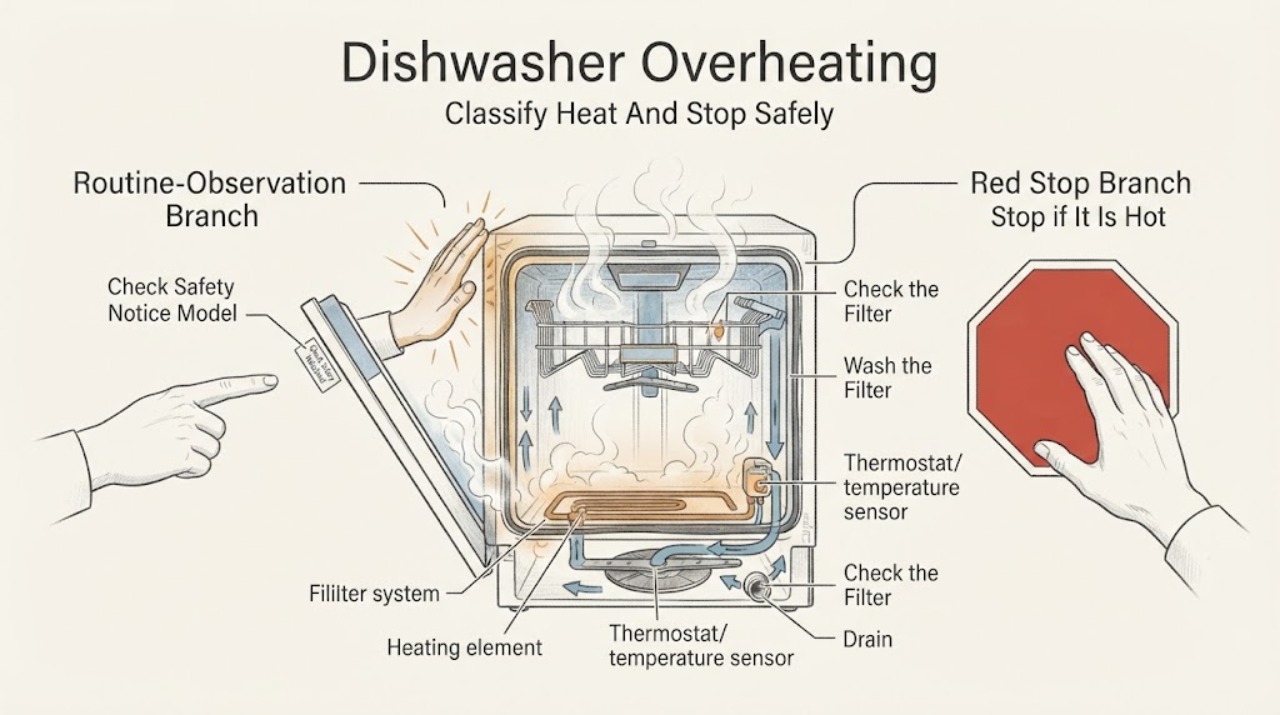
Work through in order
Diagnostic checks
Use only checks that match the exact appliance or system and its official guide.
-
Check 1
If a cycle is running, stop it using the normal control and keep clear of the door until hot steam has dissipated. Identify whether the observation is ordinary hot water or steam, a hot exterior, a hot plug or cord, a burning or electrical smell, smoke, sparking, melting, a leak, or a breaker trip.
Expected result: Only hot water or steam is present, the exterior or plug is unusually hot, or burning smell, smoke, sparking, melting, leak, or repeated power trip is present.
Next step: For steam alone, let the machine cool and continue only with the model's safe external checks. For any electrical, fire, leak, or severe heat symptom, isolate power from a dry safe position and arrange service.
Stop if: Do not touch the heater or interior while hot, reopen a door into escaping steam, restart after smoke or burning smell, or use the dishwasher with a hot or damaged cord, sparking, melting, or water at electrical parts.
Why this matters
Why: Hot water and steam can occur during normal operation, but hot electrical parts, smoke, burning odour, melting, water near electricity, or a power trip indicate a possible heating or electrical hazard rather than routine cycle heat.
-
Check 2
Find the dishwasher's model and serial information on the rating plate or in the manual, then use the official Hotpoint dishwasher safety-notice checker for the relevant region. Do not infer applicability from the brand name, age, appearance, or a similar model.
Expected result: The model and serial are listed as affected, the checker result is unavailable or unclear, the appliance is not listed as affected, or the rating plate cannot be read.
Next step: Do not use an affected appliance before the stated repair. If the result is unclear or the plate is unreadable, contact Hotpoint with photographs and symptoms; continue no powered testing while a heat or electrical concern remains.
Stop if: Do not bypass the safety notice, substitute a nearby model number, or keep operating while waiting for confirmation if the appliance is hot, smells burnt, smokes, sparks, leaks, or trips power.
Why this matters
Why: Hotpoint says the overheating risk concerns a small number of identified dishwashers and requires model and serial checking. An affected result is an immediate stop-use condition; an unclear result is not clearance to operate if overheating symptoms exist.
-
Check 3
After power is isolated and the dishwasher is cool, inspect the accessible filter assembly, trap, spray arms, racks, and dishes for food residue, blocked jets, or loading that prevents free spray-arm rotation. Clean and refit only the parts and sequence specified by the exact manual, and ensure the filter is locked.
Expected result: The filter is clogged or loose, food residue is present, a spray arm cannot rotate, the dishwasher was run without a filter, or the accessible system is clean and correctly fitted.
Next step: Remove only accessible residue, refit the filter and spray arms as documented, and do not run the machine without them. If overheating or heat symptoms remain with a clear path, stop and arrange service.
Stop if: Do not remove the pump protection, probe the sump, use sharp metal tools, touch a hot heater, run without the filter, or perform a powered test with covers removed.
Why this matters
Why: Hotpoint's guide says filters capture food residues and must be clean and correctly fitted, and that spray-arm obstructions impair operation. These conditions can affect circulation and drainage but do not establish that a heating element or thermostat is safe.
-
Check 4
With power isolated, observe whether water remains in the base after a completed cycle and check only the externally visible waste-hose routing and under-sink connection. Review detergent type and amount against the exact manual, and look for excessive foam or an obviously blocked filter.
Expected result: Standing water, a kinked or trapped hose, a blocked under-sink connection, a clogged filter, excessive foam, or no visible drainage or detergent issue is present.
Next step: Correct only an obvious external hose or sink-connection issue, clean and refit the filter, and use the correct detergent dose. Arrange service if water remains, foam persists, or heat, odour, or errors recur.
Stop if: Do not pull out an integrated appliance alone, disconnect plumbing under standing water, add chemicals to suppress foam, or keep operating with water near electrical connections.
Why this matters
Why: Hotpoint links drain failure with the waste hose, under-sink plumbing, and base filter; its guide also identifies unsuitable or excessive detergent as a source of excess foam. These can leave heat, water, or residue in the tub, but persistent overheat symptoms need service.
-
Check 5
From outside the appliance, record when the heat symptom occurs—during washing, drying, or after the cycle—and capture any exact LED sequence or display code. Compare it only with the exact Hotpoint manual or official code guide; do not measure water or heater temperature yourself.
Expected result: Heat is limited to normal steam at door opening, an exact model-specific heating code appears, the cycle stops or fails to drain, or heat is accompanied by burning odour, smoke, leak, or power loss.
Next step: Use the exact code instruction and contact service for a heating or control fault. If the symptom is only normal steam, allow cooling and maintain the appliance as documented; do not make repeated high-heat test cycles to prove it.
Stop if: Do not generalize F10 or any LED sequence to another model, open the control or heater compartment, use a meter on live parts, or restart after a safety symptom.
Why this matters
Why: Steam during a hot programme can be normal, while a documented heating code or cycle failure may indicate a component fault. A heating symptom plus burning, smoke, leak, or power loss is a safety issue regardless of the code.
-
Check 6
After the appliance is cool and all safe external observations are recorded, decide whether it is safe to leave isolated. Provide the model, serial, cycle stage, code, filter and drain findings, and any heat, odour, smoke, leak, or power symptoms to Hotpoint or a qualified dishwasher engineer.
Expected result: The machine only produced expected steam and has no fault symptom, overheating returns, an affected safety-notice result appears, a heating or sensor code appears, or electrical, fire, water, or breaker symptoms are present.
Next step: Use the dishwasher only when the exact manual and Hotpoint support clear it and all required filters and covers are correctly fitted. Otherwise keep power isolated and arrange qualified service.
Stop if: Do not remove panels, replace a heater or thermostat, bypass a thermal or door device, inspect wiring live, or repeatedly reset a breaker or fault.
Why this matters
Why: Normal steam without other symptoms can be monitored using the manual. Recurring overheating, a model-specific heating code, affected safety result, or any electrical, fire, leak, or power symptom requires professional diagnosis and may require the appliance to remain out of service.
Use your observations
Decision map
Find the observation that best matches what you see, then follow the next safe action.
-
PATH 01Safety boundary
What you see
The only observation is hot water or steam when the door is opened during or shortly after a hot programme, with no burning smell, smoke, leak, fault indication, unusual noise, hot plug, or power trip.
Do this next
Keep clear of steam, wait before unloading, and follow the exact manual's normal cooling and maintenance instructions. Do not touch the heater or use touch temperature as a test.
Why this path and its safety boundary
Why it matters: Normal programme heat is more likely than uncontrolled overheating; Hotpoint's guide specifically warns that hot steam can escape when opening the door.
Safety stop: Stop if the symptom changes to burning or electrical odour, smoke, melting, abnormal exterior or plug heat, leak, or repeated breaker trip.
-
PATH 02Safety boundary
What you see
The model and serial number match an appliance identified by Hotpoint's dishwasher safety notice, or the checker result cannot be confirmed while the unit shows an overheating or electrical symptom.
Do this next
Stop using the dishwasher, isolate it safely, and contact Hotpoint for the stated repair or model confirmation. Do not reconnect it while waiting.
Why this path and its safety boundary
Why it matters: Hotpoint says an electrical component can fail and cause overheating and a rare fire hazard in affected units; this is not a user-cleaning problem.
Safety stop: Do not bypass the notice, operate to verify the result, or remove panels around the electrical component.
-
PATH 03Safety boundary
What you see
Heat or poor operation occurs with a clogged filter, blocked spray arm, standing water, kinked waste hose, under-sink restriction, or excessive foam, but there is no burning smell, smoke, sparking, or hot electrical part.
Do this next
Isolate power, correct only the documented external or accessible condition, refit all filters, and reassess without running repeated high-heat cycles. Arrange service if standing water or abnormal heat persists.
Why this path and its safety boundary
Why it matters: An accessible circulation, drainage, loading, or detergent condition is more likely than a confirmed heater failure, although continued heat symptoms still require caution.
Safety stop: Do not access the pump, remove protection, disconnect hoses under water, or continue if electrical, fire, leak, or breaker symptoms develop.
-
PATH 04Safety boundary
What you see
The exact model displays a heating-related error or LED sequence, the cycle stops at heating or drying, or the dishwasher has repeated abnormal heat without a visible filter or drain cause.
Do this next
Record the exact code and model, stop powered troubleshooting, and arrange qualified Hotpoint service. Do not order a heater or thermostat by appearance or code alone.
Why this path and its safety boundary
Why it matters: A heating element, thermostat, sensor, control, or related circuit may be involved. Hotpoint identifies F10 as a heating-element fault only for the documented LED arrangement, so no generic code conclusion is safe.
Safety stop: Do not perform continuity or voltage tests, open panels, bypass a thermal device, or run another cycle to reproduce the fault.
-
PATH 05Safety boundary
What you see
The appliance produces burning or electrical smell, smoke, sparks, melting, a hot plug or cord, water near electrical parts, repeated breaker trips, or a serious leak while hot.
Do this next
Stop immediately, isolate power from a dry safe position, close the water supply if safely accessible, and arrange qualified service. If there is active smoke or fire, leave the area and contact emergency services.
Why this path and its safety boundary
Why it matters: An electrical, heating, wiring, or water-ingress fault may create fire, shock, or property risk; normal maintenance cannot make the appliance safe.
Safety stop: Do not touch wet electrical areas, reset the breaker repeatedly, open the door into smoke or steam, remove panels, or attempt a live test.
Helpful context
Understand the symptom
Steam is not the same as uncontrolled overheating
A dishwasher intentionally heats water and can release hot steam when a door is opened. Hotpoint's guide warns users to wait before unloading and to beware of hot steam. The concern becomes urgent when heat is accompanied by a burning or electrical smell, smoke, melting, a hot plug, a leak, a fault indication, or a breaker trip.
Check the model before assuming the cause
Hotpoint sells integrated, freestanding, and slimline dishwashers with different heating, sensor, control, plumbing, and LED arrangements. The safety notice applies only to identified model and serial combinations, while F10 and other codes are model-specific. Find the rating plate and use the exact manual or official checker before interpreting a code or opening anything.
Accessible airflow and drainage checks come before service
A dirty filter, blocked spray arm, incorrect detergent, or drainage restriction can impair washing and leave heat or water in the appliance, but these observations do not prove a failed heater. With power isolated and the machine cool, inspect only the accessible filter and plumbing areas described by the model manual. Heating elements, thermostats, pumps, sensors, controls, and wiring belong to qualified service.
Safety boundary
Stop conditions
- Stop using the dishwasher immediately for burning or electrical smell, smoke, sparks, melting, a hot plug or damaged cord, repeated breaker trips, or water near electrical parts.
- Stop and follow Hotpoint's safety notice if the model and serial number are affected; do not use the appliance before the stated repair.
- Do not touch the heater or interior during or shortly after a hot cycle, and do not open the door into escaping steam without waiting and protecting against burns.
- Do not remove panels, test heaters, thermostats, sensors, pumps, controls, or wiring, bypass a thermal or door safety device, or perform live electrical measurements.
- Do not run without the filter assembly, with a loose filter, or with an unresolved standing-water, leak, or drain condition; arrange qualified service for persistent abnormal heat or codes.
When checks do not resolve it
Need a professional?
Arrange qualified Hotpoint dishwasher service when abnormal heat returns after the model-approved filter, spray-arm, loading, detergent, and external drain checks; when an exact heating code or cycle failure appears; or when a safety-notice result is affected or unclear. Stop immediately for burning or electrical smell, smoke, sparks, melting, a hot plug or cord, water near electrical parts, a serious leak, or repeated breaker trips.
Safety scope: This article covers distinguishing expected steam from abnormal heat, checking the official safety notice, and safe external filter, loading, detergent, and drain observations. Heating elements, thermostats, sensors, pumps, controls, wiring, panels, thermal devices, and live tests require qualified service.
Common questions
FAQ
Is steam from a Hotpoint dishwasher always overheating?
No. Hotpoint's dishwasher guide warns that hot steam can escape when the door is opened during or shortly after a hot programme. Wait before opening and look for accompanying burning smell, smoke, melting, abnormal exterior or plug heat, leaks, errors, or breaker trips.
How do I check whether my Hotpoint dishwasher is affected by an overheating safety notice?
Find the complete model and serial number and enter them in Hotpoint's official dishwasher safety-notice checker for your region. If the result says the appliance is affected, do not use it before repair; if the result is unclear while overheating symptoms exist, keep it isolated and contact Hotpoint.
Can a clogged Hotpoint dishwasher filter make it overheat?
A clogged filter can restrict food-residue and wastewater flow and can contribute to poor operation, but it does not prove a heater fault. Isolate power, clean and refit the accessible filter exactly as the manual directs, and arrange service if abnormal heat continues.
What does F10 mean on a Hotpoint dishwasher?
Hotpoint's support page identifies F10 as a heating-element fault for its documented LED arrangement and recommends an engineer. Do not assume F10 or any LED sequence has the same meaning on another model; provide the exact model and display pattern to service.
Should I keep running a Hotpoint dishwasher that gets very hot?
Do not keep running it if the heat is abnormal or comes with burning or electrical smell, smoke, sparks, melting, a hot plug, a leak, a breaker trip, or an affected safety-notice result. Isolate it safely and arrange qualified service; do not repeat cycles to test a heater.
Can I replace the Hotpoint dishwasher heater or thermostat myself?
Not as a generic user repair. The heater, thermostat, sensor, pump, control, and wiring are model-specific and involve mains electricity and heat. Do not remove panels or perform live or improvised tests; use the exact manual and qualified Hotpoint service.
Read the exact guide
Official sources
- Integrated Dishwasher Troubleshooting & RepairHotpoint UK Appliances Limited · Official Hotpoint UK support page for integrated dishwashers; drainage and service guidance should be matched to the exact appliance and region.
- Official Hotpoint Appliance Service RepairHotpoint UK Appliances Limited · Official Hotpoint UK service page; the service route and regional coverage depend on the appliance location and model.
- Hotpoint Service Help and AdviceHotpoint UK Appliances Limited · Official Hotpoint UK service hub; the displayed F10 example and contact route are model- and region-dependent.
- 400011299548 EN Daily Reference GuideHotpoint · Official Hotpoint daily guide for the model identified in the document; programme, filter, and component details are model-specific examples.
- What Do Hotpoint Dishwasher Error Codes Mean?Hotpoint UK Appliances Limited · Official Hotpoint UK error-code guide; codes and LED sequences depend on the model and interface and must not be generalized.
- Hotpoint Dishwashers Safety NoticeHotpoint UK Appliances Limited · Official Hotpoint UK safety notice for the identified model and serial combinations; it does not establish that every Hotpoint dishwasher is affected.
Community feedback
Share a repair observation
Share a plain-text repair observation. Accepted observations are published automatically; this page may take a moment to update.