
On this page
Start here
Quick answer
First identify whether the Electrolux dryer stops early, keeps running without ending, or stops with wet clothes. Clean the lint screen, use a load size that can tumble freely, check the selected cycle and temperature, and verify that the exhaust path and outside hood are not restricted. Electrolux also says residue on moisture-sensor bars can prevent accurate sensing, and an overheated motor may need about 30 minutes to cool before a smaller load is tried. If a ventilation code returns, the dryer repeatedly stops after cooling, the drum does not turn, the plug or cord is hot or damaged, or there is smoke or a burning smell, stop using the dryer and arrange authorized service. Do not bypass a thermal limiter or open the cabinet as a test.
Before you begin
Safety first
- Let the Electrolux dryer cool before cleaning. Keep the lint screen installed during operation. Isolate power before user-accessible maintenance when the area is safe and dry. Never bypass a thermal limiter, operate a gas dryer without its required outdoor exhaust, remove the cabinet, or test live electrical components as an ordinary-user step.
Work through in order
Diagnostic checks
Use only checks that match the exact appliance or system and its official guide.
-
Check 1
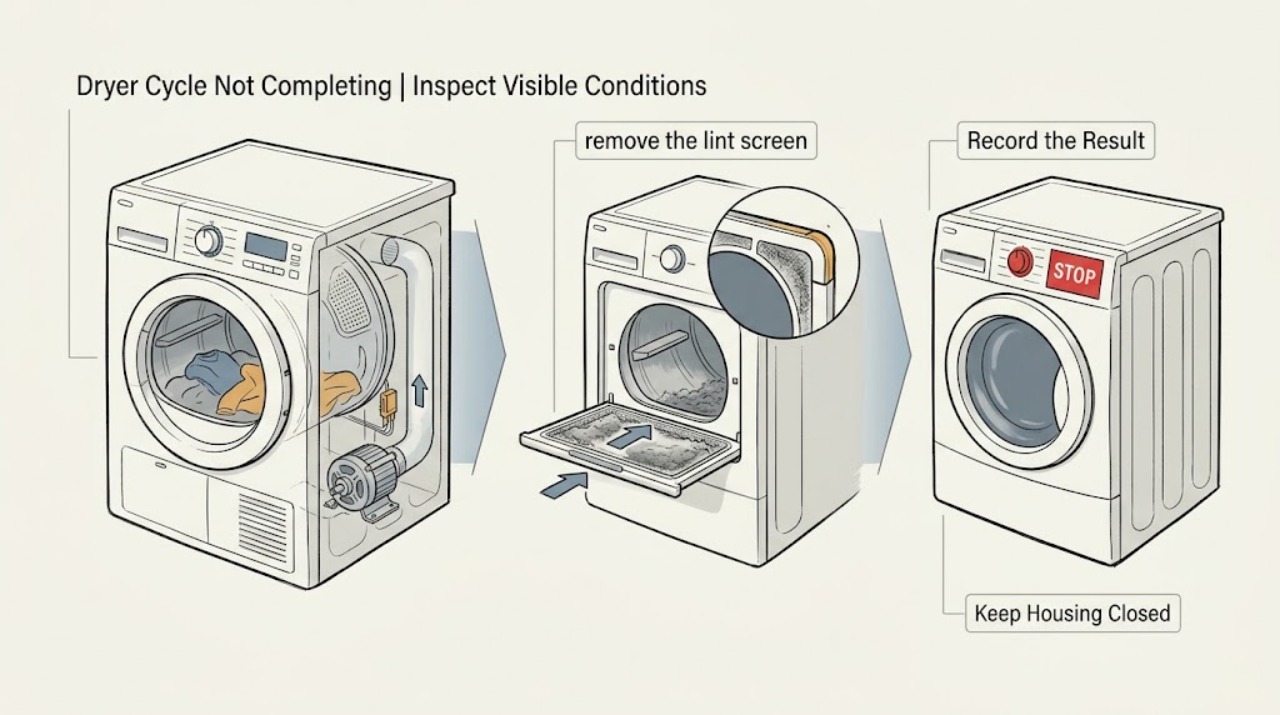
Observe the failure point and record the display: note whether the drum stops early, continues tumbling without ending, ends with clothes wet, shows an error, or loses all power. Also note whether the cabinet, clothes, plug, or cord is unusually hot and whether there is smoke or a burning odor.
Expected result: The dryer stops after becoming hot, runs long with damp clothes, shows a ventilation or sensor code, or has smoke, burning odor, sparking, or heat damage.
Next step: For smoke, burning, sparking, melted material, or a hot damaged connection, stop immediately and leave the dryer off. Otherwise let a hot dryer cool, record the exact message, and continue with the lint and load checks.
Why this matters
Why: An early stop after heat can involve motor protection or another fault; a long cycle is more consistent with airflow, load, humidity, cycle, or sensing conditions. Smoke, burning, sparking, and heat damage are safety events, not ordinary cycle troubleshooting.
-
Check 2
With the dryer stopped and cool, remove the lint screen and clean it according to the model guide. Check that the screen is intact, dry, and seated correctly, and remove loose lint from the visible screen housing without opening the cabinet.
Expected result: The screen is heavily coated, wet, damaged, or poorly seated, or it is clean, dry, intact, and correctly installed.
Next step: Clean the screen as directed and replace it only when completely dry and properly seated. If it is damaged or cannot seat, keep the dryer off until the model-specific part and service need are confirmed.
Why this matters
Why: Electrolux says to clean the lint screen after every use and warns not to operate the dryer without it. A restricted or badly seated screen can reduce airflow, prolong a cycle, and contribute to heat buildup; a clean screen shifts attention to the rest of the air path and sensing system.
-
Check 3
Check the load and programme: look for an overloaded drum, an almost empty load, mixed heavy and light fabrics, an Air Fluff or low-heat selection, or a cycle that does not match the fabric. Make sure clothes have room to tumble freely.
Expected result: The load is too large, too small, poorly sorted, or the programme is not appropriate; alternatively the load and programme match the manual.
Next step: Use a balanced load of similar fabric weight and the model-recommended cycle. If the dryer still stops early or never completes with a suitable load, continue to the sensor and airflow checks.
Why this matters
Why: Electrolux says loads that are too big or too small can take longer, that items need room to tumble, and that cycle and temperature selection affect drying. A corrected load that completes changes the diagnosis toward use conditions rather than an internal fault.
-
Check 4
If the model uses moisture sensors, locate the sensor bars from the owner guide and inspect them from the drum opening after power is off. Look for a dull film or residue from fabric-softener sheets; wipe only as the model instructions permit and do not scrape the bars.
Expected result: Residue is visible on the sensor bars, or the bars are clean but the cycle still ends too soon or runs without reaching the expected result.
Next step: Clean the sensor bars using the owner-guide method, then run one suitable supervised cycle. If the symptom persists or a humidity-sensor code returns, record it and request service.
Why this matters
Why: Electrolux says residue from fabric-softener sheets can inhibit accurate moisture sensing. Clean sensors can reduce the likelihood of a simple sensing-surface issue but cannot rule out a sensor, wiring, control, or airflow fault.
-
Check 5
Check the external air path for the dryer type: inspect the exhaust tube for a bend, restriction, or blockage and the outside hood for an obstruction on a vented model; for a condenser or heat-pump model, inspect only the user-accessible filter or collection components described in the manual. Do not dismantle the duct or cabinet.
Expected result: A duct, hood, filter, or user-accessible path is blocked, or the visible path is clear but the cycle remains incomplete.
Next step: Clear only loose visible debris and correct an obvious bend or restriction according to the model guide. If the duct needs specialist cleaning, the error returns, or the path is inaccessible, stop using the dryer and arrange authorized service.
Why this matters
Why: Electrolux identifies inadequate ventilation and a blocked exhaust duct or hood as causes of extended drying, and its error guide identifies EF1 as a ventilation-blockage condition. A clear accessible path with recurrence points toward a deeper airflow, fan, heater, sensor, or control diagnosis.
-
Check 6
If the dryer stopped because it became hot and there is no smoke, burning smell, electrical damage, or other hazard, leave it switched off for about 30 minutes so the motor can cool. Then try one smaller, balanced load only if the model instructions allow it.
Expected result: The dryer completes the smaller load after cooling, or it stops again, the motor does not turn, a thermal or ventilation code returns, or the cabinet becomes abnormally hot.
Next step: If the one smaller-load test is normal, avoid overloading and monitor the next cycle. If the symptom returns, keep the dryer off and request service; do not bypass or manually reset a thermal limiter.
Why this matters
Why: Electrolux says an overloaded dryer can overheat its motor and recommends allowing 30 minutes for cooling and reducing the load. It also says an activated thermal limiter on an electric dryer requires a service provider; repeated stopping is not a normal reason to keep restarting.
-
Check 7
Prepare a service record without opening the dryer: note the model and serial information, selected cycle, load size and fabric mix, whether clothes were damp or hot, the point of the stop, exact code, lint and airflow findings, sensor condition, and whether cooling changed the result.
Expected result: The cycle still does not complete after the accessible checks, or the dryer has a damaged cord or plug, repeated electrical trips, a burning smell, smoke, a seized drum, or an internal component would need to be reached.
Next step: Keep the dryer out of use and provide the record to Electrolux or an authorized technician. For active smoke, fire, sparking, or severe electrical damage, leave the area and seek urgent professional or emergency help.
Why this matters
Why: A recurring incomplete cycle can involve the motor, thermal limiter, heater, fan, moisture sensor, wiring, or control system. Electrolux directs unresolved dryer faults toward authorized service rather than an unverified user repair.
Use your observations
Decision map
Find the observation that best matches what you see, then follow the next safe action.
-
PATH 01Next step
What you see
Smoke, burning odor, sparking, melted material, a hot damaged cord or plug, repeated electrical trips, or an uncontrolled fire risk is present.
Do this next
Stop immediately, leave the dryer off, isolate power only if safe and dry, leave the area if needed, and seek urgent professional or emergency help. Do not run another cycle.
-
PATH 02Next step
What you see
The lint screen is cleanable, the load is too large or too small, the cycle is mismatched, or residue is visible on moisture sensors.
Do this next
Clean and reinstall the screen, correct the load and programme, clean sensor bars as directed, and perform one suitable supervised cycle.
-
PATH 03Next step
What you see
The exhaust duct, outside hood, condenser filter, or other user-accessible air path is restricted, or EF1 is displayed.
Do this next
Clear only accessible loose debris or an obvious restriction according to the model guide. Arrange authorized service or specialist duct cleaning if the code or incomplete cycle returns.
-
PATH 04Next step
What you see
The dryer stops hot after an overloaded cycle but has no smoke, burning odor, or electrical damage.
Do this next
Allow about 30 minutes for cooling, then try one smaller balanced load if the manual allows. Escalate if it stops again or a thermal limiter is suspected.
-
PATH 05Next step
What you see
The dryer still stops early or runs indefinitely after the screen, load, sensor, airflow, and one cooling checks.
Do this next
Keep it off and request authorized service for model-specific diagnosis. Do not open the cabinet, bypass a thermal limiter, or replace an internal part as a trial.
Helpful context
Understand the symptom
What “cycle not completing” tells you
A dryer that stops before clothes are dry has a different first path from one that tumbles for an unusually long time. Early stops can follow motor heat protection, a door or power interruption, a sensor decision, or a fault code. Long cycles are often affected by lint, airflow, load size, humidity, cycle selection, or moisture-sensor residue. The symptom alone does not identify a heater, motor, sensor, or control failure.
Start with cool, user-accessible checks
If the dryer is hot, stop the cycle and let it cool before touching the lint screen, sensor bars, or exhaust connection. Keep the lint screen installed during operation. Do not put a hand into a moving drum, remove the cabinet, or use a cycle to test a suspected thermal limiter.
The model and dryer type matter
Electrolux dryers differ in vented, condenser, heat-pump, and sensor-controlled designs. Use the Complete Owner's Guide for the exact sensor location, exhaust arrangement, water collection parts, and cycle names. The checks below do not assume that every model has the same filter or vent configuration.
Only after diagnosis
Potential parts
- lint screen or screen housing
Consider this category only if the filter is damaged, warped, missing, or cannot seat correctly after the model-specific cleaning check.
Confirm the complete Electrolux model and manufacturer fit information before ordering; do not infer compatibility from an incomplete cycle. - moisture sensor assembly
Consider this category only when sensor bars are clean but a technician confirms a sensor, wiring, or control fault associated with early termination or a recurring humidity code.
Use model-specific diagnosis and fit information; do not replace the sensor solely because one cycle ended early. - motor or thermal limiter
Consider this category only after a technician confirms motor overheating or thermal-protection failure with load and airflow conditions ruled out.
Do not bypass a thermal limiter; confirm the exact model and approved repair procedure before ordering any internal part. - heater or airflow fan assembly
Consider this category only when a technician confirms a heater or fan fault after the lint, exhaust, load, and sensor checks.
Match the complete model and revision using Electrolux information; a similar-looking assembly is not proof of compatibility.
When checks do not resolve it
Need a professional?
Contact Electrolux or an authorized appliance technician when the cycle remains incomplete after the lint, load, sensor, airflow, and one cooling checks; when EF1 or a sensor code returns; when the dryer repeatedly stops, the drum does not turn, or diagnosis would require reaching the motor, heater, fan, thermal limiter, wiring, or control.
Common questions
FAQ
Why does my Electrolux dryer stop before the cycle is complete?
Check for a full lint screen, an unsuitable load or cycle, moisture-sensor residue, restricted exhaust, or motor overheating. If it stops again after the accessible checks and cooling, keep it off and request authorized service.
Why does my Electrolux dryer run but never finish?
A long cycle can result from restricted airflow, a load that is too large or too small, high humidity, an unsuitable cycle, or residue on the moisture sensors. Clean the lint screen, check the exhaust path, correct the load, and arrange service if the symptom continues.
How long should I let an Electrolux dryer cool after it stops?
Electrolux says an overheated motor may need about 30 minutes to cool. Try one smaller, balanced load only when there is no smoke, burning odor, electrical damage, or other hazard. If it stops again, service is needed rather than repeated restarts.
What does EF1 mean on an Electrolux dryer?
Electrolux's error guide identifies EF1 as a ventilation blockage condition. Check the lint filter and the accessible exhaust tube and vent exit for bends, restrictions, or blockage. If the code returns or the path needs specialist access, stop using the dryer and schedule service.
Read the exact guide
Official sources
- What should I do if my dryer does not start?Electrolux · Electrolux dryers with start, door, cycle-selector, power, or circuit conditions
- What should I do if my dryer stops operating?Electrolux · Electrolux dryers that stop operating because of possible motor overheating or thermal limiter activation
- Laundry Dryer Error Code GuideElectrolux · Electrolux laundry dryers displaying ventilation, humidity-sensor, door, wiring, or power fault codes
- Dryer - Not Drying and Extended Drying TimeElectrolux · Electrolux dryers with extended drying time or cycles that do not reach the expected result
Community feedback
Share a repair observation
Share a plain-text repair observation. Accepted observations are published automatically; this page may take a moment to update.