
On this page
Start here
Quick answer
Stop using the Electrolux EFMG627UTT1 until the lint screen is fully seated, flat, and undamaged. Electrolux says lint buildup restricts airflow and reduces drying performance, and specifically warns not to operate a dryer without the lint screen in place. With the dryer off and cool, remove the screen, clear only accessible lint, inspect its frame and rails for a crack or distortion, and reinstall it without forcing it. Then check the outside exhaust hood for an obvious blockage without reaching into the duct. If the filter is damaged or will not stay seated, the whine continues with the screen correctly installed, drying is slow, the cabinet is unusually hot, or there is a burning or gas odor, keep the gas dryer off and arrange qualified service. Do not reach into the blower or vent, open panels, bypass a safety device, or choose a filter or internal part by appearance alone.
Before you begin
Safety first
- Do not operate the dryer without the lint screen, reach into the lint channel or exhaust duct, open the cabinet or burner area, bypass a thermal or door safety device, adjust gas components, or run repeated cycles to locate the whine. Stop for gas odor, smoke, burning odor, sparking, abnormal heat, a hot/damaged connection, blocked exhaust, or drum rubbing/stalling.
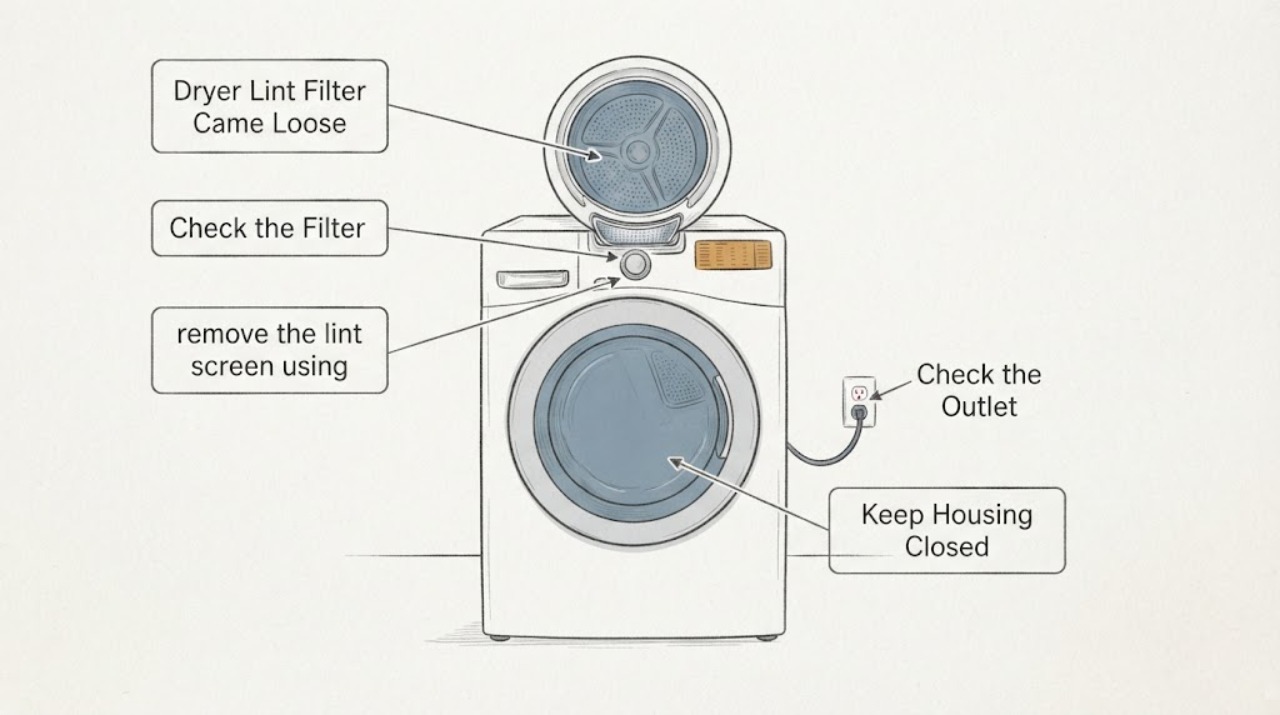
Work through in order
Diagnostic checks
Use only checks that match the exact appliance or system and its official guide.
-
Check 1
Turn the dryer off and allow it to cool. Confirm the rating label reads Electrolux EFMG627UTT1 and note whether the lint screen was loose during the last cycle, whether the filter frame is cracked or warped, and whether the whine started immediately after it moved.
Expected result: The exact model matches, the screen is loose or damaged, or the model/screen arrangement is uncertain.
Next step: If the model or filter arrangement is uncertain, photograph only the cool, accessible label and screen and ask Electrolux or a qualified technician to identify the correct guide. If the frame is cracked, warped, or missing a retaining edge, do not operate the dryer until the exact replacement and fit are verified.
Why this matters
Why: The timing makes screen fit and airflow the first distinct branch, but an uncertain model or visibly damaged filter prevents a safe fit or parts conclusion.
-
Check 2
With the dryer still off and cool, remove the lint screen using its normal handle. Clear lint from the screen and accessible seating area, inspect the mesh and frame for tears, bends, gaps, or broken guides, and reinstall it fully flat in its intended slot. Do not use the dryer with the screen absent or force it past a resistance point.
Expected result: The screen seats securely and flat, lint or residue was removed, or it rocks, catches, leaves a gap, or will not stay in place.
Next step: If it will not seat correctly, keep the gas dryer off and arrange model-specific service or an exact replacement identified by Electrolux. Do not tape, shim, glue, or substitute a generic filter to make it fit.
Why this matters
Why: A clean, correctly seated screen removes the immediate no-screen and obvious airflow-risk condition. A gap or damaged frame can let lint bypass the screen and can leave the noise source or restriction unresolved.
-
Check 3
From outside the dryer, inspect the exhaust hood and visible duct outlet for lint, a blocked flap, a crushed section, or an obstruction. Clean only material that is plainly accessible at the exterior opening; do not reach into the duct, disconnect it, or move the dryer to expose a hidden route.
Expected result: The hood opens freely and the external outlet is clear, or airflow is weak/blocked, the duct is crushed, or the outlet cannot be inspected safely.
Next step: If the external outlet is blocked or the duct is damaged or inaccessible, keep the dryer off and arrange qualified vent service. If it is clear, continue only after the lint screen is correctly seated; never operate this gas dryer without an outdoor-venting exhaust duct.
Why this matters
Why: Electrolux links restricted exhaust to longer drying and reduced performance. A restriction can also increase heat and airflow noise, but it does not identify whether the blower or motor is damaged.
-
Check 4
Only after the screen is correctly seated, there is no odor, smoke, unusual heat, damaged cord, or blocked exhaust, make one short, supervised empty-drum comparison if the owner's guide permits it. Keep the door closed and note whether the whine appears at startup, drum rotation, burner/heat, or airflow; stop immediately if the sound worsens.
Expected result: The whine disappears with the corrected screen or remains with an empty drum at the same stage of operation.
Next step: If the sound remains, stop using the dryer and provide the timing or recording to qualified Electrolux service. Do not repeat cycles to force the noise or remove a panel to locate it.
Why this matters
Why: A screen-dependent sound supports a seating or airflow interaction. A persistent empty-drum whine belongs to the dryer and may involve the blower, motor, belt, roller, support, or another internal source; it is not proof of a single failed part.
-
Check 5
After the safe airflow checks, record whether clothes are taking longer to dry, whether the exhaust feels unusually weak or hot from a normal external position, whether the drum turns normally, and whether the gas burner appears to cycle normally only if it is visible without opening anything. Do not diagnose heat by placing a hand inside the drum or vent.
Expected result: Drying time returns to normal with the seated screen, drying remains slow, the dryer overheats or stops, or the drum turns but heat is absent.
Next step: For persistent slow drying, abnormal heat, repeated stopping, or no heat, keep the dryer off and arrange qualified service. Do not reset protections repeatedly, adjust gas components, or open the burner or control area.
Why this matters
Why: Normal drying after the screen and external vent check supports an airflow/setup issue. Persistent poor efficiency can involve exhaust, supply, burner, sensor, or control conditions; a drum that turns without heat can also involve gas supply or a safety control and cannot be assigned to the lint filter.
-
Check 6
Stop immediately if there is gas odor, smoke, burning odor, sparking, a hot or damaged plug/outlet, a damaged exhaust connection, or a drum that stalls or rubs. From a safe dry position, leave controls alone for a gas odor and arrange the appropriate emergency or qualified service response.
Expected result: No hazard sign is present, or any gas, fire, electrical, severe heat, or abnormal drum symptom is present.
Next step: Keep the dryer off. For gas odor, leave the area and contact the gas supplier or emergency services from outside; for smoke, sparking, or electrical damage, isolate power only if safe and arrange qualified appliance/electrical service. Do not open the cabinet.
Why this matters
Why: The symptom has crossed from lint/filter diagnosis into gas, fire, electrical, or mechanical safety. A gas odor must not be investigated by another cycle, and continued operation can worsen lint or heat risk.
Use your observations
Decision map
Find the observation that best matches what you see, then follow the next safe action.
-
PATH 01Next step
What you see
The lint screen is cracked, warped, missing a retaining edge, or cannot sit flat and stay in its slot.
Do this next
Keep the EFMG627UTT1 off and obtain an exact model-confirmed filter or service assessment. Do not tape, shim, glue, or use a generic screen, and do not reach into the filter housing.
Why this path and its safety boundary
Why it matters: The dryer does not have a reliable lint barrier or airflow interface. Running it could allow lint bypass and makes the whine/efficiency symptom harder to interpret.
-
PATH 02Next step
What you see
The screen is clean, correctly seated, and undamaged; the external hood is clear; drying returns to normal; and the whine disappears or is greatly reduced.
Do this next
Keep cleaning the screen before or after every load and monitor the fit. If it loosens again or the whine returns, stop operation and have the screen seating and front filter housing inspected.
Why this path and its safety boundary
Why it matters: The strongest evidence favors the loose-screen/airflow condition rather than an identified internal component failure.
-
PATH 03Next step
What you see
The screen is correctly installed but the whine remains with an empty drum, drying remains slow, the hood/duct is restricted, or the dryer becomes unusually hot or stops.
Do this next
Keep the gas dryer off and arrange qualified Electrolux service or authorized vent service. Provide the filter history, empty-drum sound timing, drying change, and external vent observations; do not order an internal part from the noise alone.
Why this path and its safety boundary
Why it matters: The problem is no longer explained by the loose screen alone. Vent restriction, blower or motor airflow, belt/support, burner, sensor, control, or another model-specific fault remains possible without one being proven.
-
PATH 04Next step
What you see
Gas odor, smoke, burning odor, sparking, a hot/damaged connection, a damaged exhaust path, or abnormal drum movement is present.
Do this next
Stop and keep away from the appliance. For gas odor, leave and contact the gas supplier or emergency services from outside; for smoke, sparking, or electrical damage, isolate power only if safe and call qualified service. Do not retry the dryer.
Why this path and its safety boundary
Why it matters: This is a safety branch involving gas, fire, electrical, heat, or mechanical risk; it is not a lint-filter replacement decision.
Helpful context
Understand the symptom
Why a loose lint screen changes the first check
The assigned EFMG627UTT1 is a gas dryer, and the reported sequence matters: the lint screen came loose, a whine appeared, and drying efficiency fell. A screen that is not seated can allow lint and air to move differently at the filter opening, but that observation does not prove a blower wheel, motor, belt, or gas component has failed. Electrolux's public guidance treats the lint screen and exhaust path as airflow and drying-performance checks, while its noise guidance separates load or foreign-object sounds from a noise that remains with an empty drum. The safest first decision is therefore to restore the user-accessible screen fit and stop if the frame is damaged, rather than ordering an internal part.
Gas and venting boundaries
A gas dryer needs a clear exhaust route to dry safely. Electrolux warns never to operate a gas dryer without an exhaust duct that vents outdoors, and says the exhaust duct and hood should be checked for restriction. Keep the checks external: do not put a hand into the lint channel or exhaust duct, remove the front panel, or run the dryer with the screen missing. If the whine is joined by gas odor, smoke, burning odor, abnormal heat, or repeated stopping, leave the dryer off and use qualified appliance or gas service.
When checks do not resolve it
Need a professional?
Arrange model-specific service when the filter will not seat, is visibly damaged, loosens again, the whine persists with the corrected screen and an empty drum, drying remains inefficient after the external vent check, heat is absent or excessive, or the dryer stops unexpectedly. Use qualified vent service for an inaccessible or restricted exhaust route and the gas supplier/emergency route for gas odor.
Safety scope: Do not operate the dryer without the lint screen, reach into the lint channel or exhaust duct, open the cabinet or burner area, bypass a thermal or door safety device, adjust gas components, or run repeated cycles to locate the whine. Stop for gas odor, smoke, burning odor, sparking, abnormal heat, a hot/damaged connection, blocked exhaust, or drum rubbing/stalling.
Have this ready
- Provide the complete model EFMG627UTT1, serial information, filter condition and how it came loose, when the whine occurs, whether the drum turns, the change in drying time, screen fit after cleaning, external hood/duct observations, and any heat, odor, smoke, gas, or stopping symptoms.
Common questions
FAQ
Can I run the Electrolux EFMG627UTT1 with the lint filter removed to see whether the whine stops?
No. Electrolux specifically warns not to operate a dryer without the lint screen in place. Keep it off until the screen is correctly seated and undamaged.
Does a loose lint screen prove the blower motor is bad?
No. The loose screen can alter airflow and allow lint bypass, and a restricted exhaust can reduce efficiency, but the symptom cannot distinguish the screen interface from the blower, motor, belt, burner, sensor, or control. Verify the screen and external vent first, then use qualified diagnosis if the whine remains.
What should I check if the screen is seated but drying is still slow?
Check the outside exhaust hood for an obvious blockage without reaching into the duct, confirm the dryer is not overloaded, and keep the gas dryer connected to an outdoor-venting exhaust path. If drying remains slow, the cabinet overheats, or the dryer stops, keep it off and arrange qualified service.
When is the whine an emergency rather than a lint-filter problem?
Stop immediately for gas odor, smoke, burning odor, sparking, a hot or damaged electrical connection, abnormal heat, a blocked or damaged exhaust path, or a drum that stalls or rubs. Leave gas-odor situations and contact the gas supplier or emergency services from outside; use qualified appliance/electrical service for other hazards.
Read the exact guide
Official sources
- Dryer - Not Drying and Extended Drying TimeElectrolux · Official dryer troubleshooting guidance; it directly supports not operating without a lint screen, external exhaust checks, load/setting checks, and the outdoor-vent requirement for gas dryers, but it does not select a part for EFMG627UTT1.
- Is it normal for my dryer to make sounds or noises?Electrolux · Official generic dryer-noise guidance; it supports the load-versus-empty-drum distinction and lists airflow, gas-valve, and gas-burner sounds but does not establish that this exact whine is normal.
- My dryer is running, but does not seem to be heating. What should I do?Electrolux · Official generic heating guidance; the assigned EFMG627UTT1 is a gas-dryer topic, so the gas-supply, burner-air, and safe service boundaries are relevant while electric-only checks are excluded.
- Dryers - How often do I need to clean my dryer or the lint screen/filter to optimize my drying performance?Electrolux · Official Electrolux dryer guidance; it supports lint-screen cleaning, airflow, and drying-performance implications but does not diagnose the exact EFMG627UTT1 internal sound source.
Community feedback
Share a repair observation
Share a plain-text repair observation. Accepted observations are published automatically; this page may take a moment to update.