
On this page
Start here
Quick answer
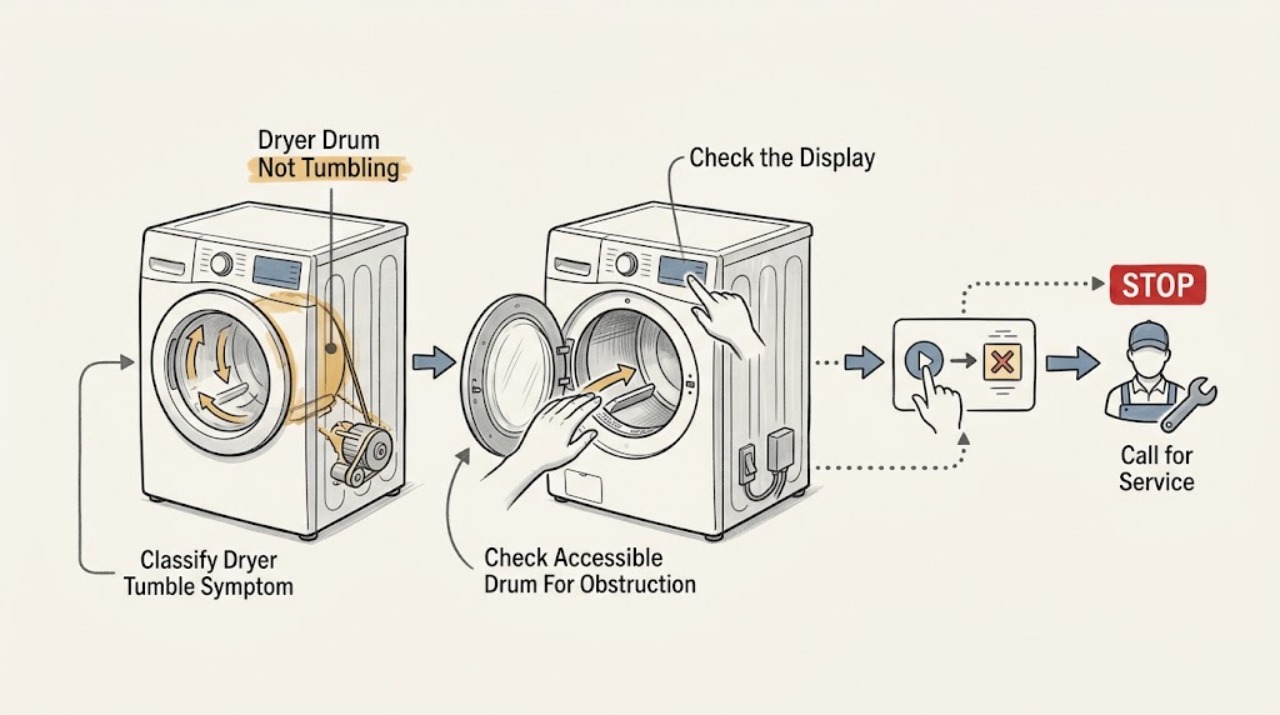
If an Electrolux dryer's drum is not tumbling, first stop the cycle and determine whether the display is off, the controls respond but the drum stays still, or the motor starts and then stops. Check the exact model's startup sequence, including a fully closed door, the selected cycle, delayed start, child lock, and a held Start button when required. With power disconnected, remove the load and look for a visible obstruction; do not open panels or bypass the door switch. Electrolux also recommends a short reset and checking the external power supply, while an overloaded or overheated motor may need about 30 minutes to cool before a reduced-load test. If the drum still does not move, the drum is hard to turn, the unit stops again, or there is smoke, burning odor, sparking, or unusual heat, unplug it when safe and arrange qualified appliance service.
Before you begin
Safety first
- This article supports only ordinary-access control, door, load, accessible-drum, reset, and external power observations. Internal access to the belt, motor, thermal limiter, drum support, wiring, control, or safety interlock should be performed by a qualified appliance technician with the exact model procedure and power isolated.
Work through in order
Diagnostic checks
Use only checks that match the exact appliance or system and its official guide.
-
Check 1
Stop the dryer and record the exact pattern from outside the appliance: whether the display is dark, the controls light up but the drum never moves, the motor hums or clicks, the drum starts and then stops, or the drum turns only briefly. Also note any smoke, burning odor, sparking, hot-plastic smell, unusual cabinet heat, or error message.
Expected result: The dryer is completely unpowered, powered but silent, making a hum or click without rotation, starting and stopping, or showing a warning while the drum remains still.
Next step: Use the matching control and power checks below once, while keeping the dryer off if a hazard sign is present. Do not infer a failed belt or motor from sound alone.
Stop if: Stop immediately for smoke, sparking, burning odor, hot wiring or plastic, a scorched plug, or heat that is worsening; disconnect power only if it can be done without touching a hazard and arrange qualified service.
Why this matters
Why: No display favors an external power or control issue; a powered silent cycle keeps startup settings and the door interlock in consideration; a hum, click, hard drum, or repeated stop makes a drive, obstruction, or motor-protection fault more likely. Odor, smoke, sparking, or excessive heat is a stop condition, not a routine symptom to reproduce.
-
Check 2
With the dryer stationary, close the door firmly, verify the cycle selector is at the intended program, check the display for delayed start or a child-lock symbol, and select a normal cycle. Press or hold Start exactly as the model manual specifies; do not force the door or bypass its switch.
Expected result: The door closes and the Start control responds normally, the cycle was delayed or locked, the Start button only flashes, the display shows energy-saving mode or another condition, or the dryer still does nothing.
Next step: Disable a confirmed setting only through the exact model controls, close the door correctly, and try one suitable cycle. If the hinge, latch, or door alignment is damaged, or a correct start still leaves the drum still, stop and arrange service.
Stop if: Do not tape, hold, or bypass a door switch; stop if the door, hinge, latch, or frame is damaged or cannot close normally.
Why this matters
Why: A delayed-start, child-lock, energy-saving, wrong selector position, or incompletely closed door can prevent a normal start without a drum-drive failure. A broken hinge may allow the door to appear closed while the door switch is not enabled. If the settings are correct and the drum remains still, continue with the reset and power checks rather than repeatedly pressing Start.
-
Check 3
Unplug the dryer or open its disconnect only when safe, remove the clothes, and inspect the visible drum opening for a coin, fastener, garment part, or other loose object. If the exact manual permits a simple empty-drum check, gently turn the drum by hand with power disconnected and no tools inserted; stop if it is jammed or unusually resistant.
Expected result: A foreign object is visible, the drum turns smoothly and quietly by hand, the drum drags or will not turn, or there is scraping, grinding, rattling, or clanking.
Next step: Remove only a loose object that is plainly accessible without reaching into gaps or dismantling anything. If resistance, scraping, or a trapped object remains, keep the dryer unplugged and arrange qualified service.
Stop if: Do not insert tools, remove panels, reach around the drum, cut or pull a trapped garment, or run the dryer to test a jam. Stop for sharp metal, a damaged drum, or exposed wiring.
Why this matters
Why: A visible loose object or noise that disappears when the drum is empty can explain the symptom without proving an internal part failure. A drum that is hard to turn or remains noisy with no load raises concern for a trapped object, drum support, roller, belt, or other internal fault that requires access beyond this article.
-
Check 4
If the drum began moving and then stopped after a large or heavy load, turn the dryer off, remove enough items to leave a light load, and allow the motor to cool for about 30 minutes before one model-approved restart. Do not keep restarting a hot or stalled dryer.
Expected result: The dryer restarts and tumbles with the reduced load, it still stops after cooling, the motor only hums or clicks, or the cabinet or controls remain unusually hot.
Next step: Use the load guidance in the exact manual and monitor the first restart from outside. If the drum does not resume, stops again, or heat remains abnormal, unplug the dryer and arrange service rather than increasing test cycles.
Stop if: Do not restart after smoke, burning smell, sparking, a scorched plug, or severe heat; do not open the cabinet to reset or replace a thermal device.
Why this matters
Why: Recovery after cooling and load reduction supports an overload or thermal-protection pattern, but it does not establish that the motor or thermal limiter is healthy. Failure after cooling, a hum without rotation, or recurring stops makes an internal drive or motor fault more likely.
-
Check 5
From a safe external position, inspect that the plug is fully seated and the cord is not visibly damaged; do not use an extension cord. For a powered model, unplug it for about 3 minutes and reconnect it as Electrolux describes, then check the dedicated breaker, RCD, or fuse without increasing fuse capacity or opening the electrical enclosure.
Expected result: Another appliance also lacks power, the breaker or RCD is tripped, the dryer returns after the reset, the plug or cord is damaged, or the dryer has power but the drum still does not tumble.
Next step: Use only a known-good outlet and the model's electrical instructions; have a qualified electrician address a supply or breaker problem. If power is present but the drum remains still, keep the dryer off and move to service rather than testing live wiring.
Stop if: Do not use an extension cord, increase fuse or breaker capacity, probe an outlet, open an electrical panel, or keep resetting a device that trips again, smells hot, or sparks.
Why this matters
Why: A tripped protective device or failed outlet can explain a dark display, while a reset that restores operation may indicate a temporary control state. A damaged cord, repeatedly tripping breaker, or persistent no-tumble symptom is not resolved by repeated resets and needs qualified electrical or appliance diagnosis.
-
Check 6
After the safe checks, capture the exact Electrolux model and serial information from an ordinary-access label if it can be read without moving or opening the appliance. Record the cycle, load size, whether the drum turns freely empty, any display symbol or code, the power/reset result, and whether the failure occurs immediately or after running.
Expected result: The drum remains still after correct controls, clear access, cooling and external power checks; the drum is hard to turn; the unit stops again; or a hazard sign or recurring protective trip is present.
Next step: Keep the dryer unplugged when the symptom persists and arrange qualified appliance service. Give the technician the model information, symptom timeline, load result, drum-resistance observation, settings, and any hazard or breaker history.
Stop if: Do not remove the cabinet, watch the drive with a panel removed, measure live voltage, bypass a safety device, or order a drive part solely from the symptom.
Why this matters
Why: A persistent no-tumble pattern after user checks is more consistent with a door switch, belt or drum support, motor, thermal limiter, control, or another model-specific fault. The observations narrow the technician's diagnosis but do not identify a safe do-it-yourself part replacement.
Use your observations
Decision map
Find the observation that best matches what you see, then follow the next safe action.
-
PATH 01Safety boundary
What you see
Do this next
Use only safe external checks and the model instructions. Have a qualified electrician investigate a damaged cord, repeated trip, hot outlet, or electrical enclosure; do not increase protection or keep resetting it.
Why this path and its safety boundary
Why it matters: An external supply, cord, protective-device, or control issue is more likely than a simple drum obstruction, although a tripped device can have more than one cause.
Safety stop: Stop for smoke, sparking, burning odor, heat, or damaged wiring and disconnect power only if safe.
-
PATH 02Safety boundary
What you see
Do this next
Follow the exact manual to clear the indicated setting or tank condition, close the door fully, and try one appropriate cycle. Arrange service for a damaged hinge, latch, or unresolved interlock.
Why this path and its safety boundary
Why it matters: A cycle condition or door interlock is more likely than a failed drum drive. Some conditions apply only to models with the relevant tank, drain, steam, or display feature.
Safety stop: Do not bypass the door switch or force the latch, and do not keep cycling a dryer that shows a fault or cannot close safely.
-
PATH 03Safety boundary
What you see
Do this next
Leave the dryer unplugged and arrange qualified service. Remove only a plainly visible loose object that does not require reaching into gaps or dismantling anything.
Why this path and its safety boundary
Why it matters: A trapped object or internal drum-support, roller, belt, or motor problem is more likely than a control setting. An empty-drum noise does not identify which internal part is defective.
Safety stop: Do not use tools, open panels, reach near the belt or motor, or run the dryer to reproduce the noise.
-
PATH 04Safety boundary
What you see
Do this next
Follow the exact load guidance and monitor one reduced-load cycle. If it stops again, remains hot, hums, clicks, or does not recover after cooling, keep it unplugged and arrange service.
Why this path and its safety boundary
Why it matters: Overload-related motor heating or thermal protection is plausible, but recurrence means the protection is not a complete diagnosis and an internal fault may remain.
Safety stop: Do not continue restarting a hot or stalled dryer and do not replace or reset an internal thermal device yourself.
-
PATH 05Safety boundary
What you see
Do this next
Stop repeated tests, leave the dryer unplugged, and arrange qualified appliance service. Provide the model, sequence of events, empty-drum result, settings, and any heat, noise, code, or power observations.
Why this path and its safety boundary
Why it matters: A door switch, belt or drum support, motor, thermal limiter, control, or related drive fault is more likely. These possibilities require model-specific inspection, and the symptom alone cannot select a replacement part.
Safety stop: Do not open the cabinet, bypass safety interlocks, test live circuits, or continue using the dryer when the drum does not tumble reliably.
Helpful context
Understand the symptom
Separate a start problem from a drive problem
A completely dark display or a cycle that never begins points first toward power, a setting, or the door interlock. A powered dryer that counts down or heats while the drum remains still points more toward the drive system, but an external observation cannot prove that a belt, motor, or control has failed. A drum that begins moving and then stops can fit an overload or thermal-protection pattern, especially if the load was heavy or the cabinet and motor area became unusually hot. Record the pattern before repeating a test.
Use the exact Electrolux controls and manual
Electrolux model controls differ. Depending on the model, delayed start, child lock, energy-saving mode, a full water tank, or an external drain condition can prevent or interrupt a cycle. The Start button may also need to be held briefly. Use the display symbols and the exact owner's manual instead of guessing at a button combination or forcing a door.
Keep the inspection external and safe
The useful user checks are limited to the controls, door, accessible drum opening, load, plug and breaker or RCD from a safe position. Do not remove the rear or front cabinet, reach toward a belt or motor, defeat the door switch, or run the dryer with a panel removed. A seized drum, recurring stop, electrical symptom, or any sign of overheating needs model-specific diagnosis rather than a guessed part replacement.
Safety boundary
Stop conditions
- Stop the dryer immediately for smoke, sparking, burning or hot-plastic odor, a scorched plug or cord, exposed wiring, severe heat, or an active electrical fault; disconnect power only when it is safe and keep the appliance unplugged.
- Do not use an extension cord, increase fuse or breaker capacity, probe live power, open an electrical enclosure, or keep resetting a breaker or RCD that trips again.
- Do not bypass the door switch, force a latch, run the dryer with a cabinet panel removed, reach near a belt or motor, or attempt an internal thermal-limiter reset or replacement.
- Do not run the dryer to reproduce a jam, scraping, grinding, or clanking sound. Leave it unplugged when the drum is hard to turn, remains still after safe checks, or stops repeatedly.
- Arrange qualified appliance service when control, door, power, cooling, reset, and accessible-obstruction checks do not restore reliable tumbling, or when the drum stops again after a reduced-load test.
Only after diagnosis
Potential parts
- dryer drive belt or drum support
Consider this category only if service inspection finds a broken, displaced, or worn belt or a failed drum support after the drum remains still or hard to turn with safe external causes ruled out.
Belt routing, drum supports, rollers, and fit vary by exact Electrolux model; confirm the model and manufacturer's fit information before ordering. - dryer drive motor or thermal limiter
Consider this category only when a qualified technician confirms a motor or thermal-protection fault after the overload, cooling, power, and control checks.
Motor and thermal-protection assemblies are model-specific and may involve electrical testing or internal access; do not select one from a hum, click, or no-tumble symptom alone. - dryer door switch or control assembly
Consider this category only if the door closes or the controls respond abnormally and service confirms an interlock or control fault rather than a setting or hinge condition.
Door-switch and control designs vary by model and revision; confirm the exact model and qualified diagnosis before ordering or replacing an assembly.
When checks do not resolve it
Need a professional?
Arrange qualified Electrolux appliance service when the drum still does not tumble after the model-specific control, door, reset, external power, accessible-obstruction, cooling, and reduced-load checks; when the drum is hard to turn or noisy while empty; when the dryer starts and stops repeatedly; or when a door hinge, latch, cord, breaker, or protective device is damaged or keeps tripping. Seek urgent electrical help for smoke, sparking, burning odor, exposed wiring, a hot outlet or plug, or severe overheating. Provide the exact model and serial information if safely visible, cycle and load, timing of the failure, display symbols or codes, drum-resistance result, power/reset result, and any noise or odor.
Safety scope: This article supports only ordinary-access control, door, load, accessible-drum, reset, and external power observations. Internal access to the belt, motor, thermal limiter, drum support, wiring, control, or safety interlock should be performed by a qualified appliance technician with the exact model procedure and power isolated.
Common questions
FAQ
Why is my Electrolux dryer running but the drum is not turning?
If the display and controls work but the drum stays still, first confirm the door is fully closed, the cycle is not delayed or locked, and the model's Start sequence was followed. With power disconnected, check only for a plainly visible obstruction. If the drum is hard to turn, the motor hums or clicks, or it remains still after cooling and reset, keep the dryer unplugged and arrange qualified service; the symptom alone cannot identify a belt or motor fault.
Could an Electrolux dryer stop tumbling because the load is too large?
Yes. Electrolux says an overload can overheat the motor. Turn the dryer off, reduce the load, and allow about 30 minutes for cooling before one model-approved restart. If the drum does not resume or stops again, do not keep restarting it; arrange service for possible motor or thermal-protection diagnosis.
What should I check when an Electrolux dryer has no error message but the drum does not rotate?
Check delayed start, child lock, energy-saving mode, a fully closed door, the selector position, the Start sequence, external power, and a safe reset. On applicable models also check a full water tank or external drain condition. Electrolux recommends authorized service and leaving the appliance unplugged if those checks do not resolve the no-rotation problem.
Should I remove the back panel to check the belt on an Electrolux dryer?
No. Do not remove panels, run the dryer with a panel removed, reach near the belt or motor, bypass the door switch, or test live wiring. Record whether the drum turns freely with power disconnected and arrange qualified appliance service for internal belt, drum-support, motor, thermal-limiter, wiring, or control diagnosis.
When should I stop using an Electrolux dryer that is not tumbling?
Stop for smoke, sparking, burning odor, unusual heat, a damaged cord or plug, a repeated breaker trip, a hard-to-turn drum, grinding or persistent empty-drum noise, or repeated stopping. Unplug it when safe and arrange qualified service. Electrolux advises not using the product until an unresolved no-rotation problem has been fixed.
Read the exact guide
Official sources
- Is it normal for my dryer to make sounds or noises?Electrolux · Manufacturer support article for Electrolux dryer sounds; used for the safe visible-object check and the boundary when noise continues with an empty load.
- What should I do if my dryer does not start?Electrolux · Manufacturer support article for Electrolux dryers that do not start; used for startup controls, door closure, cord and extension-cord cautions, and external circuit checks.
- Tumble dryer drum does not rotate, no error messageElectrolux Ireland · Manufacturer support article for tumble dryers that do not rotate without an error message; used for the exact topic's control, reset, power, door, tank, drain, hinge, unplugging, and service boundaries.
- What should I do if my dryer stops operating?Electrolux · Manufacturer support article for Electrolux dryers that stop operating; used for the overload and cooling branch and the boundary for thermal-limiter or persistent motor faults.
Community feedback
Share a repair observation
Share a plain-text repair observation. Accepted observations are published automatically; this page may take a moment to update.