
On this page
Start here
Quick answer
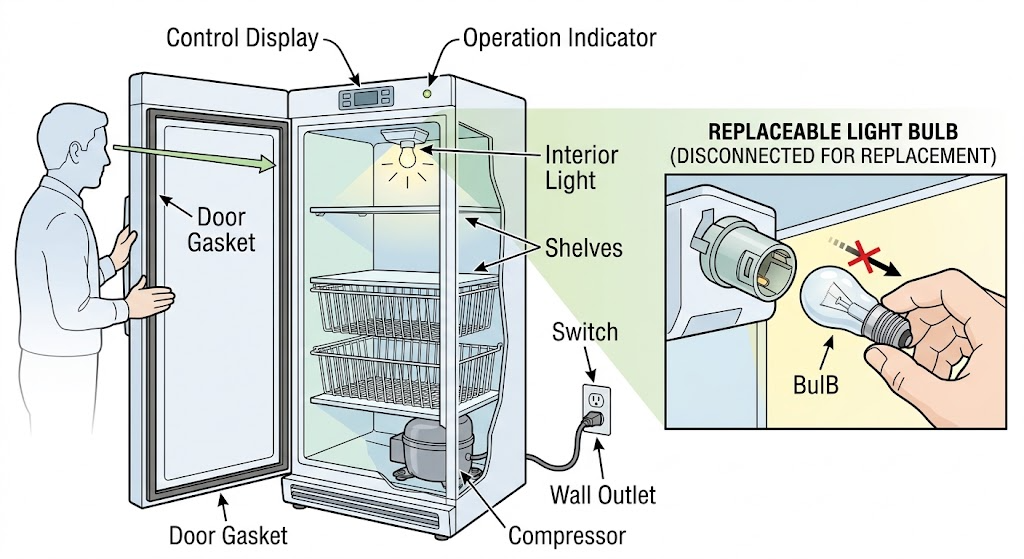
First determine whether the flicker is the freezer’s interior light, an outside safety indicator or display, or the whole appliance losing power. Check the plug, outlet, control setting, and breaker from a safe position; do not use an extension cord or repeatedly reset a tripping circuit. If the model uses a replaceable bulb, inspect it only with power disconnected and replace it only with an appliance bulb of the same wattage specified by the model. Also check for a door or lid that does not close freely, a dirty or obstructed visible door-switch area, and cooling or alarm symptoms. If the light flickers with the compressor or display, the freezer also stops, the cord or socket is damaged, or there is heat, smoke, sparking, or a burning smell, stop using it and arrange qualified electrical or appliance service. Do not open the light housing, probe live contacts, or attempt an LED module or control repair unless the model manual explicitly makes it a user procedure.
Work through in order
Diagnostic checks
Use only checks that match the exact appliance or system and its official guide.
-
Check 1
Observe the freezer without removing any cover and identify whether the flicker is inside the cabinet, on an outside safety indicator, on a display, or visible as a momentary loss of all appliance operation.
Expected result: Record whether only the interior light flickers when the door moves, the light stays on and pulses with the display, an outside indicator also flickers, or the freezer stops cooling or loses all power at the same time.
Next step: Use the appropriate bulb, door, or power check below and record the timing of the flicker; stop and arrange service for synchronized power loss or abnormal cooling.
Stop if: Stop for smoke, burning odor, sparking, a hot plug or socket, melted insulation, water near electrical parts, or a cracked light cover.
Why this matters
Why: A problem limited to the interior lamp supports a bulb, LED module, door-switch, or light-control path. A synchronized display or appliance-power flicker points toward supply or control trouble. Electrolux notes that an unlit safety signal together with an unlit bulb can indicate no electricity to the freezer.
-
Check 2
From a dry, safe position, check that the control is not set to OFF, the plug fits tightly in the wall outlet, the outlet and household supply are available, and no power event coincides with the flicker; do not use an extension cord.
Expected result: The light flicker stops when a loose plug or OFF setting is corrected, the whole freezer still pulses, the outlet or breaker is abnormal, or the supply appears stable while only the interior light flickers.
Next step: Use the correct fixed outlet and the model’s controls; for a single protective trip, follow safe household procedure once, but stop repeated resets and arrange service when it trips again or the cause is unclear.
Stop if: Do not probe the outlet, change protective-device ratings, bypass a switch, use a multi-plug or extension cord, or pull the cord by its cable.
Why this matters
Why: A response to a corrected control or plug points to an external supply or setting issue. A dead outlet, repeated protective trip, or synchronized appliance flicker requires electrical or appliance assessment. Stable supply with an isolated interior flicker moves attention to the light path.
-
Check 3
If the Use & Care manual identifies a user-replaceable bulb, disconnect power, allow the freezer to be safe to handle, and inspect the visible bulb for a darkened filament, damage, looseness, or a lamp type that does not match the manual; do not force the cover.
Expected result: The bulb is burned out or damaged, the bulb is sound but the light still flickers, the freezer uses an LED module, or access requires removing a sealed cover or electrical part.
Next step: Replace only a clearly failed user-replaceable bulb with the exact manual-specified type, restore the cover, reconnect power, and observe once. Arrange service if flicker remains or the model has an integrated light.
Stop if: Do not touch contacts while powered, substitute a household bulb, exceed the specified wattage, bend contacts, bypass the cover, or remove an LED module.
Why this matters
Why: Electrolux’s light guidance supports replacing a burned-out bulb with an appliance bulb of the same wattage. A sound bulb that flickers, an LED module, or inaccessible contacts points to a switch, socket, module, or control diagnosis rather than a trial bulb swap.
-
Check 4
Open and close the freezer door or lid normally while watching the light from a safe angle; inspect the visible switch area, gasket, and contact surface for ice, food, moisture, or an obstruction without removing trim.
Expected result: The flicker happens only at one door position, the light responds normally when the door is fully closed or opened, the gasket prevents a free seal, or the visible switch area is blocked or wet.
Next step: Remove only a plainly visible obstruction, dry external moisture, close the door fully, and observe whether the freezer remains cold. Arrange model-specific service for a loose switch, damaged gasket, misalignment, or persistent flicker.
Stop if: Do not pry the door, remove the switch, defeat the door sensor, cut the gasket, or reach behind trim or the liner.
Why this matters
Why: A position-dependent flicker supports a door-switch, alignment, gasket, or control interaction. A poor seal can also raise freezer temperature and trigger an alarm. A light that flickers while the door remains still and sealed is less likely to be caused by simple door alignment.
-
Check 5
With the freezer closed after the light observation, check whether it is holding its normal temperature and whether an alarm, unusual compressor behavior, or outside indicator changes with the flicker; avoid repeated door openings.
Expected result: The freezer stays cold with an isolated light flicker, temperature rises or an alarm sounds, the outside safety indicator also changes, or the compressor starts and stops with the light.
Next step: Keep the door closed and document the temperature, alarm, and flicker pattern; arrange service for a warm freezer, synchronized cycling, or an indicator that changes with the lamp.
Stop if: Do not keep opening the freezer to watch the lamp, change controls repeatedly, or continue operation when electrical or burning symptoms appear.
Why this matters
Why: An isolated lamp symptom can be a light-path issue. Temperature rise, an alarm, or synchronized indicator and compressor changes make a broader power, control, or cooling issue more plausible. Electrolux advises leaving a closed freezer closed so its temperature can decrease after an alarm condition.
-
Check 6
After one model-approved correction, observe one normal door cycle and one normal cooling period, then record whether the flicker disappears, remains isolated, or returns with power or temperature changes.
Expected result: The light is stable, the correct replacement bulb works, only the light still flickers, all indicators pulse, cooling is impaired, or the flicker returns after a short time.
Next step: Stop owner troubleshooting and arrange qualified appliance or electrical service; provide the model and serial information, light type, timing, power observations, temperature or alarm behavior, and each safe check performed.
Stop if: Do not run repeated tests on a flickering appliance with heat, smoke, sparking, damaged wiring, or a repeated protective trip.
Why this matters
Why: A stable light after a correct bulb or visible obstruction correction supports that limited cause. Persistent or recurring flicker, especially with display, power, or cooling symptoms, requires diagnosis of the switch, module, control, wiring, or supply.
Use your observations
Decision map
Find the observation that best matches what you see, then follow the next safe action.
-
PATH 01Safety boundary
What you see
Only the interior light flickers, the freezer remains cold, and the display or outside indicators remain stable.
Do this next
Use the model’s manual to determine whether the bulb is user-replaceable; replace only a clearly failed appliance bulb of the specified type, otherwise arrange service.
Why this path and its safety boundary
Why it matters: A bulb, socket, door switch, LED module, or light-control path is more plausible than a whole-appliance power failure.
Safety stop: Do not touch live contacts, force a light cover, or remove an LED module.
-
PATH 02Safety boundary
What you see
The interior light flickers with the display, outside indicator, compressor, or a momentary loss of cooling.
Do this next
Stop repeated reset attempts, use no extension cord, and arrange qualified electrical or appliance service after recording the timing.
Why this path and its safety boundary
Why it matters: The symptom is not safely isolated to the lamp and may involve the outlet, cord, control, or appliance supply.
Safety stop: Stop immediately for smoke, burning odor, sparking, a hot plug or socket, melted insulation, or water near electrical parts.
-
PATH 03Safety boundary
What you see
The light flickers only while the door or lid moves or at one partially closed position.
Do this next
Clear only visible obstruction, ensure the door closes freely with a proper seal, and arrange model-specific service if the position-dependent flicker remains.
Why this path and its safety boundary
Why it matters: A door switch, alignment, gasket, or visible obstruction may be changing the light signal.
Safety stop: Do not defeat the switch, pry the door, remove trim, or reshape the gasket.
-
PATH 04Safety boundary
What you see
The light is off or flickering while the control is OFF, the plug is loose, the outlet is dead, the outside safety indicator is also off, or a power outage occurred.
Do this next
Restore only a plainly loose plug or OFF setting from a safe position and follow the model’s normal start procedure; arrange service when power is absent or unstable.
Why this path and its safety boundary
Why it matters: Loss of electricity or the control state can explain the light symptom; it is not evidence that the lamp alone failed.
Safety stop: Do not use an extension cord, probe the outlet, change a protective-device rating, or repeatedly reset a tripping circuit.
-
PATH 05Safety boundary
What you see
The freezer light flickers together with a high-temperature alarm, a warm cabinet, or a door that does not close and seal freely.
Do this next
Close the freezer, check only visible seal or obstruction issues, keep the door closed, and arrange service if temperature or alarm symptoms persist.
Why this path and its safety boundary
Why it matters: The light symptom may accompany a door, power, or cooling condition rather than being the root problem.
Safety stop: Do not repeatedly open the freezer, alter controls at random, or continue operation with electrical or burning symptoms.
-
PATH 06Safety boundary
What you see
The correct bulb is sound or replaced according to the manual, but the light continues to flicker, or the model uses an integrated LED module or inaccessible light assembly.
Do this next
Stop replacing bulbs by trial and arrange qualified appliance service with the model and serial information.
Why this path and its safety boundary
Why it matters: A switch, socket, LED module, control, or wiring fault is possible and needs model-specific diagnosis.
Safety stop: Do not remove the light housing, puncture the liner, bypass the switch, or work on internal wiring.
Helpful context
Understand the symptom
A flickering light is not automatically a failed bulb
A light that flickers only when the door moves is a different observation from a light that pulses with the freezer’s display, safety indicator, or cooling cycle. Electrolux’s basic light guidance distinguishes a failed bulb from a freezer with no electricity, so compare the light with the rest of the appliance before touching the lamp. If food is warming or an alarm is active, treat the flicker as part of a possible power or cooling problem rather than a cosmetic lamp issue.
Use only model-approved light and control checks
Freezer designs vary: some use a replaceable appliance bulb, while others use an LED module or integrated control. Electrolux directs owners to the model’s Use & Care manual for feature and control details. Disconnect power before any user-approved bulb access, keep moisture away from electrical parts, and do not remove a sealed light cover or control panel just to find the cause of a flicker.
Treat synchronized flicker or electrical symptoms as a service boundary
If the interior light, outside indicator, display, or compressor all pulse together, the relevant observation is unstable appliance power, not just lamp wear. A loose connection, failing control, or supply issue can require electrical diagnosis. Electrolux lists no-power causes such as the control being off, a tripped protective device, an unplugged cord, or an outage and warns against extension-cord use; persistent or hazardous symptoms belong with qualified service.
Safety boundary
Stop conditions
- Stop immediately for smoke, burning odor, sparking, a hot or damaged plug or socket, melted insulation, water near electrical parts, a cracked light cover, or repeated protective trips.
- Do not repeatedly reset a breaker or protection device, use an extension cord or multi-plug, probe the outlet, or change a protective-device rating.
- Do not touch a bulb socket or light contact while powered, substitute a household bulb, exceed the model-specified rating, or bend contacts.
- Do not open the light housing, control panel, liner, or electrical compartment, bypass a door switch, or remove an integrated LED module as a trial repair.
- Stop opening the freezer to reproduce the flicker when temperature is rising, the alarm is active, or any electrical or burning symptom is present.
Only after diagnosis
Potential parts
- freezer appliance bulb or LED light module
Consider this only when the model manual identifies a replaceable bulb or a qualified diagnosis confirms that the light source itself is faulty after stable power is verified.
Confirm the exact model and the manual-specified light type and rating before ordering; integrated LED access should be handled by qualified service. - freezer door light switch or sensor
Consider this only when the flicker follows door position or switch operation and a qualified diagnosis rules out a loose door, gasket obstruction, and supply issue.
Confirm the exact model and fit information before any replacement; do not defeat or bypass the door sensor. - freezer light socket or control module
Consider this only when a sound light source flickers with stable power and qualified service identifies a socket, module, or control fault.
Use model-specific service and fit information; internal electrical work is not an owner check.
When checks do not resolve it
Need a professional?
Arrange qualified appliance or electrical service when the light flickers with the display or compressor, the freezer loses power or cooling, a sound bulb does not resolve the symptom, an LED module or light housing is inaccessible, or the door switch, control, socket, or wiring is suspected. Stop immediately for smoke, burning odor, sparking, a hot plug or socket, melted insulation, water near electrical parts, a cracked light cover, or repeated protective trips.
Common questions
FAQ
Why is my Electrolux freezer light flickering but the freezer still works?
If cooling, the display, and outside indicators remain stable, the symptom may be limited to the bulb, light module, door switch, socket, or light control. Use the model manual to determine whether a bulb is user-replaceable; persistent flicker needs service.
Could a flickering freezer light mean the freezer is losing power?
Yes. Electrolux says an unlit freezer bulb together with an unlit outside safety signal can indicate that electricity is not reaching the freezer. Check the plug, control state, outlet, and household supply safely; synchronized flicker needs service assessment.
Can I replace the bulb in an Electrolux freezer?
Only if the model manual identifies a user-replaceable bulb. Electrolux’s guidance says a burned-out bulb should be replaced with an appliance bulb of the same wattage. Disconnect power first and arrange service for an integrated LED or inaccessible light assembly.
Why does the light flicker when I open or close the freezer door?
A door-position-dependent flicker can involve the door switch, alignment, gasket, or a visible obstruction. Check that the door closes freely and seals properly without removing trim; persistent position-dependent flicker needs model-specific service.
What if the freezer light flickers with a high-temperature alarm?
Treat it as more than a lamp problem. Keep the door closed, check only visible seal or obstruction issues, and observe whether cooling and the outside indicator stabilize. A persistent alarm, warm freezer, or synchronized power symptom needs service.
When should I stop troubleshooting a flickering freezer light?
Stop for smoke, burning odor, sparking, a hot or damaged plug, repeated protective trips, water near electrical parts, cracked light cover, loss of cooling, or any need to open the light housing or electrical compartment. Arrange qualified appliance or electrical service.
Read the exact guide
Official sources
- Refrigerators - How do I use the features and functions on my Side-by-Side refrigerator display?Electrolux · Electrolux side-by-side, French-door, and top-freezer display controls
- Is it normal for my freezer to make vibrating or rattling sounds?Electrolux · Electrolux freezer installation observations relevant to door alignment and stable operation
- What does the alarm or “buzzer sound” mean?Electrolux · Electrolux freezer alarm or warm-cabinet symptoms accompanying a light complaint
- Freezers - What should I do if the light bulb in the freezer is off?Electrolux · Electrolux freezers and refrigerators with an unlit freezer light
- What should I do if my freezer isn’t running?Electrolux · Electrolux freezers with no-running or intermittent-power symptoms
Community feedback
Share a repair observation
Share a plain-text repair observation. Accepted observations are published automatically; this page may take a moment to update.