
On this page
Start here
Quick answer
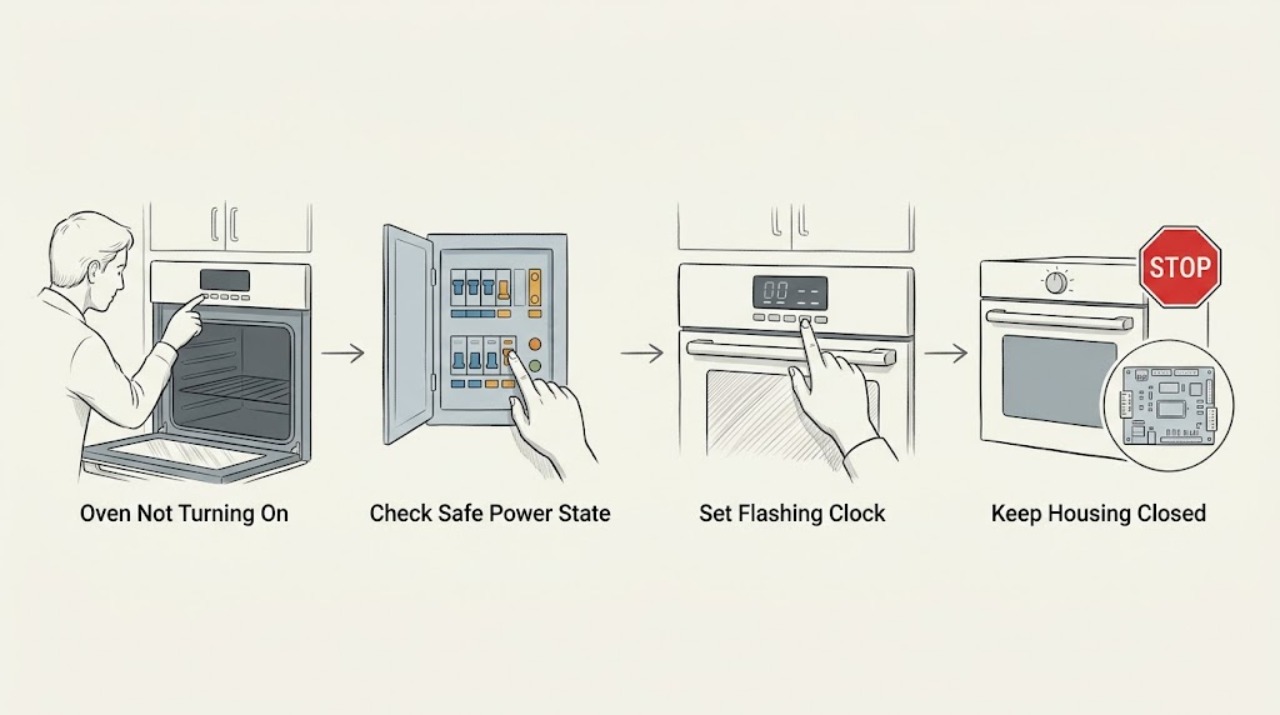
If an Electrolux oven will not turn on, first separate a blank display from a display that works but will not start a cooking function. If the display is blank, look from a safe position for a tripped fuse or RCD and note whether the problem began after installation or a power interruption; do not open the oven or repeatedly reset a breaker. Electrolux says a flashing clock after installation or a power cut may need the time set, and its support guidance also lists an active duration or end setting, demo mode, child lock, or missing temperature and function settings as model-dependent causes. Select a function and temperature exactly as the manual shows. If the circuit trips again, there is a burning smell, gas odor, smoke, heat damage, exposed wiring, or the oven remains dead, isolate it only when safe and arrange a trained technician or qualified electrician.
Before you begin
Safety first
- This article supports display, setting, and safe external supply observation only. Do not open the oven, test live circuits, replace internal fuses, bypass locks, pull out a built-in unit, or alter gas or electrical connections.
Work through in order
Diagnostic checks
Use only checks that match the exact appliance or system and its official guide.
-
Check 1
From a safe position, check whether the display is completely blank, shows a clock or lock symbol, flashes a time, shows Demo or another message, or responds to controls. If the display works, verify that a cooking function and temperature are selected as the exact manual describes.
Expected result: A blank display is different from a flashing clock after a power cut, a lock or demo indication, or a display that works while only one heating function fails.
Next step: Record the exact display text or symbol and the model number. Use the Electrolux manual before attempting any setting change; do not open the appliance.
Stop if: Stop for smoke, burning smell, gas odor, a shock, exposed wiring, heat damage, or a display that repeatedly resets with a power fault.
Why this matters
Why: The display state selects the next safe branch: supply and installation checks for a blank display, model-specific settings for a lit display, or service when a fault message persists.
-
Check 2
If the display is blank, look at the household consumer unit from a dry safe position for a tripped fuse or RCD and note whether other appliances on the circuit also lost power. Do not remove covers, touch wiring, or repeatedly reset a device that trips again.
Expected result: A tripped protective device, a whole-circuit outage, or a problem that began after installation points to a supply, installation, or appliance fault; a normal consumer unit with a blank oven display leaves the cause unresolved.
Next step: If the protective device is tripped, keep the oven off and arrange a qualified electrician or technician, especially if it trips again. If there is no safe visible supply issue, use the model manual or service route rather than accessing the oven wiring.
Stop if: Stop immediately for repeated trips, sparks, smoke, heat damage, wet electrics, a damaged cable, or any need to access the consumer unit beyond ordinary safe observation.
Why this matters
Why: Electrolux says a blank display can be associated with a tripped fuse or RCD, while repeated trips can signal an electrical or component fault that needs trained attention.
-
Check 3
If the oven has power but the clock flashes 00:00, 12:00, or another unset-time indication, use the exact Electrolux manual's Clock Functions procedure to set the time. Do not assume one button sequence fits every control panel.
Expected result: Electrolux says a flashing clock can follow installation or a power cut, and its setting method varies by control-panel type. The display should stop flashing or show the newly set time when the model procedure is complete.
Next step: After the manual-approved clock correction, select the desired function and temperature once. If the oven still does not start, continue with lock, demo, duration, and fault-message checks; do not disassemble the controls.
Stop if: Stop if setting the clock causes a trip, an error, overheating, smoke, or any electrical symptom.
Why this matters
Why: An unset clock can prevent some models from starting a cooking function, while a clock that is set but leaves the oven inactive indicates another settings or fault branch.
-
Check 4
With the oven off and the display operating normally, check the manual for an active child lock, control lock, demo mode, duration or end-time setting, or a function that requires a manual temperature. Change only the setting the manual identifies for that model.
Expected result: A lock symbol or Demo indication can block cooking controls; an active timed setting can make the oven appear idle; a function without a required temperature can fail to begin heating even though the display is lit.
Next step: Clear the applicable setting once according to the exact manual, then select a function and temperature. If the controls remain unresponsive or the setting returns, record the indication and arrange service.
Stop if: Do not force a knob, pry a touch panel, bypass a lock, or use self-cleaning to test an oven that has an unresolved electrical or heat fault.
Why this matters
Why: A control-state issue can mimic a dead oven, but a normal display with correct settings and no response points to service rather than an internal part guess.
-
Check 5
If the oven is new, was recently installed, or stopped after another kitchen appliance was added, record the installation date and whether the supply problem affects other appliances. Do not pull out a built-in oven or alter its connection.
Expected result: A fault present from first use or after a new appliance was added may indicate installation, circuit capacity, or connection issues rather than a user setting. An established oven that alone lost power needs appliance diagnosis.
Next step: Contact the installer or a qualified electrician for an installation or circuit concern; use Electrolux service for an established appliance fault. Keep the oven off until the supply is assessed.
Stop if: Stop for heat damage, a loose or hot connection, repeated breaker operation, exposed conductors, or any need to move a hardwired oven.
Why this matters
Why: Electrolux identifies recent installation or a newly added appliance as a possible installation or circuit issue and directs power-supply concerns to trained help.
-
Check 6
Only after the display, clock, and settings are correct, the appliance is dry and intact, and no protective device has tripped, select one ordinary cooking function and temperature according to the manual. Observe from outside for a brief start attempt; do not touch wiring or repeatedly cycle the controls.
Expected result: Record whether the display stays on, the oven begins its normal sequence, only one heating mode fails, an error appears, the circuit trips, or there is smoke, odor, or abnormal heat.
Next step: Stop the test at the first fault symptom. Keep the oven off and arrange qualified service if it does not start with correct settings or if any electrical, gas, or heat symptom occurs.
Stop if: Do not test if the oven has a gas odor, smoke, burning smell, water intrusion, visible damage, a repeated trip, or suspected live electrical fault.
Why this matters
Why: A single failed function may need a model-specific heating diagnosis, while a blank display, repeated trip, or abnormal odor indicates a supply or electrical safety branch.
-
Check 7
Record the exact Electrolux model, display state, clock indication, selected function and temperature, protective-device behavior, installation history, and any error, odor, heat, or visible damage. Use Electrolux's support and manual pages to identify the correct service route.
Expected result: A clear record may distinguish a blank display, unset clock, lock or demo state, installation issue, single-function failure, or a persistent electrical fault.
Next step: Keep the oven isolated when safe and arrange qualified repair for a dead display, repeated trip, persistent no-start, error, damaged wiring, gas odor, or any symptom beyond the manual-approved setting checks.
Stop if: Stop all user troubleshooting if the appliance cannot be safely isolated or the hazard is worsening.
Why this matters
Why: The record helps a technician avoid repeating unsafe tests, but it cannot prove that a fuse, element, thermostat, relay, control board, or wiring component needs replacement.
Use your observations
Decision map
Find the observation that best matches what you see, then follow the next safe action.
-
PATH 01Safety boundary
What you see
The display is blank or a fuse, RCD, or circuit breaker has tripped.
Do this next
Keep the oven off, do not access wiring, and arrange a qualified electrician or trained appliance technician, especially if the protective device trips again.
Why this path and its safety boundary
Why it matters: A power-source, installation, cable, or appliance fault is possible; repeated trips are a safety signal rather than a reset challenge.
Safety stop: Stop for sparks, smoke, heat damage, wet electrics, exposed wiring, or a damaged supply cable.
-
PATH 02Safety boundary
What you see
The display works but the clock flashes, a lock or Demo indication appears, or a duration or end setting is active.
Do this next
Use the exact Electrolux manual to set the clock or clear the indicated state, then make one normal start attempt.
Why this path and its safety boundary
Why it matters: A model-specific control state may prevent a cooking function from starting without proving an internal failure.
Safety stop: Stop if the control state returns, the oven trips power, or any heat, odor, or electrical warning appears.
-
PATH 03Safety boundary
What you see
The oven never worked after installation, stopped after another appliance was added, or the problem began with a supply change.
Do this next
Contact the installer or qualified electrician and keep the oven off; do not pull out a built-in oven or alter its connection.
Why this path and its safety boundary
Why it matters: Installation, circuit, or connection conditions are plausible and require a qualified assessment.
Safety stop: Stop for a hot connection, burning smell, damage, repeated trip, or exposed conductor.
-
PATH 04Safety boundary
What you see
The display and controls work, but only one heating or cooking function does not start.
Do this next
Confirm the function and temperature in the exact manual once, then arrange qualified service if the mode still fails.
Why this path and its safety boundary
Why it matters: A function setting or a component associated with that mode may be involved; the symptom does not identify a replaceable part.
Safety stop: Stop for smoke, overheating, abnormal odor, a trip, or visible damage.
-
PATH 05Safety boundary
What you see
Power and settings appear normal, but the oven remains unresponsive or does not start after one safe manual-approved attempt.
Do this next
Keep the oven out of service and arrange trained Electrolux or appliance repair with the model, display state, and recorded behavior.
Why this path and its safety boundary
Why it matters: An internal control, lock, relay, wiring, heating, or other appliance fault remains possible and cannot be safely separated by generic checks.
Safety stop: Do not open the oven, test live circuits, bypass a lock, or order an unverified part.
Helpful context
Understand the symptom
Start by separating no power from no heat
A dark display and a lit display that refuses to start are different faults. Electrolux's oven guidance first asks whether one heating type or several are affected. A lit display with a flashing clock, demo indication, child lock, duration or end setting, or no selected function may need a settings correction. A dark display or a circuit that trips points toward the supply or an electrical fault. Note what the display shows before changing controls, and do not infer a failed element, thermostat, control board, or fuse from the symptom alone.
Treat an oven as a mains or gas appliance
Do not remove the rear cover, measure live voltage, replace an internal fuse, bypass a door lock, or work inside a hardwired oven. If a gas oven has a gas smell, do not operate switches or create a flame; leave the area and use the local emergency or gas-safety route. If an electric oven has smoke, burning odor, heat-damaged wiring, a repeated trip, or water intrusion, leave power isolated when safe and arrange qualified service.
Safety boundary
Stop conditions
- Stop for gas odor, smoke, burning smell, shock, exposed wiring, a damaged cord, water intrusion, or heat-damaged connections.
- Stop for a repeated fuse, RCD, or circuit-breaker trip; do not repeatedly reset the protective device or work inside the oven.
- Do not remove covers, measure live voltage, replace internal fuses, bypass a door or control lock, pull out a built-in oven, or alter a gas or electrical connection.
- If the oven remains dead or will not start after safe manual-approved setting checks, keep it out of service and arrange qualified repair.
When checks do not resolve it
Need a professional?
Arrange qualified service when the display stays blank, a fuse or RCD trips, the circuit trips again, the oven remains unresponsive after the clock and settings are correct, a single function still fails, an error persists, or there is smoke, burning odor, gas odor, heat damage, water intrusion, or visible electrical damage. Contact the installer or a qualified electrician for a new-installation or circuit concern.
Safety scope: This article supports display, setting, and safe external supply observation only. Do not open the oven, test live circuits, replace internal fuses, bypass locks, pull out a built-in unit, or alter gas or electrical connections.
Common questions
FAQ
Why is my Electrolux oven display blank?
A blank display can coincide with a tripped fuse or RCD, an installation or supply issue, or an appliance fault. Look only from a safe position, do not open the oven or repeatedly reset a breaker, and arrange qualified electrical or appliance service if the problem persists.
What if the Electrolux oven clock is flashing?
Electrolux says a flashing clock can follow installation or a power cut. Use the exact model manual to set the time because control-panel procedures vary, then select a function and temperature once. Call service if the oven still will not start or a power fault returns.
Can Demo mode or a lock stop an Electrolux oven from turning on?
Yes, depending on the model. A Demo indication, child lock, or control lock can make a working display seem unresponsive. Use the exact manual to clear only the indicated setting; do not bypass a lock or continue if there is an electrical, gas, or heat warning.
Should I keep resetting the breaker when my oven will not start?
No. Electrolux treats repeated fuse or circuit-breaker trips as a possible electrical or component fault and recommends trained technical help. Keep the oven off and arrange a qualified electrician or appliance technician, particularly after a repeat trip, odor, smoke, or visible damage.
When should I call for Electrolux oven repair?
Call qualified service for a blank display, persistent no-start after correct clock and settings, a repeated trip, an error, a failed function, smoke, burning or gas odor, water intrusion, heat damage, or exposed wiring. Do not test live circuits or replace internal parts based on the symptom alone.
Read the exact guide
Official sources
- Oven clock flashes or time displaying 00:00 / 12:00 - ElectroluxElectrolux · Official Electrolux oven support article; clock-setting methods vary by control-panel type and the applicable manual controls.
- Your Electrolux SupportElectrolux · Official Electrolux support portal used to direct model-specific manual lookup, troubleshooting, and repair when safe checks do not resolve the fault.
- Oven does not heat upElectrolux · Official Electrolux support article covering built-in ovens, double ovens, cookers, and compact ovens; exact model controls and manual instructions apply.
- Oven Trips Fuses or Circuit Breaker – Causes & How to FixElectrolux · Official Electrolux support article covering built-in, combination, microwave, and freestanding ovens or cookers; electrical supply work belongs to trained technicians.
Community feedback
Share a repair observation
Share a plain-text repair observation. Accepted observations are published automatically; this page may take a moment to update.