
On this page
Start here
Quick answer
First determine whether the flicker is the interior light, a control-panel indicator, or the whole refrigerator losing power. Note whether every light flickers together, whether the refrigerator continues cooling, and whether the symptom changes when a door moves or a dispenser/compressor starts. With dry hands, check the plug, accessible cord, outlet, and household breaker only from their normal user controls; Electrolux says a refrigerator should use a dedicated, properly grounded outlet and that a power outage or surge can produce power-failure indications. Check the exact model's manual for an owner-replaceable bulb, LED module, door-light behavior, or display mode; do not guess a bulb wattage or install a part from another model. You may wipe a visibly dirty light cover or gasket with a lightly damp cloth, keeping water away from controls, bulbs, and electrical parts, but do not remove a light cover or probe a socket. Stop and disconnect the refrigerator from a dry safe position for sparking, burning odor, a hot or damaged cord/outlet, water at the light or controls, repeated trips, flickering with compressor or cooling loss, or any internal-access requirement. A persistent flicker after safe external checks needs Electrolux or qualified appliance service.
Before you begin
Safety first
- This article covers model identification, visible power and household-protection checks, external door/gasket/lens observations, careful dry cleaning around the light, model-manual feature checks, and an explicitly permitted bulb procedure. A qualified technician must handle a sealed LED module, socket, door switch, wiring, power supply, control board, and any live or internal diagnosis.
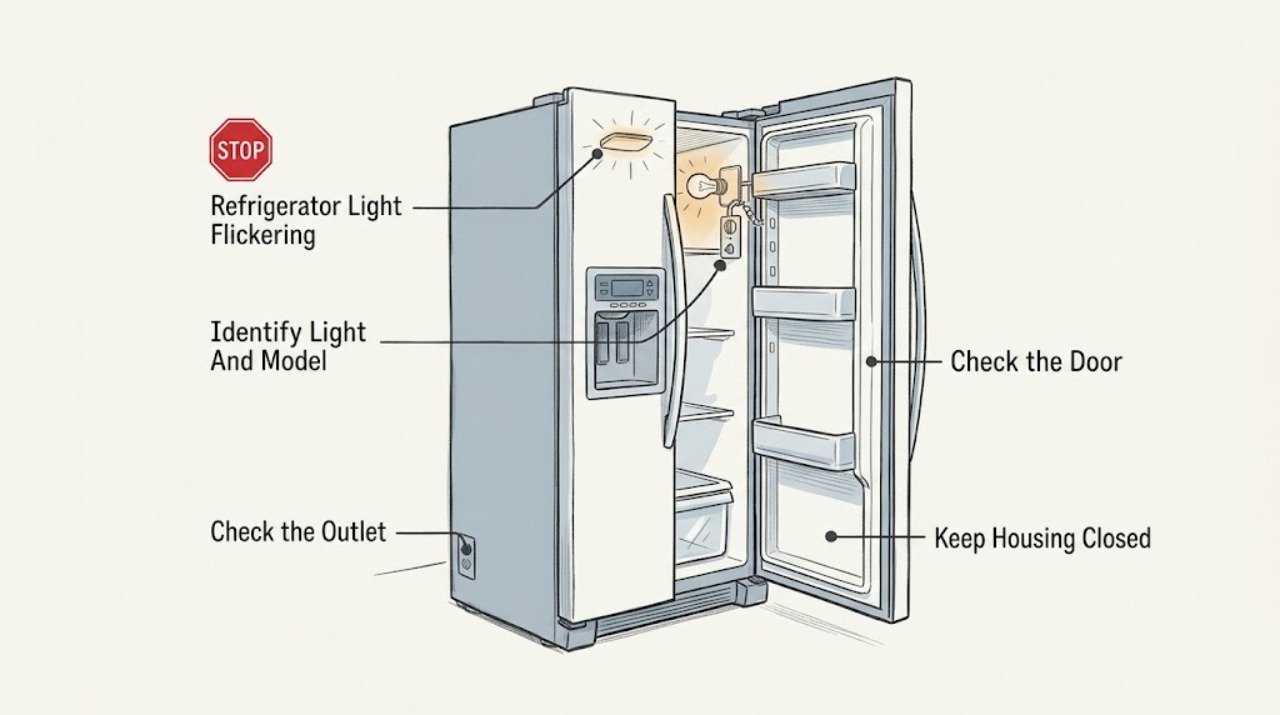
Work through in order
Diagnostic checks
Use only checks that match the exact appliance or system and its official guide.
-
Check 1
Record the exact Electrolux model and refrigerator style. With the doors closed and then opened normally, observe the interior light(s), exterior display, indicator LEDs, and cooling sounds without moving the unit. Note whether one light, several lights, or the whole display changes, and whether the flicker is continuous or tied to a door movement.
Expected result: Only one interior light flickers, all interior lights and the display flicker, only a control-panel LED changes, the light changes when the door is moved, or the refrigerator also stops cooling or resets.
Next step: Continue with the matching branch and exact model manual. If the refrigerator resets, loses cooling, or the symptom is tied to a damaged door or switch area, stop repeated door cycling and arrange service.
Stop if: Do not remove a light assembly, bend the door, hold a switch down with a tool, or create a live electrical test just to reproduce the flicker.
Why this matters
Why: A single-light symptom makes a bulb, socket, LED module, cover, or local door-switch path more likely; simultaneous lights, display reset, or cooling loss makes shared power or control trouble more likely. An indicator LED that changes with a selected feature may be normal model behavior rather than an interior-light fault.
-
Check 2
From a dry position, inspect the accessible plug, cord, and outlet face for looseness, moisture, scorching, or heat. Check whether the refrigerator display, compressor sound, and other household appliances remain powered. If the normal breaker or fuse control has tripped, follow the appliance and household safety procedure once; do not open the panel or repeatedly reset it.
Expected result: The cord or outlet is damaged/wet, the breaker trips again, the refrigerator display and cooling reset together, a power outage or surge occurred, or only the light flickers while the refrigerator otherwise remains stable.
Next step: Keep the refrigerator disconnected and arrange qualified electrical or appliance service for a damaged outlet, repeated trip, heat, or coordinated reset. Otherwise continue with the door, cover, and model-specific light checks.
Stop if: Do not use an extension cord or adaptor to mask the symptom, replace a fuse, open the outlet, measure live voltage, or repeatedly reconnect a tripping refrigerator.
Why this matters
Why: A shared power interruption or surge can affect both lighting and refrigerator controls. If only one light changes while cooling and the display remain stable, the fault is less likely to be the household supply, though it may still be an internal light circuit.
-
Check 3
Open and close the refrigerator door normally while observing the light from the side, without pressing the door switch or forcing the hinge. Inspect only the visible gasket, door edge, light lens, and surrounding liner for an obstruction, condensation, cracks, looseness, or food residue. If the exact manual permits cleaning, use a soft cloth with minimal moisture and dry the area immediately.
Expected result: The flicker occurs exactly as the door or hinge moves, the gasket is displaced, the lens is loose/cracked, moisture is visible near the light, the door does not close/seal normally, or the visible area is dry and intact.
Next step: Remove only visible residue and restore the gasket's ordinary position without tools. Keep the appliance off and arrange service for moisture, damage, loose wiring visible through a gap, unreliable door behavior, or a flicker that continues with the door still.
Stop if: Do not pry off the lens, tape or wedge the door switch, bend hinges, insert liquid into the liner, or touch a wet light/socket area.
Why this matters
Why: A door-position or local light-assembly symptom is more likely when flicker follows door movement. Moisture, a cracked lens, or a door that fails to seal can create an electrical or temperature risk and is not a reason to expose the socket.
-
Check 4
Use the exact Electrolux Use & Care manual to determine whether the refrigerator has an owner-replaceable appliance bulb, a sealed LED module, a light-level setting, or a model-specific door/display feature. If a bulb replacement is explicitly allowed, match the manual's appliance type and rating and disconnect power before the documented user procedure; if no such procedure exists, leave the light assembly closed.
Expected result: The manual identifies a replaceable bulb, identifies an LED module or service-only assembly, gives a feature or display-light setting, does not cover the symptom, or the specified replacement does not stop the flicker.
Next step: Follow only the model-matched user procedure and restore the cover securely. If the manual gives no user replacement, the module is sealed, or the flicker continues, keep the assembly closed and arrange Electrolux service.
Stop if: Do not substitute a different wattage or LED module, bypass a cover or switch, touch contacts, remove an LED board, or work on the light while energized.
Why this matters
Why: Electrolux's published light-off guidance says a failed bulb and an absence of appliance power are different checks, but bulb type and replacement procedure are model-dependent. A flicker that remains after an exact, permitted bulb replacement points to the socket, door switch, LED driver, wiring, or control rather than another guessed bulb.
-
Check 5
Observe whether the flicker coincides with the compressor starting, a water or ice dispenser being used, an alarm, a power-failure indication, a control-panel selection, or a temperature change. Verify that the interior and freezer are still cooling and that the doors close and seal. Do not use a feature repeatedly to provoke the flicker.
Expected result: The light and display reset together, a PF/power-failure indication appears, cooling or alarms change, only a selected control LED changes, or cooling and controls remain normal while the interior lamp flickers.
Next step: Record the timing and any displayed indication, then use the exact model support route. Arrange prompt service for synchronized resets, cooling loss, repeated alarm, or a returning PF indication; use the local-light branch for an isolated flicker.
Stop if: Do not change sealed-system, temperature, alarm, or service settings to test the light, and do not continue if food safety or electrical stability is affected.
Why this matters
Why: A power-failure or cooling symptom accompanying the flicker makes a shared supply or control problem more likely. A control LED that changes only with a model feature can be normal. Stable cooling and display with one flickering lamp keeps the issue localized but does not prove the bulb is user-serviceable.
-
Check 6
Record the model and serial information, refrigerator configuration, which light flickers, frequency and trigger, door/gasket observations, display and cooling status, any PF or other indication, power event, moisture, odor, heat, spark, and any model-approved bulb procedure performed. Give the record to Electrolux support or a qualified appliance technician.
Expected result: The flicker stops after a permitted bulb or feature correction, continues with one light, returns with door movement, synchronizes with display/cooling resets, or is accompanied by damage, moisture, heat, odor, smoke, sparks, or repeated trips.
Next step: Use the refrigerator only if the light is stable and no hazard or cooling issue remains. Otherwise keep the appliance in a safe state, protect food as appropriate, and arrange Electrolux or qualified service with the model and timeline.
Stop if: Do not keep opening the door to reproduce the flicker, bypass the light switch, remove internal panels, or order a part based only on appearance.
Why this matters
Why: A symptom that resolves after a model-authorized correction supports that visible condition but does not authorize internal repair. A persistent or coordinated flicker can involve the light module, door switch, control, wiring, or supply and needs diagnosis without exposing energized parts.
Use your observations
Decision map
Find the observation that best matches what you see, then follow the next safe action.
-
PATH 01Safety boundary
What you see
The interior lights and display flicker or reset together, the compressor/cooling also pauses, or the symptom follows a recent outage, surge, or breaker event.
Do this next
Check only the accessible plug, dedicated outlet, and normal breaker control once. If the refrigerator resets, loses cooling, the outlet is hot/damaged, or protection trips again, keep it disconnected and arrange qualified electrical or appliance service.
Why this path and its safety boundary
Why it matters: A shared household supply, appliance power path, or electronic-control issue is more likely than one loose bulb.
Safety stop: Do not repeatedly reset the breaker, use an adaptor or extension to retry, open the outlet, or access the refrigerator control board.
-
PATH 02Safety boundary
What you see
One interior light flickers while the display, cooling, and other lights remain stable, and the exact model permits a user-replaceable bulb.
Do this next
Follow the exact model manual's power-off bulb procedure and specified replacement only. If no user procedure exists or the new permitted bulb flickers, close the assembly and arrange service.
Why this path and its safety boundary
Why it matters: A bulb nearing failure or a local bulb/socket connection is possible, but the published Electrolux guidance does not make bulb type or replacement universal across refrigerators.
Safety stop: Do not guess the wattage, touch energized contacts, use a non-matching LED/bulb, or remove a sealed LED module.
-
PATH 03Safety boundary
What you see
The flicker occurs only as the door moves, the door does not close or seal normally, the gasket is displaced, or moisture/condensation is visible around the lamp or liner.
Do this next
Remove only visible residue and restore the gasket's ordinary position. Keep the refrigerator off and arrange service for moisture, damage, unreliable switching, or any continued flicker.
Why this path and its safety boundary
Why it matters: A door-switch, alignment, local light, gasket, or moisture issue is more likely. A wet or damaged light area is an electrical hazard and a poor seal can also affect refrigerator temperature.
Safety stop: Do not tape or wedge the switch, bend the door, pry the lens, or touch a wet socket or wiring.
-
PATH 04Safety boundary
What you see
Only a control-panel indicator changes when a feature is selected, while interior lighting, cooling, and the display otherwise behave normally.
Do this next
Use the exact Use & Care manual to identify the feature and its normal indicator behavior. Arrange service if the LED changes without an input, the display resets, or other functions become unstable.
Why this path and its safety boundary
Why it matters: This may be a model-defined feature state rather than an interior-light fault; Electrolux says refrigerator display features and LED behavior vary by model.
Safety stop: Do not enter an unknown diagnostic mode, alter service settings, or disassemble the display to stop the indicator.
-
PATH 05Safety boundary
What you see
The flicker coincides with a PF/power-failure indication, repeated alarm, temperature rise, compressor reset, or other refrigerator-wide interruption.
Do this next
Check the accessible dedicated outlet and household protection once, keep the doors closed to preserve temperature, and arrange service if the indication or reset returns or cooling is not restored.
Why this path and its safety boundary
Why it matters: Electrolux associates PF with a power outage or surge and notes that it can accompany a high-temperature alarm. This pattern needs power and appliance diagnosis, not light replacement alone.
Safety stop: Do not repeatedly cycle power, adjust sealed-system components, or continue using an unstable refrigerator as if it were only a lamp issue.
-
PATH 06Safety boundary
What you see
There are sparks, smoke, burning odor, scorching, a hot or damaged cord/outlet, water at the light or controls, repeated trips, or a damaged light lens/module.
Do this next
Stop operation and disconnect only from a dry safe position if reachable without touching the hazard. Keep clear and arrange qualified appliance or electrical inspection; protect perishable food if the refrigerator cannot run.
Why this path and its safety boundary
Why it matters: This is an immediate electrical, fire, shock, or water-electrical hazard, not a bulb-selection branch.
Safety stop: Do not restart, reset repeatedly, wipe a live wet area, touch the socket, remove the cover, or open the control housing.
-
PATH 07Safety boundary
What you see
The plug, outlet, door, gasket, visible lens, exact model setting, and permitted bulb procedure are normal, but the same light continues to flicker.
Do this next
Keep the light assembly closed and contact Electrolux or a qualified appliance technician with the model, serial, timing, and observations.
Why this path and its safety boundary
Why it matters: A light socket, LED driver/module, door switch, wiring, or control fault is more likely; an external symptom cannot identify the correct replacement part.
Safety stop: Do not probe voltage, bypass the door switch, remove an LED board, splice wiring, or install an unverified module or bulb.
Helpful context
Understand the symptom
Identify which light is flickering
An interior lamp that pulses as the door moves is a different symptom from a control-panel LED that changes with a selected feature, or every interior light and display briefly going dark. Electrolux supports French-door, side-by-side, top-freezer, and other refrigerator configurations, and says feature behavior depends on model. Record the exact model before applying a button sequence or ordering a bulb or LED module. Electrolux's model guidance places the model number on an interior wall of many refrigerator types, visible when the door is open; do not move the appliance or remove a panel to find it.
Keep the light socket and wiring out of DIY testing
Keep troubleshooting at the plug, breaker control, visible cord and outlet, door movement, light cover, gasket, and display. Do not remove an LED module or light socket, probe voltage, bypass a door switch, pull wiring, or open the control housing. Keep water and cleaning liquid away from the light, controls, and electrical parts. Stop immediately for sparks, smoke, burning odor, heat, a wet electrical area, a damaged cord or outlet, repeated trips, or simultaneous cooling loss; disconnect only from a dry safe position and arrange qualified service.
Safety boundary
Stop conditions
- Stop immediately for sparks, smoke, burning odor, scorching, a hot or damaged cord/outlet, water at the light or controls, a damaged lens/module, repeated breaker trips, or simultaneous cooling loss.
- Do not remove an LED module, light socket, control panel, door switch, or wiring cover; do not probe voltage or bypass a switch. Disconnect only from a dry safe position.
- Use only the exact Electrolux model manual for bulb type, rating, light settings, display behavior, and replacement procedure. Do not guess a part or treat a sealed LED assembly as user-serviceable.
- Do not repeatedly open the door to reproduce flicker, cycle an unstable refrigerator, or use an adaptor/extension to conceal a supply problem.
- A flicker that persists after safe external and model-authorized checks, or that affects display, cooling, alarms, or power, requires Electrolux or qualified appliance service.
Only after diagnosis
Potential parts
- refrigerator appliance bulb or LED light module
Consider a replacement only after the exact model manual identifies an owner-replaceable bulb or serviceable light module and the symptom is isolated to that light; a flicker alone does not distinguish a bulb from a socket, door switch, driver, wiring, or control fault.
Confirm the exact Electrolux model and the manufacturer's fit information before ordering. Many refrigerator light assemblies and LED modules are model-specific and may require qualified service.
When checks do not resolve it
Need a professional?
Safety scope: This article covers model identification, visible power and household-protection checks, external door/gasket/lens observations, careful dry cleaning around the light, model-manual feature checks, and an explicitly permitted bulb procedure. A qualified technician must handle a sealed LED module, socket, door switch, wiring, power supply, control board, and any live or internal diagnosis.
Common questions
FAQ
Why is only one Electrolux refrigerator light flickering?
A bulb, local socket, LED module, door switch, or light-control path is possible when the display, cooling, and other lights remain stable. Check the exact Use & Care manual for an owner-replaceable bulb or module; if no procedure exists or a permitted replacement still flickers, keep the assembly closed and arrange service.
What if the refrigerator light and display flicker together?
Check only the accessible plug, dedicated outlet, and normal breaker control after noting any recent outage or surge. If the display, compressor, cooling, or alarms reset together, the power or control path is more likely than one lamp; keep the refrigerator disconnected for a repeated trip, hot/damaged outlet, or persistent reset and arrange service.
Can I replace the flickering Electrolux refrigerator LED?
Only if the exact Electrolux manual explicitly identifies an owner-replaceable bulb or module and gives the procedure. Some models use a sealed LED assembly. Do not guess a bulb rating, remove a module, touch contacts, or bypass the door switch; a persistent flicker needs qualified service.
Is it safe to clean around a flickering refrigerator light?
If there is no water at the light and the area is safe, use only a soft cloth with minimal moisture and keep liquid away from the light, controls, and electrical parts. Electrolux says to wring excess water from a cloth before cleaning around bulbs or electrical parts. Stop for moisture, heat, sparking, or damage and disconnect only from a dry safe position.
When should I stop using an Electrolux refrigerator with a flickering light?
Stop for sparks, smoke, burning odor, scorching, a hot or damaged cord/outlet, water near the light or controls, repeated breaker trips, a damaged lens/module, or simultaneous cooling loss. Do not remove the light cover or control panel. Arrange qualified appliance or electrical service and protect perishable food if cooling is interrupted.
Read the exact guide
Official sources
- RefrigeratorsElectrolux · Official Electrolux refrigerator support index covering multiple refrigerator configurations; it routes to topic articles and does not make light assemblies or procedures universal.
- Refrigerator Clean and Care GuideElectrolux · Official Electrolux refrigerator care guidance; cleaning products and removable-part procedures remain subject to the exact Use & Care manual.
- Where can I find my model and serial number?Electrolux · Official Electrolux support guidance for appliance identification; it lists model-label locations by refrigerator type and does not prescribe electrical repair.
- Refrigerators - How do I use the features and functions on my Multi-Door refrigerator display?Electrolux · Official guidance covering multi-door, French-door, side-by-side, and top-freezer refrigerators; it explicitly directs owners to the model manual for feature descriptions.
- Refrigerator No PowerElectrolux · Official Electrolux guidance for all refrigerators; it covers external power checks and does not authorize internal light or electrical work.
- Refrigerator Error Code PF or Power Failure LightElectrolux · Official Electrolux refrigerator support article; PF behavior is an assigned model indication and should not be generalized into a light-flicker code for every refrigerator.
- Freezers - What should I do if the light bulb in the freezer is off?Electrolux · Official Electrolux article explicitly applying to refrigerators and freezers; it gives a basic light-off distinction, not a universal flicker or bulb-replacement procedure.
- Refrigerators - Not CoolingElectrolux · Official Electrolux guidance for all refrigerators; cooling and temperature specifications remain model and installation dependent.
- Book an Electrolux Appliance Repair | ElectroluxElectrolux · Official Electrolux repair page; regional availability and warranty conditions may vary.
Community feedback
Share a repair observation
Share a plain-text repair observation. Accepted observations are published automatically; this page may take a moment to update.