
On this page
Start here
Quick answer
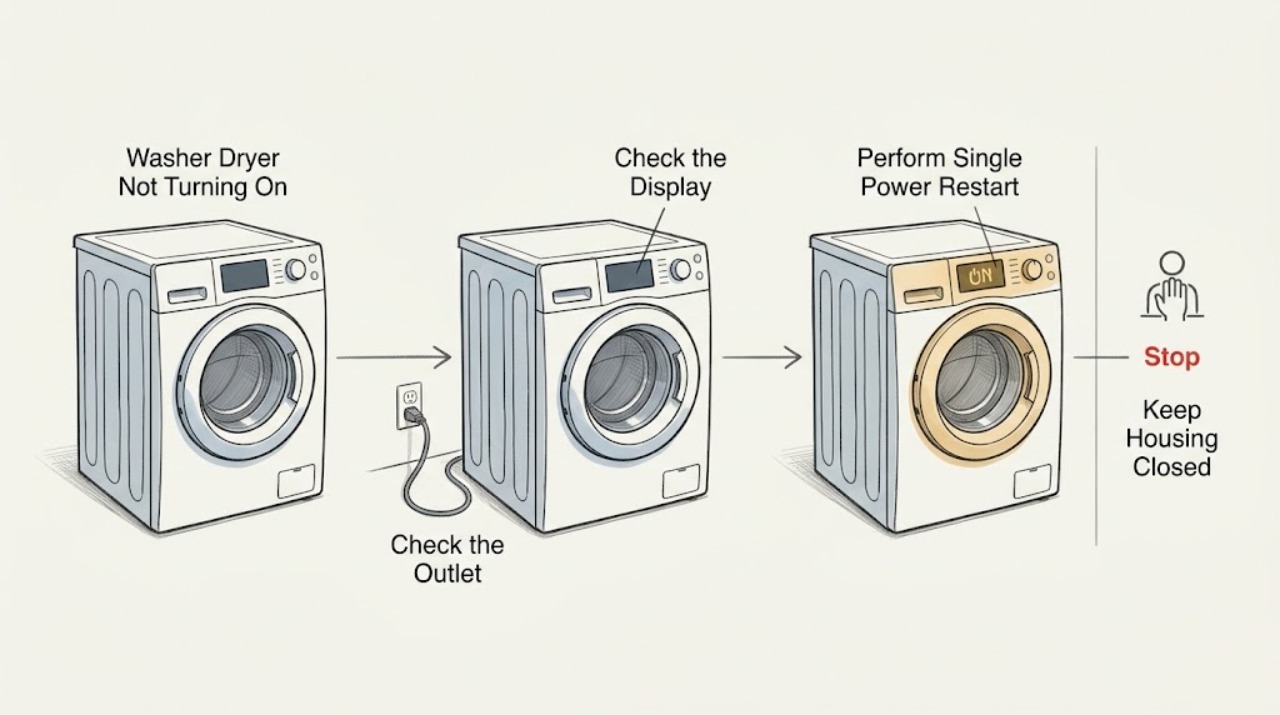
If an Electrolux washer dryer is completely blank or does not respond, first check the plug, outlet, and household breaker or safety switch from a dry, safe position. Note whether the display or indicator lights work. If the outlet is working, switch the appliance off and disconnect it from power for a few minutes, then reconnect it once and try the normal power and Start controls. If the display works but the cycle will not begin, make sure the door is fully closed, the selected program is valid, Delay Start or Child Lock is not active, and any displayed code is recorded for the exact model manual. If it remains dead, fails again after a drying cycle, trips power, smells hot or burnt, has a damaged cord, or would require opening the cabinet, stop and arrange qualified appliance service; Electrolux specifically treats a washer dryer that will not switch on after drying as a technical problem.
Before you begin
Safety first
- This article covers safe visual checks, normal control operation, one power restart, and model-documented settings only. Household wiring, live electrical testing, door-lock bypass, cabinet removal, and internal component repair require qualified service.
Work through in order
Diagnostic checks
Use only checks that match the exact appliance or system and its official guide.
-
Check 1
From a dry, stable position, note whether the display, control lights, or any indicator responds, and record whether the failure happened at power-up, after a wash, or immediately after a drying cycle; do not keep pressing controls if the appliance is hot or wet.
Expected result: The appliance is completely blank, some lights respond, the display is on but no cycle begins, or the no-power condition followed drying.
Next step: Continue to the outlet and breaker check only if there is no heat, odor, water, or cord damage; otherwise disconnect only if safe and arrange service.
Stop if: Stop for smoke, burning odor, sparks, a hot or damaged cord, water near electrical parts, or an appliance that became unresponsive after an abnormal sound.
Why this matters
Why: A blank unit focuses the first check on the power path. A lit display shifts attention to door, settings, lock, or a displayed code. Electrolux treats failure to switch on after drying as a technical problem, not as a normal pause.
-
Check 2
With the washer dryer controls OFF, inspect that the plug is seated and the outlet appears intact, check whether a household breaker or safety switch has tripped, and confirm the display or indicator behavior; do not use an extension lead, open the outlet, or repeatedly reset a protective device.
Expected result: The outlet is dead, the breaker or safety switch is tripped, the outlet works but the appliance stays blank, or power and indicators appear normal.
Next step: If there is no hazard, restore a tripped household switch once according to its normal operation. If it trips again, the outlet is damaged, or the appliance remains blank on a known-good supply, stop and arrange qualified electrical or appliance service.
Stop if: Do not increase fuse capacity, bypass protection, use an extension lead, handle exposed conductors, or test a wet or damaged outlet.
Why this matters
Why: A dead outlet or tripped protection points toward the household supply or an overload, not a confirmed washer-dryer component fault. A working outlet with a blank appliance makes the appliance power path or internal electronics more likely, but it is not a user diagnosis.
-
Check 3
If the supply is safe and the outlet is working, switch the appliance off, disconnect it from power for a few minutes, reconnect it once, and try the normal power control; do not cycle power repeatedly or reconnect a visibly damaged appliance.
Expected result: The display returns and stays responsive, the display returns but a code appears, the washer dryer remains blank, or the breaker trips again.
Next step: If it responds, continue to the door, controls, and code check. If it remains dead or trips again, leave it disconnected and arrange qualified service.
Stop if: Stop for heat, odor, visible damage, water, a repeated trip, or any need to remove a cover or probe live voltage.
Why this matters
Why: A successful restart may have cleared a temporary state, but it does not establish that the fault is gone. A code, persistent blank display, or repeat trip supports service assessment of the exact model and electrical condition.
-
Check 4
If the display is on, close the door fully without slamming it, confirm a program is selected, press the model-directed Start control, and look for a Delay Start indicator, padlock symbol, or other status message; do not defeat or bypass the door lock.
Expected result: The door closes and latches, a garment or debris prevents closure, Delay Start or Child Lock is shown, Start is not accepted, or an error code is displayed.
Next step: Remove only an obvious obstruction from the door seal, use the exact manual's control sequence for a setting or lock, and retry once. If the lock, code, or no-start condition persists, arrange service.
Stop if: Do not force the door, run the machine with a damaged latch or seal, bridge the lock, or dismantle the control panel.
Why this matters
Why: A door or control state can prevent a powered appliance from beginning a cycle without meaning that the main power has failed. A persistent lock fault or error code requires the exact manual or service diagnosis; the symbol alone does not identify a failed part.
-
Check 5
Record the full displayed code or flashing pattern, model identity, point in the cycle where the failure occurred, and all checks already completed; if the failure followed drying, leave the washer dryer unused and arrange authorized service rather than repeating drying cycles.
Expected result: The code clears and the cycle starts normally, the same code or no-start condition returns, the unit remains blank, or the failure occurs again after drying.
Next step: Provide the model, display behavior, code, timing, supply result, door and setting observations, and any odor, heat, water, or trip history to qualified appliance service.
Stop if: Stop all user troubleshooting for a recurring fault, post-drying no-power condition, burning odor, sparking, damaged cord, water intrusion, or any instruction to open the cabinet.
Why this matters
Why: A code that returns or a no-start condition that persists indicates an unresolved issue. Electrolux specifically directs an authorized service visit when a washer dryer will not switch on after a drying cycle, so repeated restarts are not a substitute for diagnosis.
Use your observations
Decision map
Find the observation that best matches what you see, then follow the next safe action.
-
PATH 01Safety boundary
What you see
The test indicates the outlet is dead or a breaker or safety switch has tripped.
Do this next
Restore the protective switch only once if it is safe and operates normally. If it trips again or the outlet is damaged, use a qualified electrician; do not keep reconnecting the washer dryer.
Why this path and its safety boundary
Why it matters: The household electrical supply or an overload is a plausible source, but the appliance may also have contributed to the trip.
Safety stop: Do not bypass protection, increase fuse capacity, open the outlet, or use an extension lead.
-
PATH 02Safety boundary
What you see
The outlet works and household protection is normal, but the washer dryer remains blank after one controlled restart.
Do this next
Leave the appliance disconnected and arrange qualified appliance service with the model and restart result.
Why this path and its safety boundary
Why it matters: The appliance power path or internal electronics may have a fault; external checks cannot identify which component.
Safety stop: Do not remove covers, test live voltage, bridge switches, or replace an internal part based on symptoms.
-
PATH 03Safety boundary
What you see
The display works but the cycle will not begin and a door, Delay Start, Child Lock, or program state is visible.
Do this next
Correct only the obvious door obstruction or model-documented setting, then attempt Start once; arrange service if the lock, control, or no-start symptom persists.
Why this path and its safety boundary
Why it matters: The appliance has power and is refusing the start request because of an operating condition rather than a proven total power failure.
Safety stop: Do not bypass the lock, force the door, or dismantle the controls.
-
PATH 04Safety boundary
What you see
A code returns, the display remains unresponsive, or the washer dryer stops responding again after a restart.
Do this next
Record the code and timing, keep the appliance unused if safety symptoms are present, and arrange qualified service.
Why this path and its safety boundary
Why it matters: The condition is unresolved and needs the exact model's code interpretation or professional diagnosis.
Safety stop: Do not keep clearing codes or repeating power cycles to continue operation.
-
PATH 05Safety boundary
What you see
The washer dryer does not switch on after a drying cycle.
Do this next
Leave the appliance unused, record the drying program and timing, and arrange an authorized service visit.
Why this path and its safety boundary
Why it matters: Electrolux identifies this specific pattern as a technical problem requiring an authorized service assessment.
Safety stop: Do not repeat drying cycles, open the cabinet, or attempt to reset an internal thermal or electronic component.
Helpful context
Understand the symptom
Separate no power from a cycle that will not start
A blank display and no indicator response point first to the power path, while a lit display with no movement can be a door, setting, lock, or error-code condition. Electrolux lists both kinds of symptoms for its washer and washer-dryer support. Record what remains visible before changing settings so a technician can distinguish a supply interruption from an appliance control problem.
Use one controlled restart
Check the outlet and protective switch from a dry position, then disconnect the appliance for a few minutes and reconnect it once. A restart can clear a temporary control state, but it does not prove that the appliance is safe or that an internal fault is fixed. Repeated trips, heat, odor, or a dead display after the restart are stop conditions.
Door, controls, and codes can block a powered start
If the display is on, check that the door is completely shut, a program has been selected, Start has been pressed as the model requires, and Delay Start or Child Lock is not holding the cycle. Use the exact manual for button combinations. Do not defeat the door lock, bridge a switch, or open the cabinet to test a control board.
Safety boundary
Stop conditions
- Stop and disconnect power only if safe for smoke, burning odor, sparks, a hot or damaged cord, water near electrical parts, or repeated breaker trips.
- Do not use an extension lead, bypass a breaker or safety switch, increase fuse capacity, or handle exposed conductors.
- Do not force or bypass the door lock, bridge a switch, open the cabinet, remove internal components, or test live voltage.
- Do not keep repeating power resets, clearing codes, or wash or drying cycles after the no-start condition returns.
- Treat a washer dryer that remains off after a drying cycle as a technical-service condition, not a normal pause.
When checks do not resolve it
Need a professional?
Arrange qualified appliance service when the outlet works but the Electrolux washer dryer remains blank after one controlled restart, when a breaker trips again, when the door lock or controls do not respond, when a code returns, or whenever the appliance will not switch on after a drying cycle. Use a qualified electrician for a damaged outlet or household supply problem. Stop immediately for smoke, burning odor, sparks, water near electrical parts, or a hot or damaged cord.
Safety scope: This article covers safe visual checks, normal control operation, one power restart, and model-documented settings only. Household wiring, live electrical testing, door-lock bypass, cabinet removal, and internal component repair require qualified service.
Common questions
FAQ
What should I check first if my Electrolux washer dryer is completely dead?
Check the plug, outlet, breaker or safety switch, and display or indicator behavior from a dry, safe position. If the supply works, disconnect the appliance for a few minutes, reconnect it once, and arrange service if it remains blank.
What if the display is on but the washer dryer will not start?
Make sure the door is fully closed, a program is selected, Start has been pressed as the model requires, and Delay Start or Child Lock is not active. Record any code and use the exact model manual before arranging service.
Should I reset my Electrolux washer dryer?
A single restart is reasonable when there is no safety symptom: switch it off, disconnect power for a few minutes, reconnect it, and check the result. Repeated resets do not replace diagnosis when the display stays blank, a code returns, or power trips.
Why will my Electrolux washer dryer not turn on after drying?
Electrolux classifies a washer dryer that does not switch on after a drying cycle as a technical problem and recommends an authorized service assessment. Leave it unused if it is hot, smells burnt, trips power, or shows damage.
Can I open the cabinet to test why the washer dryer has no power?
No. Electrolux says not to dismantle internal appliance components and to disconnect before maintenance. Cabinet removal, live electrical testing, and internal control or lock work require qualified service.
Read the exact guide
Official sources
- What to check before contacting Electrolux consumer serviceElectrolux UK · Official Electrolux support article covering appliances including washer dryers; the exact model manual controls model-specific buttons and indicators.
- Washer - dryer does not switch on after a drying cycleElectrolux UK · Official Electrolux article explicitly applying to washer dryers that do not switch on after a drying cycle.
Community feedback
Share a repair observation
Share a plain-text repair observation. Accepted observations are published automatically; this page may take a moment to update.