
On this page
Start here
Quick answer
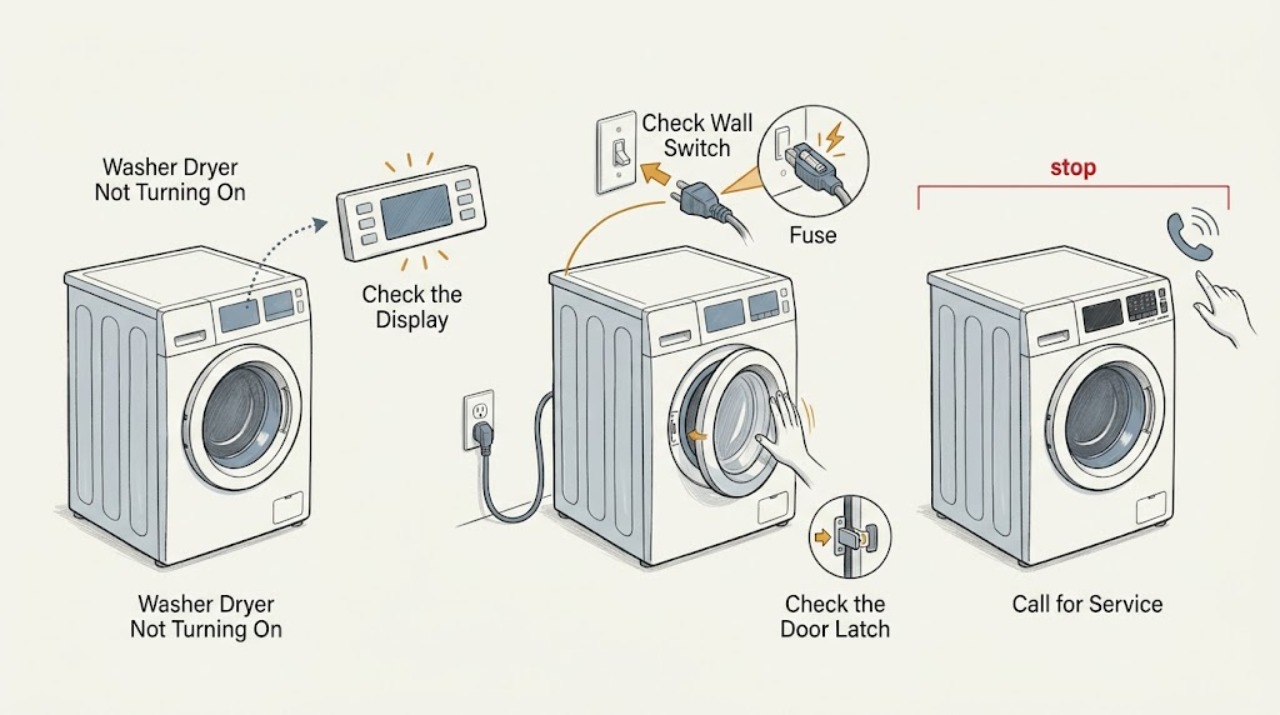
If a Hoover washer dryer will not turn on, first check whether the socket, plug, fuse, and household supply are working, then confirm the programme selector is not left in an invalid position. If the panel lights up but a cycle will not begin, close the door firmly, select a valid programme, press Start or Start/Pause, and check the water tap and inlet hose. Read and record any error code instead of guessing its meaning. Stop immediately for a burning smell, smoke, damaged cord, water near electrical parts, or a fuse that blows again; keep the machine isolated and arrange qualified Hoover service.
Work through in order
Diagnostic checks
Use only checks that match the exact appliance or system and its official guide.
-
Check 1
Look from a dry, safe position for smoke, a burning smell, a damaged plug or cord, water near the socket or controls, or a breaker that has tripped. If none is present, check whether the machine's display or indicators are completely dark.
Expected result: There is an electrical or water hazard, or the machine is dark without a visible hazard.
Next step: For any hazard, leave the washer dryer off and disconnect power only from a dry, safe position, then arrange qualified service. If the area is safe, continue with the outlet and plug checks without opening the appliance.
Why this matters
Why: A safety hazard is a stop-use condition. A dark panel with no hazard makes the socket, isolator, fuse, plug, cord, or internal power path more likely than a programme-setting problem.
-
Check 2
Test the wall socket with another small appliance, confirm the socket switch and household isolator or fuse box are on, and inspect the Hoover plug only after disconnecting it. Replace a plug fuse only if the model and local plug arrangement support that procedure; do not reuse a fuse that blows again.
Expected result: The socket has no power, the socket works but the washer dryer stays dark, or the machine powers up after the supply/fuse is corrected.
Next step: Restore the household supply only if safe and stop if a fuse blows again. If the socket works but the machine remains dark, leave it unplugged and request service; if the panel wakes, continue with the door and programme checks.
Why this matters
Why: A dead socket points to the household supply. A working socket with a dark appliance points to the plug, cord, fuse, switch, or internal power circuit. A fuse that fails repeatedly indicates an unresolved fault rather than a reason to keep trying.
-
Check 3
Turn the programme selector to the required programme, close the porthole normally until it latches, and press Start or Start/Pause once. Check that no clothing is caught in the seal, but do not force the door or bypass the door-lock indicator.
Expected result: The door-lock indication appears and the programme starts, or the panel is lit but the door does not latch / the programme remains idle.
Next step: Remove only a visible obstruction and try once more. If the door will not latch, the lock light does not behave as expected, or the machine remains idle, leave it off and arrange service.
Why this matters
Why: Hoover manuals identify a correctly selected programme, a closed door, and a pressed Start command as basic start conditions. A door that will not latch or a lit panel that ignores a valid start points toward the interlock, selector, or control system.
-
Check 4
If the panel works but the cycle will not begin, check that the water faucet is open and the visible inlet hose is not kinked or crushed. If water remains from an earlier cycle, inspect only the visible drain hose for a kink and follow the exact manual before opening a filter or draining the drum.
Expected result: The tap is closed, the inlet hose is kinked, the drain path is blocked or misrouted, water remains in the drum, or the visible water paths look normal.
Next step: Open the tap or reposition a visible kink as the manual permits, then try the programme once. If there is a leak, retained water, no fill, or a repeated stop, close the tap if safe, keep the machine off, and request service.
Why this matters
Why: Hoover identifies no water supply, a kinked fill hose, a blocked drain, and retained water as conditions that can stop a programme from starting or proceeding. Normal visible hoses shift attention to an inlet valve, pump, pressure sensor, or control fault.
-
Check 5
Read the display or flashing indicators and record every error number exactly. Use the matching Hoover manual for its meaning and reset instruction; only perform a documented restart, and never open the cabinet or alter wiring to clear a code.
Expected result: No error is shown, a model-specific code clears after its documented restart, or the same code returns.
Next step: Provide the exact code and model number to Hoover service if it returns or cannot be cleared. Leave the machine isolated for electrical, overfill, or internal-control codes rather than repeating resets.
Why this matters
Why: Hoover manuals distinguish supply, water, drain, overfill, and internal errors by model. A returning or service-directed code indicates that the no-start condition is not resolved by a simple control reset.
Use your observations
Decision map
Find the observation that best matches what you see, then follow the next safe action.
-
PATH 01Next step
What you see
There is smoke, a burning smell, cord or plug damage, water near electrical parts, or a fuse/breaker trips again.
Do this next
Stop using it and disconnect power only from a dry, safe position. Close the water tap if safe, do not open panels, and arrange qualified service.
-
PATH 02Next step
What you see
The washer dryer is dark and the wall socket also has no power.
Do this next
Check the socket switch and household supply only if safe. Use a competent electrician for a persistent supply fault; do not keep using a socket that sparks or trips.
-
PATH 03Next step
What you see
The panel is lit but the programme does not start after Start is pressed.
Do this next
Select a valid programme, close the door normally, and press Start once. A door that will not lock or a persistent no-start needs service.
-
PATH 04Next step
What you see
The machine has no water intake, a kinked hose, retained water, or an obstructed drain path.
Do this next
Correct only a visible tap or hose condition and follow the manual for retained water. If the problem repeats or a leak is present, close the tap and request service.
-
PATH 05Next step
What you see
Power, fuse, door, programme, water paths, and the documented reset are normal but the machine remains dark or will not start.
Do this next
Leave the washer dryer disconnected and arrange qualified Hoover service. Do not bypass safety devices or test live internal components.
Helpful context
Understand the symptom
“Not turning on” can mean a completely dark washer dryer, a lit panel that ignores Start, or a programme that starts only after a delay. Separate those states before changing settings. Hoover models use different selectors, displays, lock indicators, and error-code tables, so the full model number and the exact panel behavior are important.
Do not work on the machine while it is wet or connected to mains power. Do not bypass the door lock, pull a live plug through water, open the control panel, or repeatedly replace a fuse. If water is in the drum, do not force the door; use the model manual's safe drain procedure or request service.
Only after diagnosis
Potential parts
- Hoover washer-dryer door interlock
Consider this only after service confirms that the door closes but the interlock does not report a safe closed condition.
Confirm the complete Hoover model and authorized parts information before ordering any component. - Hoover washer-dryer mains filter or power component
Consider this only after qualified testing identifies a power-path fault; a dead socket or blown fuse can look identical from the front panel.
Keep mains electrical replacement with qualified service and verify exact model compatibility. - Hoover washer-dryer inlet valve, pump, or control component
Consider this only when service confirms a water-path or control fault after the tap, hoses, drain, and documented error checks.
Use the full model identification and authorized parts information; do not infer fit from a similar-looking component.
When checks do not resolve it
Need a professional?
Request qualified Hoover service when the washer dryer remains without power or will not begin a valid programme after the external supply, door, water, drain, and exact-model error checks, or whenever an internal electrical or water fault is suspected.
Have this ready
- Provide the full model number, whether the panel is dark or lit, socket and fuse behavior, selected programme, door-lock indication, any error number or flashing pattern, water-tap and hose condition, whether water remains in the drum, and what happened immediately before the failure.
Common questions
FAQ
Why is my Hoover washer dryer not turning on?
Check the socket, plug, fuse, household supply, programme selector, and door. If the panel lights but the cycle does not begin, check Start, the water tap, hoses, and any error display.
What if the Hoover washer dryer is completely dark?
Test the socket safely, check the isolator or fuse box, and inspect the plug only when disconnected. If the socket works but the machine remains dark, request service.
Why does my Hoover washer dryer have power but not start?
Confirm a valid programme, a normally latched door, and a pressed Start or Start/Pause command. Then check the water tap and visible inlet hose for a closed supply or kink.
Should I keep replacing the fuse when my Hoover washer dryer will not turn on?
No. If a replacement fuse blows again, leave the appliance disconnected and arrange qualified service. Repeated fuse failure indicates an unresolved electrical fault.
Read the exact guide
Official sources
- Hoover Washer Dryer Dynamic Next WDMT413AI2 Instruction ManualHoover · Hoover WDMT413AI2 model family; use the matching manual for another model
- Cycle won't start - Hoover Advice CentreHoover · Hoover washer dryers and related models listed by the Advice Centre
- No electrical power - Hoover Advice CentreHoover · Hoover appliances including washer dryers; local plug and fuse arrangements vary
- Is there electrical powerHoover · Hoover models listed by the Advice Centre; exact plug and fuse arrangements vary
Community feedback
Share a repair observation
Share a plain-text repair observation. Accepted observations are published automatically; this page may take a moment to update.