
On this page
Start here
Quick answer
First determine whether the GE washer dryer has no power at all or has power but will not start a cycle. Check the single power cord, the dedicated grounded outlet, the household breaker, and any control or display lights. If the display is lit but the controls do not respond, check Control Lock and the model's documented release procedure; if the display is dark, do not assume the washer and dryer have separate cords on a unitized model. Then verify the door or lid is fully closed, a valid cycle is selected, and Start is pressed as the model requires. A single model-approved reset can help, but a recurring breaker trip, damaged cord, burning smell, or persistent no-start condition needs qualified service.
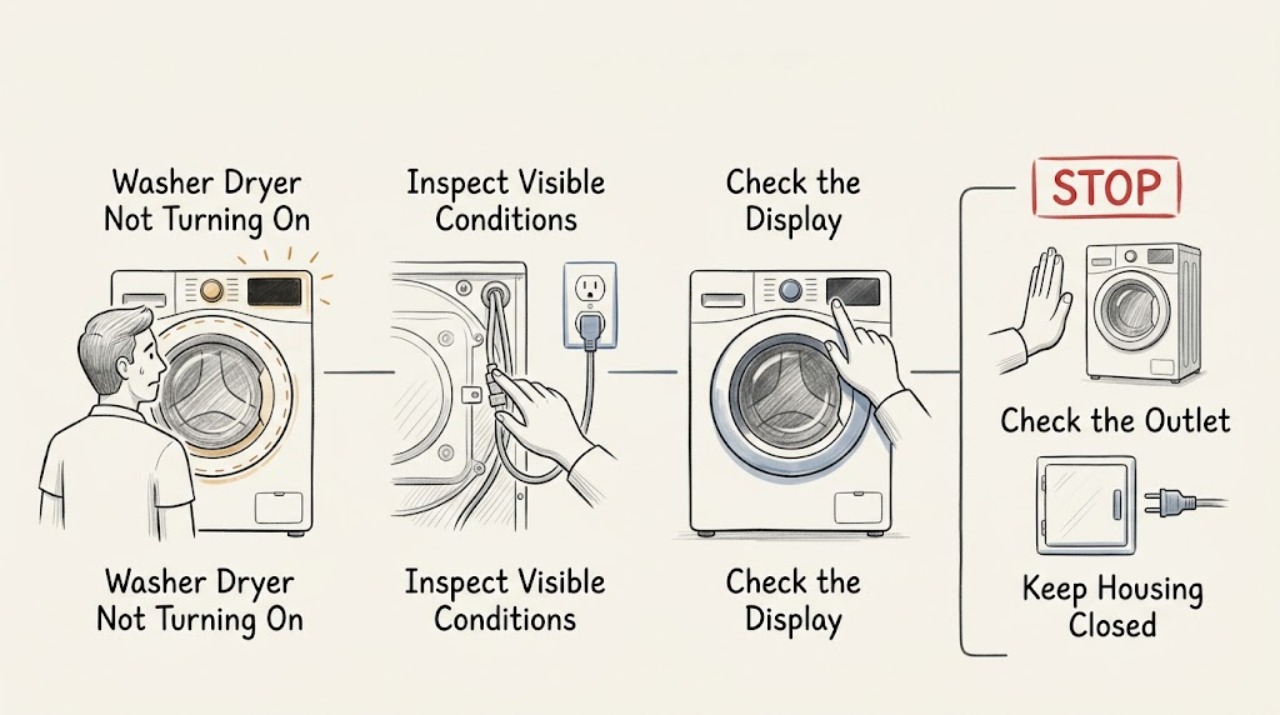
Work through in order
Diagnostic checks
Use only checks that match the exact appliance or system and its official guide.
-
Check 1
Look at the display, control-panel lights, and any interior light, then note whether the washer side, dryer side, or both fail to respond.
Expected result: All lights and sounds are absent, the display is lit but controls are unresponsive, or one section works while the other does not.
Next step: If everything is dark, continue to the cord and breaker check. If the display is lit, check Control Lock and the start conditions. If only one function fails, record which one and continue with the model manual rather than assuming a second outlet or cord is present.
Why this matters
Why: GE's combo guidance uses the presence or absence of lights and sounds to divide a power-source problem from a powered control or start problem. Unitized models use one power cord, so a partial symptom needs model-specific interpretation.
-
Check 2
Inspect the single power cord and its wall outlet without opening the appliance; verify that the plug is fully seated and that the dedicated grounded circuit or breaker has not tripped.
Expected result: The plug was loose, the breaker is tripped, the outlet has no power, or the connection looks normal but the appliance remains dark.
Next step: If a clearly tripped breaker can be restored safely and no damage is visible, restore it once and check the appliance. If it trips again, the cord or outlet is damaged, or the outlet remains dead, stop and obtain qualified electrical or appliance service; do not use an extension cord.
Why this matters
Why: GE states that a unitized washer dryer has one power cord and should use the dedicated circuit specified by its installation instructions. A dark appliance can therefore be caused by the shared supply path rather than an individual washer or dryer control.
-
Check 3
If the display is on but buttons only beep or do not change a setting, check the model's Control Lock indicator and follow the exact release procedure in the owner's manual; on the documented GE Profile UltraFast Combo, hold Extra Rinse for three seconds.
Expected result: The lock icon disappears and the controls accept a cycle selection, or the display remains locked and unresponsive.
Next step: If the controls unlock, choose a valid cycle and continue to the door or lid and Start checks. If they remain locked, stop repeating button combinations and use the model manual or arrange service.
Why this matters
Why: GE explains that Control Lock can prevent settings or a cycle from being changed while leaving the appliance powered. The button used to release it is model-specific.
-
Check 4
Confirm that the correct cycle is selected, the washer door or lid is fully closed, the dryer door is shut if the dryer function is being started, and the Start control has been pressed as the model requires.
Expected result: The door or lid was open or obstructed, the selector was between options, no valid cycle was selected, or Start was not fully engaged; alternatively, all start conditions appear correct.
Next step: Correct the accessible start condition and try one cycle. If the machine still does not respond, note whether it beeps, displays a lock message, or remains silent, then continue to the reset and escalation check.
Why this matters
Why: GE's start guidance identifies a closed dryer door, an appropriate cycle selection, a fully pressed Start button, and operational controls as prerequisites for running. Washer models can also require a closed lid or door before a cycle proceeds.
-
Check 5
If the model's instructions allow a reset, disconnect power for the documented interval and reconnect it once; for the GE Profile UltraFast Combo guidance, unplug for 30 seconds before retrying.
Expected result: The display returns normally and a selected cycle starts, or the same no-start condition returns immediately.
Next step: If the appliance starts, monitor one complete cycle. If it remains unresponsive, do not repeatedly unplug it or cycle the breaker; record the symptoms and arrange service.
Why this matters
Why: GE presents a short power reset as a final user check for the documented combo model, but a reset does not identify or repair an underlying electrical, interlock, or control fault.
-
Check 6
Before any further attempt, check for a hot or damaged cord, scorch marks, burning odor, water near electrical parts, repeated breaker operation, or unusual buzzing.
Expected result: An electrical or heat warning is present, or there are no warning signs and the appliance has failed the one safe start/reset sequence.
Next step: If any warning sign is present, stop using the appliance and disconnect power only if it is safe, then call qualified service. If no warning sign is present but the machine still will not start, arrange authorized diagnosis rather than removing panels.
Why this matters
Why: These signs require more than a user-level control check. GE directs owners to service when the published checks do not correct a no-start condition, and damaged wiring or repeated protection trips should not be tested repeatedly.
Use your observations
Decision map
Find the observation that best matches what you see, then follow the next safe action.
-
PATH 01Safety boundary
What you see
The control display, interior light, and other indicators are all dark.
Do this next
Check the single cord, dedicated grounded outlet, and breaker once. If the supply remains absent or the breaker trips again, stop and obtain qualified electrical or appliance service.
Why this path and its safety boundary
Safety stop: Power reaches at least part of the appliance; continue with Control Lock and cycle-start checks.
-
PATH 02Safety boundary
What you see
The display is lit but the buttons do not change settings, only beep, or show a Control Lock indication.
Do this next
Use the exact model manual's Control Lock release procedure. The Extra Rinse three-second procedure applies only to the GE Profile UltraFast Combo guidance cited here.
Why this path and its safety boundary
Safety stop: Continue with the door or lid, cycle selector, and Start checks.
-
PATH 03Safety boundary
What you see
The selected cycle, door or lid closure, or Start control is not in the required state.
Do this next
Correct that one condition and try one cycle, observing whether the appliance locks, fills, tumbles, or begins to run.
Why this path and its safety boundary
Safety stop: Continue to the single model-approved reset and escalation branch.
-
PATH 04Safety boundary
What you see
The appliance remains unresponsive after the external checks and one allowed reset, or there is a damaged cord, burning odor, water near electrics, unusual buzzing, or a repeated breaker trip.
Do this next
Stop using the washer dryer and contact qualified service. Do not remove the back, terminal-block, motor, or control-panel covers as an ordinary-user step.
Why this path and its safety boundary
Safety stop: If a cycle starts normally without warning signs, monitor it and keep the model manual available for future control messages.
Helpful context
Understand the symptom
Separate no power from no start
If the display and all lights are dark, start at the cord, outlet, and breaker. If the display is lit, the appliance has at least some power and the likely next checks are Control Lock, the selected cycle, the door or lid interlock, and the Start control. A washer dryer may share one cord, so do not diagnose the washer and dryer as two independently powered appliances without checking the model's installation instructions.
Use model-specific controls
GE publishes different instructions for different washer-dryer families. For example, the GE Profile UltraFast Combo page documents a Control Lock release with the Extra Rinse button, while other models can use different controls. Treat that procedure as a model-specific example and confirm the exact manual before holding buttons or changing settings.
When checks do not resolve it
Need a professional?
Use an authorized GE appliance service agent or qualified electrician for a persistent no-start condition, recurring circuit trip, damaged supply cord or outlet, failed door or lid interlock, or any repair requiring panel removal.
Common questions
FAQ
Why is my GE washer dryer completely dark?
Check the single power cord, the dedicated grounded outlet, and the household breaker. Unitized GE washer dryers use one power cord. If the outlet remains dead or the breaker trips again, stop and arrange qualified electrical or appliance service.
Why is my GE washer dryer lit but not starting?
Check Control Lock, the selected cycle, the door or lid closure, and the Start control. Control Lock release steps vary by model; do not apply a button sequence from a different GE family without checking the model manual.
Can I reset a GE washer dryer that will not turn on?
Use a reset only when the model's instructions allow it. GE documents unplugging a Profile UltraFast Combo for 30 seconds, followed by a retry. If the condition returns, stop repeating resets and arrange service.
What should I do if only the washer or dryer function fails?
Record which function fails and whether the display and other function respond. A unitized model still uses one power cord, so a partial symptom needs the exact model manual and may require service rather than a second outlet or cord.
Read the exact guide
Official sources
- Unitized Washer Dryer - Power CordGE Appliances · GE unitized Spacemaker washer-dryer models; electrical and gas configurations have different installation requirements.
- GE Profile™ UltraFast Combo Washer/Dryer - Will Not Start or RunGE Appliances · Model-specific guidance for GE Profile UltraFast Combo appliances; use the owner's manual for other GE washer-dryer families.
- Dryer - Will Not Run or StartGE Appliances · General GE dryer start guidance, including dryer functions in some washer-dryer configurations; model instructions take precedence.
Community feedback
Share a repair observation
Share a plain-text repair observation. Accepted observations are published automatically; this page may take a moment to update.