
On this page
Start here
Quick answer
Start by deciding which failure you actually have: a completely blank and unresponsive washer dryer, a powered appliance whose program will not start, a cycle that stops with a water or drain warning, or a unit that fails only after drying. From a dry, safe position, check the plug, working socket, breaker or safety switch, and any display or error message. Then make sure the door is fully closed, the selected program has been started, child lock or delay start is not blocking the controls, the water tap is open, inlet and drain hoses are not kinked, and the relevant filter or drain area is maintained according to the model manual. Electrolux says that a washer dryer that does not switch on after a drying cycle has a technical problem and should go to an Authorized Service Center. Do not open panels, bypass the door lock or thermal protection, or keep resetting a tripping circuit.
Before you begin
Safety first
- This article covers ordinary-access power, door, control, water, drain, filter, error-code, and model-approved maintenance checks. It does not authorize wet electrical work, live testing, panel removal, door-lock or thermal-safety bypass, pump or valve disassembly, or operation with a leak or damaged cord.
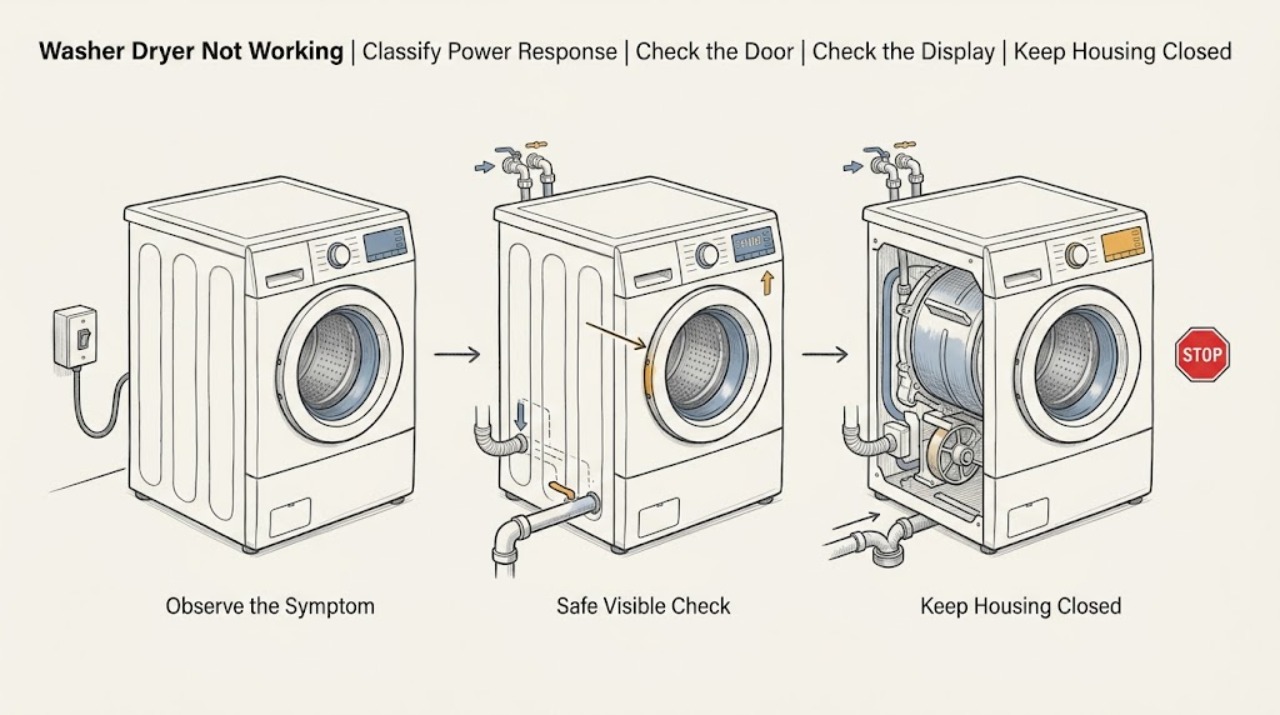
Work through in order
Diagnostic checks
Use only checks that match the exact appliance or system and its official guide.
-
Check 1
From a dry position, check whether the display or indicators light, the plug is fully seated, the socket supplies power, and the household breaker or safety switch has tripped; do not touch wet or damaged electrical parts.
Expected result: Record blank display and no response; display active but controls ignored; power lost at the socket; breaker or safety switch tripped; or a normal powered display with another symptom.
Next step: Restore only a normal plug or household supply condition and try one start command; if the appliance remains dead or protection trips again, stop and arrange qualified service or electrical help.
Stop if: Do not use an extension cable, increase fuse capacity, repeatedly reset a tripping breaker, or open the appliance to inspect wiring.
Why this matters
Why: A dead socket or tripped protection points to the household supply. A working socket with a dead appliance points toward the washer dryer. A powered display changes the path to door, program, water, drain, lock, or error-code checks.
-
Check 2
If the display works, close the loading door firmly with no laundry caught in the seal, confirm a program is selected and the start command has been pressed, and check whether a child-lock or padlock indicator is active.
Expected result: Record door fully closed and start accepted; door not seating; child lock symbol; controls unresponsive; or a normal start followed by an immediate stop.
Next step: Remove only an obvious item caught in the door, use the model manual's child-lock release, and start the correct program once; arrange service for a damaged lock, misaligned door, or recurring stop.
Stop if: Do not force the door, defeat the door lock, tape a switch, or disassemble the latch.
Why this matters
Why: Electrolux says a washer dryer will not start if the door is not securely closed and a child lock can prevent normal control use. An immediate stop with a closed door points to another branch rather than a reason to bypass the interlock.
-
Check 3
Read the full display message or code and check whether Delay Start, standby, or another program option is preventing an immediate start; record the code before clearing anything.
Expected result: Record no code; a water-inlet, drain, door, motor, heater, or water-safety code; delay active; controls locked; or an unknown symbol.
Next step: Follow only the code-specific action in the exact manual or Electrolux support page, then retry once; provide the complete code to service if it returns.
Stop if: Do not erase a recurring code without recording it, enter a diagnostic mode, or replace a part based only on the code label.
Why this matters
Why: Electrolux says codes identify different branches such as water supply, drain, door lock, motor, heating, leakage or over-foaming, and power supply. A delay can look like a dead start, while an unknown code requires the exact manual rather than a guessed fix.
-
Check 4
If the washer dryer starts but will not fill or stops on a water-supply symptom, confirm the tap is open and inspect the visible inlet hose for a kink or blockage; clean an inlet filter only as the exact manual permits.
Expected result: Record tap closed, hose kinked, inlet filter visibly restricted, normal water entry, or an active leak at the tap or machine connection.
Next step: Restore only a normal tap or hose position and follow the model-approved filter procedure; if the hose leaks, the code returns, or the appliance still will not fill, stop using it and arrange service.
Stop if: Do not loosen a pressurized connection, splice a hose, reach into the inlet valve, or operate with a leak.
Why this matters
Why: Electrolux identifies water-supply conditions and kinked or blocked inlet hoses or filters as user checks for washer dryers. A leak or normal supply with a repeated water code points toward a valve, sensor, wiring, or installation issue.
-
Check 5
If the cycle stops while draining or shows a drain, water-safety, or over-foaming symptom, inspect the visible drain hose for a kink or incorrect position and clean the pump or fluff filter only with power disconnected and the model procedure available.
Expected result: Record drain hose kink or blockage, slow house drain, filter debris or damage, excess foam, normal drainage, or water remaining inside the drum.
Next step: Use the manual's controlled drain and filter procedure, reduce detergent only as the manual permits, and retry once; if the code or leak returns, keep the water supply off and arrange service.
Stop if: Do not open a filter with hot or pressurized water inside, work while powered, tilt the appliance, or operate with a missing or loose filter.
Why this matters
Why: Electrolux links drain codes to hose position, blocked drains, pump or filter condition, excessive foam, and water that cannot leave. A damaged filter, continued water, or a leak from the base is not resolved by repeated cycles.
-
Check 6
If the washer dryer becomes unresponsive only after a drying cycle, leave it off and record whether the display, controls, drum, and door respond after the appliance has cooled; do not open the cabinet or bypass a thermal device.
Expected result: Record normal response after cooling, a blank display after drying, a door that remains locked, a recurring error, burning smell, unusual heat, or a power trip.
Next step: Keep the appliance unused and contact an Authorized Service Center with the model, cycle history, display state, and any code or hazard symptom.
Stop if: Do not restart repeatedly, open panels, test live wiring, bypass thermal protection, or force a hot or locked door.
Why this matters
Why: Electrolux specifically identifies failure to switch on after a drying cycle as a technical problem. Heat, door, control, power, and internal protection may be involved, but the observation does not identify a safe replacement part.
Use your observations
Decision map
Find the observation that best matches what you see, then follow the next safe action.
-
PATH 01Safety boundary
What you see
The socket is dead or a breaker or safety switch trips while the washer dryer is used.
Do this next
Use a safe known-working socket check only if no water or damage is present; arrange a qualified electrician for the supply or qualified appliance service if the appliance causes the trip.
Why this path and its safety boundary
Why it matters: The immediate issue may be household power or an appliance electrical fault, not a program setting.
Safety stop: Do not repeatedly reset protection, increase fuse capacity, use an extension cable, or touch wet or damaged wiring.
-
PATH 02Safety boundary
What you see
The socket works and power protection is normal, but the washer dryer display remains blank and the appliance does not respond.
Do this next
Keep the appliance unplugged or isolated as appropriate and arrange Electrolux authorized service, especially if the condition follows a drying cycle.
Why this path and its safety boundary
Why it matters: The appliance power path or internal control may have failed; a user setting is not established as the cause.
Safety stop: Do not remove panels, test live parts, or repeatedly cycle power to force a start.
-
PATH 03Safety boundary
What you see
The display works but the program will not start because the door is not securely closed, laundry is caught, or a child-lock indicator is active.
Do this next
Clear only an obvious obstruction and use the exact manual's child-lock release; arrange service for a damaged latch, misalignment, or recurring lock.
Why this path and its safety boundary
Why it matters: The interlock or control lock is preventing operation as designed, or the door assembly may be damaged.
Safety stop: Do not force the door, bypass the interlock, or operate with a damaged seal or latch.
-
PATH 04Safety boundary
What you see
The washer dryer is powered but a delay is active or a code or symbol prevents the expected program start.
Do this next
Record the full code, cancel a delay only as the manual permits, and follow the code-specific official guidance; escalate if it returns.
Why this path and its safety boundary
Why it matters: The control state or a detected water, drain, door, motor, heating, leakage, or power condition is blocking the cycle.
Safety stop: Do not guess an error-code meaning, erase recurring codes without recording them, or enter service mode.
-
PATH 05Safety boundary
What you see
The cycle cannot fill, an inlet code appears, the tap is closed, or the visible inlet hose or filter is kinked or blocked.
Do this next
Restore the tap or hose only from ordinary access, clean the filter as the manual permits, and arrange service for a leak, recurring code, or failed fill.
Why this path and its safety boundary
Why it matters: Water supply or inlet restriction is plausible; a normal tap and clear hose with a recurring code may indicate an internal valve or sensor issue.
Safety stop: Do not loosen a pressurized fitting, splice the hose, or operate with an inlet leak.
-
PATH 06Safety boundary
What you see
The washer dryer stops with water inside, a drain or water-safety code, a kinked hose, blocked filter, blocked house drain, or excessive foam.
Do this next
Isolate water and power safely, use the model's controlled drain and filter procedure, and request service if the condition returns or the filter or hose is damaged.
Why this path and its safety boundary
Why it matters: The machine may be unable to remove water or may have detected a water-level condition; continued cycles can worsen overflow or leakage.
Safety stop: Do not open a hot filter, tilt the appliance, work while powered, or continue with water leaking from the base.
-
PATH 07Safety boundary
What you see
The washer dryer does not switch on after a drying cycle, remains blank after cooling, or develops abnormal heat or a power trip.
Do this next
Keep the appliance unused and contact an Authorized Service Center with the cycle and hazard details.
Why this path and its safety boundary
Why it matters: Electrolux identifies this post-drying no-power state as a technical problem; thermal, control, electrical, or internal protection components may be involved.
Safety stop: Do not repeatedly restart, bypass thermal protection, remove panels, or test live electrical components.
Helpful context
Understand the symptom
Classify the symptom before changing a setting
A blank display and no response is primarily a power or control-path check. A lit display with no program start points to the door, start command, child lock, delay, or a displayed code. A cycle that fills but stops points toward water intake, drainage, foam, or a door condition. If the appliance becomes completely unresponsive only after a drying cycle, Electrolux treats that as a technical problem rather than a normal pause.
Use the exact model manual for maintenance
Washer dryers differ in filter access, drain arrangement, control symbols, and program behavior. Electrolux recommends the user manual for model-specific operating, maintenance, installation, and error-code instructions. Ordinary checks can identify a likely branch, but they cannot prove that a pump, heater, motor, board, door lock, or sensor is the failed part.
Protect water and power first
Do not reach through a puddle for the plug, repeatedly reset a tripping breaker, or open the cabinet to test a live component. If water is present, stop the cycle and isolate the water supply and power only from a dry safe position. If the door is locked with water inside, do not force it; use the model manual or service route so opening does not cause flooding.
Safety boundary
Stop conditions
- Stop for smoke, burning smell, sparking, a damaged cord, water near an outlet or control, severe heat, or repeated breaker or safety-switch trips.
- Do not use an extension cable, increase fuse capacity, bypass a door lock or thermal safety, or repeatedly reset household protection.
- Disconnect power before cleaning or maintenance only from a dry safe position; do not open panels, test live wiring, or dismantle internal components.
- Do not force a locked door, tilt or drag the appliance with water or hoses connected, or open a drain filter with hot or pressurized water inside.
- If the washer dryer remains unresponsive, stops with a recurring code, leaks, fails to fill or drain, or is dead after drying, stop using it and arrange qualified service.
When checks do not resolve it
Need a professional?
Arrange Electrolux authorized or qualified appliance service when the socket and safe user checks do not restore operation; the appliance remains blank; the door lock, control, motor, heater, pump, valve, sensor, or internal wiring may be involved; a water or drain code returns; the washer dryer leaks; or it does not switch on after a drying cycle. Use a qualified electrician for a faulty household supply, and keep the appliance isolated for smoke, burning smell, sparking, severe heat, or water near electrical parts.
Safety scope: This article covers ordinary-access power, door, control, water, drain, filter, error-code, and model-approved maintenance checks. It does not authorize wet electrical work, live testing, panel removal, door-lock or thermal-safety bypass, pump or valve disassembly, or operation with a leak or damaged cord.
Common questions
FAQ
Why is my Electrolux washer dryer not turning on?
Check the plug, socket, breaker or safety switch, and display first. If the socket works but the appliance remains blank, especially after a drying cycle, Electrolux treats it as a technical problem and directs owners to authorized service.
Why does my Electrolux washer dryer have power but not start?
Check that the door is fully closed, no laundry is caught, a program is selected and started, and child lock or Delay Start is not active. If a code appears, record the complete code and follow the exact model guidance instead of repeatedly restarting.
What should I check if my Electrolux washer dryer stops with water inside?
Check the tap, inlet hose, drain hose, drain position, pump or fluff filter, blocked drain, and excess foam as the exact model permits. Isolate power and water safely before filter work. A returning code, damaged filter, leak, or water that remains needs service.
What does an Electrolux washer-dryer error code mean?
The code identifies a branch such as water intake, drainage, door lock, motor, heating, water leakage or over-foaming, or power supply. Write down the complete code, consult the exact model manual or official code guidance, and arrange service if the recommended check does not resolve it.
Why did my Electrolux washer dryer stop working after drying?
Electrolux says a washer dryer that does not switch on after a drying cycle has a technical problem. Keep it off, note the display, door, heat, power, and cycle behavior, and contact an Authorized Service Center rather than opening the cabinet.
When should I stop troubleshooting an Electrolux washer dryer?
Stop for smoke, burning smell, sparking, water near electrical parts, a damaged cord, repeated breaker trips, a leak, a locked door with unsafe water conditions, or any need to open panels, test live parts, bypass an interlock, or dismantle a pump, heater, motor, or control. Arrange qualified service.
Read the exact guide
Official sources
- Washer dryer displays error message E10, C1 or emits 1 beep / 1 flashElectrolux · Electrolux UK support article for specified water or drain indications; use the exact model manual for other codes and access.
- Washer - dryer does not switch on after a drying cycleElectrolux · Electrolux UK support article for washer dryers; it does not identify a part or replace the exact model manual.
- Washing machine common error codes and troubleshooting tipsElectrolux · Electrolux UK error-code overview that includes washer dryers; an individual model manual and code page control the actual action.
- What to check before contacting Electrolux consumer serviceElectrolux · Electrolux UK support guidance covering washer dryers; exact controls, codes, and maintenance access vary by model and region.
Community feedback
Share a repair observation
Share a plain-text repair observation. Accepted observations are published automatically; this page may take a moment to update.