
On this page
Start here
Quick answer
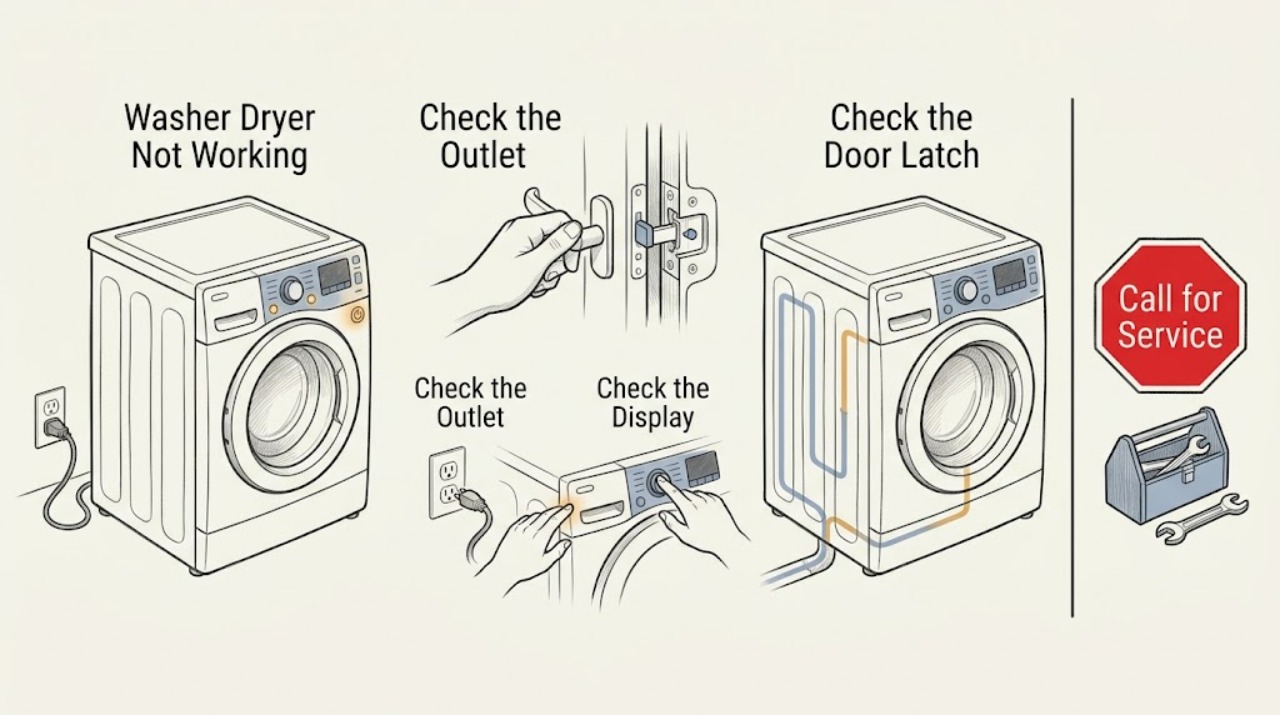
Start by identifying whether the GE washer-dryer has no lights or sounds, has power but will not accept a cycle, or starts and then stops. Check the plug, outlet and breaker, then confirm the selected cycle, Control Lock, and fully closed door or lid. For a combo or front-load unit, check that water is available, the drain hose is not kinked, and any model-accessible pump filter is not restricted. For a laundry-center washer, an unlocked lid can prevent spin. Clear only accessible loading or drainage issues and follow the exact model manual; if the appliance remains unresponsive, leaks, repeatedly trips power, shows a persistent fault, or will not complete a cycle, stop using it and arrange qualified GE appliance service.
Work through in order
Diagnostic checks
Use only checks that match the exact appliance or system and its official guide.
-
Check 1
Check for any display, interior light, control response, or operating sound, then verify that the GE washer-dryer plug is seated and the appropriate outlet and breaker or fuse are supplying power without opening the cabinet.
Expected result: There are no lights or sounds, the controls have power but do not respond normally, or the display and controls operate.
Next step: If the outlet or breaker will not hold, stop and obtain electrical service. If the appliance has power, continue to the control and closure checks. Do not repeatedly reset a tripping circuit.
Why this matters
Why: No response points first to the supply path or appliance power input; a responsive display shifts the diagnosis toward a locked control, closure condition, selected cycle, water or drain condition, or an internal fault.
-
Check 2
With the display powered, confirm that a valid wash, dry, or combined cycle is selected, check the model's Control Lock or Child Lock indicator, and press Start or Start/Pause as specified in that model's manual.
Expected result: A lock icon or lock message is present, the controls respond after the model-specific unlock procedure, or the controls remain locked or unresponsive.
Next step: Use only the exact manual's unlock and start instructions. If the display still will not accept a cycle after the documented procedure, stop trying random button combinations and arrange service.
Why this matters
Why: GE combo controls can appear unresponsive when a control lock is engaged; a valid cycle and start command are also required. Button combinations differ by model, so an unfamiliar sequence is not evidence of a fault.
-
Check 3
Close the dryer door, combo door, or laundry-center washer lid firmly and inspect the accessible strike, latch area, and lid or door alignment for clothing or debris that prevents full closure; never defeat the interlock.
Expected result: The door or lid closes and the lock indicator confirms closure, or it will not close, lock, or recognize closure.
Next step: Remove only an accessible obstruction and retry once. If the latch, switch, lid, or door still will not lock, stop use and arrange qualified service instead of bypassing the interlock.
Why this matters
Why: GE washer-dryer designs will not start or spin a cycle that requires a closed and locked door or lid; a closure problem can therefore look like a complete appliance failure.
-
Check 4
For a washer or washer-dryer cycle that stops before washing or drying, verify that the required water valves are open and that the drain hose is not kinked, crushed, pushed too far into the standpipe, or connected to a visibly blocked household drain.
Expected result: Water is unavailable, the drain path is restricted, a pump-filter message appears, or the water and drain path look correct.
Next step: Correct only an accessible valve, hose, standpipe, or model-accessible pump-filter issue using the manual, then run one appropriate test. If the filter is not user-accessible, water remains in the drum, or the message returns, arrange service.
Why this matters
Why: A combo can wait for water or stop when a drain restriction is detected; a front-load washer can also fail to complete or spin when it cannot drain. A clear hose does not rule out an internal pump or control fault.
-
Check 5
If the washer portion fills but will not spin or the combo reports an out-of-balance condition, stop the cycle, redistribute the load evenly, and select the model's documented drain-and-spin or rinse-and-spin option.
Expected result: The spin indicator or balance message clears and the load completes, or the unit remains unable to spin with a balanced load.
Next step: Use the model's load guidance and monitor one cycle. If the basket still will not spin, the lid or door will not stay locked, or the unit stops repeatedly, stop use and arrange service.
Why this matters
Why: GE identifies unbalanced loading as a reason a washer or combo may not reach full spin; a persistent no-spin result after redistribution points beyond the load itself.
-
Check 6
Record any displayed status message or fault code and the exact cycle stage where the GE washer-dryer stops, then compare it with the exact model's Owner's Manual before attempting a documented reset.
Expected result: The message identifies a door, water, drain, filter, balance, or control condition, or no message is shown and the failure is repeatable.
Next step: Follow only the manual's stated remedy and retry once. If the message persists, the appliance remains unresponsive, or the same stage fails again, stop the appliance and contact qualified service.
Why this matters
Why: A model-specific message can narrow the next safe check; a repeatable failure without a user remedy is evidence that service diagnosis is needed rather than a reason to guess at a part.
Use your observations
Decision map
Find the observation that best matches what you see, then follow the next safe action.
-
PATH 01Next step
What you see
There are no lights or sounds and the outlet or breaker does not provide stable power.
Do this next
Stop using the appliance and have the household electrical supply assessed; do not open the washer-dryer cabinet.
-
PATH 02Next step
What you see
The display works but shows a lock state, will not accept input, or indicates that the door or lid is open.
Do this next
Use the exact model manual to clear the lock and close the door or lid. Arrange service if the interlock remains unrecognized; never bypass it.
-
PATH 03Next step
What you see
A water, drain, pump-filter, or cycle-canceled message appears.
Do this next
Check the accessible water supply, drain hose, standpipe, and model-accessible filter as documented, then retry after the message's required waiting state. Escalate if it returns.
-
PATH 04Next step
What you see
A spin or balance message clears after redistributing the load.
Do this next
Complete one supervised cycle with a suitable load and follow the model's loading guidance. Repeated imbalance or no-spin behavior requires service.
-
PATH 05Next step
What you see
The GE washer-dryer still will not start or complete after stable power, correct controls, closure, water, drain, and load checks.
Do this next
Stop using it and arrange qualified appliance service for diagnosis of the interlock, pump, motor, control, or other internal system.
-
PATH 06Next step
What you see
There is a leak, smoke, burning odor, exposed or damaged wiring, standing water with an electrical concern, or repeated breaker trips.
Do this next
Stop the appliance, keep clear of the hazard, and obtain qualified appliance or electrical service before using it again.
Helpful context
Understand the symptom
First classify what not working means
A GE washer-dryer with no display or sound needs a power-path check. A lit display that beeps but will not start often points to a control lock, door or lid interlock, or an uncompleted selection. A cycle that starts and then stops may be waiting for water, unable to drain, or pausing to correct an unbalanced load. A combo, a front-load washer with a separate dryer, and a unitized laundry center do not use identical controls, so do not apply a button sequence from another model.
Use accessible checks only
Stop the cycle before opening a door, lid, filter, or hose connection, and keep hands away from moving parts. Do not bypass a door or lid lock, open the cabinet, probe live wiring, or replace a safety component as a first troubleshooting step. If there is standing water, a leak, smoke, a burning odor, or repeated power trips, stop and arrange service.
Why the same symptom can have different causes
The dryer half may not start because its door, cycle, start input, or power circuit is wrong, while the washer half may stop because the lid is not locked, the load is unbalanced, or the drain path is restricted. On an all-in-one combo, the display may show a status message that identifies which stage is waiting. Record the display message and the point where the cycle stops before resetting anything.
Only after diagnosis
Potential parts
- door or lid interlock component
Only consider this component if the door or lid is correctly aligned and closed but the appliance still cannot recognize the lock, and a qualified technician confirms an interlock fault.
Confirm the exact GE model and manufacturer's fit information before ordering any component. - drain pump or pump-filter component
Only consider a pump-side component after accessible hose, standpipe, load, and model-approved filter checks do not restore draining and a technician confirms the restriction or pump fault.
Use the exact GE model documentation and technician diagnosis; do not infer compatibility from appearance. - drive motor or control component
Only consider a motor or control component when power and closure are correct but the unit still cannot start, tumble, drain, or spin, and a qualified technician identifies the failed system.
Confirm the exact GE model and approved component information before replacement.
When checks do not resolve it
Need a professional?
A technician should diagnose a persistent no-start or no-complete condition after the model-specific power, control-lock, closure, water, drain, and load checks, especially when a pump, motor, control, interlock, or wiring fault is suspected.
Common questions
FAQ
Why does my GE washer-dryer have power but not start?
Check the selected cycle, Control Lock or Child Lock, and whether the door or lid is fully closed and recognized as locked. If the controls remain unresponsive after the exact model procedure, arrange service.
What if my GE washer-dryer stops before spinning?
Check for an unbalanced load, a door or lid that is not locked, and a drain hose or pump-filter restriction. Redistribute the load or clear only an accessible, model-approved filter path; persistent no-spin behavior needs service.
Can a blocked drain keep a GE washer-dryer from working?
Yes. A kinked hose, blocked household drain, or restricted pump area can prevent draining and stop a wash or combined cycle. Follow the exact manual for any accessible filter; do not open a model without user-accessible filter instructions.
Should I bypass the GE washer-dryer door or lid lock?
No. The interlock is part of the appliance's safe operating sequence. If the door or lid will not close or lock after an accessible obstruction check, stop using the appliance and arrange qualified service.
Read the exact guide
Official sources
- GE Profile™ UltraFast Combo Washer/Dryer - Fault & Error Codes and Status MessagesGE Appliances · GE's model-specific status-message guidance for balance, water supply, canceled draining, door-open, pump-filter, and lint-filter conditions.
- Unitized Spacemaker Washer - Washer Will Not Start / Lid Not LockedGE Appliances · GE's model-specific guidance for washer-lid closure, lid-lock recognition, and inability to spin or complete a wash cycle.
- Dryer - Will Not Run or StartGE Appliances · GE's official start checks for power, door closure, cycle and start selection, door switch condition, and dedicated circuit.
- Front Load Washer - TroubleshootingGE Appliances · GE's official checks for drain hose installation, household drain, pump filter access, and unbalanced loads affecting operation and spin.
- GE Profile™ UltraFast Combo Washer/Dryer - Will Not Start or RunGE Appliances · Model-specific GE combo guidance for no power, control lock, new-installation behavior, reset, and service escalation.
Community feedback
Share a repair observation
Share a plain-text repair observation. Accepted observations are published automatically; this page may take a moment to update.