
On this page
Start here
Quick answer
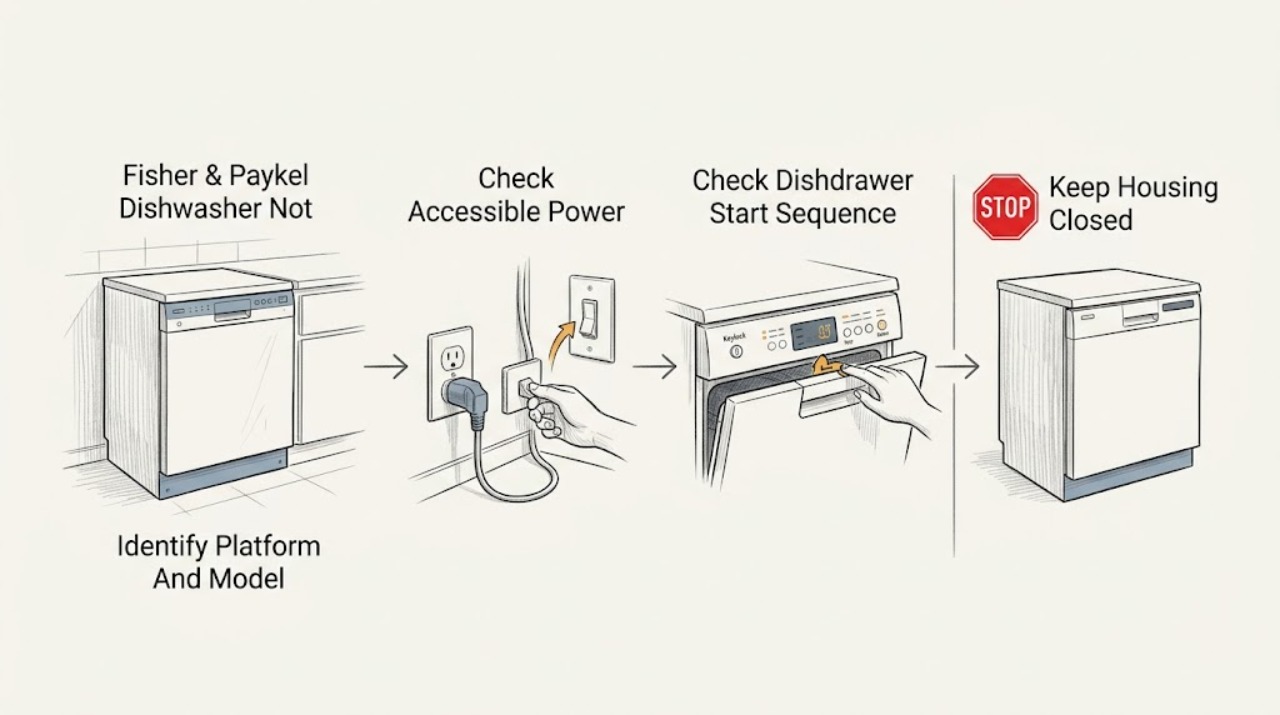
First separate a completely dark dishwasher from one whose panel or drawer indicators are lit. Fisher & Paykel sells two distinct dishwasher platforms: DishDrawer models with one or two independently operated drawers, and traditional drop-door models. For either platform, inspect only the accessible plug, wall switch, cord, and household breaker or GFCI; use a properly grounded supply and do not use an extension cord or repeatedly reset a tripping circuit. If there is no display or indicator at all, keep the dishwasher off when power does not return and arrange an electrician or Fisher & Paykel service. If a DishDrawer has lights but will not start, check that the intended drawer is closed, the cycle and Start control were selected in the model guide, Keylock is off, and a delay or demo mode is not holding it. If a traditional drop-door model has a live panel but will not start, check that the door is fully closed, Start was pressed, and the water tap and inlet strainer are not preventing the documented start sequence. Do not open the control area, bypass a latch, probe wiring, or work on a hard-wired connection.
Before you begin
Safety first
- This article covers platform identification, accessible power observations, normal controls, visible door/drawer closure, and only model-authorized external water or strainer checks. A trained Fisher & Paykel technician or qualified electrician must handle hard-wired supply, enclosure panels, latches, control boards, wiring, inlet/flood systems, and live or internal diagnosis.
Work through in order
Diagnostic checks
Use only checks that match the exact appliance or system and its official guide.
-
Check 1
Identify the exact Fisher & Paykel model and platform before trying controls. Note whether the appliance has a sliding DishDrawer (single or double) or one hinged drop door, which drawer is affected if it is a double model, and whether any display, indicator, tone, or Wi-Fi/status light is present.
Expected result: The entire appliance is dark, one DishDrawer is dark while the other responds, the panel is lit but controls do nothing, or the panel responds but the wash does not begin.
Next step: Use the DishDrawer branch or drop-door branch that matches the physical design. Keep the model number with the service record; do not apply a DishDrawer sequence to a drop-door model or vice versa.
Stop if: Do not remove panels or use a tool to hold a latch or switch while identifying the platform.
Why this matters
Why: No light or tone makes an incoming power or appliance power path more likely. A single dark drawer on a double DishDrawer can be drawer-specific, while a lit panel points to door/drawer closure, Keylock, delay/demo state, Start timing, water supply, or a fault rather than a simple outlet failure.
-
Check 2
From a dry position, inspect the accessible plug, cord, wall switch, and outlet face without moving the built-in dishwasher. Check whether a normal household breaker or GFCI has tripped and whether another small appliance confirms that the outlet is available. If the appliance is hard-wired, do not open the connection; use only the normal household protective control.
Expected result: The plug or outlet is loose, hot, wet, scorched, or damaged; the breaker/GFCI trips again; another appliance also has no power; or the dishwasher outlet and household supply appear normal.
Next step: For a damaged, wet, hot, or repeatedly tripping supply, leave the dishwasher disconnected and arrange qualified electrical or appliance service. If the outlet is normal, continue with the model-specific control and closure checks.
Stop if: Do not use an extension cord, adaptor, power strip, replacement fuse of unknown rating, live meter test, or repeated breaker reset to make the dishwasher start.
Why this matters
Why: A dark panel with a failed outlet or tripped protection is an external supply problem until proven otherwise. A normal outlet with a dark dishwasher leaves the cord, connection, internal fuse, control, or other appliance power path unresolved and is not a reason to dismantle the unit.
-
Check 3
For a DishDrawer, use the exact guide for the affected drawer. With the drawer not running, confirm it is firmly closed, select a wash program, press the documented Start control, and close the drawer within the model's stated timing. Check the Keylock indicator and cancel a delay or other user mode only by the exact manual sequence; do not press controls randomly.
Expected result: The drawer starts after a firm closure and correct Start timing, a lock indicator shows, a delay indicator is active, the controls remain lit but no cycle begins, or a fault pattern/beeping appears.
Next step: Use only the exact guide to clear Keylock or delay and repeat one normal start attempt. For Demo mode, a fault pattern, or a persistent no-start, note the indicators and contact Fisher & Paykel service; on a double model, record whether the other drawer works.
Stop if: Do not bypass the drawer lid/latch, hold a switch with an object, pull the drawer from its cabinetry, or access its electronics.
Why this matters
Why: The DD60 guide lists an unconnected power supply, drawer not closed correctly, Keylock, no cycle selected, too much time between Start and closing, and Demo mode as distinct reasons a DishDrawer will not start. A persistent lit-panel failure after those model-authorized checks can involve the latch, user interface, control, or another internal system.
-
Check 4
For a traditional drop-door Fisher & Paykel dishwasher, use the exact model guide to confirm the panel is on, the door closes fully, a wash program and Start control have been selected, and the water tap is on. If the guide identifies an owner-accessible inlet strainer at the tap connection, inspect and clean it only with water and power safely isolated and without opening the appliance.
Expected result: The door will not latch, Start was never pressed, the tap is off, the inlet strainer is blocked, the panel is lit but the dishwasher still does not start, or the panel is dark.
Next step: Correct only the visible, model-authorized condition and make one normal start attempt. If the door cannot close, the panel remains unresponsive, water is present where it should not be, or the cycle still will not start, stop and arrange service.
Stop if: Do not remove the door skin, latch, inlet valve, wiring, or base panels, and do not run the dishwasher with an exposed or damaged enclosure.
Why this matters
Why: The opened DW24UNT2X2 guide distinguishes no power from a door not properly closed, Start not pressed, a closed water tap, and a blocked inlet strainer. A lit panel with those external conditions normal points toward a latch, control, inlet, or fault condition; a dark panel remains a power-path issue.
-
Check 5
Record any lock, delay, remote-mode, beeping, flashing program/modifier, or fault display before changing settings. On a double DishDrawer, compare the affected drawer with the working drawer only through normal controls; do not swap wiring or parts. If the guide permits a reset or clearing sequence, perform it once exactly as written after the appliance is safe and not leaking.
Expected result: Only one drawer reports a fault, the controls are locked, a delay is counting down, indicators flash with continuous beeps, the appliance resumes after the documented reset, or the same condition returns.
Next step: Write down the exact display or flashing indicators, affected drawer, and timing, then contact Fisher & Paykel Customer Care or an authorized service centre. Keep the dishwasher off for recurring faults or any water/electrical warning.
Stop if: Do not enter an unknown diagnostic mode, repeatedly power-cycle the appliance, clear codes without recording them, or bypass a lock or interlock.
Why this matters
Why: A drawer-specific fault does not automatically mean the whole double appliance has lost power. A returning code or persistent no-start after the permitted reset requires the model's service path; the indicator pattern is more useful to a technician than an assumed replacement part.
-
Check 6
Prepare the service record with the exact model and serial information, DishDrawer or drop-door platform, affected drawer if applicable, whether the panel is dark or lit, outlet/breaker result, door or drawer closure, Keylock/delay/fault indicators, water-supply observation, and the last time the dishwasher started normally.
Expected result: The dishwasher remains completely dark, starts only after a model-authorized correction, has a recurring fault or no-start with a live panel, or has a hazard such as heat, odor, smoke, water, or a repeated trip.
Next step: Use the dishwasher only after a normal start and no hazard. Otherwise leave it off and provide the record to Fisher & Paykel Customer Care, a trained service technician, or a qualified electrician for a supply fault.
Stop if: Do not order a control board, latch, pump, or inlet valve solely from a no-start symptom and do not continue testing an appliance with a hazard.
Why this matters
Why: A resolved closure, lock, delay, or water-supply condition supports that user-state path, but a persistent dark or lit-panel failure can require internal power, latch, control, inlet, or flood-protection diagnosis. The external symptom cannot establish a safe replacement part.
Use your observations
Decision map
Find the observation that best matches what you see, then follow the next safe action.
-
PATH 01Safety boundary
What you see
No display, indicator, tone, or response is present on the whole dishwasher.
Do this next
Check only the accessible supply and normal household protection once. If the outlet is live but the dishwasher remains dark, leave the appliance off and arrange qualified electrical or Fisher & Paykel service.
Why this path and its safety boundary
Why it matters: Incoming supply, wall switch, breaker/GFCI, plug/cord, hard-wired connection, or the appliance's internal power path is more likely than a wash-program setting.
Safety stop: Do not open a hard-wired connection, remove a control panel, or repeatedly reset protection.
-
PATH 02Safety boundary
What you see
A DishDrawer panel or drawer indicators light, but that drawer does not begin a wash.
Do this next
Follow the exact DishDrawer guide for closure, Start timing, Keylock, and delay controls. Record any fault lights or beeps; call service for Demo mode or a repeated no-start.
Why this path and its safety boundary
Why it matters: An unclosed drawer, Keylock, no selected cycle, Start/close timing, delay state, Demo mode, or drawer-specific fault is more likely than total power loss.
Safety stop: Do not bypass the lid/latch or access the drawer electronics.
-
PATH 03Safety boundary
What you see
One drawer in a double DishDrawer responds while the other is dark or will not start.
Do this next
Record which drawer responds and its indicators, use only the affected drawer's normal controls, and arrange Fisher & Paykel service if it stays dark or reports a fault. Do not interchange components.
Why this path and its safety boundary
Why it matters: A drawer-specific control, latch, fault, or power path is more likely than a household outlet failure, although a shared supply issue is still possible if both drawers later lose response.
Safety stop: Do not remove the drawer, swap harnesses, or assume the working drawer makes internal repair safe.
-
PATH 04Safety boundary
What you see
A traditional drop-door dishwasher panel is lit, but the wash does not begin.
Do this next
Close the door fully, select a program and press Start, then confirm the tap is on and inspect only the guide-authorized inlet strainer. If it still will not start, stop and arrange service.
Why this path and its safety boundary
Why it matters: Door closure, Start selection, water tap, or inlet-strainer conditions are the documented first distinctions for the opened DW24UNT2X2 guide; a normal door, Start, and water supply leave an internal latch, control, inlet, or fault path unresolved.
Safety stop: Do not hold the door latch closed with a tool, remove the latch, or test internal voltage.
-
PATH 05Safety boundary
What you see
Controls light but buttons do not respond, a lock or delay indicator is present, or the guide identifies Demo mode.
Do this next
Use the exact model guide to unlock or cancel delay; contact Customer Care for Demo mode or if the controls remain locked after the documented procedure.
Why this path and its safety boundary
Why it matters: A user-state lock, delayed start, or model setup mode can prevent a normal start without proving a hardware failure. Fisher & Paykel's sequences differ between DishDrawer and drop-door families.
Safety stop: Do not guess a key combination, enter an unknown service mode, or bypass a control lock.
-
PATH 06Safety boundary
What you see
A fault display or continuous beeping returns, water leaks or pools outside the normal tub, the cord/outlet is hot or damaged, smoke/odor appears, or the breaker/GFCI trips again.
Do this next
Stop operation. If safe and reachable without touching the hazard, turn off water and disconnect power from a dry position; keep the floor clear and arrange trained Fisher & Paykel service or qualified electrical inspection.
Why this path and its safety boundary
Why it matters: The appliance may have a water-protection, electrical, control, or internal component fault. This is not a reason to keep clearing codes or retrying the cycle.
Safety stop: Do not restart, wipe a live wet area, reset repeatedly, open panels, or operate with missing enclosure parts.
-
PATH 07Safety boundary
What you see
The accessible supply is normal, the correct platform sequence was followed, the door or drawer closes, and there is still no start or the problem returns.
Do this next
Leave the dishwasher off and contact Fisher & Paykel Customer Care or a trained service technician with the exact model, platform, indicators, and checks already completed.
Why this path and its safety boundary
Why it matters: A concealed latch, interface, control, inlet, flood-protection, or other internal fault remains possible; the external symptom cannot identify a part or make internal work safe.
Safety stop: Do not dismantle the appliance, replace a part by appearance, or continue repeated start attempts.
Helpful context
Understand the symptom
Identify the Fisher & Paykel dishwasher platform first
A DishDrawer has one or two sliding wash drawers, and a double model can operate its drawers independently. A drop-door dishwasher has one conventional hinged door and a full-capacity tub. Fisher & Paykel's product-family page treats these as separate platforms, so a DishDrawer keylock, drawer-close timing, or drawer-specific fault should not be applied to a traditional model. Record the model from the appliance label or manual before using any button sequence. A dark panel is a power path question; a lit panel with no wash is a controls, door/drawer, water, delay, or fault-code question.
Keep electrical, water, and latch work out of DIY testing
Keep checks at the normal controls, accessible plug or wall switch, household breaker/GFCI, visible door or drawer closure, and model-authorized cleaning or loading points. Disconnect power before cleaning or maintenance, and keep the floor dry. Do not open enclosure panels, remove a junction-box cover, bypass a door or drawer latch, alter grounding, probe voltage, or repair wiring. Stop for a hot or damaged cord or outlet, burning odor, smoke, sparks, water near electrical parts, a repeated trip, or a dishwasher that is damaged or partially disassembled; use Fisher & Paykel Customer Care or a trained service technician.
Safety boundary
Stop conditions
- Stop immediately for smoke, sparks, burning odor, scorching, abnormal heat, a hot or damaged cord/outlet, water near electrical parts, a repeated breaker/GFCI trip, or an appliance that is damaged or partially disassembled.
- Disconnect power and turn off water only from safe, accessible controls and only when doing so does not require touching the hazard; arrange trained Fisher & Paykel service or qualified electrical inspection.
- Do not use an extension cord, adaptor, power strip, or improvised ground; do not open hard-wired connections or perform live voltage testing.
- Do not bypass a door or drawer latch, hold an interlock with a tool, remove enclosure panels, swap drawer harnesses, or enter an unknown diagnostic mode.
- A persistent dark panel, repeated fault/no-start, water-protection symptom, or failure after model-authorized external checks requires professional service.
When checks do not resolve it
Need a professional?
Safety scope: This article covers platform identification, accessible power observations, normal controls, visible door/drawer closure, and only model-authorized external water or strainer checks. A trained Fisher & Paykel technician or qualified electrician must handle hard-wired supply, enclosure panels, latches, control boards, wiring, inlet/flood systems, and live or internal diagnosis.
Common questions
FAQ
How do I tell whether my Fisher & Paykel dishwasher has lost power or simply will not start?
A completely dark panel or drawer is the power-path branch: check only the accessible plug, wall switch, outlet, and normal breaker/GFCI. If the panel lights but a wash will not begin, use the platform-specific door/drawer, Start, lock, delay, and water checks. Do not open the dishwasher to test its internal supply.
Why will my Fisher & Paykel DishDrawer not start even though the lights are on?
The DD60 guide lists a drawer that is not closed correctly, Keylock, no selected cycle, too much time between pressing Start and closing the drawer, and Demo mode in addition to no power. Follow the exact guide for the affected drawer and record any fault lights or beeps; do not bypass the latch.
Why will my traditional Fisher & Paykel dishwasher not start?
For the DW24UNT2X2 drop-door guide, the first distinctions are no power, the door not properly closed, Start not pressed, the water tap being off, or a blocked inlet strainer. Correct only the visible, model-authorized condition. A persistent lit-panel no-start needs service rather than a guessed latch or control part.
Can one drawer work if the other drawer in my double DishDrawer does not?
Yes, the DD60 guide states that a fault can occur in one or both drawers and that a double model can have different fault codes in each. Record which drawer responds and arrange service for the affected drawer if it remains dark or will not start; do not swap wiring or parts.
When should I stop trying to start the dishwasher?
Stop for a hot or damaged cord/outlet, smoke, sparks, burning odor, water near electrical parts, a repeated breaker/GFCI trip, a leak, a returning fault code, or a damaged or partially disassembled appliance. Disconnect only from a dry safe position and contact Fisher & Paykel service or a qualified electrician.
Read the exact guide
Official sources
- Contemporary Dishwasher User Guide (DW24UNT2X2)Fisher & Paykel Appliances · Official US/Canada guide for DW24UNT2X2; exact model and market guide controls the user's button sequence and maintenance permissions.
- DishwashingFisher & Paykel USA · Official Fisher & Paykel USA dishwashing family page covering current DishDrawer and traditional drop-door platforms; it does not determine a user's exact model procedure.
- Fisher & Paykel Australia SupportFisher & Paykel Appliances · Official Fisher & Paykel support landing page; availability and service options vary by country and model.
- Integrated Tall Double DishDrawer™ DishwasherFisher & Paykel Asia · Official product page for the DD60DTX6HI1 model; its independent-drawer and control features are model-specific examples, not universal settings for every Fisher & Paykel dishwasher.
- Series 7 Contemporary Tall Built-in DishwasherFisher & Paykel USA · Official product page for the DW24UNT2X2 drop-door dishwasher; features and controls are model-specific examples of the traditional platform.
- DishDrawer™ Dishwasher Integrated User Guide (DD60DTX6HI1, DD60STX6HI1)Fisher & Paykel Appliances · Official user guide for the listed DD60 integrated DishDrawer models; use the exact local model guide for controls and model-specific sequences.
Community feedback
Share a repair observation
Share a plain-text repair observation. Accepted observations are published automatically; this page may take a moment to update.