
On this page
Start here
Quick answer
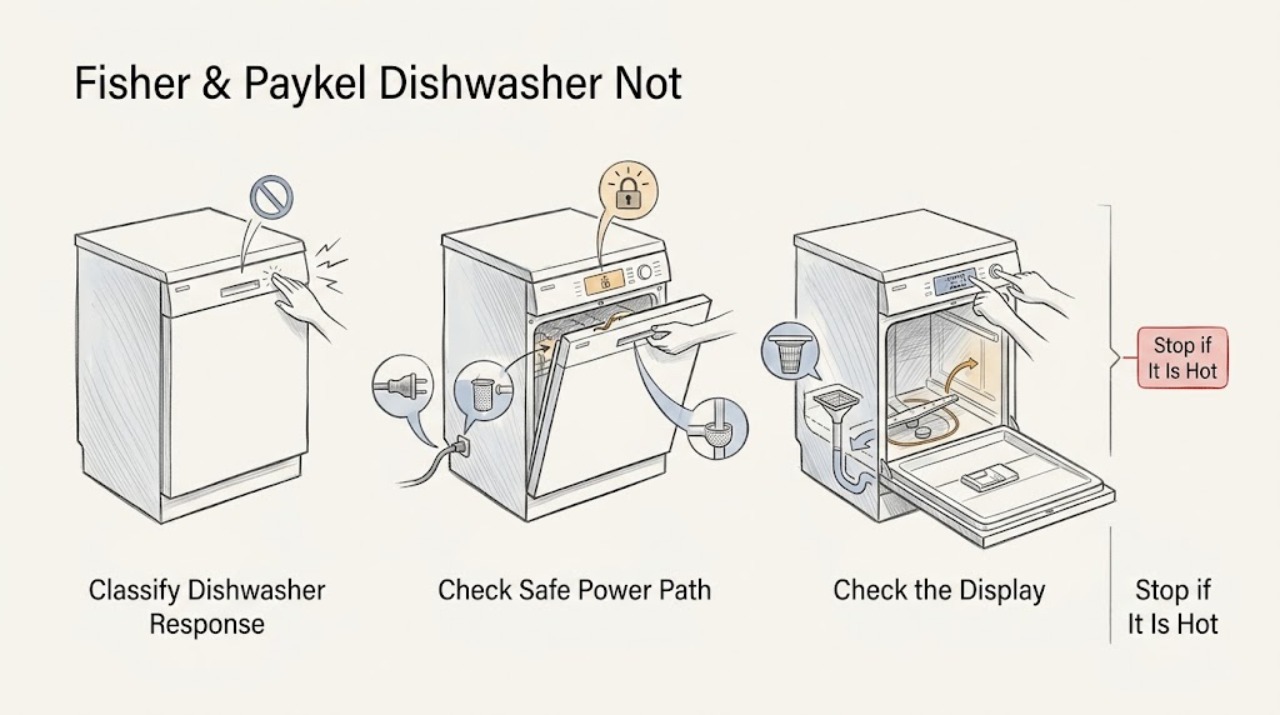
First define what “not working” means on the exact Fisher & Paykel dishwasher: no lights or response, controls that respond but will not begin, a cycle that starts but does not fill, or a cycle that leaves water behind. Fisher & Paykel's dishwasher troubleshooting guides point first to power, a fully closed door, the model's Start/Pause control, an open water tap, and a blocked inlet strainer; some models also list Keylock as a reason buttons beep without starting. From a dry position, check only the accessible plug, wall switch or breaker, door or drawer closure, visible loading obstruction, control lock, water tap, and model-documented filter or drain access. Do not force a door or drawer, disconnect pressurized plumbing, open the base or pump, make a live electrical test, or repeatedly reset a tripping breaker. Water near electricity, smoke, sparking, burning odor, a hot or damaged cord, a leak that continues, or a recurring fault means leave the dishwasher off and arrange qualified Fisher & Paykel service.
Before you begin
Safety first
- The user may identify the model, make dry external power and closure observations, clear visible loading obstructions, and follow exact model instructions for user-accessible filters or strainers. Qualified personnel must handle internal electrical parts, pump, valve, heater, controls, wiring, base access, pressurized plumbing disconnection, live testing, and any wet or damaged appliance.
Work through in order
Diagnostic checks
Use only checks that match the exact appliance or system and its official guide.
-
Check 1
Stop trying to start the dishwasher and record the exact model code, whether it is a DishDrawer or door-style unit, whether the display or indicators respond, whether buttons beep, whether a pump or inlet sound is heard, and whether water is left inside.
Expected result: The dishwasher is completely dark; controls respond but a cycle will not begin; a cycle starts but does not fill; or water remains after a cycle, with or without a displayed fault.
Next step: Follow the matching branch below and keep the exact model guide available. If the model or symptom is unclear, use Fisher & Paykel Product Help to locate the model-specific documentation before removing anything.
Stop if: Stop immediately for smoke, sparking, burning odor, a hot or damaged cord, water near electrical parts, or a repeated breaker trip.
Why this matters
Why: These patterns lead to different checks. A powered control problem is not evidence of a failed pump, and a drain symptom is not evidence that the appliance has no power.
-
Check 2
From a dry, stable position, check that the accessible plug is seated, the wall switch is on, and the household breaker or GFCI has not tripped. Look at the accessible plug, cord, and outlet face for heat, discoloration, moisture, or damage without opening the appliance or moving a built-in unit.
Expected result: The outlet is dead, the breaker trips again, the cord or plug is hot or damaged, water is present, or the outlet and supply remain normal but the dishwasher stays dark.
Next step: If the external supply is safely restored and the dishwasher responds, continue to the closure and control checks once. If it remains dark or any hazard appears, leave it disconnected and arrange qualified electrical or Fisher & Paykel appliance service.
Stop if: Do not repeatedly reset a breaker, use an extension cord or multi-outlet board, touch wet electrical parts, or perform live-voltage testing.
Why this matters
Why: A dead outlet or supply issue is external; a repeated trip, heat, moisture, or damaged cord is a safety fault. Normal power at the outlet does not prove that the dishwasher's internal control or wiring is sound.
-
Check 3
With the dishwasher idle, inspect the door or drawer opening for a rack, utensil, custom panel, or surrounding cabinetry that prevents full closure. Close it normally, select the intended programme, and press the exact model's Start/Pause control; if the buttons beep without responding, check the guide for Keylock and use only its documented unlock sequence.
Expected result: The door or drawer will not close freely; it closes and the cycle starts; the controls beep or remain locked; or the controls respond but no cycle begins.
Next step: Remove only the visible loading obstruction and retry once. If the latch, drawer alignment, custom panel, control lock, or Start/Pause response remains abnormal, stop and use model-specific service rather than forcing or bypassing it.
Stop if: Do not force the door or drawer, defeat a latch or closure sensor, remove a custom panel, or open the control area.
Why this matters
Why: A physical closure obstruction or active Keylock can prevent a start without proving that the motor or pump has failed. A freely closing unit with normal controls but no cycle response points beyond the simple user check.
-
Check 4
If the unit starts but does not fill, verify from outside that the dishwasher water tap is open and the visible inlet hose is not kinked or crushed. Check the model guide before touching the inlet strainer; only clean an accessible strainer by the documented procedure, with the appliance safely isolated and no pressurized hose disconnection.
Expected result: The tap is off, the visible hose is kinked, the model identifies a blocked accessible inlet strainer, or the tap, hose, and documented strainer check are normal but no water enters.
Next step: Correct only the visible tap or hose condition and run one model-approved test. If there is still no fill, a leak, or a fault code, turn the dishwasher off and arrange qualified service.
Stop if: Do not disconnect a pressurized hose, open the base, bypass a water sensor, or energize the dishwasher while a connection is leaking.
Why this matters
Why: The first three results support a water-supply restriction. A normal external supply with no fill can involve an inlet valve, sensor, control, or internal hose and cannot be identified safely from sound alone.
-
Check 5
If water remains after a cycle, turn the dishwasher off and follow the exact guide for any user-accessible filter, drain area, or spray-arm inspection. From outside, look for a kinked drain hose or an obvious leak at the supply or drain connection; do not remove the pump, base, or plumbing connection to reach a blockage.
Expected result: The filter or accessible drain area is blocked, the drain hose or waste connection is visibly kinked or restricted, water is leaking at a connection, or the accessible path is clear but water remains.
Next step: Clean or refit only model-approved user-accessible components and make one normal drain observation. If water remains, the pump is noisy or jammed, a leak persists, or a fault repeats, leave the appliance off and call service.
Stop if: Do not reach into a powered dishwasher, use sharp tools to clear the pump, dismantle the base, or run another cycle with water near electrical parts.
Why this matters
Why: A documented filter or visible hose restriction can explain residual water. A clear path with standing water makes an internal pump, valve, hose, installation, or control fault more likely; a leak needs containment rather than another cycle.
Use your observations
Decision map
Find the observation that best matches what you see, then follow the next safe action.
-
PATH 01Safety boundary
What you see
The display and indicators remain dark after the accessible plug, wall switch, outlet, and breaker/GFCI check, or the breaker trips again.
Do this next
Leave the dishwasher disconnected and arrange qualified electrical or Fisher & Paykel appliance service; provide the model code and what happened immediately before the loss of power.
Why this path and its safety boundary
Why it matters: A household supply problem remains possible, but normal outlet power with a dark dishwasher may indicate an internal power, control, wiring, or safety fault. A repeat trip is not a reset invitation.
Safety stop: Do not keep resetting the breaker, use an extension cord, open the toe-kick or control area, or make a live test.
-
PATH 02Safety boundary
What you see
The controls light or beep, but the programme does not start; the door or drawer is obstructed, not fully closed, Keylock is active, or Start/Pause has not been accepted.
Do this next
Clear only the visible loading or panel obstruction, close the unit normally, and use the exact model guide's control or Keylock procedure once. Escalate if the latch or controls still do not behave normally.
Why this path and its safety boundary
Why it matters: Closure, control-lock, programme selection, or Start/Pause state is more likely than a failed wash pump. A DishDrawer and a door-style model may use different indicator and key sequences.
Safety stop: Do not force or bypass the latch, hold a closure switch, or remove panels to make the cycle start.
-
PATH 03Safety boundary
What you see
The dishwasher accepts Start and makes a start or drain sound, but no water enters; the water tap is off, the visible inlet hose is restricted, or the model's inlet strainer is blocked.
Do this next
Correct only the visible supply issue or clean the accessible strainer as the exact guide permits, then make one model-approved test. Persistent no-fill or an A10 or similar model fault should go to service.
Why this path and its safety boundary
Why it matters: An external water-supply restriction is more likely than a completely dead dishwasher. If the tap, hose, and documented strainer are normal, an internal inlet valve, sensor, hose, or control issue remains possible.
Safety stop: Do not disconnect pressurized plumbing, bridge an inlet valve, or continue operating with a leak.
-
PATH 04Safety boundary
What you see
A cycle runs but excessive water remains above the filter plate, or the dishwasher reports a drain-related fault; a kinked drain hose, blocked waste connection, high-loop/routing issue, or accessible filter restriction is visible.
Do this next
Follow the exact model's filter and drain-cleaning instructions and correct only a visible hose-routing problem. If water remains or a pump fault repeats, stop using the unit and arrange qualified service.
Why this path and its safety boundary
Why it matters: The drain path or installation is more likely than a no-power fault. A clear external path with residual water or a jammed pump points to an internal drain or control diagnosis.
Safety stop: Do not dismantle the pump or base, insert sharp tools, or run another cycle if water is near electrical parts.
-
PATH 05Safety boundary
What you see
There is water around a supply or drain connection, a leak reaches the appliance base or electrical area, the cord or controls are hot or damaged, smoke or sparking occurs, or the dishwasher still fails after the documented external checks.
Do this next
Stop the cycle, isolate power only from a safe dry location, close the water tap if a supply leak is visible, contain water without touching electrical parts, and arrange qualified Fisher & Paykel service.
Why this path and its safety boundary
Why it matters: A plumbing installation fault or internal pump, valve, heater, control, wiring, or anti-flood condition may be involved. The visible symptom does not identify a safe replacement part.
Safety stop: Do not re-energize a wet or damaged appliance, bypass anti-flood or door protection, open the base, or perform live testing.
Helpful context
Understand the symptom
Separate a dead appliance from a failed wash function
“Not working” can describe a dark control panel, a powered dishwasher that will not accept Start, a cycle that begins but never fills, or water left after a cycle. A Fisher & Paykel DishDrawer and a conventional door-style dishwasher can use different controls and closure checks. Record the model code, whether any display or indicator responds, whether the pump runs, and the exact point at which the cycle stops before choosing a procedure.
Use the model guide for controls and keylock
If the controls light but a cycle does not begin, make sure the door or drawer is fully closed, the load or custom panel is not preventing closure, the intended programme is selected, and the model's Start/Pause control has been used. Some Fisher & Paykel guides list Keylock as a separate reason buttons beep and do not respond. Use only the key sequence in the guide for the exact model; do not force the latch or bypass a closure sensor.
Keep water-inlet and drain symptoms distinct
A dishwasher that starts but does not fill points toward the water tap, a kinked or restricted visible inlet hose, or the inlet strainer described by the model guide. A dishwasher that has excessive water above the filter plate after a rinse points toward the drain hose, waste connection, high loop or filter/drain arrangement. Inspect only the parts the exact manual identifies as user-accessible; a pump, valve, internal hose, or base fault needs service.
Treat leaks and electrical symptoms as a stop point
The installation guide separates water around supply or drainage connections from other operating faults and requires accessible, correctly fitted connections. If water is reaching the outlet, cord, controls, or base, or if there is smoke, sparking, burning odor, heat damage, or a repeated breaker trip, stop using the appliance. Do not remove panels or energize it to find the failed pump, valve, heater, control, wiring, or leak source.
Safety boundary
Stop conditions
- Leave the dishwasher off for smoke, sparking, burning odor, a hot or damaged plug or cord, water near electrical parts, a repeated breaker trip, or a leak that continues.
- Do not use an extension cord or multi-outlet power board, bypass a door or drawer latch, defeat Keylock or an anti-flood feature, or disconnect pressurized plumbing.
- Do not open the base, pump, valve, heater, control, wiring, or other internal electrical area, and do not perform live-voltage or continuity testing.
- Do not run another cycle when standing water is near electrical parts or when a fault code, no-fill condition, or drain fault repeats after the model-documented external checks.
When checks do not resolve it
Need a professional?
Arrange qualified Fisher & Paykel service when the dishwasher remains dark with normal accessible power, controls or closure remain abnormal, it starts but will not fill after the documented water-supply check, water remains after the accessible drain check, a pump or fault code repeats, or any leak, electrical hazard, or internal component issue is present.
Safety scope: The user may identify the model, make dry external power and closure observations, clear visible loading obstructions, and follow exact model instructions for user-accessible filters or strainers. Qualified personnel must handle internal electrical parts, pump, valve, heater, controls, wiring, base access, pressurized plumbing disconnection, live testing, and any wet or damaged appliance.
Common questions
FAQ
Why is my Fisher & Paykel dishwasher not working when the display is dark?
Check the accessible plug, wall switch, outlet, and breaker or GFCI from a dry position. If the supply is normal but the dishwasher stays dark, or the breaker trips again, leave it disconnected and arrange qualified service rather than repeatedly resetting power.
Why does the dishwasher light up but not start?
Check that the door or drawer closes fully without a rack, utensil, custom panel, or cabinet obstruction, then use the exact model's Start/Pause control. If buttons beep without responding, check the model guide for Keylock. Do not force or bypass the latch.
What should I check if a Fisher & Paykel dishwasher starts but does not fill?
Confirm that the water tap is on and the visible inlet hose is not kinked. If the exact manual identifies an accessible inlet strainer, clean it only by that procedure. Persistent no-fill, a leak, or a fault code needs service because an inlet valve, sensor, hose, or control may be involved.
Why is water left in my Fisher & Paykel dishwasher?
Follow the exact model's instructions for a user-accessible filter or drain area and check from outside for a kinked drain hose or blocked waste connection. If the path is clear but water remains, or a pump fault repeats, stop using the unit and arrange qualified service.
When should I stop using a Fisher & Paykel dishwasher?
Stop for water near electrical parts, a continuing leak, smoke, sparking, burning odor, a hot or damaged cord, a repeated breaker trip, or a fault that returns after the model-documented external checks. Do not open the base or perform live electrical testing; arrange qualified Fisher & Paykel service.
Read the exact guide
Official sources
- TROUBLESHOOTINGFisher & Paykel · Supports the common troubleshooting branches for the cited DW60 model families: no power, door closure, Start/Pause, water tap, inlet strainer, Keylock, and residual water. Exact model controls and access instructions govern other Fisher & Paykel dishwashers.
- FP Install Guide DW24U6I1/DW24U2I1 DishwasherFisher & Paykel · Supports safe power and hose boundaries plus installation troubleshooting for the cited DW24 models: residual water, no water supply, connection leaks, door closure, leveling, and referral to trained service. It is not a universal repair manual.
- Help & Support | Book A Service | Repair | TechnicianFisher & Paykel · Supports the use of Product Help, manuals, and authorized service for Fisher & Paykel appliances; it does not identify a fault in an unspecified dishwasher model.
- Contact UsFisher & Paykel · Supports directing owners to model-specific Product Help, documentation, and authorized service when a general symptom needs a model-specific answer.
Community feedback
Share a repair observation
Share a plain-text repair observation. Accepted observations are published automatically; this page may take a moment to update.