
On this page
Start here
Quick answer
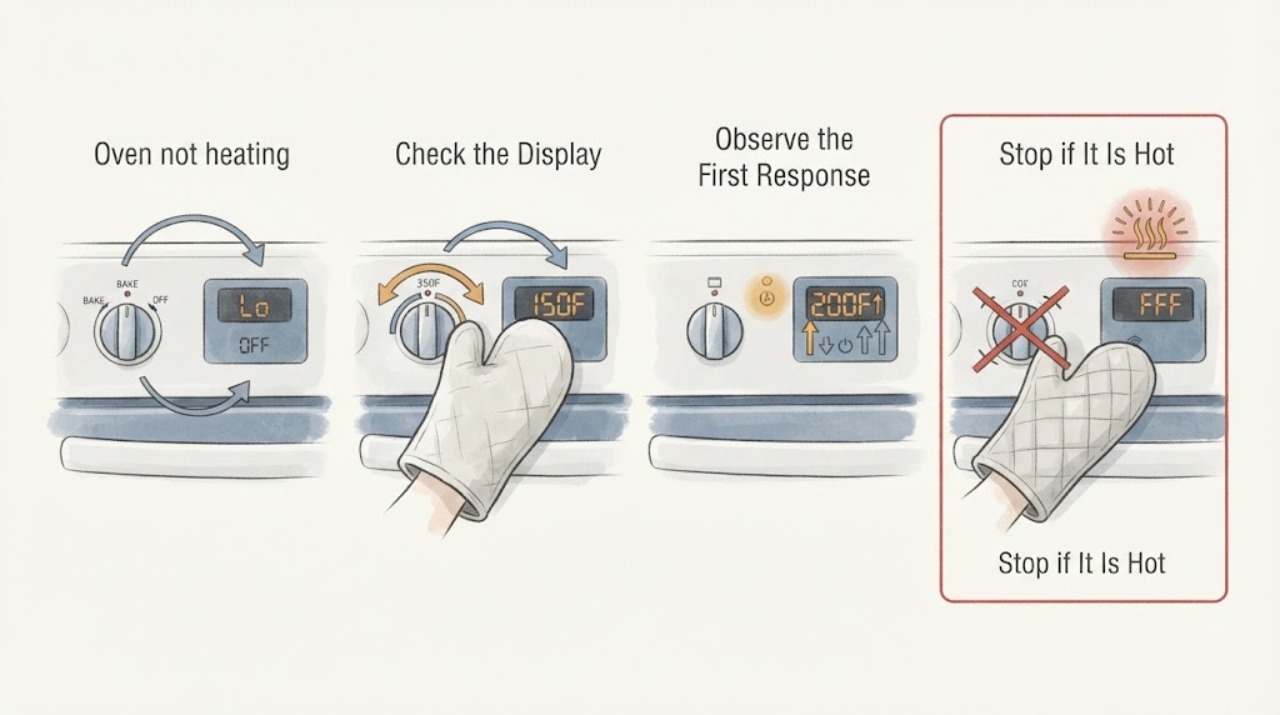
For a Fisher & Paykel WODV30 SS US oven that seems not to heat during preheat, first select the intended oven function and temperature and read the indicators instead of judging heat by opening the door. The official WODV30 quick-start guide shows the function halo glowing orange when a function is selected, the temperature halo glowing white while the oven heats, and the temperature display showing actual and set temperatures. When the oven reaches the set temperature, the display returns to the set value, a tone sounds, and the temperature halo turns orange. A white temperature halo with a rising actual temperature is normal preheat. If the display never shows a rising actual temperature, the selected function or temperature control does not respond, the oven stays cold after one supervised preheat, or an alert, lock, smoke, gas odor, or electrical symptom appears, stop and use the matching service or safety path. Do not open panels or order a heating component from the indicator alone.
Work through in order
Diagnostic checks
Use only checks that match the exact appliance or system and its official guide.
-
Check 1
With the oven empty and the door closed, select the intended function with the function knob and set the target with the temperature shuttle. Watch the function halo, temperature halo, selected function display, and actual/set temperature display.
Expected result: The function halo glows orange, the temperature halo is white, the actual temperature rises, the temperature halo turns orange at the target, or one of the controls and displays does not respond.
Next step: If the actual temperature rises, allow preheat to finish. If the oven does not respond, verify the exact function and temperature control in the user guide, then move to the power, lock, door, or service checks without opening panels.
Stop if: Stop for smoke, burning odor, gas odor, sparking, a damaged cord, cracked glass, or a door that cannot close safely.
Why this matters
Why: For the WODV30 control panel shown in Fisher & Paykel's guide, an orange function halo indicates a selected function, while a white temperature halo and changing actual temperature indicate preheat. An orange temperature halo with a tone indicates that the selected temperature has been reached; an unresponsive control is a different fault path.
-
Check 2
During one supervised preheat, compare the displayed actual temperature with the set temperature and avoid repeatedly opening the door. Note whether the actual value rises and whether the display eventually returns to the set temperature.
Expected result: The actual value rises toward the set value, the actual value stays unchanged, the display never shows a temperature response, or the temperature halo changes to orange with a tone.
Next step: Use the oven normally after the documented preheat indication. If the value remains unchanged or the oven is cold, stop repeated heating attempts and arrange qualified service after checking only accessible power and mode conditions.
Stop if: Do not open the oven cabinet, touch heating elements, or repeatedly cycle a cold or faulting oven.
Why this matters
Why: A rising actual value means the oven is responding even before the target is reached. The documented end of preheat is the display returning to the set temperature, a tone, and an orange temperature halo; no temperature response after a normal controlled check suggests a control, power, or heating fault.
-
Check 3
Check the display for LOCKED, a timer or automatic-cooking state, a flashing control, or another message, and compare it with the exact WODV30 SS US user guide. Use only the documented button sequence to clear a user setting.
Expected result: The display shows a lock, the oven is waiting for an automatic start, the control is flashing, or no mode or alert is shown.
Next step: Clear only a model-documented user setting and repeat one supervised preheat. If the lock or automatic state cannot be exited, or an alert returns, leave the oven off and arrange service.
Stop if: Do not bypass a lock, enter undocumented diagnostics, remove controls, or keep operating with an alert or abnormal heat.
Why this matters
Why: The WODV30 guide shows that the display can represent control lock, timer, automatic cooking, selected function, and actual/set temperature. A mode or delayed state can make an oven appear not to heat without proving a failed heating component.
-
Check 4
From outside the oven, confirm that the door closes fully and the seal and glass look intact. Check only the accessible household breaker or disconnect indication once if the controls and oven light are both dark and there is no hazard.
Expected result: The door is open or damaged, the controls are dark, the breaker is clearly tripped, the controls are active but the oven remains cold, or power is present with no temperature response.
Next step: Close the intact door and perform one normal check, or restore a clearly tripped accessible breaker once when safe. If the door is damaged, the breaker trips again, or active controls still produce no temperature rise, arrange qualified service.
Stop if: Do not reset a breaker repeatedly, touch wiring, pull out the built-in oven, or operate with broken glass, smoke, burning odor, or gas odor.
Why this matters
Why: A door position or power condition can prevent normal operation and should be separated from an active oven that fails to heat. Power restoration does not identify a failed heater, sensor, relay, or control.
-
Check 5
Prepare a service handoff with the full WODV30 SS US identity, oven cavity used, selected function, set temperature, actual-temperature behavior, halo color, display message, door condition, and any recent power event. Do not select a replacement part from the symptom.
Expected result: The actual temperature never rises, the oven remains cold after one correct preheat, the alert or lock returns, or the oven has a smoke, gas, electrical, or structural symptom.
Next step: Leave the oven out of service and contact Fisher & Paykel or a qualified appliance technician using the documented service route. Provide the recorded indicator sequence instead of opening the cabinet.
Stop if: For gas odor, smoke, sparking, or an electrical emergency, leave the area and use the appropriate local emergency or utility response; do not operate switches in the affected area.
Why this matters
Why: These observations cross the user-level preheat check and can involve power, control, sensor, relay, heating, door, or safety systems that the indicator cannot distinguish. A part name or service-value judgment cannot be established from the preheat symptom alone.
Use your observations
Decision map
Find the observation that best matches what you see, then follow the next safe action.
-
PATH 01Next step
What you see
The function halo is orange, the temperature halo is white, and the actual temperature rises toward the set temperature.
Do this next
Keep the door closed and allow preheat to finish. When the display returns to the set temperature, a tone sounds, and the temperature halo turns orange, proceed with cooking.
Why this path and its safety boundary
Why it matters: The WODV30 is showing the documented preheat state; the oven is heating even though it has not reached the target yet.
-
PATH 02Next step
What you see
The function is selected but the actual temperature does not rise during one supervised preheat, or the controls do not respond as the exact guide describes.
Do this next
Check only accessible power and documented mode conditions, then leave the oven off and arrange qualified Fisher & Paykel service if the cold condition persists.
Why this path and its safety boundary
Why it matters: The symptom is no longer explained by normal preheat indication; a power, control, sensor, or heating-system fault remains possible, but the failed component is not identified.
-
PATH 03Next step
What you see
The display shows a lock, automatic-cooking state, timer-related status, or returning alert before the oven begins heating.
Do this next
Use only the documented control sequence once. If the state cannot be cleared or returns, stop using the oven and request service.
Why this path and its safety boundary
Why it matters: A user setting or technical alert may be blocking or delaying operation; the display state must be interpreted with the exact model guide.
-
PATH 04Next step
What you see
Smoke, burning odor, gas odor, sparking, a hot or damaged cord, cracked glass, or a door that cannot close accompanies the apparent no-heat problem.
Do this next
Stop using the oven. Leave the area for gas odor or smoke and use the appropriate emergency response; otherwise isolate power only from a safe position and obtain qualified service.
Why this path and its safety boundary
Why it matters: An immediate gas, electrical, or structural hazard overrides preheat diagnosis.
Helpful context
Understand the symptom
What the WODV30 preheat indicators mean
The Fisher & Paykel WODV30 quick-start guide identifies separate function and temperature halos and shows the display's actual-versus-set temperature behavior. The function halo glows orange when a cooking function is selected. During heat-up, the temperature halo glows white and the display can show the actual temperature alongside the set temperature. When the set temperature is reached, the display returns to the set value, a tone sounds, and the temperature halo turns orange. Therefore, a white temperature halo is evidence that the preheat phase is in progress, not by itself evidence of a failed heater.
Select a real cooking function and target temperature
Turn the function knob to the intended oven function and confirm that the correct oven display responds. The WODV30 quick-start example uses BAKE, which starts at its preset temperature, then uses the temperature shuttle knob to raise the target. The temperature shuttle returns to its off position after adjustment and must not be forced beyond its limited travel. If the function display, temperature display, or control halos do not respond as described for the exact unit, stop treating the symptom as ordinary preheat and use the model user guide or service route.
Watch the actual temperature instead of repeatedly opening the door
After selecting the function and temperature, allow one supervised preheat while watching whether the actual temperature rises toward the set temperature. Opening the door repeatedly changes the heat balance and makes a slow preheat harder to judge. If the display shows a rising actual temperature and the temperature halo remains white, the oven is following the documented heat-up indication. If the actual temperature never rises, the function or temperature control is not accepted, or the oven remains cold after the normal preheat interval, stop repeated tests and continue with the power, mode, door, and service checks.
Separate an indicator or mode issue from a cold oven
Check the display for a control lock, delayed or automatic cooking state, or another message documented by the exact user guide. The WODV30 quick-start guide shows that the displays can represent the selected function, actual and set temperatures, timer information, and automatic-cooking status. A clock or timer display alone does not prove that the oven is heating. If a lock or automatic state cannot be cleared with the model-documented controls, leave the oven off and arrange service rather than bypassing it.
Stop when the symptom is unsafe or remains unresolved
A correct function, target temperature, closed intact door, and one monitored preheat should produce a rising actual temperature or the documented indicator transition. If the oven remains cold, an alert returns, the door cannot close, the glass is damaged, smoke or a burning odor appears, or a gas or electrical symptom is present, stop using it. The quick-start guide points owners to the user guide and service and warranty information for service, assistance, and replacement parts; it does not support selecting a heater, sensor, relay, or control part from the preheat symptom alone.
When checks do not resolve it
Need a professional?
Arrange qualified Fisher & Paykel appliance service when the WODV30 SS US shows no rising actual temperature after one correct supervised preheat, the control or display does not respond, a lock or alert cannot be cleared, or internal heating, sensor, relay, wiring, or control testing is needed. Provide the full model, function, set temperature, actual-temperature behavior, halo color, display message, and door condition. Do not order a replacement component from the preheat symptom alone.
Common questions
FAQ
What should the WODV30 temperature halo look like while preheating?
In Fisher & Paykel's WODV30 quick-start guide, the temperature halo is white while the oven heats. The display shows actual and set temperatures; after the set temperature is reached, the display returns to the set value, a tone sounds, and the temperature halo turns orange.
Does a white temperature halo mean the oven is not heating?
No. For the WODV30 indicator sequence, white means the oven is still heating toward the selected temperature. Watch whether the actual temperature rises. A cold oven with no temperature response after one correct supervised preheat needs service diagnosis.
Why is the oven display active but the oven still seems cold?
Confirm the selected function and target temperature, then check the actual-temperature display and any lock or automatic-cooking state. If the actual value never rises, an active display does not prove that the heating system is working; record the indicator sequence and arrange qualified service.
Read the exact guide
Official sources
- 591010B FP WODV230 Quick Start Guide, Wall Oven, US CAFisher & Paykel · The opened US/CA quick-start PDF labels the model overview WODV30 and documents the function halo, temperature halo, actual/set temperature display, BAKE selection, and service handoff. Confirm the exact WODV30 SS US user-guide revision for any model-specific mode or control variation.
Community feedback
Share a repair observation
Share a plain-text repair observation. Accepted observations are published automatically; this page may take a moment to update.