
On this page
Start here
Quick answer
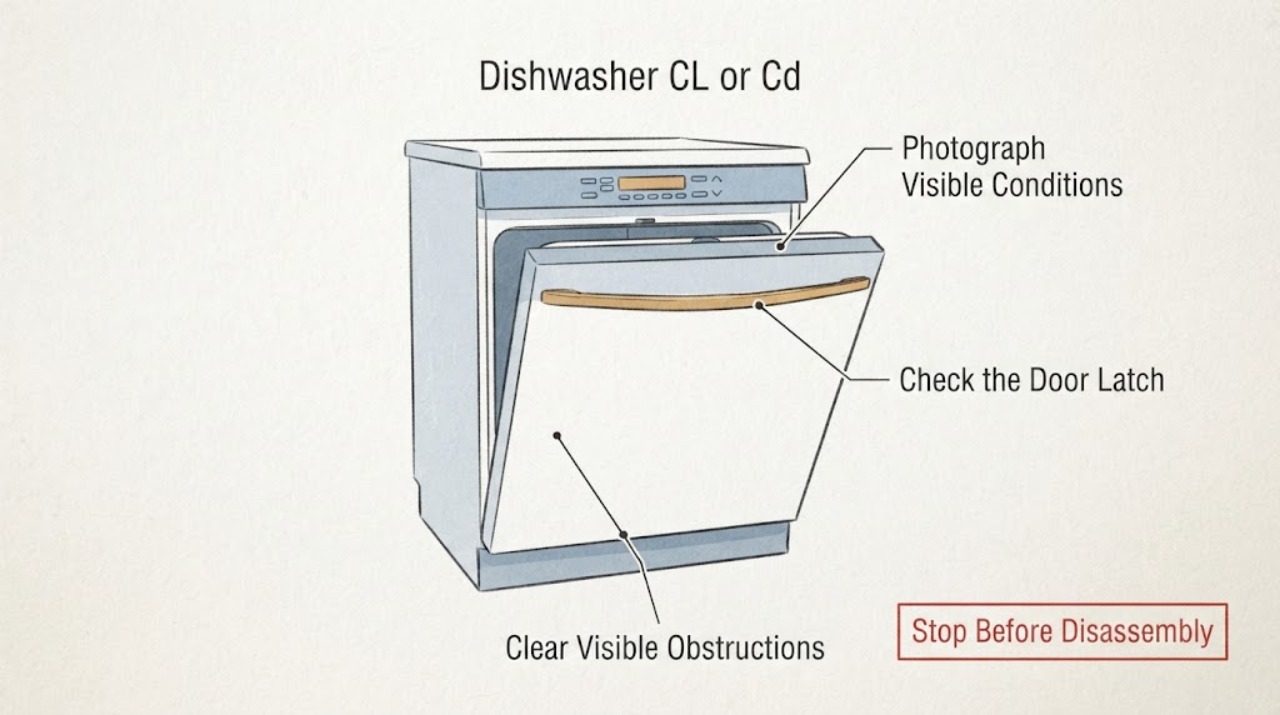
On the Frigidaire dishwasher support guide, CL or Cd means the door was not successfully closed and latched; it is a door-state message, not by itself a pump, heater, or control diagnosis. Remove only a visible rack, dish, or packaging obstruction, close the door firmly, and check whether the message turns off. If the door closes normally but CL or Cd returns, or the exact model and display format do not match the guide, stop guessing from another model's code table and arrange Frigidaire or qualified dishwasher service. Do not hold or bypass the latch while the dishwasher operates. A leak, wet electrical area, burning odor, smoke, sparking, damaged cord, or repeated breaker trip is a stop-use condition.
Work through in order
Diagnostic checks
Use only checks that match the exact appliance or system and its official guide.
-
Check 1
With the dishwasher idle, photograph the complete display and write down whether it reads CL, Cd, or a different message; note whether it is steady or blinking and whether it appeared after pressing Start. Do not reach into a running or filling tub.
Expected result: The display is exactly CL or Cd, a different code or status message is present, only indicator lights are flashing, or the unit has water, smoke, sparking, a burning odor, or damaged electrical parts.
Next step: For a hazard, stop using the dishwasher and isolate water or power only from a safe, dry location before arranging service. Otherwise keep the photo and continue with a visible door-path check only if the appliance is safe.
Stop if: Do not repeatedly start cycles to reproduce an unknown message, touch wet electrical areas, or reset a tripping breaker repeatedly.
Why this matters
Why: The opened Frigidaire support guide gives CL and Cd a specific door-latch meaning, while another display format may belong to the exact model's own guide. A water or electrical hazard takes priority over code interpretation.
-
Check 2
With the door open and the dishwasher not operating, inspect only the visible door path: check that no rack, dish, utensil, or packaging projects into the opening or presses against the seal or latch area. Remove only a clearly visible obstruction, then close the door firmly without holding the latch by hand.
Expected result: A visible obstruction is removed and the door now closes; the door still stops short or feels misaligned; or the door closes but never gives a normal latch engagement.
Next step: If the obstruction was the cause, proceed to one normal clear/start check. If the door remains unable to latch, stop and arrange service with the model and observations.
Stop if: Do not force the door, bend the latch, remove panels, or hold the latch closed to make the dishwasher run.
Why this matters
Why: An obstruction can prevent the control from seeing a successful closed-and-latched state. Persistent mechanical failure cannot be distinguished safely from a damaged latch or alignment problem by CL or Cd alone.
-
Check 3
After the visible path is clear, close the door completely as the Frigidaire support instruction directs and observe the display without bypassing the latch. If a cycle was interrupted, use the model's normal Start or resume instruction only after the door is safely closed.
Expected result: CL or Cd turns off; the message remains with a normal-feeling closed door; the code returns immediately after Start; or a different code appears.
Next step: If it clears and the dishwasher behaves normally, record the result and use it normally. If it remains or returns, stop repeated resets and give service the exact display, model, and timing.
Stop if: Do not run repeated cycles with the latch defeated, continue operation when water is leaking, or order a part from CL or Cd alone.
Why this matters
Why: A message that turns off after correct closure is consistent with the documented door-state condition. A returning message with a closed door needs model-specific service diagnosis; it does not prove that a latch, board, or other part should be replaced.
-
Check 4
If the message persists, read the complete dishwasher model number from the inside of the door or the right side of the tub when visible, and compare the exact display with that model's owner guide. Record the market, display location, whether the door physically latches, and whether CL or Cd appears before or after Start.
Expected result: The model and CL/Cd display match the Frigidaire guide; the model is different or unknown; the display is actually a different code; or the door latches but the message persists.
Next step: Use only the exact model guide. If the message is undocumented, the model cannot be confirmed, or CL/Cd persists with a sound latch, arrange Frigidaire or qualified service and provide the record.
Stop if: Do not use a cross-model code table, open the control or toe-kick area, test live wiring, or bypass a safety interlock.
Why this matters
Why: Frigidaire routes message-code interpretation to the owner manual when the display is not covered by the general support article. Model and display identity prevent a door message from being confused with a model-specific fault.
Use your observations
Decision map
Find the observation that best matches what you see, then follow the next safe action.
-
PATH 01Next step
What you see
CL or Cd turns off after a visible obstruction is removed and the door is completely closed and latched, with no leak or electrical symptom.
Do this next
Record what blocked the door and use the dishwasher normally while monitoring for recurrence. Stop if the message returns or the door behavior changes.
Why this path and its safety boundary
Why it matters: The documented door-state condition was cleared; this result does not identify or justify replacing an internal part.
-
PATH 02Next step
What you see
The door physically closes and appears latched, but CL or Cd remains or returns immediately.
Do this next
Stop repeated resets and arrange model-matched service with the complete model, display photo, timing, and whether the latch feels normal. Do not bypass the latch or buy a part from the code alone.
Why this path and its safety boundary
Why it matters: The control is still not accepting the closed-latch state, but CL or Cd alone cannot distinguish latch alignment, latch sensing, wiring, keypad, or control causes.
-
PATH 03Next step
What you see
The door cannot close because of a visible rack or dish obstruction, or the exact message is different from CL/Cd.
Do this next
Remove only the visible obstruction or retrieve the exact model guide. If the door remains mechanically abnormal or the message is undocumented, arrange service.
Why this path and its safety boundary
Why it matters: The immediate issue is a visible loading/closure condition or an identity mismatch, not a confirmed CL/Cd diagnosis.
-
PATH 04Next step
What you see
Water is present under or around the dishwasher, electrical parts are wet or damaged, there is smoke, burning odor, sparking, or repeated power tripping.
Do this next
Stop the cycle, keep clear of wet electrical areas, shut off the water supply and isolate power only from a safe dry location when possible, then arrange qualified service.
Why this path and its safety boundary
Why it matters: This is a stop-use safety condition regardless of whether CL or Cd is displayed.
Helpful context
Understand the symptom
Frigidaire uses CL and Cd as two display variants for the same basic condition in its dishwasher support material: the control has not recognized a successful door close and latch. This is narrower than a general 'dishwasher will not start' diagnosis. It does not identify a failed latch assembly, keypad, wiring, control board, or another part by itself. The exact owner guide remains the authority if your model shows a different message, a light pattern, or a code that is not documented for that model.
Start with the door in an idle, safe state. Look at the rack edge, dishes, utensils, and any packaging near the door seal or latch path; remove only what is visibly preventing closure. Close the door firmly as the Frigidaire guide describes. If CL or Cd clears, that observation supports a door-position or latching condition rather than a reason to order a motor or electronic part. If the door cannot close, closes but does not latch, or the message returns immediately, preserve the exact model number and arrange service rather than defeating the safety interlock.
The model number is important when the display does not match this guide or when a normally closed door is not accepted. Frigidaire says a dishwasher model number is commonly on the inside of the door or on the right side of the tub, visible with the door open. Record the complete model, the exact capitalization of CL or Cd, whether it stays on or blinks, and whether the message appears at power-up or after Start. Do not transfer a code meaning from a different Frigidaire model or from a washer, range, or another brand.
When checks do not resolve it
Need a professional?
Arrange Frigidaire or qualified dishwasher service when CL or Cd remains or returns with a properly closed door, the door cannot latch normally, the exact model or display format is not confirmed, the message is absent from the model's owner guide, or the dishwasher shows a leak, wet electrical area, burning odor, smoke, sparking, damaged cord, or repeated breaker trip. Do not run the appliance with the latch bypassed and do not perform live electrical tests or replace a part from CL or Cd alone.
Common questions
FAQ
What does CL or Cd mean on a Frigidaire dishwasher?
Frigidaire's official dishwasher support says CL or Cd indicates that the door has not been successfully closed and latched. Close the door completely; the guide says the message should turn off when closure is successful. This does not identify a failed latch or another part by itself.
What should I check before calling service for CL or Cd?
With the dishwasher idle, remove only a visible rack, dish, utensil, or packaging obstruction from the door path, then close the door firmly and observe whether the message clears. If the door cannot latch or the message returns with a properly closed door, use the exact model guide and arrange service rather than bypassing the latch.
Can I hold the latch closed or replace a latch part to clear CL or Cd?
No. Do not defeat or hold the latch closed while the dishwasher operates, and do not choose a latch, control, or other part from CL or Cd alone. If correct closure does not clear the message, provide the model and display record to Frigidaire or qualified service.
Read the exact guide
Official sources
- Dishwashers - Forgot to load an item to a wash cycle that is in process?Frigidaire Owner Support · The opened Frigidaire dishwasher article describes waiting for wash action to stop after unlatching, then pressing Start and closing the door firmly to resume; it supports safe door handling, not a universal part diagnosis.
- What do I do if my dishwasher is showing a message code?Frigidaire Owner Support · The opened Frigidaire dishwasher message-code article says CL or Close the door reminds the owner to close the door to start the cycle and directs other messages to the owner's manual.
- Dishwasher Error Codes and Alarms GuideFrigidaire Owner Support · The opened Frigidaire dishwasher error guide lists CL or Cd as door open, explains that the door was not successfully closed and latched, and directs service when the consumer cannot close the door.
- Dishwasher Error Code CL or Cd - Door is openFrigidaire Owner Support · The opened Frigidaire support article applies to dishwashers and explicitly names both CL and Cd; it says the door has not been successfully closed and latched and that complete closure turns the message off.
- Where can I find my model and serial number?Frigidaire Owner Support · The opened Frigidaire support page states that a dishwasher model number is commonly on the interior side of the door or the right side of the tub and is visible with the door open.
Community feedback
Share a repair observation
Share a plain-text repair observation. Accepted observations are published automatically; this page may take a moment to update.