
On this page
Start here
Quick answer
On a Frigidaire Gallery dishwasher, HO or HD means Heat Delay or Heater On: the dishwasher is waiting for the water to reach its target temperature. Frigidaire says colder incoming water makes that delay longer, and its long-cycle guide says cycle choice, added heat options, Delay Start, and slow hot-water delivery can also extend the displayed time. After four years unused, check the selected cycle and Delay Start, run the nearby faucet until the water is hot, and inspect the accessible water supply, filter/glass trap and drain hose before one supervised cycle. If HO/HD remains for an unusually long time, the cycle never progresses, water is not entering or draining, or there is a leak, stop relying on repeated resets and arrange Frigidaire or qualified dishwasher service. The task supplies only the Gallery family name, so use the exact owner manual for controls and model-specific behavior.
Before you begin
Safety first
- Do not open the base, bypass the heater or sensor, perform live electrical measurements, or order a component from HO/HD alone. Shut off water for a leak and disconnect power only by a safe normal means before service.
Work through in order
Diagnostic checks
Use only checks that match the exact appliance or system and its official guide.
-
Check 1
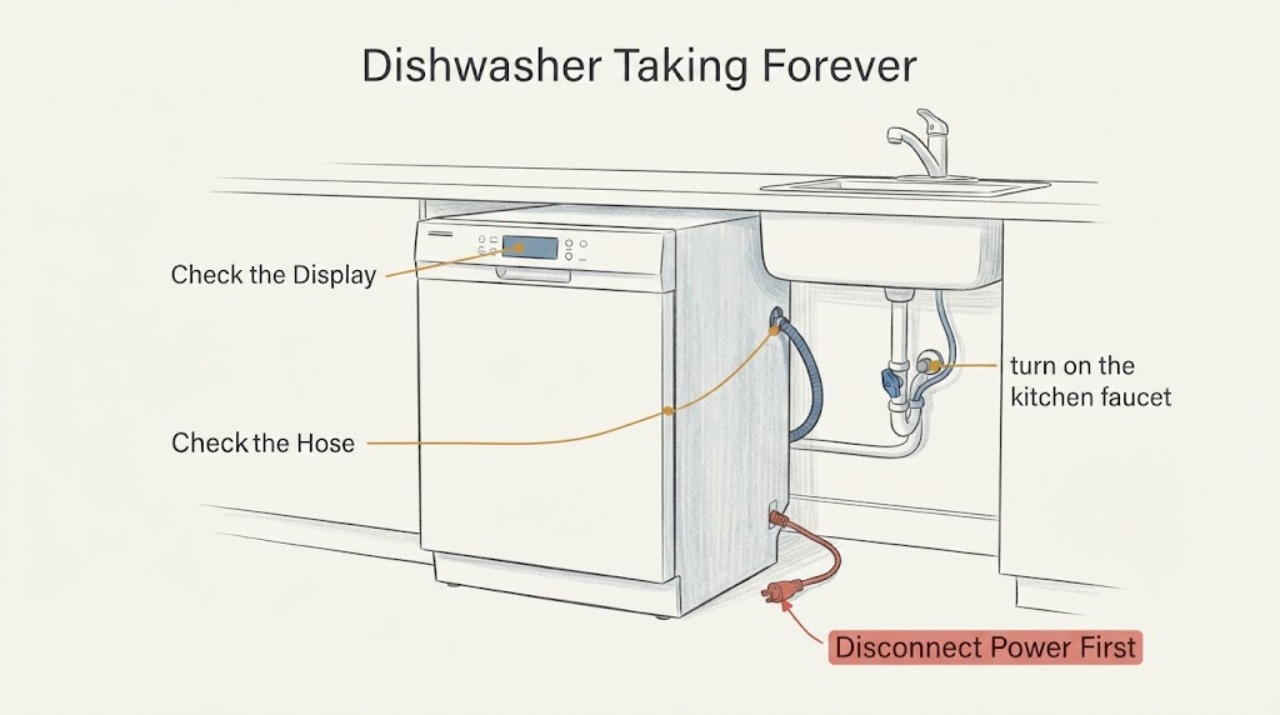
Read the display and note whether it shows HO or HD, whether a Delay Start indicator or time is active, which cycle and heat options are selected, and how long the dishwasher has actually been washing or waiting. Compare the elapsed time with the exact owner manual if the full model number is available.
Expected result: The display is HO/HD during the heating phase, or a delay/high-heat/heavy setting is active; alternatively, the dishwasher remains on HO/HD far beyond the selected cycle with no progress.
Next step: Cancel an unintended Delay Start and use the exact manual for the Gallery model. If the code remains stalled after the water and path checks below, stop repeated testing and arrange service.
Why this matters
Why: HO/HD is a heat-delay/heater-on status. Cycle choice and added heat can lengthen normal runtime, and Delay Start can postpone starting. A persistent stall after those settings are ruled out is not explained by the display alone.
-
Check 2
With the dishwasher empty and no cycle running, turn on the kitchen faucet nearest the dishwasher and let it run until the water is hot. Confirm the household water-heater setting or temperature safely without changing appliance wiring or opening the dishwasher.
Expected result: Hot water reaches the faucet promptly and the home water supply is otherwise normal, or the water remains cold/slow and other fixtures are using water.
Next step: After the dishwasher is otherwise safe and the settings are correct, make one supervised run. If the water supply is persistently cold/slow, address the household water issue or ask a qualified technician to assess the dishwasher supply rather than blaming a specific internal part.
Why this matters
Why: Frigidaire says colder incoming water increases the HO/HD heating delay and recommends starting with hot water; simultaneous household water use or low pressure can also affect cleaning performance.
-
Check 3
After four years unused and with the appliance unpowered or idle, inspect the accessible water valve and supply line for an open valve, kinks or restriction. Clean the accessible filter and glass trap according to the exact Gallery owner manual, and look for a kinked or displaced drain hose; do not pull the dishwasher out or open its base just to inspect hidden plumbing.
Expected result: The supply line is open and clear, the filter/glass trap is clean, and the drain hose is correctly routed, or there is no fill, standing water, a leak, a kink, or heavy debris.
Next step: Correct only an obvious accessible kink or cleanable filter condition allowed by the manual, then supervise one cycle. For a leak, no-fill/no-drain condition, or persistent HO/HD, stop using the dishwasher and contact Frigidaire or qualified service.
Why this matters
Why: Frigidaire identifies restricted water supply as a not-filling cause and kinks, filter/glass-trap debris or drain routing as causes of draining problems. These findings can keep a cycle from progressing, but a clear path does not prove the heater or sensor is healthy.
-
Check 4
If HO/HD remains unusually long after the settings, hot-water and accessible path checks, record the full model/serial label, cycle and options, elapsed time, whether the tub fills, whether water becomes warm, and whether it drains. Use Frigidaire support or a qualified dishwasher technician for the exact Gallery model.
Expected result: The cycle progresses normally after the external checks, or it stays on HO/HD, stops mid-cycle, fails to fill/drain, or leaks.
Next step: Keep the dishwasher out of service if it leaks or cannot fill/drain safely, and arrange service. Do not bypass the heater or sensor, run live electrical tests, or order a part from the code alone.
Why this matters
Why: Normal progress after correct settings and hot-water priming supports a delay/settings explanation. Persistent stalling or a fill/drain/leak symptom needs model-specific diagnosis; HO/HD alone does not identify a failed heater, thermistor, pump or board.
Use your observations
Decision map
Find the observation that best matches what you see, then follow the next safe action.
-
PATH 01Next step
What you see
HO or HD appears during a selected wash cycle, the incoming water is cold at startup, and the cycle later continues within the model manual's expected time.
Do this next
Use the correct cycle and options, run the nearby faucet until hot before starting, and follow the exact Gallery model manual.
Why this path and its safety boundary
Why it matters: The official Frigidaire definition is Heat Delay or Heater On; the dishwasher is waiting for water temperature rather than reporting a standalone part failure.
-
PATH 02Next step
What you see
The elapsed time includes Delay Start or a Heavy, High Heat, Sanitize or Scour option, and there is no leak or fill/drain problem.
Do this next
Cancel unintended Delay Start and compare the cycle with the exact model manual before seeking a component diagnosis.
Why this path and its safety boundary
Why it matters: The selected settings can add substantial time or postpone the start; this is different from proving the heater has failed.
-
PATH 03Next step
What you see
The dishwasher remains stalled while the supply is restricted, the tub does not fill, water remains after the cycle, the filter/glass trap is blocked, or the drain hose is kinked/displaced.
Do this next
Turn off water if there is a leak, correct only an accessible condition allowed by the manual, and arrange service if fill/drain trouble continues.
Why this path and its safety boundary
Why it matters: Frigidaire documents water-supply and drain-path conditions that can prevent normal cycle progress. Those observations do not prove an internal heater or pump failure.
-
PATH 04Next step
What you see
HO/HD stays displayed far beyond the model's expected cycle after Delay Start is excluded, hot water reaches the sink, and the accessible supply/filter/drain checks are satisfactory.
Do this next
Stop repeated cycles and contact Frigidaire or a qualified dishwasher technician with the full model/serial and timing record. Do not bypass a sensor/heater or perform live testing.
Why this path and its safety boundary
Why it matters: The status message still does not identify a particular failed component. The heating or sensing process is not completing as expected, and an exact model manual or technician is needed.
Helpful context
Understand the symptom
HO or HD is a heating wait, not a standalone failure diagnosis
Frigidaire's official dishwasher guide defines Hd or HO as Heat Delay or Heater On. The dishwasher pauses so the water can reach the temperature needed for the selected operation; colder incoming water takes longer. That explains why a cycle may appear to take forever, but the display alone does not prove that the heater, temperature sensor, water path or control has failed. Treat the code together with the elapsed time, water temperature, fill/drain behavior and selected options.
Start with settings and incoming water
Frigidaire lists cycle and option ranges from roughly 30–60 minutes for Quick Wash to 180–240 minutes for Heavy Wash, with High Heat, Sanitize or Scour adding about 60 minutes. Delay Start can postpone operation for hours. The company also recommends running the nearby sink until the water is hot before starting; its cleaning guidance says a minimum 120°F water setting helps performance. These are family-level checks because the task identifies Gallery but does not provide a complete model number or manual.
After a long idle period, check the accessible water and drain path
Before one supervised run on a dishwasher that has sat unused for four years, verify that the water valve is open, the supply line is not pinched, the filter and glass trap are free of debris, and the drain hose is not kinked or displaced. Frigidaire identifies those conditions as possible fill or drain problems and recommends cleaning the filter/glass trap as part of odor and maintenance care. Do not remove panels, probe live wiring, or assume that cleaning a filter has repaired a persistent HO/HD condition.
When checks do not resolve it
Need a professional?
Safety scope: Do not open the base, bypass the heater or sensor, perform live electrical measurements, or order a component from HO/HD alone. Shut off water for a leak and disconnect power only by a safe normal means before service.
Have this ready
- Provide the full model and serial labels, the exact display text, cycle and options, elapsed time, whether hot water reaches the sink, whether the tub fills/drains, any standing water or leak, and the fact that the dishwasher had been unused for four years.
Common questions
FAQ
What does HO or HD mean on a Frigidaire Gallery dishwasher?
Frigidaire defines Hd or HO as Heat Delay or Heater On. The dishwasher is waiting for water to reach the required temperature, and colder incoming water takes longer. The display alone does not identify a failed heater or sensor.
Can a dishwasher take hours because it has not been used for four years?
The official guidance does not define a special four-year storage mode. After a long idle period, verify the cycle and Delay Start, hot-water delivery, water supply, filter/glass trap and drain hose. If HO/HD still stalls, use the exact owner manual or service rather than assuming storage caused a specific part failure.
Should I keep resetting the dishwasher when HO or HD stays on?
Do not rely on repeated resets. One supervised run after the external checks can show whether the cycle progresses, but persistent HO/HD, no fill, standing water or a leak calls for Frigidaire or qualified service. Do not bypass the heating or sensing system.
How long is a normal Frigidaire dishwasher cycle?
Frigidaire lists approximate ranges of 30–60 minutes for Quick Wash, 150–180 for Normal, 180–240 for Heavy, and about 240 for ECO; High Heat, Sanitize or Scour can add about 60 minutes. Exact values and controls vary by model, so use the complete Gallery model manual.
Read the exact guide
Official sources
- Dishwasher - Not FillingFrigidaire · Opened the official Frigidaire dishwasher not-filling page. It directs users to check open water valves, an unobstructed valve and a non-pinched supply line; it recommends service if the issue is not resolved. It does not identify a particular inlet component.
- Dishwasher Error Code Hd or HO - Heat delay or heater on mode activatedFrigidaire · Opened the official Frigidaire dishwasher support page. It applies to dishwashers and defines Hd or HO as Heat Delay or Heater On while the unit heats water to the optimal temperature; colder water takes longer. It does not provide a model-specific Gallery component diagnosis.
- Dishwashers - How can I ensure the best cleaning results?Frigidaire · Opened the official Frigidaire dishwasher page. It recommends a minimum 120-degree water setting, running the sink until hot before starting, and avoiding simultaneous household water use when pressure is low. It supports external water checks, not a heater or sensor diagnosis.
- What do I do if my dishwasher is showing a message code?Frigidaire · Opened the official Frigidaire message-code page. It explains that displays can show delay hours or cycle minutes and directs owners to the owner manual for other message codes and to contact Frigidaire when unresolved. It supports checking whether a displayed value is a timer or status message, not a component diagnosis.
- Dishwashers - Not DrainingFrigidaire · Opened the official Frigidaire not-draining page. It covers drain-hose routing/kinks, filter and glass-trap debris, disposal knockout-plug context, mid-cycle stopping and contacting support when trouble continues. It is used for external path checks only.
- Dishwasher Runs Too LongFrigidaire · Opened the official Frigidaire long-cycle support page. It gives approximate cycle ranges, explains added time from High Heat/Sanitize/Scour, describes Delay Start and says slow household hot-water heating can delay the start. Exact cycle values remain model-dependent.
- Dishwasher - OdorsFrigidaire · Opened the official Frigidaire odor page. It recommends periodic cleaning and filter/glass-trap cleaning and explains that standing water from poor draining can cause odor. It is used only to support an accessible maintenance check after long idle storage, not to claim a cause for HO/HD.
- Dishwashers - How do I start my dishwasher?Frigidaire · Opened the official Frigidaire dishwasher start guide. It directs users to select the cycle and options, press Start/Cancel, close the door to latch, and run the nearest faucet until warm/hot for performance. Exact Gallery controls require the owner manual.
Community feedback
Share a repair observation
Share a plain-text repair observation. Accepted observations are published automatically; this page may take a moment to update.