
On this page
Start here
Quick answer
Separate a blank dishwasher from a dishwasher that has a lit panel but will not begin a cycle. If the panel and indicators are completely dark, check the breaker and any accessible plug or wall switch from outside the appliance; do not remove electrical covers or use live tests. If the panel lights but selections do not respond, check for the model's control lock or LOC state. If it responds but will not run, make sure the door is fully latched, cancel any delayed start, and press START/CANCEL as the exact model guide directs. After an outage, PF or a power-failure state may require START/CANCEL to clear. A flashing pattern, repeated breaker trip, burning smell, smoke, water at electrical parts, damaged wiring, or a dishwasher that stays dead with a sound supply is a stop-use and service condition. This page is about not turning on or a dead/unresponsive panel; a lit panel with a normal response but a cycle that will not run is a separate not-starting diagnosis.
Before you begin
Safety first
- This article covers symptom classification, safe external supply checks, model-specific lock/delay/power-state recognition, door observation, and one supervised test. Internal electrical, keypad, control, wiring, and door-interlock work requires qualified service.
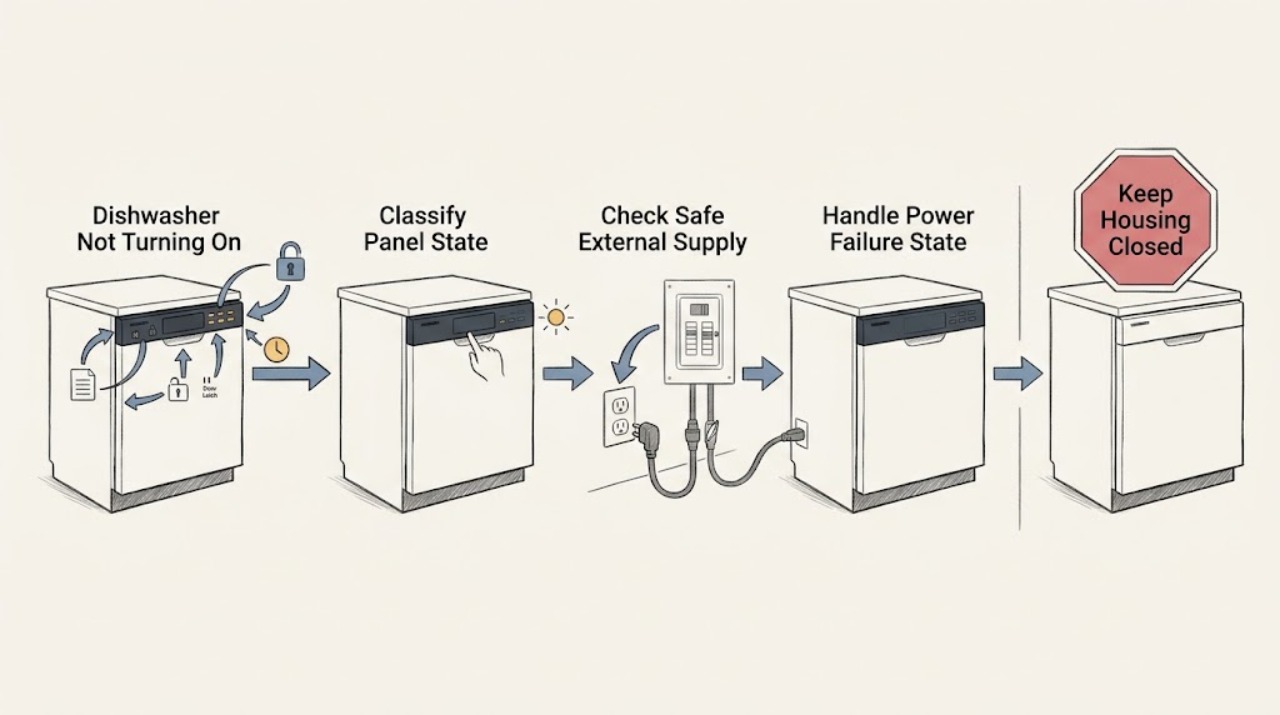
Work through in order
Diagnostic checks
Use only checks that match the exact appliance or system and its official guide.
-
Check 1
Press one normal control once and observe the display, indicator lights, tones, and panel response without opening the appliance or changing wiring. Record whether the panel is completely dark, shows a code or flashing pattern, shows LOC or a lock indicator, or accepts selections.
Expected result: Nothing lights or responds; the panel lights but ignores touches; LOC or a lock icon is present; PF or another code is displayed; or selections are accepted but the cycle does not run.
Next step: Use the matching branch below; capture the exact code and model number before attempting a reset or ordering a control part.
Stop if: Do not pry off the control panel, bridge a key, or reach inside to test whether the machine has power.
Why this matters
Why: A dark panel selects the external power branch. A powered but locked panel selects control-lock guidance. A powered panel with a code or accepted selections is not the same as a complete no-power fault and may belong to a separate not-starting or code-specific path.
-
Check 2
If the panel is blank, check the dishwasher breaker and any safely accessible wall switch or plug from outside the appliance. If there was a recent outage, check whether other equipment on the same circuit also lost power. Do not pull a built-in dishwasher forward or remove an electrical cover to reach its supply.
Expected result: The breaker or switch was off and the panel returns; the accessible receptacle or circuit is dead; the breaker trips again; the cord or plug is damaged; or the dishwasher remains dark while the supply appears normal.
Next step: Restore a tripped device once only if there is no hazard and test the panel. If it remains dark, trips again, or damage is visible, leave the dishwasher isolated and arrange qualified service.
Stop if: Stop for smoke, sparking, a burning smell, heat, water near electrical parts, damaged insulation, or repeated breaker trips; do not keep resetting the circuit.
Why this matters
Why: An interrupted external supply can explain a blank panel. A recurring trip, damaged supply component, or sound supply with no panel response points to a fault requiring electrical or appliance service rather than a wash-cycle setting.
-
Check 3
If the panel returns after an outage and shows PF, a power message, or a blinking START indicator, read the exact model instructions before choosing a cycle. Use START/CANCEL once as the official PF guidance describes, or acknowledge/resume the interrupted cycle only with the model's documented control.
Expected result: PF clears and the panel accepts a new cycle; a power-alert state remains; the display is still blank; or the code returns after power is stable.
Next step: If the panel behaves normally after the documented clear, run one supervised cycle. If PF returns or the panel remains unresponsive, stop and provide service the code and outage history.
Stop if: Do not repeatedly cycle the breaker, bypass a power alert, or open the control or junction-box area.
Why this matters
Why: PF identifies a loss-of-power state, not a diagnosis of a failed pump or motor. A persistent code or blank display after a stable supply shifts the issue toward controls, protection, or wiring.
-
Check 4
If the display is lit but the keys do not respond, look for LOC or the lock indicator and confirm whether the exact model is a plastic-tub or stainless-steel control family. Follow that model's child-lock release instruction; do not hold random combinations or assume every Frigidaire panel uses the same key.
Expected result: The lock indicator or LOC clears and keys respond; the panel is lit with no lock indication but still ignores every key; or a lock state returns immediately.
Next step: After unlocking, select a cycle and continue to the door/start check. If no key responds with the correct model procedure, leave the dishwasher off and arrange control-panel service.
Stop if: Do not remove the console, short keypad contacts, or work on the control while it is energized.
Why this matters
Why: A control lock intentionally prevents selections and starting. Frigidaire documents different release behavior by dishwasher family, while a powered panel that remains unresponsive after the correct unlock path points to a keypad, control, or communication issue.
-
Check 5
If the panel accepts selections but the cycle does not begin, close the door firmly without slamming and verify the latch engages. Check for a displayed delay time or delay indicator, cancel it only with the exact model's START/CANCEL or DELAY procedure, then press START and close the door as instructed.
Expected result: The door was not latched; CL, Close the door, or a lock state appears; a delay countdown is active; the cycle begins after the documented cancel/start sequence; or the panel still accepts selections but the machine remains idle.
Next step: If the cycle starts after latching or canceling delay, monitor the first run. If the door cannot latch, CL persists, or a normal panel remains idle, use the separate not-starting or door-service path.
Stop if: Do not force the door, defeat the latch, bypass a door switch, or reach into a running or unexpectedly starting dishwasher.
Why this matters
Why: This is a powered not-starting condition, not a not-turning-on condition. Frigidaire says the dishwasher will not start unless the door is securely latched and that delayed start prevents an immediate run; the exact button sequence varies by model.
-
Check 6
If lights flash or the dishwasher drains without accepting a cycle, count the pattern and record which indicators flash. Compare the pattern with the exact model's Frigidaire error-code or Owner's Manual guidance; do not guess from a generic code list.
Expected result: The pattern matches a power-failure state, a door-not-closed state, or a possible shorted-keypad state; a different code appears; or the flashing continues after the documented acknowledgment/reset.
Next step: Apply only the exact documented acknowledgment. If the pattern persists, the panel drains unexpectedly, or the code is not identified for the model, leave the dishwasher off and arrange service.
Stop if: Do not bypass a keypad or door interlock, remove the console, or continue a cycle when the dishwasher is flashing with smoke, smell, heat, or leakage.
Why this matters
Why: Flashing lights can identify a door or power state rather than a dead appliance. Frigidaire says a continuing shorted-keypad pattern may require service; other codes are model-dependent and should not be mapped across families.
-
Check 7
After an external supply correction or documented lock/delay/power-state correction, perform one brief supervised test with the door, floor area, and controls dry. Observe whether the panel remains lit, accepts the cycle, latches normally, and starts without a warning.
Expected result: The dishwasher starts normally; the panel goes dark again; the breaker trips; the door or controls remain unresponsive; or a flash/code, smell, leak, or abnormal noise returns.
Next step: Leave a repeat-fault dishwasher disconnected or switched off and arrange Frigidaire or qualified appliance service with the model, panel state, code pattern, and checks already completed.
Stop if: Do not keep cycling power, run with a damaged door or wet control, or perform live electrical tests.
Why this matters
Why: Recovery after an external correction supports a supply or control-state issue. A repeat failure points to the power connection, control, keypad, door interlock, or wiring and cannot be safely isolated by more button presses.
Use your observations
Decision map
Find the observation that best matches what you see, then follow the next safe action.
-
PATH 01Safety boundary
What you see
The display and indicator lights remain completely dark after one normal button press.
Do this next
Check only the safely accessible external supply path once. If supply is sound or trips again, leave the dishwasher off and arrange service.
Why this path and its safety boundary
Why it matters: External supply, breaker, accessible cord/switch, internal protection, control, or wiring is more likely than door latch or delay settings.
Safety stop: Do not move a built-in unit or open an electrical panel to continue diagnosis.
-
PATH 02Safety boundary
What you see
The display or lock indicator is lit, but key presses do not change the selection and LOC or a lock state is shown.
Do this next
Use the exact Frigidaire lock-release procedure for the model. If it remains locked or no key responds, call for control-panel service.
Why this path and its safety boundary
Why it matters: Control lock is more likely than no power. Unlock behavior is model-family dependent.
Safety stop: Do not short the keypad or remove the console.
-
PATH 03Safety boundary
What you see
The panel accepts selections, but the cycle does not begin and a delay, CL, Close the door, or latch symptom is present.
Do this next
Cancel delay and close/latch the door using the exact model sequence. If the door will not latch or the cycle remains idle, use door/not-starting service.
Why this path and its safety boundary
Why it matters: This is a powered not-starting branch. Delay state or door interlock is more likely than a not-turning-on fault.
Safety stop: Do not defeat or force the latch.
-
PATH 04Safety boundary
What you see
The dishwasher recovered after an outage and shows PF, a power alert, or a documented flashing pattern.
Do this next
Acknowledge or clear it only with the model's documented START/CANCEL or button procedure. Escalate if it returns or the panel becomes blank.
Why this path and its safety boundary
Why it matters: The control is reporting a power or state transition, not necessarily a failed wash motor.
Safety stop: Do not repeatedly reset a tripping circuit or ignore smoke, heat, smell, or water.
-
PATH 05Safety boundary
What you see
The external supply is sound but the panel stays dead, a keypad remains unresponsive after the correct unlock path, a flashing fault repeats, or the breaker trips again.
Do this next
Leave the dishwasher off and contact Frigidaire or a qualified appliance technician with the model, installation type, and exact observations.
Why this path and its safety boundary
Why it matters: Internal power connection, protection, control, keypad, door interlock, or wiring service is required; owner settings cannot identify the failed assembly.
Safety stop: Do not operate or perform energized testing.
Helpful context
Understand the symptom
First decide whether the dishwasher is actually without power
A completely dark display is a power-path symptom. A lit display with an unresponsive keypad is more consistent with a control-lock, panel, or control-state problem. A lit panel that accepts selections but does not run belongs to a not-starting path involving the latch, delay, cycle acknowledgment, water, or drain conditions. Do not treat these as interchangeable faults, and do not infer an internal part from a dark panel alone.
Built-in installation changes what you can safely check
Some Frigidaire dishwashers have a reachable power cord while others are installed to a fixed supply or switch. Check only the breaker, wall switch, or plug that is safely accessible without moving the appliance or removing a kickplate or electrical cover. Use the exact model manual for its supply arrangement.
Lock, delay, and outage states can look like a failed control
The control panel may be powered while refusing new selections. Frigidaire documents child/control lock behavior, delayed start, PF after power loss, and flashing patterns that identify a door or keypad state. The labels and button combinations vary by model family, so use those observations to choose the model-specific instruction rather than holding random keys.
Safety boundary
Stop conditions
- Stop using the dishwasher for smoke, sparking, a burning smell, abnormal heat, water near electrical parts, a damaged cord or plug, or repeated breaker/GFCI trips.
- Do not move a built-in dishwasher, remove a kickplate or electrical cover, bridge a keypad or door interlock, or perform live electrical testing.
- Do not force a door, defeat a latch, keep cycling a tripping breaker, or apply a control-lock or delay sequence from another model.
- A blank panel with a sound accessible supply, persistent lock or keypad failure, recurring PF or flashing fault, or any diagnosis requiring internal control, wiring, or latch access requires Frigidaire or qualified appliance service.
When checks do not resolve it
Need a professional?
Arrange Frigidaire or qualified appliance service when the dishwasher remains completely dark with a sound accessible supply, the breaker trips again, a lock or keypad remains unresponsive after the exact model procedure, PF or flashing lights return, the door will not latch, or diagnosis would require moving the appliance, opening electrical covers, or accessing controls, wiring, or the door interlock.
Safety scope: This article covers symptom classification, safe external supply checks, model-specific lock/delay/power-state recognition, door observation, and one supervised test. Internal electrical, keypad, control, wiring, and door-interlock work requires qualified service.
Common questions
FAQ
Why is my Frigidaire dishwasher completely dark?
A completely dark panel is different from a dishwasher that has power but will not start. Check the breaker and any safely accessible plug or wall switch from outside the appliance. If the supply is sound, the breaker trips again, or the dishwasher is hardwired and remains dark, leave it off and arrange service rather than removing electrical covers.
How do I know whether the control lock is on?
Look for a lock indicator or LOC while the display is lit. Frigidaire documents different lock-release behavior for plastic-tub and stainless-steel dishwasher families, so follow the exact model instruction; do not assume a universal button combination.
Can delayed start make a dishwasher seem broken?
Yes. A powered dishwasher may accept the selection but wait for the scheduled time. Frigidaire says Delay Start functionality varies by model; cancel it with the exact model's START/CANCEL or delay procedure, then close the door and start the cycle as directed.
What does PF mean on a Frigidaire dishwasher?
PF indicates loss of power. Frigidaire says START/CANCEL can clear the PF state so a new cycle can be started. If PF returns, the panel goes dark, or the breaker trips, stop resetting and arrange service.
Is a dishwasher that will not start the same as one that will not turn on?
No. If the panel is lit and responds, check the door latch, delay, lock state, and exact error or flashing pattern; that is a powered not-starting diagnosis. If the panel is completely dark, start with the external supply and professional safety boundary on this page.
Read the exact guide
Official sources
- Dishwasher Error Code PF - Loss of PowerFrigidaire · Official Frigidaire error-code article for dishwashers that display PF.
- Dishwashers - Resume the wash after power outageFrigidaire · Official Frigidaire article for dishwasher models with the described power-outage display and resume behavior; panel details vary by model.
- Dishwashers Flashing LightsFrigidaire · Official Frigidaire owner-support article for dishwasher flashing indicators; exact patterns and codes can vary by model.
- Dishwashers: How do I set the child lock feature?Frigidaire · Official Frigidaire article for dishwasher child/control lock behavior; release controls differ between the listed plastic-tub and stainless-steel families.
- Dishwashers - How do I set the delay start feature?Frigidaire · Official Frigidaire owner-support article; Delay Start controls and range vary by model.
- Dishwasher Not StartingFrigidaire · Official Frigidaire owner-support article for dishwashers; controls and installation details remain model-specific.
- What do I do if my dishwasher is showing a message code?Frigidaire · Official Frigidaire message-code article for dishwashers; other messages require the exact Owner's Manual.
Community feedback
Share a repair observation
Share a plain-text repair observation. Accepted observations are published automatically; this page may take a moment to update.