
On this page
Start here
Quick answer
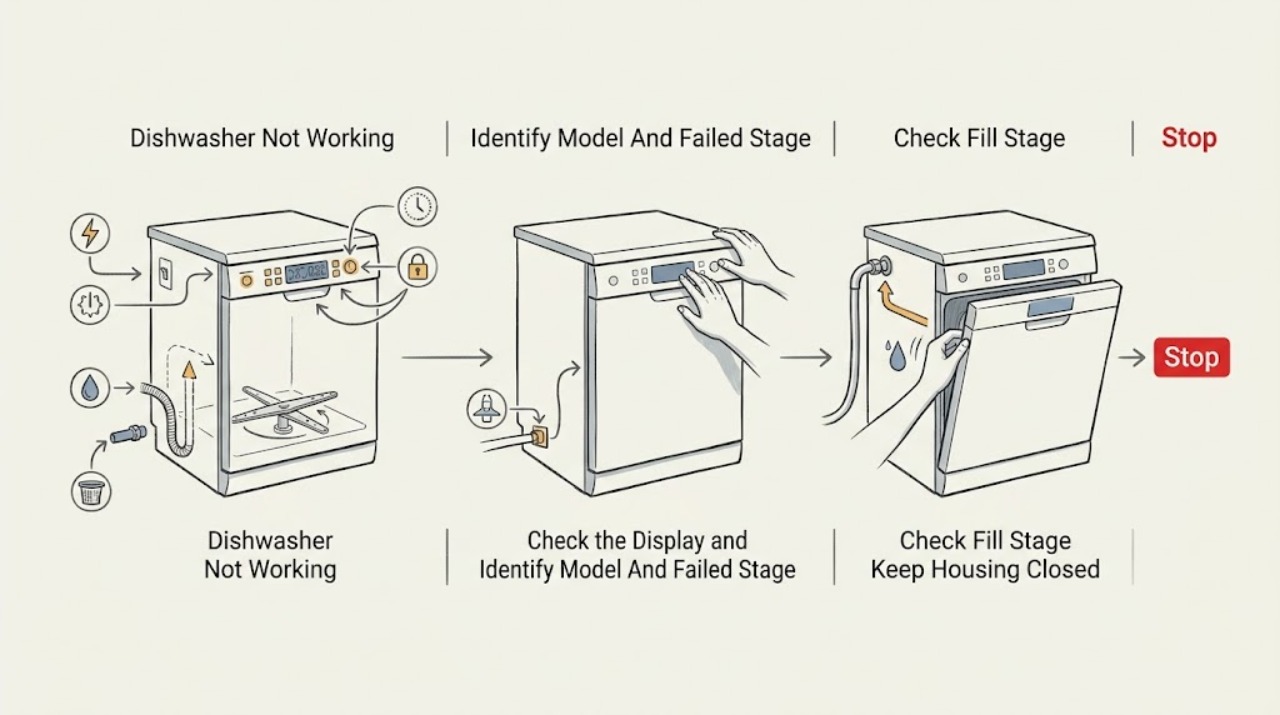
First identify the last stage that definitely worked. If there are no display lights, check the breaker and power connection from a safe, dry position. If the panel lights but Start does nothing, confirm the door is securely latched, Delay Start or Control Lock is not active, Start/Cancel was pressed, and the water supply is on; Frigidaire says a dishwasher will not start unless the door is latched and water is available. If it starts but does not fill, check only the open, unobstructed supply and a non-kinked line. If it stops with water inside, use the model-authorized drain, hose, disposer, air-gap, and filter checks. If it runs but cleans or heats poorly, separate cycle/loading/detergent/filter issues from an internal wash or heating fault. Record any exact flashing pattern or code rather than guessing its meaning. Do not bypass the latch, open the electrical base, perform live testing, or keep resetting a dishwasher that leaks, smells burnt, trips a breaker, or leaves water near electrical parts.
Before you begin
Safety first
- This article covers normal controls, safe power observation, visible door/load checks, accessible water/drain/filter checks, and model-authorized cleaning or option checks. Qualified appliance, electrical, or plumbing personnel must handle the enclosure, latch/switch, inlet valve, pump, heater, sensors, controls, wiring, and pressurized connections.
Work through in order
Diagnostic checks
Use only checks that match the exact appliance or system and its official guide.
-
Check 1
Read the exact model and serial label and write down what “not working” means. Check whether the display or status lights are on, whether the door ever latched, whether the tub filled, whether spray action occurred, whether the machine drained, whether dishes are dirty or only wet/cold, and whether an error code or flashing pattern appeared. Do not start by replacing a part or using a reset sequence from another model.
Expected result: The dishwasher has no power, has power but will not start, starts but does not fill, stops with water, completes a cycle without cleaning/heating, or shows a code/flashing pattern.
Next step: Continue with the action and branch matching the first failed stage. If the model or code cannot be identified, record the panel and arrange model-specific support rather than guessing.
Stop if: Do not remove trim or panels to find the label, enter an undocumented diagnostic mode, or perform a live test.
Why this matters
Why: The last completed stage changes the likely path. No lights points to supply; lights with no start points to latch, lock, delay, water, or drain-state controls; standing water points to drain; poor cleaning points to cycle/load/detergent/filter/spray; poor heating or drying points to selected options, water temperature, rinse aid, or an internal heating fault. A code is model-specific evidence, not a universal part number.
-
Check 2
For a dead panel or a Start button that does nothing, verify from a safe, dry position whether the display lights, whether the cord is connected if it is reachable, and whether the household breaker is open after a recent outage. If the panel is alive, close the door firmly without forcing it, check for a visible rack or dish obstruction, and look for Delay Start, Control Lock, or another normal status. Select the intended cycle and press the model's Start/Cancel control once as described in its guide.
Expected result: The panel is dark, the breaker is open, the door will not latch, Delay Start/Control Lock is active, the cycle was not started, or the panel remains ready but will not respond.
Next step: Correct only a loose accessible connection, a single tripped breaker when there is no hazard, a visible door obstruction, or an exact documented control state. If it remains inactive, leave it off and arrange appliance or electrical service as appropriate.
Stop if: Do not repeatedly reset the breaker, bypass the latch or control lock, remove the console, or test live wiring.
Why this matters
Why: Frigidaire documents power, breaker, door latch, delayed start, and control state as separate reasons a dishwasher may not start. A door that cannot latch or a panel that remains unresponsive after safe supply and normal-control checks needs diagnosis; it does not justify bypassing the latch.
-
Check 3
If a cycle is selected and the dishwasher does not fill, leave the door and controls alone and inspect only the accessible water supply state. Confirm the household/dishwasher valve is open, water is available, and the visible supply line is not pinched, kinked, or restricted. If the dishwasher was recently installed or moved, record that fact and do not pull it forward to reach a hidden connection.
Expected result: The water valve is closed, water is unavailable, the visible line is kinked/restricted, the unit fills normally, or the supply looks normal but the dishwasher still does not fill.
Next step: Restore only an intentionally closed accessible valve or clear a visible routing kink without disconnecting the line. If it still does not fill, stop and arrange service; keep the water off if there is any leak.
Stop if: Do not disconnect a pressurized line, remove the inlet valve, reach behind the machine, or energize the dishwasher to watch a suspected leak.
Why this matters
Why: Frigidaire lists an unavailable supply, a blocked valve area, or a pinched/restricted supply line as fill checks. A normal accessible supply with no fill can involve a concealed inlet path, float, valve, control, or door state; the external symptom cannot choose one.
-
Check 4
If the dishwasher stops with water inside or leaves water after a cycle, check only the visible drain path and the model-authorized accessible filter/glass trap. Look for a high loop and kink-free drain hose, a recently installed disposer whose dishwasher knock-out plug may still be present, a dirty sink air gap if fitted, and food debris in the filter or glass trap. If the model guide authorizes it, clear and rinse the filter and replace it correctly. Do not open the pump or base.
Expected result: The drain hose is kinked or displaced, the disposer is new, the air gap is dirty, the filter/glass trap is clogged, the dishwasher stopped mid-cycle with flashing lights, or the visible path is clear.
Next step: Correct only visible hose routing or model-authorized filter/air-gap maintenance. A model guide may authorize holding Cancel to clear a cycle, but use that sequence only when there is no active leak or electrical hazard. If draining or starting still fails, arrange service.
Stop if: Do not use drain chemicals, disconnect a drain hose, reach into the pump area, or run repeated cycles with standing water or a leak.
Why this matters
Why: Frigidaire links poor draining and some mid-cycle stops to hose routing, disposer knock-out plugs, clogged filters/glass traps, and model-specific flashing indicators. A clear visible path with water still trapped does not identify the drain pump, sensor, or internal hose.
-
Check 5
If the cycle runs but dishes remain dirty, identify the selected cycle and inspect the loading, detergent dispenser, filter, glass trap, and spray arms only when the machine is off and safe. A Rinse cycle is not a cleaning cycle, and Quick/30 Minute cycles may be inadequate for heavily soiled loads. Make sure dishes do not block the dispenser or spray-arm movement, use the model-recommended detergent amount, and clear authorized filter or spray-arm debris.
Expected result: Rinse or a short cycle was selected, dishes block a spray arm or dispenser, detergent remains in the dispenser, the filter/glass trap/spray arms are dirty, or the load and consumables are correct but cleaning remains poor.
Next step: Use a suitable model-authorized cycle and loading pattern, correct only visible obstructions, clean accessible components as directed, and make one normal cycle check after the machine is dry and safe. Escalate persistent poor cleaning.
Stop if: Do not reach into moving spray arms, remove the wash pump, add excess detergent, or use chemicals not authorized by the model guide.
Why this matters
Why: Frigidaire identifies cycle selection, loading, detergent amount/dispenser access, and debris in the filter, glass trap, or spray arms as cleaning-performance factors. If those checks are normal, poor wash action may require internal pump, spray, sensor, or control diagnosis; the visible symptom does not identify a part.
-
Check 6
If the dishwasher completes washing but dishes are cold, wet, or poorly dried, distinguish normal load/option behavior from a no-heat symptom. Check the selected cycle and whether Air Dry or a short cycle was chosen, place bowls and other concave items to drain, confirm the rinse-aid reservoir and setting only as the model manual permits, and check that the home's hot-water setup meets the model guidance. Do not touch a heater or open the base.
Expected result: Only plastics or concave items are wet, Air Dry or Quick/30 Minute was selected, rinse aid is absent, hot water was not available at the start, or all loads remain cold/wet despite a heat option.
Next step: Correct only the documented cycle, loading, rinse-aid, or household hot-water condition, then observe one complete cycle. If the unit never heats, shows an error, smells burnt, or trips a breaker, stop using it and arrange qualified service.
Stop if: Do not touch the heating element, open wiring covers, test voltage, or keep running a dishwasher with a burning odor or electrical symptom.
Why this matters
Why: Frigidaire says plastics, wooden and concave items may retain water; Air Dry relies on air rather than heat; selected models have additional forced-air cycles; rinse aid helps water sheet off; and the manufacturer recommends 120°F minimum water-heater temperature. Persistent cold/wet results across suitable cycles may involve an internal heater, sensor, fan, or control and needs service.
-
Check 7
If lights flash, an error code appears, the machine stops mid-cycle, or the stage remains unexplained, record the exact model, code or light sequence, which stage failed, water level, door state, recent installation or outage, and any leak/odor/noise. Use the model's official Error Code Guide or owner manual for that exact display; do not decode an unknown pattern from another Frigidaire series.
Expected result: The display identifies a documented condition such as a drain/fill path, the pattern is not documented for the exact model, or the dishwasher repeatedly stops after the external checks.
Next step: Follow only the exact model's safe owner procedure. Otherwise leave the dishwasher off if it is wet, leaking, electrically abnormal, or repeatedly failing, and provide the recorded pattern to Frigidaire service or a qualified technician.
Stop if: Do not clear a recurring fault by repeated resets, bypass a lock, open the control area, or order a part based only on a code or blinking light.
Why this matters
Why: Frigidaire directs owners to the Error Code Guide for flashing lights or codes, while its start and drain pages show that a code may reflect the stage that failed rather than a directly replaceable component. An undocumented or recurring pattern requires service diagnosis.
Use your observations
Decision map
Find the observation that best matches what you see, then follow the next safe action.
-
PATH 01Safety boundary
What you see
The display and status lights are dark and the dishwasher is silent.
Do this next
From a safe dry position check the accessible connection and household breaker once. If the breaker trips again, the cord/receptacle is hot or damaged, or the panel remains dead, leave the dishwasher off and arrange electrical or appliance service.
Why this path and its safety boundary
Why it matters: Frigidaire's start guidance points first to the power cord and breaker after checking for display power. This is a supply path until a safe supply is confirmed; it is not evidence that the control board or latch should be replaced.
Safety stop: Do not repeatedly reset the breaker, remove the junction cover, or test live wiring.
-
PATH 02Safety boundary
What you see
The panel lights, but the dishwasher will not begin a cycle.
Do this next
Close the door without forcing it, check visible load obstruction and normal control state, select a cycle, press the exact Start/Cancel control once, and verify the water supply. If it still will not start, follow the model's code guide or arrange service.
Why this path and its safety boundary
Why it matters: A door that is not securely latched, Delay Start, Control Lock, a missed Start/Cancel command, missing water, or a drain-state issue is more likely than a generic motor failure. Frigidaire documents these as separate start checks.
Safety stop: Do not tape, hold, or bypass the latch and do not use a guessed diagnostic sequence.
-
PATH 03Safety boundary
What you see
The cycle is accepted but no water enters the tub.
Do this next
Check only the accessible valve and visible line routing. Leave the appliance off if there is a leak; otherwise arrange service if it still does not fill.
Why this path and its safety boundary
Why it matters: A closed or unavailable water supply, blocked valve area, or pinched/restricted line is documented. If the visible supply is normal, an inlet valve, float, control, or door-related fault remains possible but cannot be identified safely externally.
Safety stop: Do not disconnect the supply, reach behind the unit, or test an inlet valve while energized or pressurized.
-
PATH 04Safety boundary
What you see
The dishwasher stops with water inside, leaves standing water, or shows a flashing pattern after a drain-stage failure.
Do this next
Use the model-authorized filter and visible drain-path checks. Only a dry, non-leaking machine should receive the exact guide's single reset/drain procedure; contact service if the problem recurs.
Why this path and its safety boundary
Why it matters: Hose high-loop/kink, disposer knock-out plug, air gap, filter/glass trap, or a model-specific drain-state issue is more likely than a wash-stage failure. A clear visible path does not identify an internal pump or sensor.
Safety stop: Do not use drain chemicals, open the pump area, or run repeated cycles with standing water or an active leak.
-
PATH 05Safety boundary
What you see
A full cycle runs, but dishes are still dirty or the dispenser retains detergent.
Do this next
Use an appropriate cycle, correct visible loading and dispenser obstruction, use the model-recommended detergent amount, and clean accessible filters/spray arms. Arrange service if wash action remains poor.
Why this path and its safety boundary
Why it matters: Cycle choice, load placement, detergent amount/dispenser obstruction, filter/glass trap, or spray-arm debris are documented first-line causes. Persistent poor wash after those checks needs internal wash-system diagnosis rather than a guessed part.
Safety stop: Do not reach into moving parts, remove a pump, or add excess detergent or unapproved chemicals.
-
PATH 06Safety boundary
What you see
The cycle washes but does not heat/dry normally, or an error code/flashing pattern appears.
Do this next
Check the exact option and manual-authorized settings, record the code/pattern and failed stage, and stop for any odor, heat, trip, or water hazard. Arrange qualified appliance service for internal heating, fan, sensor, or control diagnosis.
Why this path and its safety boundary
Why it matters: Air Dry, short cycles, load shape, rinse aid, water temperature, and model-specific options can explain some wet dishes; an exact code may point to a stage but does not automatically name a part. Persistent cold/wet results or an undocumented pattern requires service.
Safety stop: Do not touch the heater, test voltage, open wiring covers, or repeatedly reset the code.
-
PATH 07Safety boundary
What you see
The dishwasher leaks, has water near electrical parts, smells burnt, smokes, sparks, overheats, damages the cord, or trips the breaker repeatedly.
Do this next
Stop the cycle if the dry controls are safe, close the accessible water shutoff, and isolate power only from a safe dry position. Arrange qualified electrical/appliance service and do not restart it.
Why this path and its safety boundary
Why it matters: This is a stop-use condition. The stage diagnosis is no longer the priority; continuing a cycle can worsen water, fire, or electrical damage.
Safety stop: Do not touch wet electrical areas, repeatedly reset, remove panels, or perform live testing.
Helpful context
Understand the symptom
“Not working” is a stage, not a diagnosis
A silent panel, a panel that will not start, a dishwasher that fills but stops, standing water after a cycle, dirty dishes, and cold or wet dishes are different failure paths. Start by recording the exact model and the last stage that completed: power, start/latch, fill, wash, drain, or heat/dry. Frigidaire's support pages provide separate checks for each path, and model-specific controls and error displays still take priority over a generic button sequence.
Safe boundary before any check
Keep user checks to the display, normal buttons, door closure, accessible water shutoff, visible hose routing, accessible filter/glass trap and spray arms, loading, and detergent. If the dishwasher is leaking, stop the cycle and close the accessible water shutoff; if water is near electrical parts, do not touch the wet area and isolate power only from a safe, dry position. Do not bypass or hold the door latch, remove the toe-kick or junction cover, probe energized wiring, work on a pressurized connection, or reach into a running spray or heating system. Stop for smoke, sparks, burning odor, abnormal heat, a damaged cord, repeated breaker trips, or continuing water and arrange qualified service.
Safety boundary
Stop conditions
- Stop and close the accessible water shutoff for an active leak; isolate power only from a safe dry position when water reaches electrical parts.
- Stop for smoke, sparks, burning odor, abnormal heat, a damaged cord/outlet, or repeated breaker trips.
- Do not bypass the door latch, Control Lock, or other interlock, and do not remove toe-kicks, panels, pumps, valves, heaters, or wiring covers.
- Do not perform live electrical or pressurized-water testing, use drain chemicals, or reach into moving spray/heating parts.
- Do not keep resetting an unexplained code or order a latch, pump, valve, heater, sensor, control, hose, or other part without the exact model and diagnosis.
When checks do not resolve it
Need a professional?
Safety scope: This article covers normal controls, safe power observation, visible door/load checks, accessible water/drain/filter checks, and model-authorized cleaning or option checks. Qualified appliance, electrical, or plumbing personnel must handle the enclosure, latch/switch, inlet valve, pump, heater, sensors, controls, wiring, and pressurized connections.
Common questions
FAQ
Why does my Frigidaire dishwasher have power but not start?
Check that the door is securely latched, Delay Start or Control Lock is not active, the intended cycle was selected, Start/Cancel was pressed as the model requires, and the water supply is on. Frigidaire says the unit will not start without a secure latch or running water. If it still will not start, record any flashing lights or code and use the exact model guide; do not bypass the latch.
What should I check when my Frigidaire dishwasher does not fill?
Check only that the accessible water valve is open, water is available, and the visible supply line is not pinched or restricted. A normal supply with no fill can require internal diagnosis. Do not disconnect the line or remove an inlet valve yourself.
Why does my Frigidaire dishwasher stop with water inside?
Look for a kinked or displaced drain hose, a missing high loop, a new disposer knock-out plug, a dirty air gap, or a clogged filter/glass trap. Frigidaire says some models flash indicators when a drain problem stops a cycle. Use only the model-authorized filter and reset procedure, and do not run repeated cycles with standing water or a leak.
My Frigidaire dishwasher runs but does not clean. Is it broken?
Not necessarily. Check the selected cycle, loading, detergent amount and dispenser access, filter, glass trap, and spray arms. Frigidaire notes that Rinse and short cycles may not clean heavily soiled dishes. Persistent poor cleaning after those checks needs service rather than a guessed pump or motor part.
Why are my dishes cold or wet after a Frigidaire cycle?
Check whether Air Dry or a short cycle was selected, whether concave items were loaded to drain, whether rinse aid is available, and whether the household hot-water setting meets the model guidance. Frigidaire says some drying options and item shapes normally leave water. If all suitable cycles remain cold/wet, or there is an odor or electrical symptom, stop and arrange service rather than touching the heater.
What should I do if my Frigidaire dishwasher shows an error code?
Record the exact code or flashing sequence, the model number, and the stage that failed. Frigidaire's start guidance directs owners to the Dishwasher Error Code Guide, while its drain guidance shows that some flashing indicators accompany a drain-stage failure. Use only the exact model's documented procedure; an unknown code is not a universal part number.
When should I stop using my Frigidaire dishwasher?
Stop for an active leak, water near electrical parts, smoke, sparks, burning odor, abnormal heat, a damaged cord, or a breaker that trips again. Close the accessible water shutoff and isolate power only from a safe dry position when necessary. Do not remove panels or keep resetting the machine.
Read the exact guide
Official sources
- Dishwasher - Not FillingFrigidaire Owner Support · Official dishwasher support article; it supports safe external supply checks and does not authorize inlet-valve or internal work.
- Dishwasher - Dispenser and Detergents GuideFrigidaire Owner Support · Official dishwasher detergent guidance; amount varies with water hardness and the exact model.
- Dishwasher Not StartingFrigidaire Owner Support · Official Frigidaire support article marked as applying to dishwashers; exact controls and code meanings remain model-specific.
- Dishwasher - Not DryingFrigidaire Owner Support · Official dishwasher drying guidance; Heat Dry, Air Dry, Sahara Dry, and PowerPlus Dry are model-dependent options.
- Dishwashers - Not DrainingFrigidaire Owner Support · Official dishwasher drain support article; reset timing and component access remain model-dependent and should be used only when safe.
- Dishwasher Glass Trap and Filter GuideFrigidaire Owner Support · Official dishwasher filter-care article; the exact removable design and owner access are model-dependent.
- Dishwasher - Water LeakingFrigidaire Owner Support · Official dishwasher leak article; it supports distinguishing installation, door, supply, filter, detergent, and rinse-aid paths.
- Delivery and Installation Guide - DishwasherFrigidaire Owner Support · Official delivery/installation guidance; it provides connection context and does not authorize energized or pressurized repair.
- Product Support: Frigidaire Gallery 24'' Built-In Dishwasher with Dual OrbitClean Wash System — FGID2468UFFrigidaire Canada · Official product-support page for the specific FGID2468UF model, used only to show why exact-model manuals and features matter.
- Dishwasher - Not CleaningFrigidaire Owner Support · Official dishwasher cleaning guidance; cycle options and loading details vary by model.
Community feedback
Share a repair observation
Share a plain-text repair observation. Accepted observations are published automatically; this page may take a moment to update.