
On this page
Start here
Quick answer
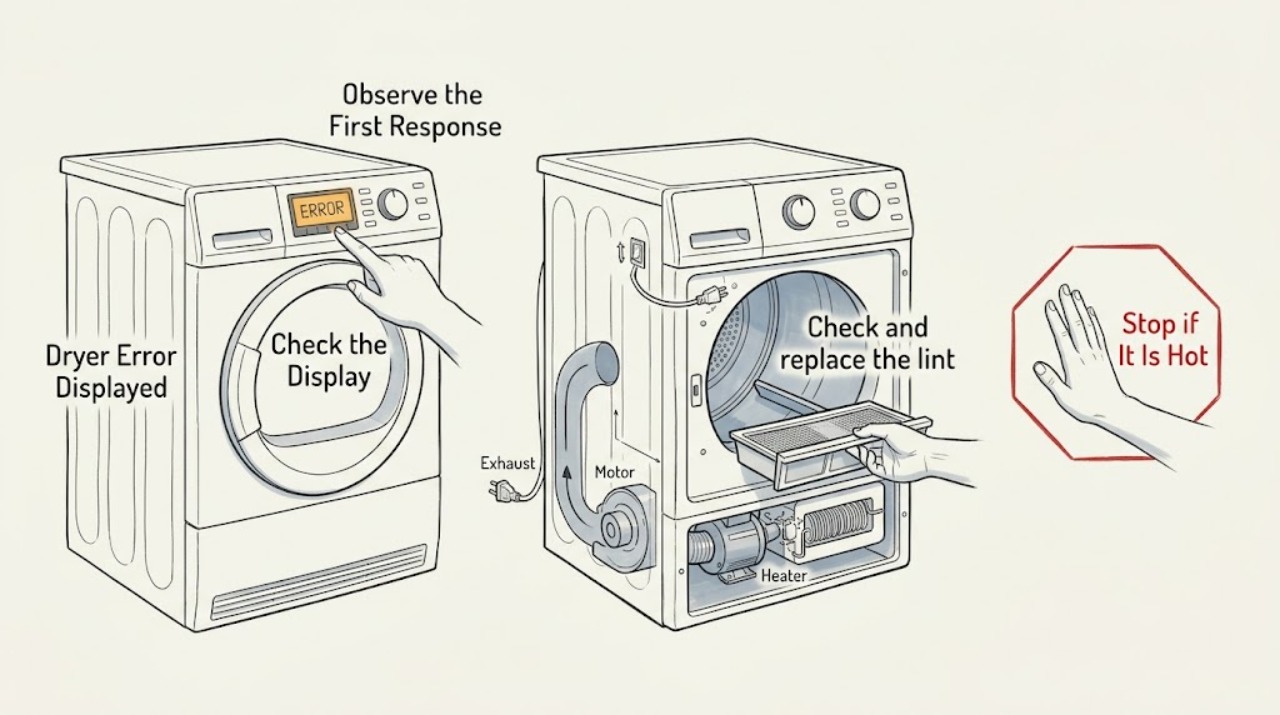
Record the exact Frigidaire dryer message or code, its flashing pattern, the model number, and what the dryer was doing before it appeared. Frigidaire's alarms-and-codes page applies to dryers but does not make one generic code list safe for every model, so use the manual matched to your model. Only try low-risk external checks: close the door, confirm the cycle and Start control, check the plug and accessible breaker, and clean and replace the lint screen. If the message points to airflow, stop using the dryer until the lint screen and exhaust path are clear. If the motor may have overheated, allow it to cool and reduce the load; if the message returns, the dryer will not start, the thermal limiter has operated, or there is a burning smell, smoke, damaged cable, shock, gas odor, or repeated breaker trip, stop and arrange qualified service.
Work through in order
Diagnostic checks
Use only checks that match the exact appliance or system and its official guide.
-
Capture the exact display and model identity
Leave the dryer stopped and record the exact letters, numbers, dashes, or flashing pattern, the selected cycle, and whether the drum was turning or heating. Photograph the display and the model label. Use the Frigidaire support page to locate the manual or dryer support for that model rather than relying on a code list from another model.
Expected result: The message and model are clear, the display is only a reminder or light pattern, or the model or code is missing.
Next step: Read the exact model's alarms, display, or troubleshooting section. If the model or code cannot be identified, keep the dryer off and contact Frigidaire support or a qualified servicer with the photograph.
Why this matters
Why: A clear model and code can be matched to the correct procedure. An unidentified code cannot safely establish a failed part or authorize a reset sequence.
-
Check the door, cycle, Start control, and accessible power
Confirm the dryer door is fully closed, the cycle selector is at a valid start position, and press or hold the Start control only as the model instructions require. From a dry position, check that the power plug is firmly seated and that the accessible household breaker or fuse is on. Do not use an extension cord or repeatedly reset a breaker that trips.
Expected result: The door was open, the selector was between cycles, Start was not engaged, the plug was loose, the breaker is off, or all of these conditions are normal but the message remains.
Next step: Correct one accessible condition and try one manual-approved start. If the breaker trips, the cable is damaged, or the dryer still displays the message, leave it off and arrange qualified service or electrician support.
Why this matters
Why: A door or control position can prevent a cycle from starting and may produce an alert without an internal failure. A dead or repeatedly tripping circuit is an electrical problem; normal external conditions with a persistent alert require model-specific diagnosis.
-
Check and replace the lint screen safely
With the dryer off and cool, remove the lint screen and inspect it for a heavy coating or damage. Clean it using the model instructions, dry it completely, and reinstall it before operating. Inspect only the visible exhaust outlet and accessible duct for crushing or blockage; do not dismantle the cabinet or reach into the blower path.
Expected result: The screen is coated or damaged, the visible exhaust path is restricted, the screen is clean and correctly installed, or an airflow-related alert returns.
Next step: Restore the clean, dry screen and clear only an accessible obstruction. If the duct remains restricted, have the exhaust path cleaned by a qualified provider; if the code returns, stop the dryer and arrange service.
Why this matters
Why: Frigidaire states that lint buildup can restrict airflow and hinder performance, and the dryer should not be operated without its lint screen. A recurring airflow alert can indicate a restricted duct or an internal issue beyond a screen cleaning.
-
Separate a normal indicator from a heating or ventilation fault
Compare the displayed text with the exact manual. If it is a lint reminder, clean the screen as directed. If the message is associated with no heat, long drying, or a vent warning, stop the test if the dryer is hot, check the cycle and temperature setting, and inspect the visible exhaust outlet without operating a gas dryer without its outdoor duct.
Expected result: The message is a documented reminder, the cycle or temperature setting explains the behavior, airflow is visibly restricted, or the alert persists with a clear screen, correct setting, and unobstructed outlet.
Next step: Clear only the documented reminder or accessible airflow issue and run one manual-approved cycle. If the alert persists, the dryer overheats, or heat and airflow are abnormal, stop using it and request qualified service.
Why this matters
Why: Some lights or reminders are normal operating feedback, while persistent heat or ventilation alerts can indicate restricted airflow, a heater or sensor issue, or an unsafe installation. A clean screen does not prove that the full duct or an internal component is sound.
-
Allow an overheated motor to cool before escalating
If the dryer stopped after a large load and the exact Frigidaire guidance identifies an overheated motor, leave it off for the stated cooling period and reduce the load before one retest. Do not open the cabinet, touch the motor or heater, bypass a thermal limiter, or continue cycling the dryer while it is hot.
Expected result: The dryer restarts after cooling and a smaller load, or it remains stopped, displays the same message, smells hot, or stops again.
Next step: If it restarts normally, monitor one cycle without overloading. If the message returns, the dryer stops again, or a thermal limiter is suspected, stop using it and arrange authorized service.
Why this matters
Why: Frigidaire identifies motor overheating and overloading as possible causes of a dryer that stops operating. A thermal limiter or recurring stop is a service condition, not a user-replaceable conclusion from the display alone.
-
Stop immediately for a safety hazard or recurring code
Stop the dryer for smoke, burning odor, gas odor, shock, water near electrical parts, a hot or damaged cable, visible arcing, or a breaker that trips again. If there is no immediate hazard but the code returns after the manual-approved external checks, leave the dryer off and record the code and conditions for service.
Expected result: An immediate hazard is present, or the alert persists without an immediate hazard after the permitted external checks.
Next step: Isolate power or gas only from a safe position, keep clear, ventilate and leave the area for a gas odor, and contact the appropriate emergency or qualified service provider. Do not reset the dryer repeatedly or remove its covers.
Why this matters
Why: A hazard can involve mains power, gas combustion, heat, moving parts, or a damaged control. A recurring display indicates that the underlying condition was not corrected by a safe user check.
Use your observations
Decision map
Find the observation that best matches what you see, then follow the next safe action.
-
PATH 01Next step
What you see
The display is a documented lint reminder and the screen is dirty but intact.
Do this next
Clean, dry, and reinstall the lint screen. If the reminder persists or airflow is restricted, stop and have the exhaust path or dryer checked.
-
PATH 02Next step
What you see
The door is open, the cycle selector is not positioned correctly, Start was not engaged, or the plug or accessible breaker is the cause.
Do this next
Correct one safe external condition and try one manual-approved start. If the message returns, arrange service rather than repeatedly resetting the circuit.
-
PATH 03Safety boundary
What you see
The exact manual associates the message with airflow, no heat, or extended drying and the visible lint screen or exhaust path is restricted.
Do this next
Stop operation until the lint screen and exhaust path are safely cleared. Have a qualified provider clean or inspect any inaccessible duct or internal fault.
Why this path and its safety boundary
Safety stop: True
-
PATH 04Next step
What you see
The dryer stopped after a large load and the manual identifies motor overheating, but there is no smoke, gas odor, or electrical hazard.
Do this next
Allow the stated cool-down period, reduce the load, and try one test. If it stops again or the alert returns, arrange service for the motor or thermal protection.
-
PATH 05Safety boundary
What you see
The code is unlisted for the model, returns after the safe external checks, or there is smoke, burning odor, gas odor, shock, water near electrical parts, a damaged cable, arcing, or repeated breaker trips.
Do this next
Stop using the dryer. Isolate power or gas only if safe, leave the area for a gas odor, and arrange appropriate qualified or emergency service. Do not bypass safety devices or open the cabinet.
Why this path and its safety boundary
Safety stop: True
Helpful context
Understand the symptom
A displayed message is not automatically a failed part
Write down every character and photograph the display before turning the dryer off. The same-looking alert can have different meanings across model families, and some indicators are reminders rather than faults. Keep the complete model number with the image so the correct owner documentation can be selected.
Start with the checks Frigidaire exposes to the user
A dryer may display an alert because the door is not fully closed, the Start control was not held as the controls require, a cycle selector is between positions, or power is interrupted. The lint screen and exhaust path also affect safe airflow. Work only from a dry, stationary position and do not open the cabinet.
Stop for heat, gas, electrical, or water hazards
Do not continue a test cycle for smoke, a burning smell, a hot or damaged cable, shock, water near electrical parts, a gas odor, or a breaker that trips again. Never operate a gas dryer without its outdoor exhaust duct. Those symptoms require a qualified technician or, for an immediate gas or fire hazard, the appropriate emergency response.
When checks do not resolve it
Need a professional?
A technician is required for recurring or unknown displays, internal heating, motor, sensor, control, thermal-protection, or airflow faults, and for any electrical, gas, or water hazard.
Common questions
FAQ
Can I use a generic Frigidaire dryer error-code list?
Use the manual matched to the complete model instead. Record the exact display and flashing pattern first, because a code or indicator may differ across model families.
Why is my Frigidaire dryer showing a lint or clean-filter message?
Some Frigidaire dryer indicators are reminders. Clean and dry the lint screen and reinstall it; if airflow remains restricted or the message returns with poor drying, stop and have the exhaust path or dryer checked.
What should I check if the error prevents my Frigidaire dryer from starting?
Check the closed door, valid cycle position, Start control, firmly seated plug, and accessible breaker without using an extension cord or repeatedly resetting a tripping circuit. If the display remains, use the model manual and arrange service if it returns.
When should I stop using a Frigidaire dryer with an error displayed?
Stop for smoke, burning or gas odor, shock, water near electrical parts, a hot or damaged cable, visible arcing, repeated breaker trips, recurring overheating, or an error that returns after the manual-approved external checks. Arrange qualified service and do not bypass safety devices.
Read the exact guide
Official sources
- Support for DryersFrigidaire · Finding dryer display, alarms, manuals, starting, operating, heating, and lint-care support by model or topic
- Owner Center Resource LibraryFrigidaire · Escalating model-specific dryer error displays to Frigidaire manuals or service support
- How To Use Your Dryer: Alarms & CodesFrigidaire · Using the model-specific manual and Frigidaire support path when a dryer displays an alarm or code
- My dryer is running, but does not seem to be heating. What should I do?Frigidaire · Cycle and temperature settings, electrical or gas model boundaries, ventilation, and safe escalation when a display accompanies a heating or airflow symptom
- What should I do if my dryer stops operating?Frigidaire · Allowing a possibly overheated motor to cool, reducing load size, and escalating thermal-limiter or recurring stop conditions
- Why does my Frigidaire Laundry Center beep or have blinking lights?Frigidaire · Distinguishing a documented door, close-door, or clean-lint indicator from an unlisted dryer fault; used cautiously because the page applies to Laundry Centers
- What should I do if my dryer does not start?Frigidaire · Door, cycle selector, Start control, plug, extension-cord, fuse, and breaker checks when a displayed message prevents starting
- Dryers - How often do I need to clean my dryer or the lint screen/filter to optimize my drying performance?Frigidaire · Cleaning and drying the lint screen and recognizing restricted airflow as a possible reason for dryer alerts or poor performance
Community feedback
Share a repair observation
Share a plain-text repair observation. Accepted observations are published automatically; this page may take a moment to update.