
On this page
Start here
Quick answer
If a Frigidaire freezer is not starting, first confirm that its control is ON and that the outlet is supplying power. Check for interior or control lights, inspect the plug without using an extension cord, and check the matching breaker or GFCI. If the freezer has power and the control is ON but the compressor and fans never start, stop at those user-level checks and arrange appliance service; if it does run but stays warm, allow up to 24 hours after a power interruption or installation for temperatures to stabilize.
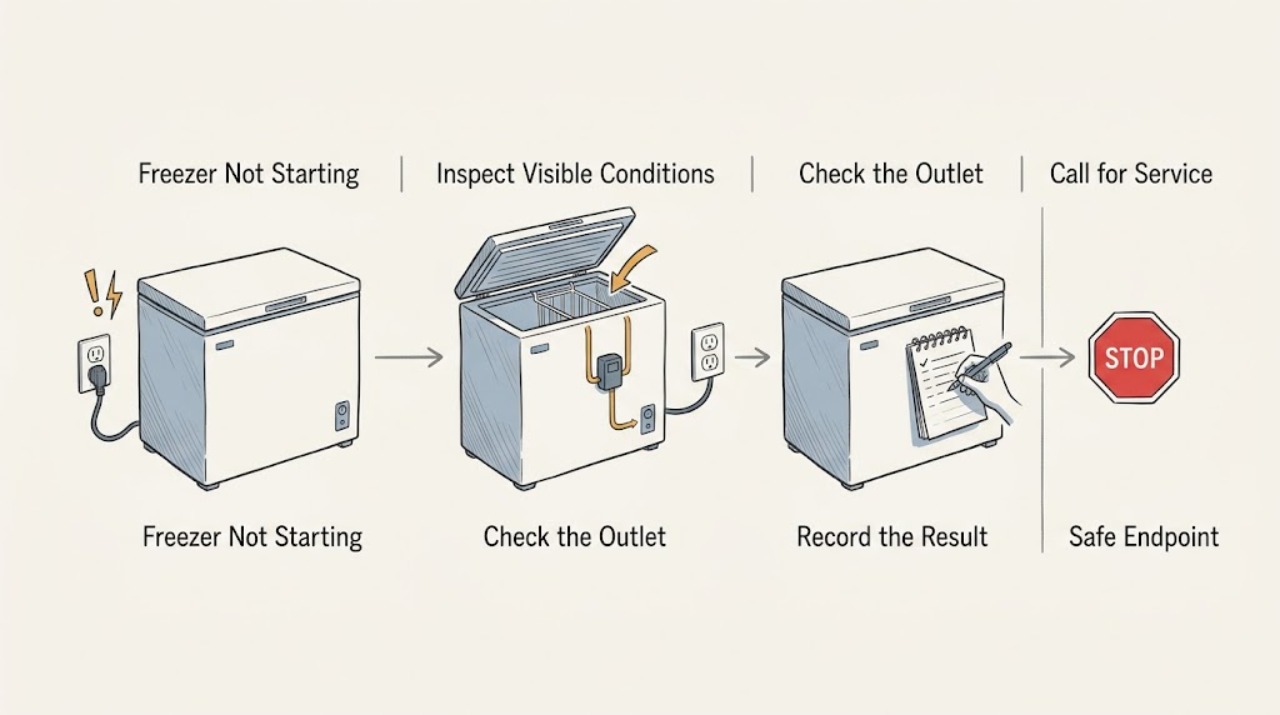
Work through in order
Diagnostic checks
Use only checks that match the exact appliance or system and its official guide.
-
Check 1
Look for an interior light, control display, alarm, or other indicator while the freezer is connected to the wall outlet. If the model has a light, make sure the door or lid switch is being engaged normally rather than holding the switch open.
Expected result: No light or indicator suggests that power is not reaching the freezer; a light or display means at least part of the unit is receiving power.
Next step: If there is no indication of power, continue with the outlet and breaker check. If indicators are present, continue with the control and sound checks.
Why this matters
Why: A completely dark freezer points first to the outlet, cord, breaker, GFCI, or an outage. Power at the controls moves the diagnosis toward the ON setting or the start and control circuit.
-
Check 2
Verify that the freezer control knob or electronic control is set to ON and not OFF. Confirm that the plug is seated firmly in the wall outlet and that no extension cord is being used.
Expected result: The control is ON and the plug is secure, or the control is OFF, the plug is loose, or an extension cord is present.
Next step: Correct the setting or connection, then allow the freezer a short period to begin its cycle. If it remains silent with confirmed power and an ON setting, use the service boundary rather than opening the cabinet.
Why this matters
Why: An OFF setting or incomplete connection can prevent the freezer from running without a failed component. An extension cord is not an appropriate substitute for the required wall connection.
-
Check 3
Check the household electrical panel for the freezer circuit and check whether a nearby GFCI receptacle has tripped. Reset a tripped breaker or GFCI once, then observe whether the freezer indicators return and whether the breaker holds.
Expected result: The breaker or GFCI resets and stays on, or it trips again immediately / will not reset.
Next step: If it trips again, stop resetting it and arrange qualified electrical or appliance service. If it holds but the freezer still has no response, have the outlet and appliance power path tested professionally.
Why this matters
Why: A stable reset can explain a no-start condition after an interruption. A repeat trip indicates an electrical fault or overload that should not be chased by repeated resets.
-
Check 4
With the control ON and the door or lid closed, listen briefly for a compressor hum, fan movement, or refrigerant gurgling after power is restored. Keep the door closed while you observe and do not repeatedly cycle the plug.
Expected result: A hum, fan, or gurgling sound is present, or the freezer remains completely silent despite lights and a confirmed ON setting.
Next step: For a running but warm freezer, check airflow and temperature conditions and allow stabilization time. For a powered, ON, silent freezer, stop user troubleshooting and request appliance service.
Why this matters
Why: Those sounds indicate that the freezer is attempting to cool, while lights plus complete silence make a control, start device, compressor, or related circuit problem more likely.
-
Check 5
If the freezer is running but not becoming cold, check that food is not blocking the interior vents, the door or lid closes fully, and the gasket is clean and sealing. Note whether there is heavy frost restricting airflow.
Expected result: Airflow is blocked, the seal leaks, or heavy frost is present; alternatively, the vents are clear and the door seals normally.
Next step: After correcting an accessible obstruction or seal issue, keep the door closed and allow temperature recovery. If it remains warm after 24 hours, arrange service.
Why this matters
Why: Blocked airflow, a poor seal, or excessive frost can make a running freezer appear not to start cooling effectively. Clear only accessible food obstructions and clean the gasket; persistent frost or a normal airflow path requires a deeper diagnosis.
Use your observations
Decision map
Find the observation that best matches what you see, then follow the next safe action.
-
PATH 01Next step
What you see
There are no lights, display, or other signs of power.
Do this next
Restore a stable household supply if the reset is safe and holds. If the outlet is dead or a breaker trips again, stop and use qualified service.
-
PATH 02Next step
What you see
Lights or controls work, but the setting is OFF.
Do this next
Set the control to ON and monitor for a normal start. If it stays silent, do not remove panels; arrange appliance service.
-
PATH 03Next step
What you see
The freezer has power, is ON, and makes compressor or fan sounds.
Do this next
Check accessible airflow, door or lid closure, and the gasket. After installation or a power interruption, allow up to 24 hours for stabilization; if still warm, schedule service.
-
PATH 04Next step
What you see
The freezer has power and is ON but remains silent, or household power protection trips again.
Do this next
Stop troubleshooting, avoid repeated breaker resets, and request qualified appliance or electrical service.
Helpful context
Understand the symptom
“Not starting” can mean two different things: the freezer is completely dead, or it has lights but the cooling system does not begin. Start with the power path and the control setting. Do not remove panels or probe live wiring as a household test.
A freezer that has just been reconnected may need time to stabilize. If you hear the compressor or fans, the unit is attempting to cool; that is a different branch from a freezer that has power but remains silent.
Only after diagnosis
Potential parts
- freezer control or start component
Only consider a replacement after testing confirms that the freezer has correct power, the control is ON, and the component is preventing the compressor from starting.
Confirm the complete freezer model and the manufacturer's fit information before ordering any component.
When checks do not resolve it
Need a professional?
Request appliance service for a powered freezer that will not start, or for a unit that runs but does not cool after the stabilization period.
Have this ready
- Provide the model number, whether lights or controls work, whether the breaker or GFCI trips, and whether any compressor or fan sound is present.
Common questions
FAQ
Why is my Frigidaire freezer completely silent?
First check for lights or controls, the ON setting, the plug, and the matching breaker or GFCI. If power is confirmed and it remains silent, the start or control circuit needs service rather than repeated resets.
How long should I wait after restoring power?
If the freezer is actually running, Frigidaire says temperature stabilization can take up to 24 hours after installation or a power interruption. A freezer with power that never starts should not be left unattended for that entire period; arrange service after the basic checks.
Should I keep resetting the breaker if the freezer will not start?
No. Reset a tripped breaker or GFCI once only if it can be done safely. If it trips again or will not hold, stop and use qualified electrical or appliance service.
Read the exact guide
Official sources
- What should I do if my freezer isn’t running?Frigidaire · Freezers and refrigerators
- Freezers - What should I do if the light bulb in the freezer is off?Frigidaire · Freezers and refrigerators
- Freezer - Not Freezing or Not CoolingFrigidaire · Freezers and refrigerators with freezers
Community feedback
Share a repair observation
Share a plain-text repair observation. Accepted observations are published automatically; this page may take a moment to update.