
On this page
Start here
Quick answer
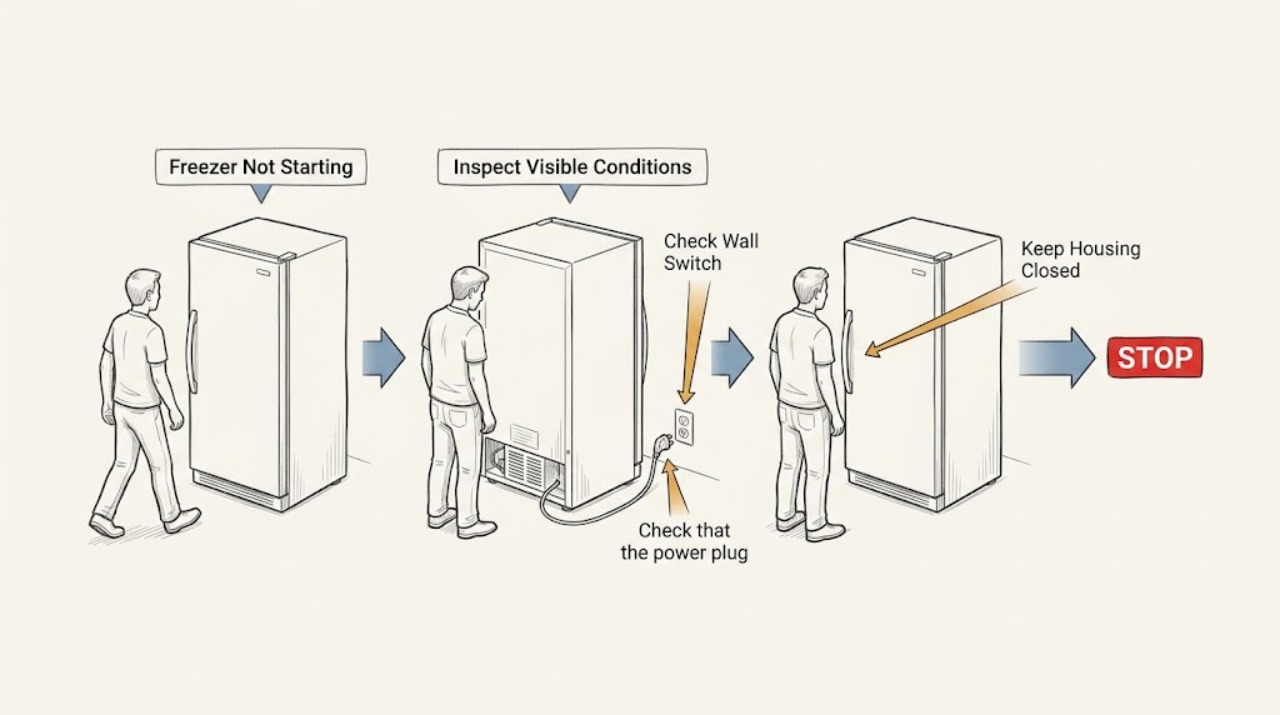
If a Liebherr freezer is not starting, first check whether it is switched on, whether the plug and appliance connector are seated, and whether the wall outlet fuse or breaker is supplying power. A power failure can leave the freezer apparently off, so keep the door closed and protect the food rather than repeatedly opening it. If the display or interior light works but the compressor does not start, check the temperature setting, door closure, ventilation, and any model-specific rapid-freezing or alarm indication. Do not open electrical covers or diagnose the sealed refrigeration system. If power is available and the freezer still will not start, the breaker trips again, a fault message appears, or the temperature rises, contact Liebherr customer service with the model and service information.
Before you begin
Safety first
- Do not open the appliance, test live electrical parts, access the compressor or fan, or work on the refrigeration circuit.
Work through in order
Diagnostic checks
Use only checks that match the exact appliance or system and its official guide.
-
Check 1
Look at the display or interior light and listen from outside the closed freezer, without opening panels or reaching behind it, to determine whether the appliance is completely dark or has some signs of power.
Expected result: The display and light are off with no operating sound, or the display or light works while the compressor or fan does not start.
Next step: For a dark appliance, perform the external power checks next. For an appliance with power, check its control state and cooling indicators without repeatedly changing settings.
Why this matters
Why: A completely dark appliance points first to the on/off state, plug, outlet protection, connector, or power failure. Signs of power shift the investigation toward settings, temperature demand, door or ventilation conditions, or a fault.
-
Check 2
Confirm from the front controls that the freezer is switched on and that a child lock, showroom or demonstration state, or other model-specific control mode is not preventing normal operation; use the model manual for the exact control method.
Expected result: The appliance was switched off or a control mode was active, or the controls already show an operating state but the freezer remains inactive.
Next step: Correct only the identified control state and allow one normal start cycle. If the freezer remains inactive, continue with the plug and outlet check rather than repeatedly pressing controls.
Why this matters
Why: An off state or control mode can mimic a power failure. If the controls indicate normal operation but no cooling begins, an electrical, control, or refrigeration fault becomes more likely.
-
Check 3
Check that the power plug is firmly seated in the wall socket and, on models that use one, that the appliance connector is correctly seated; inspect the accessible house fuse or breaker without moving a heavy freezer or entering a hazardous area.
Expected result: The plug or appliance connector is loose, the fuse or breaker is abnormal, or the connection and house protection appear normal.
Next step: Restore a safe connection only if the house protection has not repeatedly failed. If a breaker trips again, leave the freezer off and arrange electrical or appliance service.
Why this matters
Why: Liebherr lists an incorrectly seated plug, connector, or failed wall-socket fuse as direct causes of an appliance that does not work. A normal connection with no start points to a fault beyond this check.
-
Check 4
If the whole home or outlet has lost power, keep the freezer door closed and check whether power returns; do not repeatedly unplug and replug the appliance or open it to monitor food.
Expected result: Power is still absent, or power returns but the freezer does not resume normal operation and the contents begin to soften.
Next step: Protect food with appropriate cold storage or another freezer when needed, do not refreeze thawed food, and contact customer service if the freezer does not recover after power returns.
Why this matters
Why: Liebherr treats power failure as a reason to keep the appliance closed and protect food. A restored supply with no restart indicates that the freezer needs a separate appliance diagnosis.
-
Check 5
With power present, check the temperature display or alarm state, confirm the door closes fully, and inspect only the accessible ventilation grille for blockage; do not remove covers or access the fan or compressor.
Expected result: The door is not closing, ventilation is obstructed, a fault or temperature warning is present, or these external conditions are normal while the freezer remains inactive.
Next step: Close the door and clear loose external obstructions only. If the warning remains or the freezer still does not cool, keep the door closed and contact service.
Why this matters
Why: Liebherr identifies an open door, inadequate ventilation, and temperature conditions as contributors to a freezer that is too warm. A warning or normal exterior with no start requires model-specific service diagnosis.
-
Check 6
After the external checks, observe one ordinary start attempt from outside and record whether the compressor or fan starts, whether the display changes, and whether any fault message appears; do not open electrical covers or test the sealed system.
Expected result: The freezer starts and begins cooling, or it remains silent, shows a fault, trips the breaker, or fails to lower the temperature.
Next step: If it remains inactive or cooling is not restored, stop user-level troubleshooting and contact Liebherr customer service with the model, service number, serial number, display state, and checks performed.
Why this matters
Why: A normal restart after a corrected connection or setting supports an operating-error explanation. Persistent silence or a fault after power is available points to an internal electrical, control, compressor, or refrigeration problem.
Use your observations
Decision map
Find the observation that best matches what you see, then follow the next safe action.
-
PATH 01Next step
What you see
The display and interior light are off and household power is also absent
Do this next
Keep the freezer closed, protect food as appropriate, and wait for safe household power restoration; do not refreeze food that has thawed.
-
PATH 02Next step
What you see
The plug, appliance connector, fuse, or breaker is abnormal
Do this next
Correct only a safe loose connection or household protection issue. If protection trips again, leave the freezer off and arrange qualified service.
-
PATH 03Next step
What you see
The freezer is on but a door, ventilation, temperature, or alarm condition is abnormal
Do this next
Close the door, clear loose external ventilation obstructions, and follow the model manual. Contact service if the temperature or alarm does not recover.
-
PATH 04Next step
What you see
Power and controls are present but the freezer remains silent or a fault indication appears
Do this next
Leave it off and contact Liebherr customer service. Do not open the control, compressor, or refrigeration compartments.
-
PATH 05Next step
What you see
The freezer restarts and cools normally after a safe connection or setting correction
Do this next
Keep the door closed as much as practical and monitor the temperature; arrange service if the no-start symptom returns.
Helpful context
Understand the symptom
Decide whether it has no power or is not cooling
A blank display and no interior light point toward an on/off, plug, outlet, fuse, connector, or power-failure check. If the display or light works, the freezer may have power while a temperature setting, door, ventilation, control, or cooling-system fault prevents normal operation. Keep the door closed during a suspected outage to preserve the contents.
Use the model manual for model-specific controls
Liebherr freezer layouts differ. Some models have a display, child lock, rapid-freezing function, appliance connector, or a separate on/off control. Confirm the control state using the model's instructions instead of guessing at a button sequence. The serial tag provides the model and service information needed for support.
External checks are the safe limit
You can inspect the plug, accessible outlet protection, door closure, and ventilation grille without opening the appliance. Do not remove covers, reach the compressor or fan, alter the refrigerant circuit, or replace internal electrical parts. Repairs and power-cable work outside the manual belong to a qualified service provider.
When not to wait
Arrange service promptly for a recurring breaker trip, fault indication, rising temperature, damaged cord, burning odor, water intrusion, or a freezer that remains off after a safe power check. Protect food according to local food-safety guidance and avoid refreezing food that has thawed.
Safety boundary
Stop conditions
- Stop troubleshooting for a burning odor, smoke, liquid intrusion, damaged power cable, repeated breaker trip, or visible damage.
- Do not open electrical covers, access the compressor or fan, alter the refrigerant circuit, or replace internal parts.
- Do not keep opening the freezer during a power failure; protect food and keep the door closed.
- Stop and contact service when a fault indication remains or the freezer does not cool after safe power and control checks.
Only after diagnosis
Potential parts
- electronic control or power module
Only consider this category if qualified diagnosis confirms that the freezer has correct power but the control does not start the cooling system.
Confirm the exact model, service number, and approved fitment with Liebherr or the technician before ordering. - compressor start component
Only consider this category after a qualified technician confirms a start-circuit fault rather than a power, control, or sealed-system issue.
Start components are model-specific and require safe electrical diagnosis and installation by qualified service.
When checks do not resolve it
Need a professional?
Contact Liebherr customer service when power and controls are present but the freezer will not start or resume cooling., Request prompt service for a fault indication, repeated breaker trip, damaged cord, burning odor, water intrusion, or rising temperature., Provide the model designation, service number, serial number, display or alarm state, power status, and the external checks already completed.
Safety scope: Do not open the appliance, test live electrical parts, access the compressor or fan, or work on the refrigeration circuit.
Common questions
FAQ
Why is my Liebherr freezer completely dead?
Check whether it is switched on, then inspect the plug, appliance connector where applicable, and the wall outlet fuse or breaker. If household power is out, keep the freezer closed and protect the food rather than repeatedly opening the door.
What if the display works but the freezer does not start cooling?
Check the temperature setting, door closure, accessible ventilation, and any alarm or fault indication. If power and controls are normal but cooling does not begin, contact Liebherr service rather than opening the compressor or control area.
Should I keep opening the freezer during a power failure?
No. Liebherr advises keeping the appliance closed during a power failure and protecting food with suitable cold storage or another freezer when needed. Do not refreeze food that has thawed.
What information does Liebherr service need?
Have the model designation, service number, and serial number from the appliance serial tag ready, along with the display state, power status, and what happened when you tried to start the freezer.
Read the exact guide
Official sources
- User GuideLiebherr · Liebherr freezer startup, power failure, power connection, temperature, ventilation, fault, and customer-service guidance
- FAQs – frequently asked questions about Liebherr refrigerators & freezersLiebherr · Liebherr freezer power, temperature, ventilation, startup, fault, and customer-service guidance
Community feedback
Share a repair observation
Share a plain-text repair observation. Accepted observations are published automatically; this page may take a moment to update.