
On this page
Start here
Quick answer
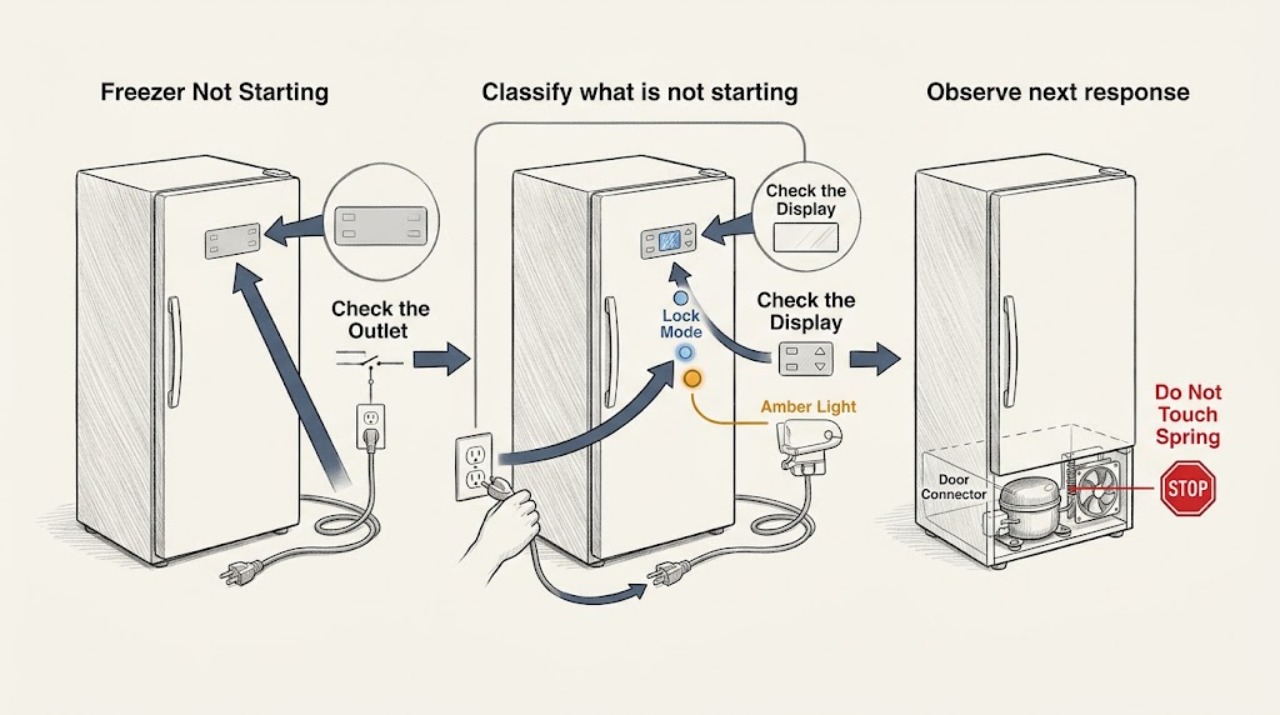
First determine whether the LG freezer is completely without power, whether only the display seems off, or whether the lights and controls work but the freezer is not cooling. Confirm the power cord is fully seated, test the outlet from a dry position, and check the appropriate breaker without repeatedly resetting it. Wake the display by opening the door or pressing a control, then clear the control-panel lock only as the exact model guide describes. If a recent outage or power fluctuation occurred, LG's guidance allows one safe power reset; keep hands dry and wait the model's stated interval before reconnecting. If the panel remains unresponsive, the freezer does not start on a known-good supply, an error appears, the door connector may be loose after moving, or there is smoke, burning smell, heat, or damaged wiring, protect the food and arrange qualified LG service.
Work through in order
Diagnostic checks
Use only checks that match the exact appliance or system and its official guide.
-
Classify what is not starting
From a dry, safe position, check whether the interior light works, whether the display wakes when the freezer door opens or a control is pressed, whether the control panel responds, whether the compressor or fan runs, and whether food is still frozen. Note any error message, unusual sound, odor, heat, or recent move, cleaning, outage, or breaker event.
Expected result: A display that wakes or a running compressor indicates the freezer may have power even if the panel looked dark. No light, no display, no sound, and warming food support a power or control branch; a lit panel with no cooling supports a cooling-system branch instead.
Next step: Use the power and outlet checks for a completely dead unit, the lock and display checks for an apparently unresponsive panel, and the service branch for a powered freezer that does not cool.
Why this matters
Why: The observable state separates display behavior from a true no-start condition and helps protect food before troubleshooting takes time.
-
Verify the cord, outlet, and breaker
With dry hands, confirm the power cord is fully inserted and inspect only the visible cord and plug for damage. Test the outlet with another suitable device from a dry position and check whether the refrigerator's breaker or fuse is on. Do not repeatedly reset a breaker, use an extension cord, or continue if the receptacle, plug, or cord is hot, loose, wet, or damaged.
Expected result: If the test device also fails, the outlet, circuit, or breaker is the likely cause. If the outlet works but the LG refrigerator remains dark, the appliance's power input or control may require service. A breaker that trips again indicates an electrical fault rather than a successful reset.
Next step: Arrange qualified electrical help for a dead or repeatedly tripping circuit. Arrange LG or qualified appliance service when the outlet is good but the refrigerator will not power on.
Why this matters
Why: An external power test distinguishes the household supply from the refrigerator without opening an electrical compartment.
-
Wake the display and check the control lock
Open and close the freezer or refrigerator door, then press a control once to see whether the display wakes. If a Lock icon is present, press and hold the model's Lock/Unlock control only for the documented interval, keeping the panel dry. Do not repeatedly press controls or assume every LG model has the same lock button.
Expected result: LG explains that some displays turn off after inactivity and wake when a door opens or a button is pressed. A locked panel will not respond to temperature controls, while an unlocked panel that remains dead or shows an error suggests a display or internal fault.
Next step: Follow the exact model manual for the lock state. Arrange service if the panel will not unlock, the display remains unresponsive, or the freezer is warming.
Why this matters
Why: A sleeping or locked interface can look like a freezer that will not start even when cooling continues; an unresponsive interface after these safe checks is not a user-setting issue.
-
Check the freezer setting and door condition
If the display works, use the exact model manual to confirm the freezer is not in a display/demo mode, the freezer control is enabled, and the door closes completely. Remove only a visible package or shelf that blocks closure and confirm drawers and shelves are seated. Do not enter a service mode or change an unknown setting from a generic button combination.
Expected result: A model-specific display mode or disabled control can make freezing units appear not to work, while a door that does not close can allow warm air in and make the freezer seem unable to start. A closed door and active control with no cooling points toward a refrigeration or control fault.
Next step: Exit only a documented display or demo mode and correct visible door obstructions. Arrange service if the mode cannot be changed, the door remains misaligned, or the freezer still does not cool.
Why this matters
Why: The freezer may have power but be prevented from cooling by a mode, control, or door condition; the exact model manual determines available settings.
-
Consider a door connector only after moving or door work
If the refrigerator was recently moved, had a door removed, or had a door reassembled, check from the outside whether the display and door functions changed at that time. Do not remove the upper door cover or handle wiring unless the exact model manual explicitly identifies that as a safe user check; never pull a connector under power.
Expected result: LG states that a door-to-body connector disconnected during moving or reassembly can prevent the display from turning on. If the issue began without door work, a connector is not established and the power, lock, or service branches remain more appropriate.
Next step: Follow the exact manual or arrange qualified service to inspect the connector. Do not operate with exposed wiring or a loose door assembly.
Why this matters
Why: A recent door event changes the likelihood of a connector issue, but the connector and internal wiring remain a service boundary for many models.
-
Perform one safe power reset after an outage or display fault
If the cord, outlet, floor, and hands are dry and there is no burning smell, smoke, spark, leak, or hot connection, unplug the refrigerator and wait about five minutes as LG's display guidance describes. If the plug cannot be reached, use only the refrigerator's identified breaker and the model guidance; then reconnect power once and keep the doors closed.
Expected result: A display that returns and a freezer that resumes normal cooling support a temporary power or control state. A dark panel, error, repeated trip, or no cooling after one reset confirms that the fault remains.
Next step: Stop resetting and arrange qualified service if the issue returns. Protect food if the freezer is warming and do not unplug a unit repeatedly while trying to recover it.
Why this matters
Why: A single reset can clear a temporary display or power condition but cannot prove that a control board, wiring, compressor, or cooling system is healthy.
-
Check for error, cooling, and food-safety signs
After one reset or a documented control correction, observe whether the display shows an error, whether the compressor or fan starts, whether cold air returns, and whether food remains frozen. Do not remove panels to inspect a fan, compressor, relay, or wiring, and do not keep the door open while waiting for cooling.
Expected result: A displayed error, no compressor or fan response, unusual clicking, or warming food with a powered panel indicates an appliance fault rather than a simple start-button problem. A return to normal cooling after one correction supports a temporary state, but continued monitoring is still needed.
Next step: Move food to safe cold storage and arrange service for a powered but non-cooling freezer, recurring error, or abnormal sound. Stop immediately for smoke, burning odor, sparks, or heat.
Why this matters
Why: A freezer can have control power while its cooling system is unable to start; only qualified diagnosis can separate sensor, control, start-device, fan, compressor, or sealed-system faults.
-
Prepare a safe service handoff
Record the exact model and serial number, outlet result, breaker behavior, display and lock state, recent outage or moving event, error code, door closure, compressor or fan sound, cooling status, food condition, and any odor, heat, water, or cord damage. Keep the freezer closed and disconnected only when safe while arranging service.
Expected result: A consistent timeline distinguishes a supply failure, interface issue, connector event, and powered no-cooling fault. Missing the original display state or repeatedly resetting the appliance can make diagnosis less reliable.
Next step: Use LG's official support route or a qualified refrigerator technician. Keep food protected until the unit is confirmed to be cooling safely.
Why this matters
Why: Once external power and control checks are exhausted, the useful next step is qualified diagnosis rather than panel removal or part substitution.
Use your observations
Decision map
Find the observation that best matches what you see, then follow the next safe action.
-
PATH 01Next step
What you see
The test outlet is dead, the breaker trips again, or the plug, cord, or receptacle is hot, wet, loose, or damaged.
Do this next
Stop using the refrigerator and seek qualified electrical help. Do not repeatedly reset the breaker, use an extension cord, or touch wet electrical connections.
-
PATH 02Next step
What you see
The display wakes when the door opens or a control is pressed, or the panel is locked.
Do this next
Follow the exact model's documented lock or display behavior. Arrange service if the panel remains unresponsive, an error appears, or the freezer is warming.
-
PATH 03Next step
What you see
The refrigerator was recently moved or a door was removed and the display or freezer function stopped afterward.
Do this next
Use the model manual or qualified service to inspect the door connector and wiring. Do not remove covers or operate exposed wiring.
-
PATH 04Next step
What you see
The outlet works and the panel is active, but the compressor or fan does not start or the freezer does not cool.
Do this next
Protect food and arrange qualified LG refrigerator service for control, start-device, fan, compressor, or sealed-system diagnosis. Do not open the cabinet.
-
PATH 05Next step
What you see
A single safe reset restores normal display and cooling with no warning signs.
Do this next
Keep doors closed and monitor once for recurrence. Arrange service if the no-start condition, error, warming, or abnormal sound returns.
-
PATH 06Next step
What you see
Smoke, burning odor, sparks, water near electricity, an exposed wire, or a rapidly warming freezer is present.
Do this next
Stop immediately, disconnect only if safe, keep clear, protect food, and seek qualified appliance or electrical help. Do not restart or dismantle the refrigerator.
Helpful context
Understand the symptom
A dark display does not always mean the freezer is off
LG displays can turn off after a period of inactivity as a power-saving feature, and a locked control panel can make the controls appear dead. If the interior light, compressor sound, or cooling is normal, wake the display and check the lock state before treating the freezer as unpowered. A completely dark appliance, no response on a known-good outlet, or a freezer that is warming is a different branch.
Keep electricity and food safety within the safe boundary
Keep hands and the floor dry when touching the plug or breaker. Do not use an extension cord, open the cabinet, probe live wiring, or repeatedly reset a tripping breaker. Keep the freezer door closed while checking power to preserve cold air, and move perishable food to safe cold storage if the unit is warming or will be unplugged for an extended period.
Only after diagnosis
Potential parts
- power cord, outlet, or circuit component
Consider this only when qualified electrical testing confirms an appliance supply, cord, plug, or circuit fault after the external outlet check.
Electrical supply work is not a freezer DIY repair; use qualified service and do not substitute an extension cord. - control panel or display module
Consider this only when the outlet is good, the panel is unlocked, and qualified testing confirms a display or control fault.
Display and control modules are model-specific and may involve door wiring; verify exact model fitment through qualified service. - door connector or door harness
Consider this only when the problem began after door removal or moving and qualified inspection confirms a loose or damaged connector or harness.
Door wiring is model-specific and must be handled with power disconnected; do not pull or splice exposed conductors. - fan, start device, or compressor component
Consider this only when the freezer has correct supply and active controls but qualified testing identifies a cooling-system start or airflow fault.
Cooling components are model-specific and can involve mains voltage and refrigerant; use qualified refrigerator service.
When checks do not resolve it
Need a professional?
Arrange qualified LG refrigerator service when the freezer remains dark on a known-good outlet, the control panel will not unlock or respond, an error remains after one model-appropriate reset, the appliance has power but the freezer does not start cooling, a door connector may be loose after moving, or food is warming. Seek qualified electrical help for a dead or repeatedly tripping circuit. Stop immediately for smoke, burning odor, sparks, water near electrical parts, a hot or damaged cord or outlet, or exposed wiring. Do not open panels, enter unlisted service modes, or replace a control or compressor from the symptom alone.
Common questions
FAQ
Why will my LG freezer not start?
Check whether the issue is a dead appliance, a sleeping or locked display, a recent power or moving event, or a powered freezer that is not cooling. Test the outlet, check the panel and door, perform one safe reset, and arrange service if it remains unresponsive.
Why is my LG freezer display dark but the refrigerator has power?
The display may be in a power-saving state or the control panel may be locked. Open the door or press a control, check the Lock icon, and follow the model manual. A panel that remains unresponsive needs service.
How do I reset an LG freezer that will not start?
If the cord, outlet, hands, and floor are dry and there is no hazard, LG's display guidance allows unplugging for about five minutes and reconnecting once. Do not repeatedly reset a tripping circuit or a freezer with smoke, heat, sparks, or damaged wiring.
Can the control lock make an LG freezer seem turned off?
Yes. A locked panel will not respond to temperature controls, and the display may also turn off after inactivity. Wake the display and use the exact model's documented Lock/Unlock action; persistent failure needs service.
When should I call for LG freezer no-start service?
Arrange service when the freezer stays dark on a known-good outlet, the display will not unlock, an error remains, the panel is active but cooling does not start, or the issue followed door work. Stop immediately for smoke, sparks, burning odor, water near electricity, or a hot or damaged cord.
Read the exact guide
Official sources
- LG Refrigerator - Are lamps or display not on?LG USA Support · Fully seated power cord, defective outlet, and alternate outlet test
- Why your LG refrigerator display(control panel) is flickering and how to fix itLG USA Support · Temporary power issue, dry-hand reset, breaker alternative, and service for persistent unresponsive display
- LG Refrigerator - Why Does the Display Keep Disappearing or Turning Off?LG USA Support · Display wake behavior, power-saving timeout, lock control check, and service boundary
- What should I do if the control panel buttons on my LG refrigerator are not responding?LG USA Support · Locked controls, Lock/Unlock operation, dry panel, model differences, and service boundary
- LG refrigerator display] The display is flickering.LG USA Support · Electrical-supply instability, dry power reset, and technician escalation
- [LG Refrigerator] Display keeps turning off or doesn’t turn on at allLG USA Support · Door reassembly or relocation, connector state, display power-saving behavior, and service boundary
- Refrigerator Has No PowerLG USA Support · Power cord, breaker, circuit, outlet test, and service separation for no-power symptoms
Community feedback
Share a repair observation
Share a plain-text repair observation. Accepted observations are published automatically; this page may take a moment to update.