
On this page
Start here
Quick answer
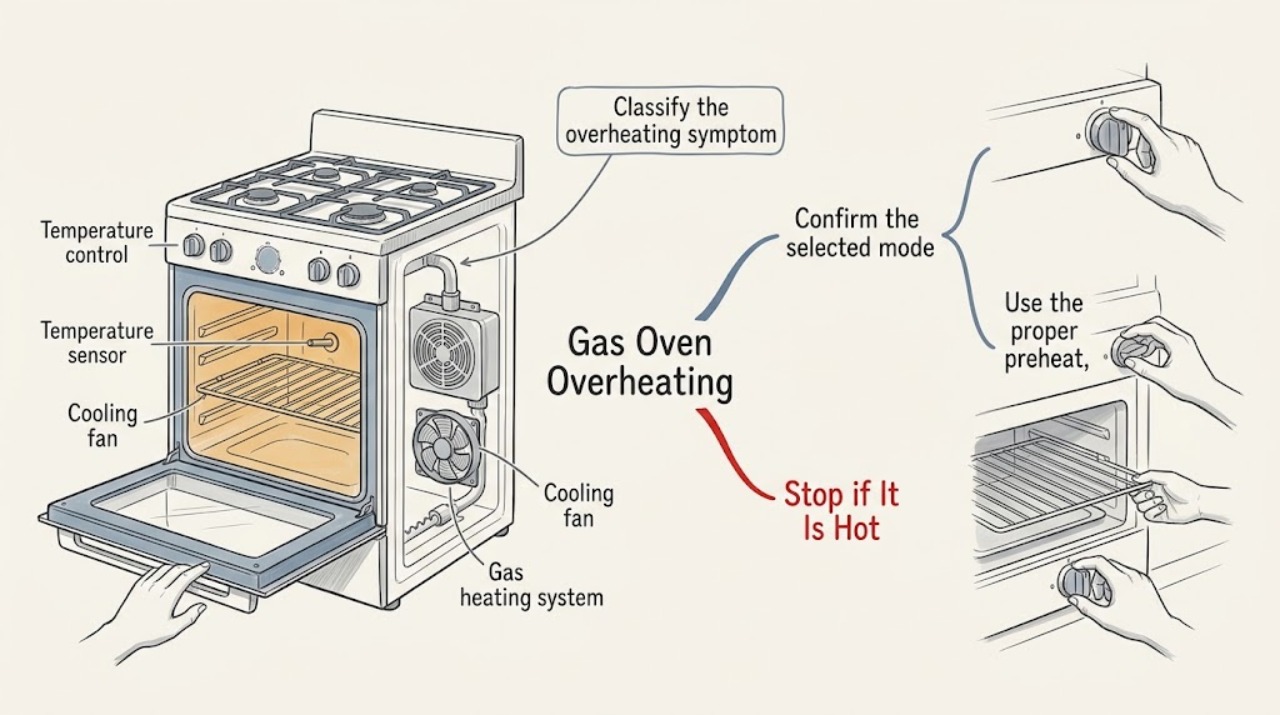
First separate a real temperature overshoot from normal burner cycling or a cooling fan that continues after cooking. With the oven safe to approach, put the oven controls in OFF using the instructions for the exact model and let it cool. Then verify that the selected mode and temperature are intentional, preheat with an empty cavity and a closed door, and review the recommended rack and bakeware setup. If the display shows F10, Frigidaire describes that as a higher-than-normal temperature alert: turn the oven off and let it cool. Stop using the appliance for smoke, scorching, an abnormal flame, gas odor, heat outside the cavity, a recurring alert, or continued heating after OFF, and arrange qualified gas-appliance service.
Work through in order
Diagnostic checks
Use only checks that match the exact appliance or system and its official guide.
-
Classify the overheating symptom
From a safe position, record what you actually observe: food browning too quickly, a temperature reading that overshoots, a fan running after OFF, a preheat indicator that never changes, an error such as F10, smoke or scorching, an abnormal visible flame, or gas odor. Do not open covers or reach into the oven to check heat.
Expected result: A fan after shutoff can be part of normal cooling, while smoke, gas odor, an abnormal flame, or a persistent high-temperature alert is a safety or fault signal. A poor baking result alone can also come from rack position or bakeware rather than an overheated control.
Next step: If any gas, smoke, scorching, abnormal flame, or uncontrolled heat is present, stop immediately and use the safety and service branch. If only the fan is running and heat is declining, allow cooling before continuing. Otherwise continue with the model-control and baking checks.
Why this matters
Why: The next check depends on whether the appliance is merely cooling or is still producing uncontrolled heat; the same word, overheating, can describe different symptoms.
-
Confirm the selected mode and temperature
When there is no gas odor, smoke, abnormal flame, or unsafe external heat, compare the selected cooking function and temperature with the recipe and the exact Frigidaire owner's manual. Check that a delayed, timed, or cleaning function was not selected by mistake, and return the oven mode and temperature controls to OFF when ending the cycle.
Expected result: If the mode, setpoint, and end-of-cycle controls are correct, an intentional setting is less likely to explain the symptom. If the display or controls do not respond to the documented OFF sequence, the problem is not a simple recipe or rack adjustment.
Next step: Correct one clearly wrong setting and observe the next supervised cycle only if the oven is otherwise safe. If the controls ignore OFF, heat continues, or the same setting reappears, stop using the oven and request service rather than repeatedly pressing controls.
Why this matters
Why: Frigidaire notes that controls vary by model and that changing functions requires using the model's normal on/off sequence; an incorrect or stuck control can make heat appear uncontrolled.
-
Use the proper preheat, rack, and bakeware setup
After the oven has cooled and no safety symptom is present, follow the owner's manual and Frigidaire's guidance: preheat with the cavity empty, keep the door closed during preheat, use the recipe's rack position, and use bakeware appropriate for the recipe. Do not line or block vents, and do not leave cookware in the cavity during preheat unless the manual specifically calls for it.
Expected result: If food browns normally after the correct preheat and rack or bakeware setup, the earlier complaint may have been a baking-result issue rather than actual uncontrolled heating. If the oven still overshoots severely or produces an alert under the same safe setup, the symptom is repeatable.
Next step: Use the manual's temperature-calibration procedure only if the issue is a consistent cooking offset and there is no safety warning. Do not keep operating the oven to compensate for severe overshoot, smoke, or a recurring code; move to service.
Why this matters
Why: Frigidaire explains that preheating, bakeware, and rack placement affect temperature and cooking results, and that model-specific calibration instructions are in the owner's manual.
-
Separate fan run-on from continued heating
With the oven controls OFF and no gas odor or abnormal flame, stand clear and listen for the cooling fan while the oven cools. Observe whether the fan is the only active sound and whether the heat is declining; do not block vents or unplug the appliance simply to silence a fan.
Expected result: Frigidaire says a fan may operate during use and continue after the oven is turned off until internal temperature falls. Continued burner heat, renewed heating, smoke, an error, or an unusual fan sound is not explained by ordinary fan run-on.
Next step: If only normal cooling occurs and the oven remains off, no repair decision follows from the fan alone. If heat continues, the fan never settles with other symptoms, or an alert returns, record the behavior and stop using the oven pending service.
Why this matters
Why: Fan noise alone does not prove that gas is still being supplied, but fan operation cannot make an actually overheating cavity safe to use.
-
Respond to an F10 or other temperature alert
Before any reset, photograph or write down the exact display code and the conditions when it appeared. If the display shows F10, turn the oven off and let it cool as Frigidaire directs; compare other codes with the exact model manual rather than applying a generic code table.
Expected result: Frigidaire identifies F10 on standard ovens and ranges as a higher-than-normal temperature alert. If the code clears after cooling but returns during a normal supervised use, the condition is recurring; if the oven remains hot or active, it has not returned to a safe state.
Next step: Do not continue testing after a recurring temperature alert. Keep the oven out of use and arrange qualified service, providing the code and whether heating or the fan continued after OFF.
Why this matters
Why: An alert is a protective indication, not permission to continue cooking until the message disappears. Model-specific instructions determine whether a reset is appropriate.
-
Check visible gas clues without opening the appliance
From the normal user position, note whether any accessible surface-burner flame is unusually high, uneven, or affected after cleaning, and verify only that a removable burner cap is seated and visible ports are not obviously blocked. Do not disassemble the oven, adjust gas pressure, clean an internal burner, or reach near a hot flame.
Expected result: Frigidaire lists an unseated cap, moisture after cleaning, clogged ports, and a surface knob set too high as possible causes of an uneven or high surface flame. Those observations do not prove the oven burner or control is safe, especially when the cavity is overheating.
Next step: If the accessible flame remains abnormal after the simple manual-approved checks, or if there is gas odor, stop using the range and seek qualified gas-appliance service. For cavity overheating without a surface-flame clue, continue only with the error and service path.
Why this matters
Why: A surface-flame clue can point to a broader gas-service concern, but a user should not infer an internal gas-valve or regulator diagnosis from flame appearance alone.
-
Use one cautious reset only when the oven is cool
Only when there is no gas odor, smoke, scorching, abnormal flame, external heat, or active heating, and the oven has cooled, follow the exact model manual for one power reset. Frigidaire's general error guidance describes briefly disconnecting power or using the breaker when unplugging is not possible; do not use a reset to suppress an active gas or fire hazard.
Expected result: If the display returns to normal and the oven stays OFF, a transient control state may have cleared. If the alert returns, heating resumes unexpectedly, or the controls still ignore OFF, the fault is persistent.
Next step: Stop after one attempt. Keep the oven out of use and arrange qualified service for a recurring alert, continued heating, or any unsafe symptom; do not repeatedly cycle power or run an unattended test.
Why this matters
Why: A reset can clear a temporary control state but cannot repair a temperature sensor, electronic control, gas valve, igniter, or wiring fault.
Use your observations
Decision map
Find the observation that best matches what you see, then follow the next safe action.
-
PATH 01Next step
What you see
Only the cooling fan is running after OFF, the heat is declining, and there is no gas odor, smoke, abnormal flame, or alert.
Do this next
Allow the normal cool-down and keep vents clear. The fan alone is not proof of continued gas heating.
-
PATH 02Next step
What you see
Food is over-browning but there is no smoke, gas odor, alert, or continued heat after OFF.
Do this next
Check the selected mode, preheat, rack position, bakeware, and the model's calibration guidance. Stop compensating with extreme settings if the offset is severe or repeatable.
-
PATH 03Next step
What you see
The display shows F10 or another recurring temperature-related alert.
Do this next
Turn the oven off and let it cool as directed. Do not resume normal cooking after a recurring alert; arrange qualified service with the exact code and model information.
-
PATH 04Next step
What you see
Heat continues after OFF, smoke or scorching appears, a flame is abnormal, gas is smelled, or the cabinet or controls become unusually hot.
Do this next
Stop immediately, avoid switches and ignition sources, leave the area if necessary, and contact appropriate emergency or qualified gas-appliance help from a safe location.
Helpful context
Understand the symptom
Do not diagnose temperature by touch
An oven cavity and nearby metal can remain hot after a cycle. Use the display, normal user-visible indicators, the food result, and the presence or absence of a fan, odor, smoke, or abnormal flame as observations. Do not reach into the cavity, remove panels, or place an unprotected hand near a burner or vent.
Gas and fire safety boundary
If you smell gas, see smoke or sparks, see a flame where it should not be, notice scorching or heat escaping from the cabinet, or the oven continues heating after OFF, stop testing. Avoid switches, flames, and ignition sources, leave the area if necessary, and contact appropriate emergency or qualified gas-appliance help from a safe location.
Only after diagnosis
Potential parts
- oven temperature sensor
Consider this only after a qualified diagnosis confirms a sensor-related temperature fault rather than a control or gas-system problem.
The sensor, connector, and mounting vary by model; verify the exact model and service diagnosis before ordering. - electronic oven control
Consider this only when a qualified technician confirms that the control or relay is not regulating the selected temperature or is leaving heat active.
Controls are model-specific and may require configuration; do not substitute by appearance or by a generic code match. - gas valve or igniter
Consider either component only after qualified gas-appliance testing identifies a combustion or gas-flow fault.
Gas components require exact model compatibility and qualified installation; this article does not authorize user replacement.
When checks do not resolve it
Need a professional?
Arrange qualified gas-appliance service when overheating returns after the correct mode and bakeware checks, when an F10 or other temperature alert recurs, when controls do not stop heating, or when one model-approved reset does not restore normal operation. Stop immediately for gas odor, smoke, sparks, scorching, an abnormal flame, heat outside the cavity, or a hot or damaged cord or cabinet; seek help from a safe location.
Common questions
FAQ
Why does my Frigidaire gas oven seem too hot even when the fan is running?
A cooling fan can run during or after cooking while the oven cools, but it does not explain smoke, scorching, an abnormal flame, a temperature alert, or continued heating after OFF. Separate fan noise from an actual temperature problem before testing further.
What does F10 mean on a Frigidaire gas oven?
Frigidaire describes F10 on standard ovens and ranges as a higher-than-normal temperature alert. Turn the oven off and let it cool as directed, then obtain service if the alert returns or heating is not controlled.
Can rack position or bakeware make a Frigidaire oven look overheated?
Yes. Frigidaire says bakeware and rack position can change baking results, and its oven guidance also calls for proper preheating. These checks are appropriate for uneven browning without smoke, gas odor, an alert, or continued uncontrolled heat.
Should I keep using the oven at a lower setting if it overheats?
Do not compensate for severe or repeatable overheating with extreme settings. Stop using the oven for a recurring alert, continued heating after OFF, smoke, scorching, abnormal flame, gas odor, or unusual external heat, and arrange qualified service.
Read the exact guide
Official sources
- Oven Error Codes and Alarms GuideFrigidaire Owner Support · Power reset guidance, F10 higher-than-normal temperature alert, and service escalation
- How do I use my display or controls?Frigidaire Owner Support · Model-specific display, timer, temperature, and lock controls
- Ranges - Is it normal for a fan to come on while using my range and when does it stop running?Frigidaire Owner Support · Fan operation during cooking and after the oven is turned off while internal temperature cools
- How do I improve my baking results with my Frigidaire range? Ex. My oven appears to be too hot or I have uneven temperatures.Frigidaire Owner Support · Bakeware, rack position, and the owner's manual's before-you-call guidance for uneven or apparently high temperatures
- Oven - Is too HotFrigidaire Owner Support · Preheating, bakeware, rack placement, temperature calibration, and service escalation for an oven that is too hot
- How do I change the cooking function during cooking?Frigidaire Owner Support · Leaving a cooking state, selecting a function, and using the model's on or off control
- What should I do if my gas flames are uneven or too high?Frigidaire Owner Support · Visible surface-flame checks for seated caps, moisture, clogged ports, and knob position
Community feedback
Share a repair observation
Share a plain-text repair observation. Accepted observations are published automatically; this page may take a moment to update.