
On this page
Start here
Quick answer
Identify when the sound occurs and what still works before deciding that a Frigidaire microwave has failed. A steady airflow sound from an over-the-range (OTR) ventilation fan can be separate from the microwave heating circuit, and OTR models can recirculate air or use an external duct depending on installation. A low hum or brief relay-like click during heating may be operating sound, but a new harsh buzz, grinding, scraping, or sound that changes with the turntable should be investigated. With power disconnected and the oven cool, remove and correctly reseat the glass tray and roller support; Frigidaire says these parts lift out for cleaning. Check the food container and packaging: the manufacturer warns that metal in some popcorn packaging can interfere with a metal turntable. Any visible arc or spark, dark smoke, burning or electrical smell, scorched waveguide cover or cavity, or repeated breaker trip requires immediate stop-use; unplug only when safe and never open the microwave. Transformer, magnetron, capacitor, diode, wiring, and internal fan diagnosis belongs to qualified microwave service.
Before you begin
Safety first
- This article covers symptom timing, OTR vent classification, approved-load observation, external power checks, owner-removable tray/support cleaning, and safe recording. The cabinet, waveguide cover, transformer, magnetron, capacitor, diode, wiring, control board, internal fan, and energized testing require qualified service.
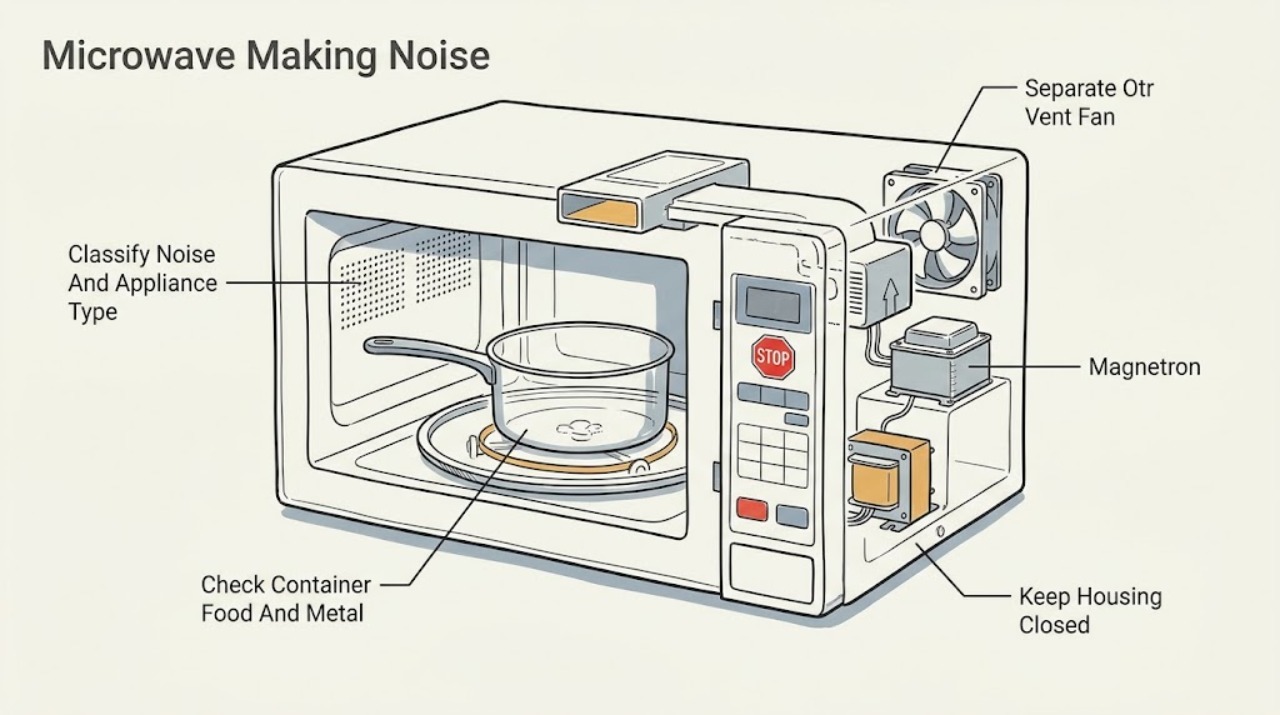
Work through in order
Diagnostic checks
Use only checks that match the exact appliance or system and its official guide.
-
Check 1
Record the complete model number and whether the unit is countertop, built-in, or OTR. Note whether the sound occurs with the vent fan alone, with microwave heating, only while the tray rotates, immediately after stopping, or only with one container or food load. Observe whether the display, interior light, and heating otherwise behave normally.
Expected result: The sound is smooth airflow, a low steady heating hum, a click, tray rotation noise, grinding/scraping, crackling, or a noise accompanied by smoke, smell, visible arc, or power loss.
Next step: If any arc, smoke, burning odor, scorching, hot/damaged cord or outlet, or repeated breaker trip occurred, stop and use qualified service. Otherwise follow the matching checks below.
Stop if: Do not open the cover or run the microwave with a suspected electrical or fire symptom merely to record another sound.
Why this matters
Why: Timing separates vent operation, tray mechanics, food/cookware interaction, and internal electrical/heating symptoms. Hazard signs override ordinary sound classification.
-
Check 2
For an OTR model, switch the microwave heating function off and observe whether the noise remains when only the ventilation fan is selected or when the cooktop area has recently been hot. Check the model's fan control and whether the unit recirculates or vents outside; do not remove ductwork or mounting hardware.
Expected result: The noise is airflow from the vent system and changes with the vent setting or cooktop heat, or it remains with the vent off and microwave heating stopped.
Next step: Use the exact model guide for fan operation and duct configuration. If a fan is rough, scraping, or remains on unexpectedly, stop using that function and arrange service; do not access the blower from the housing.
Stop if: Do not reach into the blower, remove the OTR microwave, alter the duct, or test fan wiring while energized.
Why this matters
Why: A noise that follows the vent control or hot cooktop condition is more consistent with the separate ventilation path. A noise that remains with the vent off, or that comes from the cavity during heating, needs a different branch.
-
Check 3
With the unit stopped, remove the container only after it is safe to handle and inspect for foil, metallic trim, twist ties, a metal rack, a damaged lid, a container touching the cavity, or splattered food near the sidewall waveguide cover. Use a model-approved glass or ceramic container and never place metal where the model guide prohibits it.
Expected result: The sound or crackle occurs only with one container, package, rack, or greasy/splattered load, versus it occurs with an approved plain container and clean cavity.
Next step: Discard or replace the questionable packaging/container and follow the model guide. If there was any arc, scorch, or repeat noise with a safe load, stop and arrange service.
Stop if: Do not scrape the waveguide cover, remove it, operate with foil or unknown metal, or hold the door open during a test.
Why this matters
Why: A load or cookware interaction is more likely when the symptom follows one item. A repeat with a safe container and clean cavity is not a reason to keep operating; it shifts concern toward the oven's internal heating path.
-
Check 4
Unplug the microwave and wait until it is cool. Lift out the glass turntable and its support, inspect for chips, cracks, food debris, a bent or obstructed roller, and correct seating on the drive hub. Clean only as the model guide permits, dry the parts, and refit them without forcing the support.
Expected result: The noise is present only while the tray rotates and changes or disappears when the tray/support is correctly seated, or the tray is still rough, wobbling, scraping, or noisy with the cavity empty.
Next step: Replace only a visibly damaged owner-removable tray with a model-confirmed part. If the tray continues to wobble or the drive makes noise, stop using the microwave and arrange service.
Stop if: Do not lubricate the drive, bend the roller track, remove the oven floor, or run the microwave with a cracked glass tray.
Why this matters
Why: A loose, dirty, cracked, or mis-seated tray/support can make a mechanical rotation sound. Persistent noise with the tray assembly correctly seated suggests the drive or internal mechanism, which is service work.
-
Check 5
If the noise coincided with a display reset, power loss, or breaker trip, check the plug, outlet, and breaker from outside the appliance. Reset the breaker only once when there is no heat, smell, water, scorch, or damage; do not use a live voltage test or an extension cord as a workaround.
Expected result: The external supply was interrupted and the microwave returns without abnormal sound, versus the outlet is sound but the microwave trips again, stays dead, or makes the noise immediately when heating starts.
Next step: Leave the unit disconnected after a repeated trip or damaged power hardware and arrange qualified appliance service or an electrician as appropriate.
Stop if: Do not keep resetting the breaker, touch a hot or wet outlet, remove panels, or continue operation after an electrical smell.
Why this matters
Why: An external power event can explain a reset, but repeated trips or a noise that returns with heating points to an electrical or internal control/heating issue rather than a tray adjustment.
-
Check 6
If there is no hazard and the sound is a steady hum or brief click during a normal cycle, compare it with the model's User Guide and note whether it is new, louder, accompanied by reduced heating, or changes as the turntable or vent fan operates. Do not remove the cabinet to identify a transformer, magnetron, capacitor, diode, or internal fan.
Expected result: The sound is unchanged, smooth, and the microwave heats normally, or it is new/harsh, rattling, grinding, crackling, accompanied by weak/no heating, smell, smoke, or repeated stopping.
Next step: Use the model guide for normal-operation notes. Escalate any new or worsening noise, weak heating, or combined symptom rather than replacing a high-voltage part.
Stop if: Never open a microwave cabinet or attempt high-voltage discharge, component testing, or internal repair.
Why this matters
Why: A stable operating sound without a changed symptom can be normal for that model, but sound alone cannot prove a component is healthy. A changed sound or combined heating/electrical symptom needs professional diagnosis.
-
Check 7
Before arranging service, record the model/serial information, exact sound description, whether the vent or heating function was selected, turntable position, container and food used, display state, and any arc, smoke, smell, scorch, heat, or breaker event. Keep the microwave unplugged when a hazard or repeat fault is present.
Expected result: The noise can be reproduced only during a safe external observation, or the symptom is intermittent and includes a hazard or internal-heating clue.
Next step: Arrange qualified microwave service for a repeat, unresolved, or hazardous noise and provide the recorded details. Do not send the unit back into operation to obtain a recording.
Stop if: Stop immediately for visible arc/spark, smoke, burning/electrical odor, scorching, damaged cord/outlet, or repeated breaker trip.
Why this matters
Why: A precise symptom record helps the technician separate vent, tray, load, control, and high-voltage paths without asking the owner to open the appliance. Intermittence does not make arcing or electrical odor safe.
Use your observations
Decision map
Find the observation that best matches what you see, then follow the next safe action.
-
PATH 01Next step
What you see
The sound occurs in an OTR microwave with the vent function or after the cooktop has been hot.
Do this next
Confirm the model's internal or external vent arrangement and arrange service for a rough, scraping, or unexpected fan. Do not remove the blower or microwave from its mount.
Why this path and its safety boundary
Why it matters: The first pattern is more consistent with the separate ventilation path; the second makes a cavity, cooling, control, or mechanical source more likely.
-
PATH 02Next step
What you see
Noise or crackling occurs only with a particular food, container, package, or metal turntable arrangement.
Do this next
Follow the model guide for approved cookware and packaging. Stop immediately for any spark, scorch, smoke, or burning smell.
Why this path and its safety boundary
Why it matters: A load or cookware interaction is more likely in the first pattern. A repeat with a safe load requires stop-use and service; it is not evidence to increase time or power.
-
PATH 03Next step
What you see
The noise starts or changes when the glass tray rotates.
Do this next
Use only model-confirmed owner-removable tray parts. Arrange service for a persistent drive noise; do not lubricate or open the oven floor.
Why this path and its safety boundary
Why it matters: A removable tray or roller-support issue is more likely when seating changes the symptom. Persistent noise points to the drive or internal mechanism.
-
PATH 04Next step
What you see
The sound is a hum or click during a normal heating cycle without visible hazard.
Do this next
Compare with the exact User Guide and monitor only if there is no hazard and the sound is unchanged. Escalate a changed or combined symptom without opening the cabinet.
Why this path and its safety boundary
Why it matters: A stable sound can be model-specific operating noise, but a changed sound or combined symptom makes an internal motor, control, transformer, or high-voltage problem more likely.
-
PATH 05Next step
What you see
The noise includes a spark/arc, dark smoke, burning smell, scorch mark, damaged power hardware, or repeated breaker trip.
Do this next
Stop, disconnect power only when safe, keep the microwave out of service, and arrange qualified microwave service. Never remove the waveguide cover or open the cabinet.
Why this path and its safety boundary
Why it matters: A stopped sound does not undo an arcing or electrical hazard. Continued operation could worsen cavity, wiring, or power damage.
Helpful context
Understand the symptom
Classify the sound before touching anything
Write down whether the noise happens with the vent fan only, during microwave heating, while the turntable rotates, or after the cycle ends. A smooth airflow sound, a short click as controls change, and a tray motor turning are different observations from a rough mechanical scrape, electrical buzz, or crackling. Sound alone cannot identify a transformer, magnetron, diode, or fan motor, so do not diagnose an internal part by noise or search for a generic replacement.
Container and food can create the noise
Stop the cycle and inspect the container, lid, rack, foil, twist tie, metallic trim, and food splatter once everything is cool. Frigidaire specifically notes that some microwave models have metal turntables and that metal in popcorn packaging can interfere with the turntable; use only the packaging and cookware permitted by the model guide. A sound that disappears with the same load removed is a load or cookware branch, not proof that the transformer failed.
A spark or burning smell changes the decision
Do not run another test after visible arcing, dark smoke, a burning or electrical smell, a scorched cavity, or a damaged cord or outlet. Disconnect power only when safe and leave the appliance for qualified service. The waveguide cover is not an owner-removable repair part; Frigidaire says to wipe splatters gently and never remove that cover.
Safety boundary
Stop conditions
- Stop immediately for visible arcing or sparks, dark or persistent smoke, burning or electrical odor, scorching, a hot or damaged cord/outlet, or a repeated breaker trip; disconnect only when safe and arrange qualified service.
- Never open the microwave cabinet, perform high-voltage discharge or energized testing, or attempt transformer, magnetron, capacitor, diode, wiring, or internal fan repair.
- Unplug before cleaning or handling the turntable and support; never remove the waveguide cover, and do not operate with a cracked tray or questionable metal in the cavity.
- A new harsh buzz, grinding, crackling, weak heating, or noise that persists after safe tray/load checks requires qualified microwave service.
Only after diagnosis
Potential parts
- glass turntable tray
Consider only if the owner-removable tray is visibly cracked or damaged and the exact model confirms the replacement; a tray part is not a fix for a drive or high-voltage noise.
Confirm the complete Frigidaire model and tray dimensions/fit information; turntable types vary by microwave. - turntable roller support or coupler
Consider only after qualified or model-guide diagnosis finds a damaged owner-removable support or coupler and the noise is limited to tray rotation.
Do not lubricate or force the drive; confirm model-specific fitment and whether the component is owner-removable. - ventilation fan assembly
Consider only when the model's vent fan is confirmed as the source of a rough or abnormal airflow noise and qualified service identifies the fan assembly.
OTR vent arrangements and fan assemblies vary by model and duct configuration; internal access requires service. - high-voltage or control assembly
Consider only after qualified diagnosis identifies a transformer, magnetron, diode, capacitor, control, wiring, or internal motor issue after safe load and tray checks.
High-voltage and internal electrical components require model-specific diagnosis and professional installation; no fitment is assumed.
When checks do not resolve it
Need a professional?
Arrange qualified Frigidaire microwave service when a new or worsening noise persists with an approved load and correctly seated tray, the noise accompanies weak or absent heating, the vent fan is rough or abnormal, the display or breaker is affected, or the source appears internal. Use immediate stop-use service for arcing, sparks, smoke, burning/electrical odor, scorching, damaged power parts, or repeated circuit trips.
Safety scope: This article covers symptom timing, OTR vent classification, approved-load observation, external power checks, owner-removable tray/support cleaning, and safe recording. The cabinet, waveguide cover, transformer, magnetron, capacitor, diode, wiring, control board, internal fan, and energized testing require qualified service.
Common questions
FAQ
Why is my Frigidaire microwave making a buzzing or humming noise?
First identify whether the sound is from an OTR ventilation fan, tray rotation, or microwave heating. A steady unchanged sound can be model-specific, but a new or harsh hum, weak heating, crackling, smell, smoke, or power trip needs service. Do not open the microwave to identify a transformer or other internal part.
Can the turntable cause a Frigidaire microwave to make noise?
Yes. With the unit unplugged and cool, the glass tray and support can be lifted out for cleaning and correctly reseated. If the tray is cracked, wobbles, scrapes, or the noise remains after seating is corrected, stop using it and arrange service for the drive mechanism.
Can food or a container cause crackling in a Frigidaire microwave?
It can. Inspect for foil, metallic trim, twist ties, a metal rack, or splatter, and follow the exact model guide for approved cookware. Frigidaire warns that metal in some popcorn packaging can interfere with a metal turntable. Any visible arc, scorch, smoke, or burning smell is a stop-use condition.
Why does my over-the-range Frigidaire microwave fan keep making noise?
Separate the vent fan from microwave heating. Frigidaire says OTR models may recirculate air internally or be converted to external venting, so use the model's vent controls and installation information. A rough or scraping fan, or a fan that remains abnormal with the vent control off, needs service; do not remove the blower or mounting hardware.
Is it safe to keep using a noisy Frigidaire microwave?
Only a stable, familiar operating sound without other symptoms can be observed against the model guide. Stop immediately for sparks, dark smoke, a burning/electrical smell, scorching, a hot or damaged cord or outlet, or a repeated breaker trip. Disconnect power only when safe and never open the cabinet or remove the waveguide cover.
Read the exact guide
Official sources
- Microwaves - Where does my over the range microwave vent?Frigidaire · Official OTR vent-arrangement guidance.
- Microwaves - Do I need a special plate to cook popcorn in my microwave?Frigidaire · Official model-dependent guidance on glass or metal turntables and popcorn packaging.
- How do I clean my microwave?Frigidaire · Official cleaning and safety guidance including tray/support handling and waveguide-cover boundary.
- Microwaves - No PowerFrigidaire · Official external power, surge, breaker, and dedicated-circuit guidance.
- Support for MicrowavesFrigidaire · Official microwave support category identifying model-dependent ventilation, cleaning, installation, and power guidance.
Community feedback
Share a repair observation
Share a plain-text repair observation. Accepted observations are published automatically; this page may take a moment to update.