
On this page
Start here
Quick answer
A GE microwave may normally click or hum as the magnetron cycles at lower power, click when relays operate, run an internal cooling fan during cooking, or run an over-the-range vent fan automatically when the underside gets hot. A turntable may hesitate, jerk, drag, or change direction normally. Popping from food, spills, tight food membranes, or an incorrectly seated rack is also different from an electrical or mechanical pop. Stop the oven immediately for arcing, sparks, smoke, a burning odor, a damaged cavity or door, or a harsh electrical/mechanical sound; unplug or isolate power only from a dry, safe position. Never run it empty, use unapproved metalware, open the cabinet, or perform live testing. If the noise persists after safe food, rack, turntable, and external vent checks, arrange qualified microwave service.
Before you begin
Safety first
- Do not open the microwave cabinet, touch high-voltage parts, probe interlocks, use metalware outside the exact manual, run the oven empty, test leakage, defeat a door switch, or move a mounted unit to investigate. Stop for arcing, smoke, burning/electrical odor, sparks, a damaged cavity or door, abnormal heat, water near electrical parts, a hot/damaged cord or outlet, or repeated breaker trips.
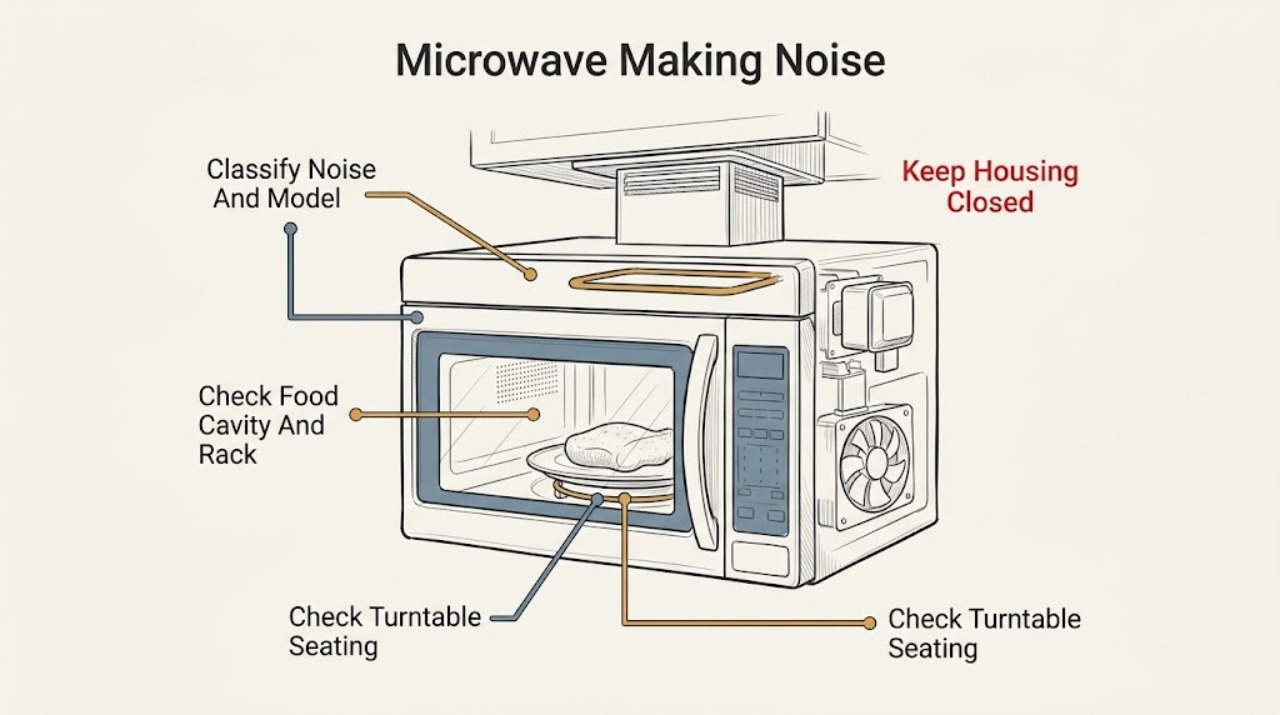
Work through in order
Diagnostic checks
Use only checks that match the exact appliance or system and its official guide.
-
Check 1
From outside the microwave, record the exact model, installation type, and sound: hum, click, thump, fan, rattle, tray drag, pop, snap, buzz, or arc. Note whether it happens before cooking starts, at a lower power setting, during cooking, after the cycle, when the vent fan runs, or when the door opens.
Expected result: The sound follows lower-power cooking, relay/start, the internal or vent fan, the turntable, the food, or an apparently electrical/mechanical event.
Next step: Continue with the matching external check. Stop without reproducing the sound if there is arcing, smoke, burning/electrical odor, sparks, a damaged cavity or door, abnormal heat, or a hot/damaged cord or outlet.
Why this matters
Why: Timing selects the mechanism. GE documents normal lower-power magnetron cycling and relay clicks, fan behavior, and turntable movement; food-related popping and an electrical/mechanical pop require different next steps. Model and installation type determine which features exist.
-
Check 2
If the noise is popping or sizzling, stop cooking and let the cavity cool. Remove food only after it is safe to handle, wipe visible spills with the unit unpowered, and check that the cookware is microwave-safe. If the model has a metal rack or cooking probe, compare its position with the exact manual; do not add metal or leave a probe in the cavity unless the model procedure requires it.
Expected result: The sound tracks high-fat food or a tight membrane, a spill is present, the microwave was empty, a metal or metal-trimmed container was used, a probe was left inside, or the rack is loose/upside down.
Next step: Clean the visible spill, use only the model-approved cookware/rack/probe arrangement, and stop using the oven if arcing recurs. Never run the oven empty or open the cabinet to inspect the waveguide or electrical parts.
Stop if: Stop immediately for sparks, continuing arcing, smoke, burning/electrical odor, a burned-through cavity, or a damaged door or cord.
Why this matters
Why: GE says food, spills, tight membranes, empty operation, metalware, a probe, and a misplaced rack can cause popping or arcing. A food-related pop that stops after a safe correction is less likely to be an internal failure; an electrical or mechanical pop is not a food diagnosis.
-
Check 3
With the oven off and the glass tray cool, inspect the visible turntable tray and support ring. Reseat the tray centered on its shaft or wheel ring, confirm it is right side up, and remove only loose food or debris from under the visible wheels; do not remove a motor or reach through the cavity floor.
Expected result: The tray is off-center, upside down, dragging on the cavity floor, not seated on the shaft/ring, or the support wheels have visible debris; the tray is correctly seated but the noise or no-turn symptom remains.
Next step: Run a normal, nonempty cooking cycle only if there is no safety warning and the manual permits it. If the turntable still grinds, will not turn, or makes a harsh mechanical sound, stop and arrange service.
Why this matters
Why: GE says incorrect seating, orientation, or debris can prevent smooth turntable movement and create drag. Direction changes, brief hesitation, jerking, dragging, or pausing can also be normal. A correctly seated tray with persistent mechanical noise may need service.
-
Check 4
For a fan-like sound, determine whether the microwave is countertop, over-the-range, or a convection model. From outside, note whether the sound occurs only while cooking, for a short time after the cycle, while the cooktop is hot, or when the vent setting changes; check only the accessible, model-approved external filter or vent path.
Expected result: An internal fan runs during cooking or briefly after it, an over-the-range vent fan changes speed or starts automatically, a convection fan alternates with heating, or a fan makes a new scraping/rattling sound.
Next step: Allow an automatic fan to cool according to the manual and keep external vents unobstructed. Do not remove the fan or vent housing; arrange service for persistent scraping, abnormal vibration, overheating, or a fan that remains abnormal after cooling.
Why this matters
Why: GE says internal cooling fans can run during use and briefly after a cycle, and over-the-range fans can increase speed or start automatically from heat or duct back pressure. A new scraping or rattling sound, an obstruction, or a fan that never settles after cooling is not established as normal by these sources.
-
Check 5
If the noise is a dull hum, thump, or click without arcing and the oven heats normally, note the selected power level and whether the sound occurs at Start or during a cycle transition. Use only the exact model's normal Cook Time or power-level controls; do not repeatedly start and stop the oven to amplify the sound.
Expected result: The noise appears only below High power, occurs as a relay clicks after Start, or is present as a harsh buzz or electrical/mechanical pop at every setting.
Next step: Use the manual's documented setting and monitor once if the sound matches the normal pattern. Stop and arrange service for a harsh, new, or persistent electrical/mechanical noise rather than opening the cabinet.
Why this matters
Why: GE says the magnetron cycles on and off at lower power and that this can cause a dull thump, click, or hum; relay clicks after Start can also be normal. A harsh or electrical/mechanical sound is a service condition, even if the oven still heats.
-
Check 6
With the unit off and cool, inspect only the visible cavity surface, door screen, door frame, glass tray, cord, and outlet for scorch marks, cracks, exposed metal damage, or moisture. Do not push on the door, remove trim, or test leakage or interlock operation.
Expected result: There is no visible damage and the sound was tied to food or a documented operating function, or there is a scorch mark, cavity hole, cracked/damaged door, moisture near electrical parts, hot cord/outlet, or an unexplained electrical sound.
Next step: Stop using the microwave for any damage or electrical warning and arrange qualified service. Do not use a damaged cavity or door, and do not attempt to judge microwave leakage or repair the shielding yourself.
Stop if: Stop immediately for smoke, odor, sparks, active arcing, abnormal heat, water near electrical parts, or repeated breaker trips.
Why this matters
Why: A safe visible food or operating cause may be corrected externally. GE says electrical or mechanical popping should be serviced and that cavity damage after arcing changes whether continued use is safe; a door or electrical hazard cannot be cleared by listening alone.
-
Check 7
Record the exact model, countertop or over-the-range installation, sound description, cooking mode and power level, food or cookware, turntable result, fan timing, visible cavity condition, and whether heating completed. Provide this sequence to qualified GE microwave service; do not order a magnetron, diode, fan, motor, or control from the sound alone.
Expected result: The noise persists after safe food, rack, turntable, and external vent checks; the microwave stops heating; the turntable or fan remains abnormal; or any arc, electrical odor, cavity damage, or breaker event occurs.
Next step: Leave the unit off and arrange qualified microwave service. Use qualified electrical help for a damaged outlet, cord, plug, or repeated breaker operation, and do not move a mounted over-the-range unit to investigate.
Stop if: Do not open the cabinet, defeat interlocks, probe energized parts, or run the microwave empty to reproduce the sound.
Why this matters
Why: An internal high-voltage, interlock, motor, fan, control, or shielding diagnosis may be needed. GE's public guidance does not support an owner-level internal test or a universal part conclusion from a noise.
Use your observations
Decision map
Find the observation that best matches what you see, then follow the next safe action.
-
PATH 01Next step
What you see
A dull thump, hum, or click occurs at a lower power setting or at a normal Start/cycle transition, without arcing, odor, damage, or loss of heating.
Do this next
Use the exact model manual and monitor the pattern. Arrange service if the sound becomes harsh, changes suddenly, occurs at every setting, or is joined by poor heating or a safety symptom.
Why this path and its safety boundary
Why it matters: GE's documented magnetron cycling or relay operation is more likely than an immediate component failure.
-
PATH 02Next step
What you see
Popping or sizzling tracks high-fat food, a tight membrane, a visible spill, an empty run, unapproved metal or trim, a misplaced probe, or a loose/upside-down rack.
Do this next
Stop, cool, clean visible spills, pierce appropriate food membranes, and use only the model-approved cookware, rack, and probe arrangement. Stop and service the oven if popping continues without a food/setup cause.
Why this path and its safety boundary
Why it matters: The food or cavity setup is more likely than an internal electrical fault, but metal use or empty operation can cause arcing and damage.
-
PATH 03Next step
What you see
The sound is tray drag or rattling, and the glass tray is off-center, upside down, not seated, or has debris under its visible support ring; or the tray merely hesitates, changes direction, or pauses normally.
Do this next
Reseat the cool tray and clean only visible debris with the oven off. Arrange service if the correctly seated tray still makes a harsh mechanical noise or will not turn.
Why this path and its safety boundary
Why it matters: Tray seating or visible debris is more likely when the correction changes the sound. GE also identifies direction changes, hesitation, jerking, dragging, and pauses as normal turntable behavior.
-
PATH 04Next step
What you see
A fan runs during cooking or briefly after it, an over-the-range fan gets louder or changes speed, or it starts automatically while the underside is hot and settles after cooling.
Do this next
Allow the unit to cool and follow the model's external vent/filter guidance. Arrange service for scraping, grinding, persistent abnormal vibration, overheating, or a fan that remains abnormal after cooling.
Why this path and its safety boundary
Why it matters: Internal cooling or automatic over-the-range vent operation is more likely than a failed fan. Duct back pressure can make an over-the-range vent louder.
-
PATH 05Safety boundary
What you see
The sound is an electrical or mechanical pop, harsh buzz, or arc; it continues after safe setup checks; heating stops; or there is smoke, burning/electrical odor, sparks, cavity/door damage, water near electrical parts, abnormal heat, or a breaker trip.
Do this next
Stop using the microwave and arrange qualified microwave or electrical service from a dry, safe position. Do not run it empty, open the cabinet, test leakage, defeat interlocks, or repeatedly reset a breaker.
Why this path and its safety boundary
Why it matters: An internal high-voltage, interlock, control, fan, motor, shielding, or power fault may be involved. GE recommends service for an electrical or mechanical pop and does not provide a safe user-level internal test.
Safety stop: Leave the unit off for any active arc, smoke, odor, sparks, damaged cavity or door, water near electrical parts, hot/damaged cord or outlet, or repeated breaker operation.
Helpful context
Understand the symptom
Noise depends on the GE microwave configuration
A countertop microwave, an over-the-range unit, and a model with convection or a turntable can make different sounds. GE says lower-power magnetron cycling can cause a dull thump, click, or hum, while relays may click after Start. An over-the-range unit also has a vent fan and may switch it on automatically when heat builds below the microwave. Identify the exact model and installation type before treating a sound as a fault.
Separate food and turntable noises from appliance noises
Popping or sizzling can be caused by food fat, a tight membrane, or a spill; a turntable can normally change direction or briefly hesitate. A loose rack, an upside-down rack, a tray that is off-center, or debris under the support ring can instead create a mechanical sound. These checks require only a cool, clean cavity and the exact manual. Do not run an empty microwave to reproduce a noise.
Microwave internal repairs are not an owner check
Do not remove the microwave cabinet, probe the door interlocks, touch the magnetron or high-voltage parts, defeat a safety switch, or perform an energized test. Stop immediately for arcing, sparks, smoke, burning or electrical odor, a damaged cavity or door, a hot or damaged cord or outlet, water near electrical parts, or repeated breaker trips. Leave the appliance off and obtain qualified microwave service; a countertop unit can be unplugged only from a dry, safe position, and an over-the-range unit should not be pulled from its mounting to investigate.
When checks do not resolve it
Need a professional?
Call qualified microwave service for an electrical or mechanical pop, recurring unexplained noise, persistent turntable or fan fault, cavity or door damage, or loss of heating. Call qualified electrical service for a damaged outlet, cord, plug, or repeated breaker trip. Stop immediately for active arcing, smoke, burning or electrical odor, sparks, abnormal heat, or water near electrical parts.
Safety scope: Do not open the microwave cabinet, touch high-voltage parts, probe interlocks, use metalware outside the exact manual, run the oven empty, test leakage, defeat a door switch, or move a mounted unit to investigate. Stop for arcing, smoke, burning/electrical odor, sparks, a damaged cavity or door, abnormal heat, water near electrical parts, a hot/damaged cord or outlet, or repeated breaker trips.
Have this ready
- Exact model, countertop or over-the-range installation, sound type and timing, power level and cooking mode, food and cookware, rack/probe status, turntable seating result, fan timing, visible cavity or door condition, heating result, and any safe recording from outside the appliance.
Common questions
FAQ
Is a humming or clicking GE microwave normal?
It can be. GE says lower-power magnetron cycling can cause a dull thump, click, or hum, and relays can click after Start. An internal cooling fan or over-the-range vent fan can also be heard. A harsh, new, electrical, or mechanical sound should be serviced rather than tested by opening the cabinet.
Why is my GE microwave popping?
GE says food, high-fat ingredients, tight membranes, spills, an empty cavity, metal or metal-trimmed cookware, a cooking probe, or a misplaced rack can cause popping or arcing. Stop, cool, and correct only the visible food or cookware condition. If the pop sounds electrical or mechanical or continues without a food cause, arrange service.
Why does the GE microwave turntable drag or jerk?
GE says a turntable can normally hesitate, jerk, drag, pause, or change direction. If it will not turn or makes a harsh noise, turn the oven off and cool the tray, then check that the tray is centered, right side up, seated on its shaft or wheel ring, and free of visible debris underneath. Persistent trouble needs service.
Why does my over-the-range GE microwave fan get louder?
GE says an over-the-range vent fan can change speed or get louder because duct back pressure requires more airflow. It can also turn on automatically when the underside becomes too hot and remain on until it cools. Arrange service for scraping, grinding, abnormal vibration, or a fan that does not settle after cooling.
Can I open a GE microwave to find the source of a noise?
No. Keep the cabinet closed. Do not touch high-voltage parts, test door interlocks, run the oven empty, or perform live measurements. Stop for arcing, smoke, burning or electrical odor, sparks, cavity or door damage, abnormal heat, or a hot/damaged power connection and arrange qualified service.
Read the exact guide
Official sources
- Microwave - Arcing or Making SoundsGE Appliances · GE microwave ovens; the exact Owner's Manual controls approved utensils and feature-specific procedures
- Service Scheduling for Other GE ProductsGE Appliances · GE products; exact service scope depends on model and product category
- Microwave - Turntable Does Not TurnGE Appliances · GE microwave models with a non-turning turntable; exact shaft, ring, and control features vary
- Microwave - Normal Operational CharacteristicsGE Appliances · GE microwaves and 5-in-1 Advantium models covered by the article; exact features vary by model and installation
- Microwave - Turntable OperationGE Appliances · GE microwave models equipped with a turntable; exact tray and ring design varies by model
- Microwave - Vent Getting Louder or Changing SpeedsGE Appliances · Over-the-range GE microwave ovens with the described vent-fan controls
- Over-the-Range Microwave - Automatic Fan FeatureGE Appliances · GE over-the-range microwave ovens; automatic fan features vary by model
- Microwave - Makes a Popping NoiseGE Appliances · GE microwave ovens; use the exact manual for cookware, rack, and probe details
Community feedback
Share a repair observation
Share a plain-text repair observation. Accepted observations are published automatically; this page may take a moment to update.