
On this page
Start here
Quick answer
After a self-clean cycle, a Frigidaire DGGF3042KFN may leave the door and controls unavailable while the oven is still hot; Frigidaire says the door remains locked until the oven cools and then unlocks automatically. Do not treat a nonresponsive Cancel button while the lock is active as proof of a failed control board. Once the oven is fully cool and the door has released, note whether Cancel alone fails or the whole panel is unresponsive, and record the display or lock indication. If the exact manual permits it and there is no heat, odor, smoke, or other hazard, perform one manufacturer-directed power reset; if the button remains unresponsive, the lock will not release when cool, or any heating or electrical behavior is abnormal, keep the gas range off and arrange qualified service without opening the panel.
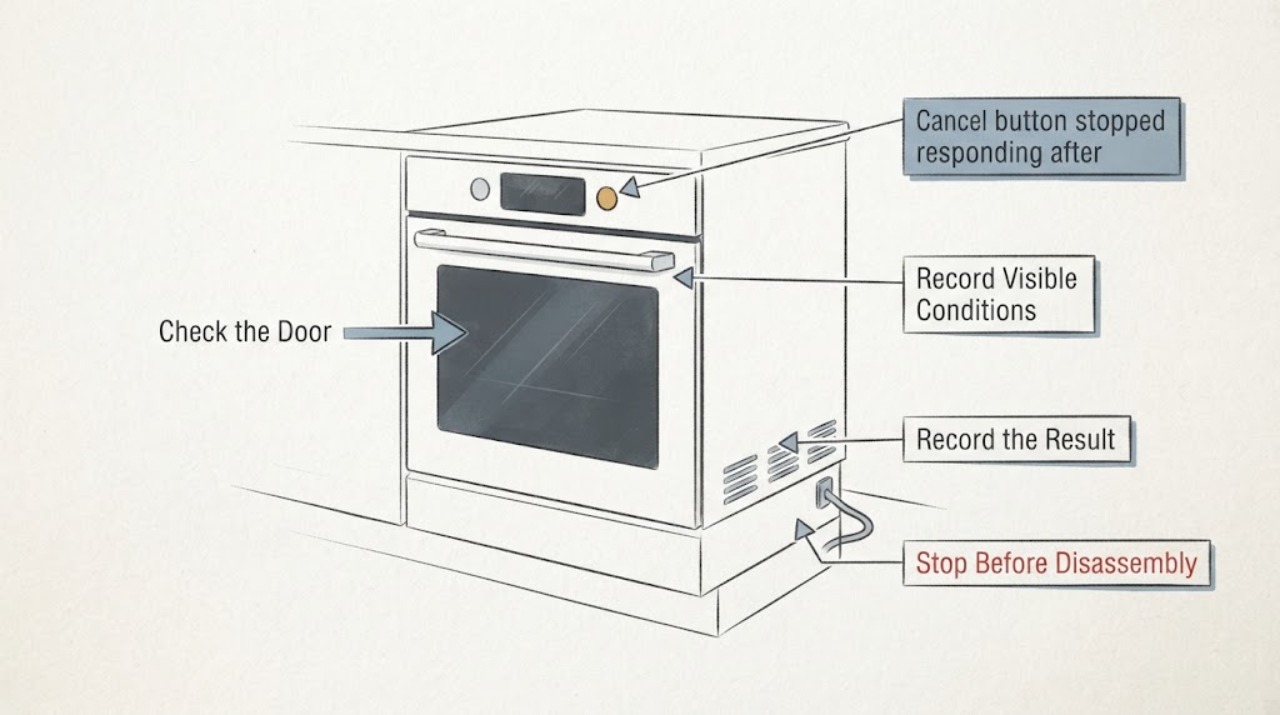
Work through in order
Diagnostic checks
Use only checks that match the exact appliance or system and its official guide.
-
Check 1
From a safe position, record the exact display, beeps, lock indicator, selected mode, and whether the oven cavity or door feels hot without touching a hot surface. Note whether self-clean ended normally or stopped partway through.
Expected result: The display shows a lock or dash, the door is still locked while the oven is hot, the display is blank or erratic, or the oven is cool and only Cancel appears unresponsive.
Next step: Do not reset or force the door while it is hot. Keep the display description and timing for the exact DGGF3042KFN manual or service request; continue only when the appliance is cool and safe.
Why this matters
Why: A hot locked cavity can be the normal post-self-clean safety state. A cool oven with a selective or whole-panel response failure is a different diagnostic branch, and a blank or erratic display may indicate a power or control issue without identifying a particular part.
-
Check 2
Allow the oven to cool naturally after self-clean and wait for the door lock to release on its own. Check the door only by trying the handle normally after it has released; do not pry, lift, or press the door against resistance.
Expected result: The lock releases and the door opens normally after cooling, or the oven is cool but the lock remains engaged or an error appears.
Next step: If the door releases, proceed to the panel-response comparison. If it remains locked when cool, leave the range off and arrange qualified service; do not run self-clean again or access the latch.
Why this matters
Why: Frigidaire states that the self-clean door remains locked until sufficiently cool and then unlocks automatically. Failure to release when cool is not a reason to defeat the latch and may require lock or control diagnosis.
-
Check 3
When the oven is cool and unlocked, test the panel only with normal, brief presses: compare Cancel with the clock, mode, temperature, and other available controls, and record whether each gives the expected display or beep. Do not keep repeating a failed key.
Expected result: Only Cancel is ignored while other keys respond, every key is ignored, or the panel responds but immediately returns to a lock or error display.
Next step: Photograph the display and stop the comparison after one pass. Use the exact model manual or qualified service to identify the control path; do not remove the overlay or console.
Why this matters
Why: A selective failure makes the Cancel keypad or its control path worth diagnosing; a whole-panel or lock-state failure broadens the possibilities to power, control state, or control electronics. Neither result proves that a board or keypad is the failed part.
-
Check 4
If the display shows a dash or lock state, use the exact DGGF3042KFN manual's lock-cancel instruction. Frigidaire's range guidance says the applicable lock feature is canceled by holding Off for 6 seconds, but its instructions may vary by model; use that sequence only if the model documentation confirms it.
Expected result: The lock indication clears and normal controls return, or the lock indication remains, the door does not release, or pressing the documented control produces no response.
Next step: Stop using the oven and arrange service if the documented lock-cancel step does not restore normal control and door operation. Do not substitute another Frigidaire model's key sequence or bypass the latch.
Why this matters
Why: A cleared lock state supports a control setting rather than a failed replacement part. A persistent lock state after the correct model procedure points to a service condition, especially after self-clean.
-
Check 5
Only after the oven is cool, there is no smoke, gas odor, abnormal heat, damaged wiring, or repeated breaker event, follow the exact manual's power-reset instruction once. If the model manual does not provide a safe external method, leave the range off rather than opening it.
Expected result: The display and Cancel control return to normal after one permitted reset, the same failure returns, or a different code or lock state appears.
Next step: Record the before-and-after display and stop resetting. Arrange qualified service for a recurring failure, a code not covered by the exact manual, or any abnormal heating or door behavior.
Why this matters
Why: A one-time recovery can be a temporary control event, but a returning symptom or a new code means the underlying condition remains. Frigidaire's general error guide gives reset steps for some range conditions but directs owners back to the use-and-care guide and service when the issue persists.
-
Check 6
Prepare the complete model DGGF3042KFN, serial information, self-clean timing, display photo, lock behavior, which keys respond, and any odor, heat, smoke, or power event for Frigidaire or an appliance technician.
Expected result: The failure is repeatable only after self-clean, persists while the oven is cool, affects one key, affects every key, or is accompanied by a lock or error indication.
Next step: Keep the range off until the technician confirms safe operation if the lock, heating, or electrical behavior is abnormal. Do not open the console, test live wiring, or order a board or keypad before diagnosis.
Why this matters
Why: The timing and response pattern separate a normal cooling lockout from a repeatable keypad, lock, power, or control diagnosis. A part name cannot be selected safely from the Cancel symptom alone.
Use your observations
Decision map
Find the observation that best matches what you see, then follow the next safe action.
-
PATH 01Next step
What you see
The oven is still hot after self-clean and the door remains locked, with no smoke, gas odor, or uncontrolled heating.
Do this next
Wait for natural cooling and automatic release. Do not press the door, defeat the lock, or run another mode while the lock remains active.
Why this path and its safety boundary
Why it matters: This matches Frigidaire's documented safety behavior for self-clean: the door remains locked until the oven cools sufficiently.
-
PATH 02Next step
What you see
The oven is cool and unlocked, other controls respond, but Cancel alone repeatedly gives no display change or beep.
Do this next
Stop testing after one comparison, keep the range off if the oven cannot be safely controlled, and request model-specific service without opening the console.
Why this path and its safety boundary
Why it matters: A selective Cancel input or its control path is more plausible than a still-active self-clean lock, but the observation does not identify a keypad, overlay, connector, or board.
-
PATH 03Next step
What you see
The oven is cool but the lock remains engaged, or a door-lock indication returns after the documented model procedure.
Do this next
Leave the door and latch undisturbed and arrange qualified appliance service. Do not pry the door or repeat self-clean.
Why this path and its safety boundary
Why it matters: The lock/control path needs service; a normal post-clean cooling delay no longer explains the persistent condition.
-
PATH 04Next step
What you see
Every control is unresponsive, the display is blank or erratic, the same failure returns after one permitted reset, or an unfamiliar code appears.
Do this next
Keep the range off, preserve the exact display and reset result, and arrange qualified service. Do not remove the panel or perform electrical testing.
Why this path and its safety boundary
Why it matters: A broader power, control-state, or control-electronics diagnosis is needed; the Cancel report alone does not justify a replacement board.
-
PATH 05Next step
What you see
There is smoke, a burning-gas smell, sparks, uncontrolled heating, visible damage, a hot or damaged cord or outlet, or a breaker that trips again.
Do this next
Turn the oven off if it can be done without approaching danger, keep people away, and obtain qualified emergency or appliance help. Do not reuse it until cleared.
Why this path and its safety boundary
Why it matters: The unresponsive button is accompanied by an immediate gas, fire, shock, or overheating risk, so further button checks or resets are unsafe.
Helpful context
Understand the symptom
The relevant identity is Frigidaire DGGF3042KFN, not a generic oven keypad. Frigidaire's official owner support is model-driven, so keep the full suffix when retrieving the use-and-care manual. The Cancel symptom also needs a timing check: a locked, hot oven after self-clean is a different state from a cool oven whose other controls work but Cancel does not.
Do not pull on the door, insert anything around the latch, remove the console, or keep pressing a key while the cavity is hot. Stop immediately for smoke, sparks, a burning-gas smell, uncontrolled heating, a hot or damaged cord or outlet, or a breaker that trips again.
The useful decision is whether the Cancel key is being ignored because self-clean has not safely finished, because the control is in a lock state, or because the cool appliance has a repeatable keypad or control response fault. That distinction is enough to choose waiting, one permitted reset, or service; it is not enough to name a control board.
When checks do not resolve it
Need a professional?
Stop immediately for smoke, sparks, a burning-gas smell, uncontrolled heating, visible damage, a hot or damaged cord or outlet, a breaker that trips again, or a door that remains locked and unsafe to handle. Keep the range off and obtain qualified emergency or appliance service. Arrange appliance service when the oven is cool but Cancel or the full panel remains unresponsive, the lock does not release normally, the symptom returns after one model-permitted reset, or diagnosis would require the console, latch, wiring, sensor, or control area. Do not pry or bypass the door lock, open the panel, test live wiring, or run self-clean again to reproduce the symptom.
Common questions
FAQ
Why did Cancel stop working right after self-clean?
If the oven is still hot or the door-lock state is active, Frigidaire says the door remains locked until the oven cools. Wait for natural cooling and automatic release before deciding whether Cancel itself is unresponsive.
Should I hold Off to unlock the Frigidaire range?
Frigidaire's range lock guidance says the applicable Lock feature is canceled by holding Off for 6 seconds, but it also says instructions may vary by model. Confirm that sequence in the DGGF3042KFN manual and never use it to defeat a hot or mechanically resistant door.
Do I need a new control board because Cancel does not respond?
Not from this symptom alone. First establish that the oven is cool and unlocked, compare Cancel with the other keys, record the display, and use at most one exact-model reset when safe. A selective key failure and a whole-panel failure require different diagnosis, and neither identifies a compatible part by itself.
Read the exact guide
Official sources
- Owner Center Resource Library | FrigidaireFrigidaire · Opened the official Frigidaire Owner Center. It provides product-support and manual lookup; the complete DGGF3042KFN suffix must be entered to obtain model-specific instructions, so generic range behavior is not treated as an exact control sequence.
- Oven Error Codes and Alarms GuideFrigidaire · Opened official Frigidaire oven error guide. It gives a limited external power reset for some codes, directs owners to the use-and-care guide, identifies high-temperature and door-lock categories, and sends persistent problems to service.
- Range - How do I set my oven or range to self-clean?Frigidaire · Opened official Frigidaire range self-clean guidance. It says to check the model for Self Clean and that the oven door remains locked until the oven cools, then unlocks automatically.
- Ranges - What does the Lock feature do and how can I activate it?Frigidaire · Opened official Frigidaire range Lock guidance. It states that instructions may vary by model, documents the applicable Off-hold example, and directs owners to the owner's manual or service when the lock cannot be resolved.
Community feedback
Share a repair observation
Share a plain-text repair observation. Accepted observations are published automatically; this page may take a moment to update.