
On this page
Start here
Quick answer
Frigidaire's opened F3 support article labels F3/F20 as a communication error for electric ranges and electric cooktops, and recommends disconnecting power for up to 30 seconds before arranging service if the code remains. Because this task has no model and says only “oven,” first confirm whether the appliance is an electric range oven, electric cooktop, wall oven or another configuration and read the exact model manual; do not transfer the range-only F3 meaning to a wall oven or gas appliance. Record the code, turn the oven off, and use only the manufacturer-supported power reset. If F3 returns, the oven will not operate normally, or there is smoke, burning odor, abnormal heat or electrical damage, keep it out of service and arrange qualified repair without opening the control area or testing live circuits.
Before you begin
Safety first
- Do not open the control area, remove panels, bypass safety devices, probe energized wiring or repeatedly operate an oven that smells burned, smokes, overheats, sparks or trips a breaker.
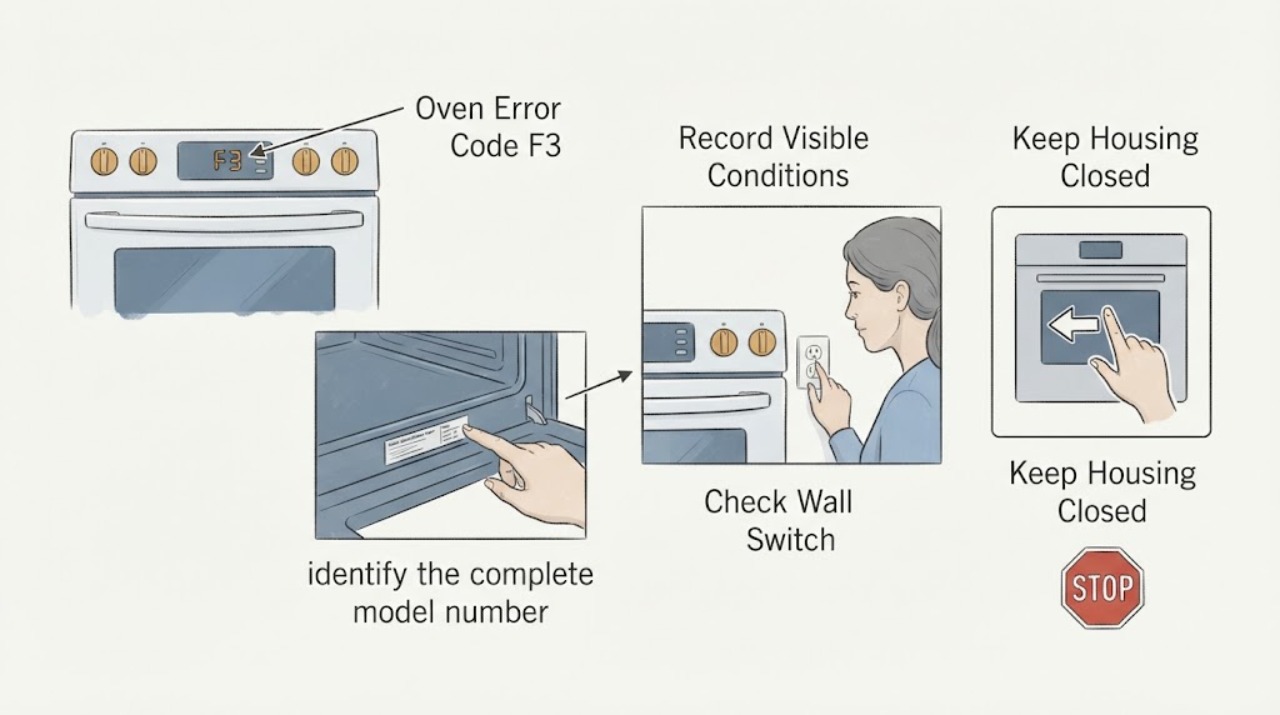
Work through in order
Diagnostic checks
Use only checks that match the exact appliance or system and its official guide.
-
Check 1
Before interpreting F3, identify the complete model number and whether the appliance is an electric range oven, electric cooktop, wall oven, gas range or another configuration. Use the model tag and the matching Use and Care guide; do not remove panels to find it.
Expected result: The appliance is confirmed as an electric range/cooktop covered by Frigidaire's F3 page, or it is a wall oven, gas appliance or another configuration that is not established by that page.
Next step: For a covered electric range/cooktop, continue with the documented reset. For a wall oven, gas appliance or unknown configuration, use the exact model manual or Frigidaire support before assigning F3 a meaning.
Why this matters
Why: Frigidaire's opened F3 page applies to electric ranges and electric cooktops, while the range guide applies to electric ranges. The same code text cannot be transferred to an unconfirmed appliance family.
-
Check 2
With the oven off, record the exact display text, when F3 appears, whether heating or controls stop, and whether there is smoke, burning odor, abnormal heat, visible electrical damage or a tripped breaker. Do not keep operating the oven to reproduce the code.
Expected result: F3 is the only symptom and the appliance is cool and intact, or the code is accompanied by a safety symptom or loss of normal control.
Next step: If there is any safety symptom, keep the appliance off and arrange qualified service. If there is no hazard, record the model and proceed only to the documented power reset.
Why this matters
Why: The official F3 source supports a communication-error label only within its stated electric range/cooktop scope; smoke, heat, odor or electrical damage requires a safety stop rather than a reset experiment.
-
Check 3
For an appliance configuration covered by the Frigidaire F3/F20 guidance, turn the appliance off and disconnect its power for up to 30 seconds, either by unplugging it when accessible or by switching its circuit breaker off and back on as appropriate for the installation. Do not remove covers or probe the circuit.
Expected result: The code clears and normal controls return, or F3 returns immediately/after the next operation.
Next step: If F3 returns, stop repeated resets and use the exact-model manual or service path. If the appliance does not safely return to normal, keep it off.
Why this matters
Why: Frigidaire documents this as the first reset for F3/F20 and for general oven error clearing. A returning code means the reset did not resolve the issue; it does not identify a particular board or wiring fault.
-
Check 4
Compare the exact model and displayed code with the manufacturer's Use and Care guide or Frigidaire support page. Check whether the display is F3, F20, F26 or a different character, and do not infer a code from a blurry display or a similar appliance.
Expected result: The model manual confirms the code and appliance family, or it does not list F3 or lists a different meaning/configuration.
Next step: Follow only the matching manual's instructions. If the manual does not confirm the code for this model, provide the model and display evidence to Frigidaire service rather than borrowing another model's definition.
Why this matters
Why: Frigidaire's published code lists group F3/F20/F26 for electric ranges, but the task has no model and the oven error guide does not define F3 for every oven type. Exact documentation controls the scope.
-
Check 5
Prepare the full model and serial, appliance configuration, installation age, exact code, when it appears, reset result, and any safety symptoms before contacting Frigidaire or the installer.
Expected result: The code persists after the documented reset, the model scope is uncertain, or any next step would involve controls, wiring, heating circuits, cabinet access or live electrical testing.
Next step: Keep the oven out of service and arrange qualified repair; do not open the control area, bypass a safety device, or test energized circuits.
Why this matters
Why: Frigidaire directs unresolved F3/F20 cases to the installer or service, and the available official code definition is not enough to identify a replaceable internal part for an unspecified model.
Use your observations
Decision map
Find the observation that best matches what you see, then follow the next safe action.
-
PATH 01Next step
What you see
The full model confirms an electric range or electric cooktop, and the display is F3/F20/F26 without smoke, burning odor, abnormal heat or visible electrical damage.
Do this next
Perform the documented power disconnect for up to 30 seconds once. If the code returns, stop resetting and arrange installer or Frigidaire service.
Why this path and its safety boundary
Why it matters: This matches Frigidaire's published electric-range/cooktop communication-error scope.
-
PATH 02Next step
What you see
The appliance is a wall oven, gas range, unknown configuration, or a model whose manual does not confirm the published F3 meaning.
Do this next
Do not transfer the code meaning or component advice. Use the exact model manual and provide the model/display details to Frigidaire service.
Why this path and its safety boundary
Why it matters: The available F3 article does not establish that the electric-range communication definition applies to this appliance.
-
PATH 03Next step
What you see
After a covered appliance is safely powered down for the documented interval, F3 clears and the controls return without a hazard.
Do this next
Use the oven only according to the matching manual and monitor it; if F3 recurs, stop repeated resets and contact service with the recorded model and code.
Why this path and its safety boundary
Why it matters: The display condition was cleared by the supported reset, but that result does not prove the underlying cause or guarantee that the code will not return.
-
PATH 04Next step
What you see
F3 returns after reset, the controls/heating do not behave normally, or there is smoke, burning odor, abnormal heat, sparking or repeated breaker tripping.
Do this next
Keep the oven off, disconnect power only from a safe position when appropriate, and arrange qualified service; do not open the appliance or perform live electrical tests.
Why this path and its safety boundary
Why it matters: The issue is unresolved or unsafe and cannot be narrowed to a component from this no-model code report.
Helpful context
Understand the symptom
Scope the code before interpreting it
Frigidaire's exact F3/F20 article calls the condition a communication error and lists electric ranges and electric cooktops under Applies to. The range error guide also lists F3/F20/F26 as a communication error but applies that guide to electric ranges. This is enough to support an electric-range scope, not a universal code meaning for every Frigidaire wall oven, gas range or other appliance. Find the full model and configuration before using a model-specific procedure.
What the safe reset can and cannot show
Frigidaire says to disconnect power for up to 30 seconds on the F3/F20 article. Its general oven error guide likewise describes a 30-second unplug or breaker reset and says to refer to the Use and Care guide. A reset can clear a transient display condition, but it does not prove that a control, wiring harness or other internal part is good or bad. Do not open the oven or perform live electrical tests to investigate a returning code.
Treat a returning code as a service boundary
The F3 support article routes an unresolved code to the installer for a unit installed within the past 30 days, or to Frigidaire service for an older installation. Keep the exact code, model, appliance type and reset result for that handoff. A persistent F3 is not a safe reason to replace a board or probe based on a generic code list.
When checks do not resolve it
Need a professional?
Contact the installer for a unit installed within the past 30 days or Frigidaire service for an unresolved F3/F20 condition. Use qualified service immediately for smoke, burning odor, abnormal heat, sparking, visible electrical damage, repeated breaker trips or any next step requiring cabinet access or live electrical diagnosis.
Safety scope: Do not open the control area, remove panels, bypass safety devices, probe energized wiring or repeatedly operate an oven that smells burned, smokes, overheats, sparks or trips a breaker.
Have this ready
- Provide the full model and serial, appliance type, exact display code, when it appears, installation age, reset result, and any smoke, odor, heat, sparking or breaker symptoms.
Common questions
FAQ
What does F3 mean on a Frigidaire oven?
Frigidaire's opened F3/F20 support page calls it a communication error for electric ranges and electric cooktops. Because no model is supplied here, confirm the appliance configuration and exact manual before applying that meaning to a wall oven or gas appliance.
How do I clear Frigidaire F3?
For the electric range/cooktop scope covered by Frigidaire's F3 article, turn the appliance off and disconnect power for up to 30 seconds, then restore power. If the code returns or the model scope is uncertain, stop repeated resets and contact the installer or Frigidaire service.
Does F3 prove that the control board needs replacement?
No. Frigidaire labels the displayed condition a communication error in a specified electric-range/cooktop scope, but the public guidance does not establish a replacement part for an unspecified model. Do not open the appliance or live-test controls; use the exact manual and qualified service.
Read the exact guide
Official sources
- Oven Error Codes and Alarms GuideFrigidaire · Opened Frigidaire's official oven error guide. It supports a general 30-second power reset and directs owners to the Use and Care guide, but it does not define F3 for every oven configuration; F10, F30 and door-lock examples are not transferred to F3.
- Ranges - Error Code GuideFrigidaire · Opened Frigidaire's official range error guide. It applies to electric ranges and lists F3/F20/F26 as a communication error, then directs unresolved cases to the installer or Frigidaire service.
- Range Error Code F3 / F20 - Communication ErrorFrigidaire · Opened Frigidaire's official support article. It explicitly applies to electric ranges and electric cooktops, identifies F3/F20 as a communication error, documents a power disconnect of up to 30 seconds and routes unresolved cases to the installer or service.
- Where can I find my model and serial number?Frigidaire · Opened Frigidaire's official model-identification article. It gives separate model-label locations for ranges/stoves and wall ovens, supporting the need to identify the exact appliance before applying a code definition.
Community feedback
Share a repair observation
Share a plain-text repair observation. Accepted observations are published automatically; this page may take a moment to update.