
On this page
Start here
Quick answer
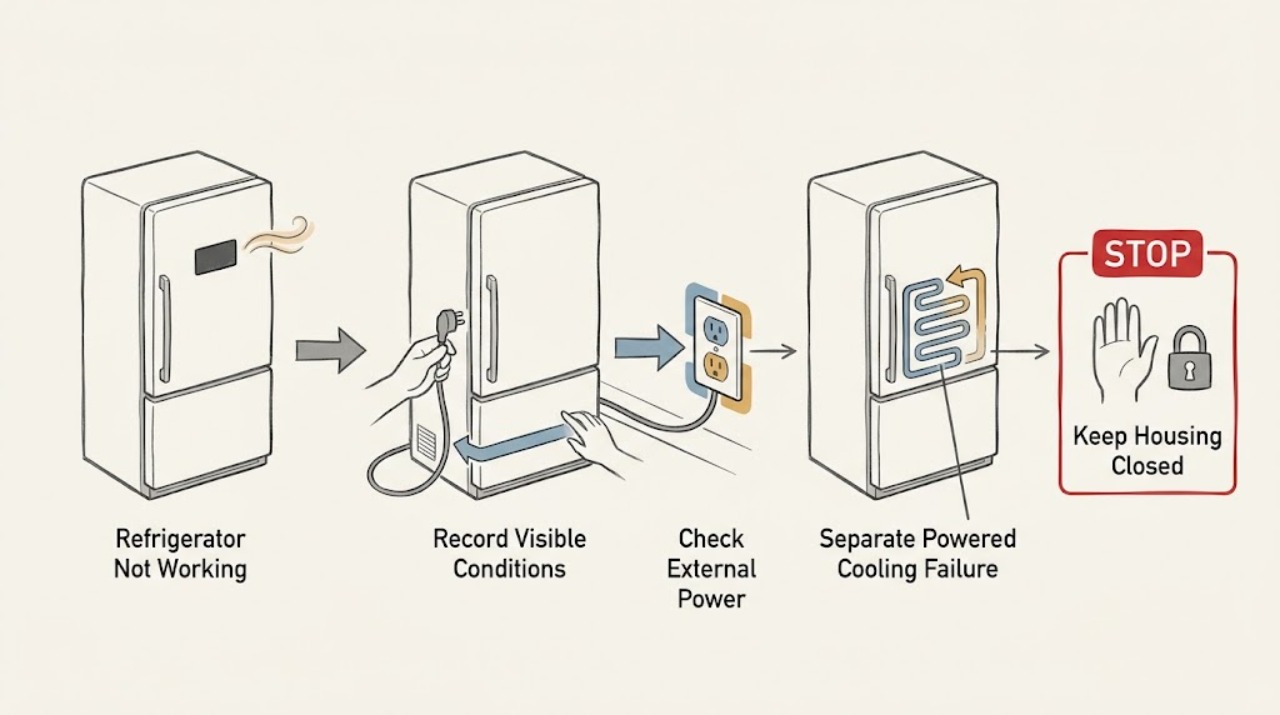
Do not start by ordering a part. First identify which of these is true: the cabinet has no lights or display; it has power but is not cooling; cooling works but water or ice does not; or the display is beeping or showing a code. For a completely dead refrigerator, check the plug, the dedicated outlet, and the refrigerator's breaker or fuse from a safe, dry position; Frigidaire says another appliance can be used to confirm the outlet. If lights or the display work, check the temperature setting, door closure and seal, visible vents, and whether the unit recently lost power or was installed. If only water or ice fails, check the model's lock state, visible water supply, and correctly seated filter. Treat PF, high-temperature, door-ajar, Sabbath, demo, and other messages as model-dependent states, not as a universal fault code. Do not open panels, bypass a switch, probe live wiring, or repeatedly reset a breaker. Stop immediately for smoke, burning odor, a hot or damaged cord/outlet, water near electrical parts, or repeated trips; otherwise arrange model-specific service when the external branch does not restore normal operation.
Before you begin
Safety first
- This article covers safe external power, normal control, temperature, door, vent, and visible water/filter checks. Qualified appliance or electrical service must handle internal power, wiring, controls, fans, compressors, defrost components, valves, sealed refrigeration, and live testing.
Work through in order
Diagnostic checks
Use only checks that match the exact appliance or system and its official guide.
-
Check 1
Read the exact model and serial label without dismantling anything. Define the first failure: no interior light and no display, light/display present but cabinet warm, cooling present but water or ice absent, or a code/beep/mode on the display. Record whether the unit was newly installed, moved, unplugged, affected by an outage, or recently had a setting/filter change.
Expected result: Everything is dark, any light or display works, only water/ice fails, the display shows a named code or mode, or the symptom is not yet clear.
Next step: Follow only the branch matching the first failed function and keep the model information for every later check. If the symptom is mixed, address the highest-risk condition first: electrical hazard, complete loss of cooling, then the isolated convenience function.
Stop if: Do not use a guessed button sequence, remove a cover, or infer a part from the phrase not working.
Why this matters
Why: An all-dark cabinet belongs first to the power branch. A powered but warm cabinet belongs to cooling and airflow. A single water/ice symptom does not prove that refrigeration has failed, while a display code or mode must be matched to the model rather than guessed.
-
Check 2
For an all-dark cabinet, check from a safe dry position that the power cord is fully seated and that no switch or accessible plug is off. Inspect the outlet only for visible damage, then check the refrigerator's labeled breaker or fuse. Frigidaire says a separate appliance may be used to check whether the outlet works; do not use a damaged load or handle exposed wiring.
Expected result: The plug is loose, the breaker or fuse is open, the outlet does not power another safe appliance, the refrigerator returns briefly then loses power, or the outlet and supply appear normal but the refrigerator remains dark.
Next step: Restore a loose connection only if it is dry and undamaged. Have the household electrical supply checked if the outlet or breaker is abnormal; arrange refrigerator service if a verified outlet feeds the unit but it remains dark.
Stop if: Do not repeatedly reset a tripping breaker, replace a fuse with a different rating, use an extension cord, open the plug, or test live voltage yourself.
Why this matters
Why: A loose plug, tripped breaker/fuse, or failed outlet can explain a dead refrigerator. A breaker that trips again, heat or damage at the outlet, or a refrigerator that stays dark with a verified supply points beyond an owner power check.
-
Check 3
If a light or display works but the refrigerator is warm, read the refrigerator and freezer settings and compare them with the exact owner's manual. As a general Frigidaire electronic-control reference, the opened guidance lists 37°F for fresh food and 0°F for the freezer; dial and special temperature-drawer models can differ. Check that visible vents are not covered, doors close fully, and the gasket is clean and visibly sealing. Note a recent installation, outage, or long door opening.
Expected result: The setting is abnormal for the model, the unit has not stabilized after installation or power loss, a vent is blocked, a door or gasket does not seal, the cabinet is warm despite normal external checks, or cooling is present and only one function fails.
Next step: Restore only the model-authorized setting, clear accessible items from vents, close the doors, and allow the documented stabilization time. Protect food and arrange service if the cabinet remains warm or cooling is absent; return to the water/ice branch if the cabinet is cold.
Stop if: Do not remove evaporator covers, touch fans or heaters, adjust hidden controls, add refrigerant, or use heat to thaw internal ice.
Why this matters
Why: A wrong setting, blocked airflow, open door, or recent warm event can explain poor cooling. Frigidaire says a non-sealing door causes unstable temperature. If the cabinet remains warm after the model's stabilization period with clear vents and a good seal, the fault is not narrowed to a safe external part.
-
Check 4
If the cabinet is cooling normally but water or ice does not work, use the exact model's normal display and verify that control lock is not active. Check only the visible water connection, accessible line for a kink, and filter seating or visible damage. If a filter or water system was newly installed, follow the model-authorized prime-and-purge instructions. Distinguish no water at the dispenser from no ice production or ice that is made but will not dispense.
Expected result: The lock is active, water supply is absent or visibly kinked, filter is incorrectly seated/frozen/cracked, the system is newly installed, no water dispenses but ice is present, or no ice is made while water works.
Next step: Use the model's documented unlock, filter, and prime/purge procedure only; correct a visible kink without pulling the refrigerator into an unsafe position. Route dispenser, ice-maker, valve, or concealed-line faults to model-specific service.
Stop if: Do not disconnect a pressurized line, force a filter, pour water into an ice mold, rotate an auger, remove a valve, or work near wet electrical parts.
Why this matters
Why: Frigidaire says a locked display can stop water or ice dispensing and that the visible supply and filter condition matter. A dispenser, ice maker, and water path are separate functions; one failing does not identify the others' parts.
-
Check 5
Record the display text, letters, numbers, light pattern, and beep timing before clearing anything. Compare it with the exact owner's manual. Frigidaire's general alarm guidance describes PF after a power failure, HI or high-temperature alerts, a door-ajar alert, Sb/SB Sabbath mode, and DI SP for an ice-chute jam, while warning that models vary. If the manual permits an alert-clear or reset, perform only that documented normal-control action after checking for an electrical or cooling hazard.
Expected result: The message matches a documented power-failure, door-ajar, high-temperature, Sabbath, demo, or dispenser state; an unknown code appears; the alert clears but the appliance remains abnormal; or the code returns.
Next step: Correct only the documented condition, close the door, allow temperature to recover after an outage, or use the model's documented reset. Save a photo and code history and arrange service for unknown, repeated, or service-indicating codes.
Stop if: Do not cycle random keys, repeatedly unplug a fault, bypass a door switch, or continue operating through smoke, odor, heat, water, or repeated breaker trips.
Why this matters
Why: A documented user state may explain why a function appears inactive, while PF or high temperature can follow an outage without proving a failed part. An unknown or returning code, or a cleared alert with no cooling or power, needs the model manual and service diagnosis.
-
Check 6
When the external branch does not restore normal operation, prepare a service record rather than opening the cabinet. Include the exact model and serial, the first failed function, whether lights/display work, outlet and breaker result, temperature settings and food-temperature symptom, door/vent result, water/filter result, exact code or alarm, recent outage or installation, and any odor, heat, water, noise, or trip event.
Expected result: Power is verified but the unit stays dark, the cabinet remains warm after stabilization, a single function fails despite normal visible prerequisites, a code returns, or any electrical/water hazard is present.
Next step: Arrange Frigidaire or qualified appliance service; use qualified electrical service for a faulty receptacle or household circuit. Isolate the appliance only from a safe dry position when a hazard is present and protect food if temperatures are unsafe.
Stop if: Do not disassemble, live-test, bypass, repeatedly reset, open the sealed system, or order an internal part from the symptom alone.
Why this matters
Why: The remaining causes may involve internal power, controls, compressor/start components, fans, defrost, valves, sensors, wiring, or sealed refrigeration. The broad symptom and absent model number do not select a compatible part or make internal work safe.
Use your observations
Decision map
Find the observation that best matches what you see, then follow the next safe action.
-
PATH 01Safety boundary
What you see
There is no interior light, display, response, or other sign of operation.
Do this next
Check the secure plug, dedicated outlet, and labeled breaker/fuse from a safe dry position. If the supply is verified but the cabinet remains dead, arrange service.
Why this path and its safety boundary
Why it matters: Power delivery is the first decision: plug, outlet, breaker/fuse, or an appliance-side power fault. A dead display cannot be diagnosed by temperature or dispenser settings yet.
Safety stop: No repeated breaker resets, extension cords, opened plug, live voltage test, or internal electrical work.
-
PATH 02Safety boundary
What you see
Lights or display work, but the refrigerator or freezer is warm, food is softening, or a high-temperature alert remains.
Do this next
Check the model setting, visible vents, door closure/seal, and recent outage or installation; allow the manual's stabilization period and protect food. Arrange service if temperature does not recover.
Why this path and its safety boundary
Why it matters: The cabinet has some power, so a wall-outlet-only explanation is less likely. Settings, door seal, vents, stabilization after an outage, and then internal cooling or defrost faults become the relevant order.
Safety stop: Do not access evaporator panels, fans, heaters, compressor components, or refrigerant lines.
-
PATH 03Safety boundary
What you see
The refrigerator is cold and powered, but water, ice production, or ice dispensing is the only failed function.
Do this next
Use the exact model's normal controls, visible supply/filter checks, and authorized prime-and-purge instructions. Arrange service for an unresolved internal valve, line, ice-maker, or dispenser problem.
Why this path and its safety boundary
Why it matters: This is a function-specific path, not proof that the whole refrigerator is not working. Lock state, visible water supply, filter seating, and new-installation purge can affect water and ice; dispenser, ice maker, and valve faults remain distinct.
Safety stop: Do not force filters, disconnect pressurized lines, pour water into the mold, or defeat an interlock.
-
PATH 04Safety boundary
What you see
The display works but shows PF, HI, a door-ajar indication, Sb/SB, DI SP, demo behavior, beeps, or an unknown code.
Do this next
Photograph the state, match it to the exact owner's manual, correct only the documented user condition, and use the documented clear/reset action if appropriate. Escalate returning or unknown codes.
Why this path and its safety boundary
Why it matters: The display may be reporting an outage, temperature, open door, Sabbath/demo state, or dispenser jam rather than a general refrigerator failure. Frigidaire says alarm meanings and controls vary by model, and some listed codes can indicate authorized service.
Safety stop: Do not guess a code, use a random key combination, repeatedly power-cycle, or ignore an electrical/cooling hazard.
-
PATH 05Safety boundary
What you see
There is smoke, a burning smell, abnormal heat, sparking, a hot/damaged cord or outlet, water near electrical parts, repeated breaker trips, or normal external checks do not restore operation.
Do this next
Stop using the refrigerator and arrange qualified appliance service; use an electrician for a household outlet or circuit problem. Isolate power only if it can be done safely and keep a record for the technician.
Why this path and its safety boundary
Why it matters: This is no longer a safe owner troubleshooting path. The remaining cause may be internal electrical, cooling, defrost, control, water, or sealed-system work, and repeated testing can worsen a hazard or food loss.
Safety stop: No internal access, live testing, bypassing, improvised repair, repeated breaker reset, or continued use through a hazard.
Helpful context
Understand the symptom
Not working is four different troubleshooting paths
A refrigerator can be completely without power, powered but warm, cold while a dispenser or ice maker fails, or operating while its display reports a mode or alarm. A light or display proves that some low-voltage functions have power; it does not prove that the compressor, fan, valve, heater, or control circuit is healthy. Record the exact model and the first failed function before changing settings. The matching owner's manual controls button names, reset behavior, temperature features, and access limits across Frigidaire families.
Stop before internal or energized diagnosis
Keep checks to the plug and outlet, breaker status, normal display controls, visible temperature setting, door/gasket, accessible vents, and visible water/filter conditions. Never remove an electrical cover, reach behind an interior panel, defeat a door or dispenser switch, probe live wiring, bypass a control, or open the sealed refrigeration system. Do not keep resetting a breaker that trips. If the cord, plug, or receptacle is hot or damaged, if water reaches electrical parts, or if there is smoke, a burning smell, abnormal heat, or sparking, stop using the refrigerator and arrange qualified appliance or electrical service from a safe dry position.
When checks do not resolve it
Need a professional?
Safety scope: This article covers safe external power, normal control, temperature, door, vent, and visible water/filter checks. Qualified appliance or electrical service must handle internal power, wiring, controls, fans, compressors, defrost components, valves, sealed refrigeration, and live testing.
Common questions
FAQ
How do I tell whether my Frigidaire refrigerator has no power or is simply not cooling?
Check whether the interior light or display works. If everything is dark, begin with the plug, outlet, and breaker/fuse. If a light or display works but the cabinet is warm, use the cooling branch: model setting, visible vents, door closure/seal, recent outage or installation, and stabilization time.
Why does the refrigerator work while the water or ice does not?
Water and ice are separate functions from cabinet cooling. Check the exact model's control lock, visible water connection, accessible line, filter seating and condition, and the authorized prime-and-purge procedure after a new filter or installation. A dispenser, ice maker, valve, or concealed line may still need service.
What does PF, HI, or a door-ajar message mean on a Frigidaire refrigerator?
PF generally indicates a power outage or surge; HI indicates a high-temperature state; and door-ajar indicates a door that has remained open, but exact behavior varies by model. Photograph the message and use the matching owner's manual before clearing or resetting it. A returning or unknown code needs service.
When should I stop troubleshooting and call for service?
Stop when the outlet and visible external checks are normal but the cabinet stays dead or warm, a single function remains failed, a code returns, or there is smoke, burning odor, abnormal heat, sparking, water near electrical parts, a damaged/hot cord or outlet, or repeated breaker trips. Do not remove panels or test internal refrigerator parts yourself.
Read the exact guide
Official sources
- Refrigerator Too ColdFrigidaire · Frigidaire refrigerator general settings and visible vent blockage
- What do the alarms or error messages mean on my French-Door refrigerator?Frigidaire · Frigidaire refrigerator-family alarm meanings and service-indicating codes
- Refrigerator Error Code PF or Power Failure LightFrigidaire · Frigidaire refrigerator PF/power-outage indicator
- Refrigerator Error Codes and Alarms GuideFrigidaire · Frigidaire refrigerator common alarm, display, mode, and model-dependent reset guidance
- Refrigerators - What is the recommended temperature settings for my refrigerator?Frigidaire · Frigidaire refrigerator family temperature-setting and stabilization guidance
- Refrigerators - No WaterFrigidaire · Frigidaire refrigerator water-dispenser and visible water/filter checks
- Refrigerator No PowerFrigidaire · Frigidaire refrigerator external power and outlet checks
- Refrigerators - Not CoolingFrigidaire · Frigidaire refrigerator power/cooling separation, settings, airflow, door seal, and stabilization
- Refrigerator Prime and Purge GuideFrigidaire · Frigidaire refrigerator water-system priming after installation or filter change
Community feedback
Share a repair observation
Share a plain-text repair observation. Accepted observations are published automatically; this page may take a moment to update.