
On this page
Start here
Quick answer
First decide whether the Gaggenau dishwasher is still in a documented wash, heat, drain, or drying stage, or whether the timer and status have stopped progressing. Start at Gaggenau's Downloads page and use the exact E-Nr to open the correct Use and Care manual: Gaggenau manuals differ in controls, cycle messages, indicators, and error-code meanings. A door that was opened may pause a compatible model; a water-supply interruption, blocked drain path, or a heat stage waiting for temperature can also make a cycle appear stuck. Check the display and stage from outside, close the door normally, confirm only visible water-supply conditions, and inspect standing water or an accessible filter only when the exact manual permits it and power is safely isolated. On the DF211701 manual, for example, a completed cycle is shown as “Finished!”, the documented cancel command is model-specific, and Extra Dry can add runtime; those details must not be copied to another E-Nr. If water-protection or heating codes appear, water remains, the pump or heater runs without progress, the controls do not respond, or there is steam, smoke, burning odor, leakage, abnormal heat, or repeated power interruption, stop repeated testing and arrange qualified Gaggenau service.
Before you begin
Safety first
- The user may read the E-Nr/FD, observe the display and stage, close the door normally, check visible tap and hose conditions, and inspect an accessible filter only when the exact manual permits it and power is safely isolated. Qualified personnel must handle latch or interlock work, pump and heater access, internal filters, controls, wiring, live measurements, water-protection faults, and any leak or electrical repair.
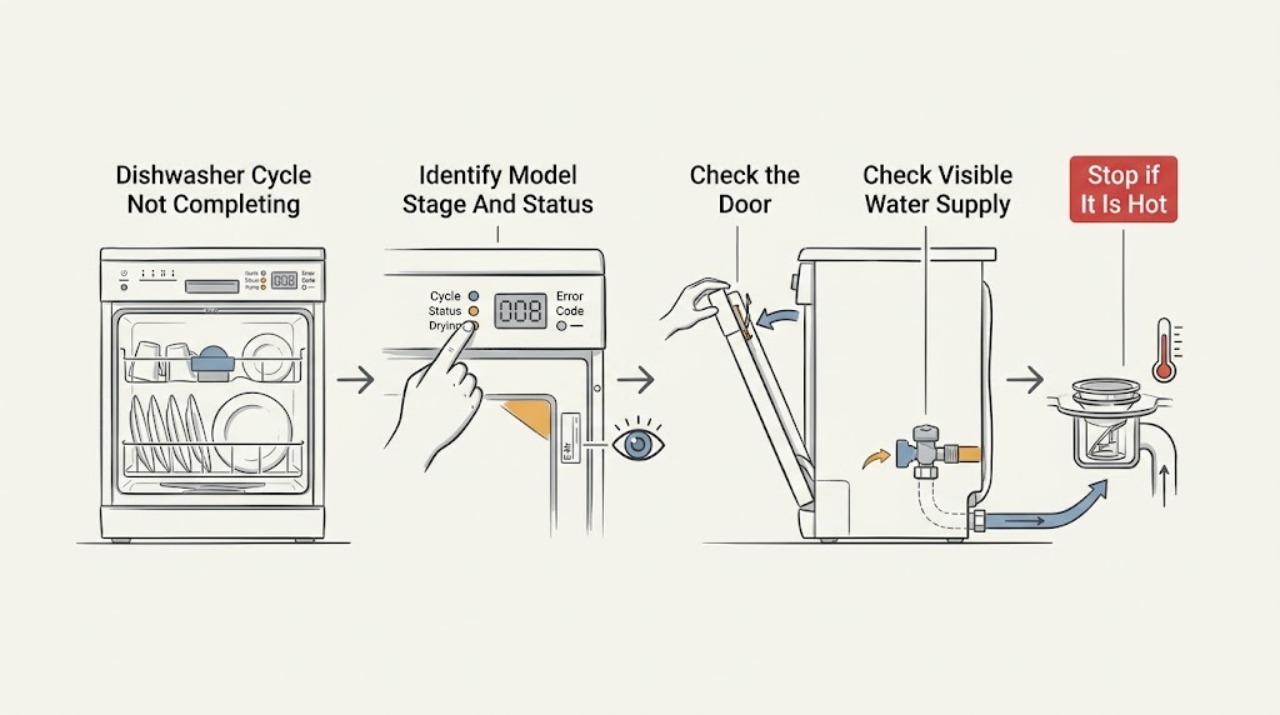
Work through in order
Diagnostic checks
Use only checks that match the exact appliance or system and its official guide.
-
Check 1
From outside the appliance, record the complete E-Nr and FD information, selected programme, remaining time, display text, status lights or floor indicator, door position, and the sound you hear. Note whether the time or stage changes over the documented interval; do not open a hot cycle just to inspect it.
Expected result: The timer progresses, the appliance shows a drying or heat stage, “Finished!” appears on a compatible DF211701 control, the floor light flashes, an error code is shown, or the timer and display remain unchanged.
Next step: Use the exact E-Nr manual and choose the normal-stage, door, water/drain, heat, or control branch that matches the observation. Do not transfer a DF211701 key sequence or code meaning to another model.
Stop if: Stop waiting and isolate the appliance from a safe dry location if smoke, burning odor, abnormal heat, leakage, a hot connection, repeated power interruption, or water near electricity is present.
Why this matters
Why: A progressing stage supports normal operation or a model-specific delay. A flashing door indicator, frozen display, or code shifts the diagnosis toward door state, supply, drain, heat, or control behavior; an indicator alone does not identify a part.
-
Check 2
If the door was opened or the indicator suggests incomplete closure, close it normally without forcing the latch. On the DF211701 only, follow the manual's Start-and-close resume instruction; otherwise use the exact manual for your E-Nr. Check that a rack, dish, or attached decor is not preventing closure, but do not bypass or hold the interlock closed.
Expected result: The door closes and latches normally and the cycle resumes, the floor indicator stops flashing, the door rebounds or will not latch, or the display remains paused after the model-specific resume instruction.
Next step: Allow a resumed cycle to progress. If the door cannot latch or the pause remains, keep the dishwasher off and arrange service with the exact E-Nr and display behavior.
Stop if: Do not force the door, tape or wedge the latch, hold the interlock closed, or open the door while hot water or steam may escape; wait for noise and steam to subside.
Why this matters
Why: A successful resume supports a door-interruption state. A persistent pause or incomplete latch makes alignment, latch, interlock, or control trouble more likely, but closure behavior alone cannot choose the failed component.
-
Check 3
If the appliance did not fill or displays a water-supply message, inspect only visible conditions: confirm the household dishwasher tap is open, the accessible inlet hose is not kinked, and there is no visible leak. Match any code to the exact E-Nr manual; do not remove inlet filters or alter plumbing unless that manual explicitly permits it.
Expected result: The tap is closed, the hose is visibly kinked, a water-supply code appears, no water enters, the inlet path appears normal, or water is leaking or the protection system may have activated.
Next step: Correct only an obvious closed tap or loose visible condition permitted by the manual, then retry once if there is no hazard. For a persistent supply code, no fill, leak, or water-protection indication, close the tap, disconnect safely, and arrange service.
Stop if: Stop immediately for a leak, water-protection indication, water near electrical parts, a damaged hose, or an inaccessible connection; do not run another cycle.
Why this matters
Why: A closed tap, kink, or blocked inlet can prevent the programme from advancing. A normal visible supply does not rule out an inlet valve, sensor, wiring, or water-protection fault; a leak or protection state is a service boundary.
-
Check 4
If the cycle stops during draining or water remains, cancel only with the exact manual's procedure and isolate power before any permitted filter inspection. Look for standing water, a visibly blocked filter area, a kinked external drain hose, or an obstructed visible sink connection. Clean an accessible filter or drain-pump area only when the exact manual authorizes it and only after allowing hot water to cool; do not reach into a pump or remove the base.
Expected result: Water drains and the pump sound ends, water remains under the filters, the drain path is visibly kinked or blocked, a drain-related code returns, or the pump hums without progress.
Next step: Restore only a visible external hose or connection condition allowed by the manual. If water remains, the pump continues, the code returns, or access would require removing panels, keep the appliance off and arrange qualified service.
Stop if: Do not touch sharp debris, reach into the drain pump, remove a pump cover or bottom panel, perform a live test, or operate a dishwasher that cannot drain.
Why this matters
Why: A filter or drain-path restriction is more likely when standing water and a visible obstruction occur together. Persistent humming, repeated drain failure, or a clear path makes an internal pump, sensor, control, or wiring issue more likely; the observation does not prove a replacement part.
-
Check 5
When the cycle remains at heating, final rinse, or drying, note whether heat or steam is normal for the documented stage, whether the timer advances, and whether an exact-model code is displayed. On DF211701, check the manual's documented interpretation for E:2060, E:3000/E:3100, or E:3200 only if that is the exact compatible manual. Use one documented cancel or recovery procedure if the appliance is cool, dry, and hazard-free; do not enter service menus or test live parts.
Expected result: The stage advances after waiting, Extra Dry is selected, a heat or water code repeats, the display is frozen or unresponsive, the heater appears to remain on, or there is abnormal heat or odor.
Next step: Leave the dishwasher off after one unsuccessful documented procedure and arrange qualified service. Provide the E-Nr/FD, code, selected options, cycle stage, water level, and timing rather than selecting a part from the symptom alone.
Stop if: Do not open a hot door, touch the heater or wiring, reset a wet or hot appliance, continue a long-running heater, or perform live voltage or resistance testing.
Why this matters
Why: A progressing drying or heat stage can be normal, and a documented drying option may add time. A persistent heat stage, repeated exact-model code, unresponsive control, or abnormal heat makes a temperature, heater, supply, drain, latch, control, or wiring fault more likely.
Use your observations
Decision map
Find the observation that best matches what you see, then follow the next safe action.
-
PATH 01Safety boundary
What you see
The timer or status progresses, the observed sound matches a documented wash, drain, heat, or drying stage, and no leak, abnormal heat, odor, or electrical hazard is present.
Do this next
Keep the door closed and allow the exact model's stage to finish. Reassess only if the timer freezes, the same stage repeats unusually, water remains, or a hazard appears.
Why this path and its safety boundary
Why it matters: The dishwasher is more likely still completing a model-specific stage than failing to complete the cycle.
Safety stop: Stop if the pump or heater runs indefinitely, the appliance leaks, or smoke, burning odor, abnormal heat, or power interruption appears.
-
PATH 02Safety boundary
What you see
The door was opened, the floor indicator flashes, the display remains paused, or a rack, dish, or trim prevents normal closure.
Do this next
Close the door normally and use only the exact E-Nr manual's resume instruction. If the latch will not engage or the state remains, keep the dishwasher off and arrange service.
Why this path and its safety boundary
Why it matters: A door-interruption or latch/alignment state is more likely than a drain or heater failure; DF211701 documents a pause after opening, but other models may use different controls.
Safety stop: Do not force, wedge, tape, or bypass the latch, and do not open the door into hot water or steam.
-
PATH 03Safety boundary
What you see
The tub does not fill, a compatible exact-model manual identifies a water-supply or water-protection code, the inlet hose is visibly kinked, or there is a leak.
Do this next
If safe, close the tap and disconnect power from a dry location; correct only an obvious visible tap or hose condition allowed by the manual. Keep the appliance off and arrange service for a repeated code, leak, or protection state.
Why this path and its safety boundary
Why it matters: A supply restriction or water-protection response is more likely. On DF211701, E:3000/E:3100 and E:3200 have model-specific meanings and must not be generalized to another E-Nr.
Safety stop: Do not keep running with a leak, water near electricity, a damaged hose, or a water-protection indication.
-
PATH 04Safety boundary
What you see
Water remains at the end, a drain stage repeats, the drain pump hums without removing water, or a visible filter, hose, or sink connection restriction is present.
Do this next
Use one exact-model cancel procedure, isolate power, and perform only a manual-approved accessible filter or visible hose check. Arrange service if water or pumping persists or internal access is required.
Why this path and its safety boundary
Why it matters: A drain-path restriction is more likely when the visible path is obstructed; a clear path with persistent pumping makes an internal pump, sensor, control, or wiring fault more likely.
Safety stop: Do not reach into the pump, remove the base, handle sharp debris, run live tests, or restart a non-draining dishwasher.
-
PATH 05Safety boundary
What you see
The timer remains at heating or final rinse, the exact model's code repeats, the display is unresponsive, or the heater or pump appears to run without stage progress.
Do this next
Stop after one documented, hazard-free cancel or recovery procedure and arrange qualified service. Supply the E-Nr/FD, display, programme, option, water level, and time spent in the stage.
Why this path and its safety boundary
Why it matters: A temperature, heater, sensor, supply, drain, latch, control, or wiring fault is possible; a sound or code from a different Gaggenau E-Nr cannot select the part.
Safety stop: Stop immediately for abnormal heat, steam that does not subside, smoke, burning odor, a hot connection, leakage, water near electricity, or repeated power trips; do not continue the cycle.
Helpful context
Understand the symptom
Confirm what “not completing” means
A Gaggenau dishwasher may still be working if the display is counting down, the wash or drain stage changes, or a drying option is finishing. The indicator behavior is model-dependent: the generic Gaggenau manual describes an infoLight that shines on the floor during a running programme and flashes when the door is not completely closed, while the DF211701 manual uses “Finished!” to identify the end of a cycle. A missing floor light is therefore not enough to diagnose a fault. Record the exact E-Nr, programme, remaining time, display text, indicator behavior, and whether the sound is fill, circulation, draining, heating, or drying before changing any setting.
Separate a paused door, water, drain, or heat stage
If the door was opened, close it normally and use only the exact manual's resume instruction. On the DF211701, operation pauses when the door is opened and resumes after Start is pressed and the door is closed; another Gaggenau model can use different keys. If the dishwasher never filled, a closed or restricted tap, kinked hose, or blocked inlet filter is possible, but a water-supply code must be matched to the exact manual. If water remains in the tub, the manuals point to the filter system or area around the drain pump and tell the owner to clean only as documented. A long heat or final-rinse stage can indicate waiting for temperature; Extra Dry on DF211701 can also increase runtime slightly. Do not open a hot door until steam and water noise subside.
Know when the control or appliance needs service
A single documented cancel or power-recovery action can distinguish an interrupted programme from an unresponsive control, but repeated resets do not identify a failed part. The DF211701 manual says to close the water supply and contact customer service for its water-protection states; it also lists a heating-element condition and water-supply condition by code. The generic manual requires trained technicians for internal electrical and appliance work. Keep the dishwasher off for a persistent pump or heater, standing water, leak, burning smell, smoke, hot connection, repeated power trip, or any water near electricity. Give the technician the E-Nr/FD, code or display, cycle stage, water level, and the one documented procedure already tried.
Safety boundary
Stop conditions
- Stop immediately for smoke, burning odor, abnormal heat, a hot or damaged plug or connection, leakage, water near electrical parts, exposed damage, or a repeated power trip; isolate power only from a safe dry location.
- Close the water tap and keep the appliance off for a water-protection indication, persistent leak, or damaged inlet hose; arrange qualified service.
- Do not open a hot door into escaping steam, bypass or wedge the door latch, hold the interlock closed, or run the dishwasher with panels removed.
- Do not reach into the drain pump, remove the base or control cover, touch internal wiring or the heater, perform live tests, or open a sealed appliance system.
- Do not repeatedly cancel, cycle the breaker, or restart a dishwasher that keeps pumping, heating, flashing, failing to drain, or showing a repeated exact-model code.
When checks do not resolve it
Need a professional?
Arrange qualified Gaggenau dishwasher service when a door will not latch, a cycle remains paused or frozen after the exact model procedure, a water-supply or water-protection code repeats, standing water or a drain pump persists, a heat stage does not progress, or the control is unresponsive. Stop immediately for smoke, burning odor, abnormal heat, a leak, water near electrical parts, a hot or damaged connection, or repeated power trips; isolate power or close the water tap only from a safe dry location. Provide the exact E-Nr/FD, display or code, programme and options, cycle stage, water level, and the safe checks already attempted.
Safety scope: The user may read the E-Nr/FD, observe the display and stage, close the door normally, check visible tap and hose conditions, and inspect an accessible filter only when the exact manual permits it and power is safely isolated. Qualified personnel must handle latch or interlock work, pump and heater access, internal filters, controls, wiring, live measurements, water-protection faults, and any leak or electrical repair.
Common questions
FAQ
How do I know whether my Gaggenau dishwasher cycle has actually finished?
Use the exact E-Nr manual and the display/status indicator rather than sound alone. The DF211701 manual uses “Finished!” at the end of a cycle, while the generic Gaggenau manual describes an infoLight that is present during a running programme and can flash when the door is not fully closed. Other E-Nr models may differ.
Can opening the door make a Gaggenau dishwasher appear stuck?
Yes, on compatible models. DF211701 documents that opening the door pauses operation and that pressing Start and closing the door resumes it. Close the door normally and follow the exact manual for your E-Nr; never bypass the latch.
What should I check if water remains when the Gaggenau cycle does not complete?
After the water has cooled and power is safely isolated, check only the filter or drain area that the exact manual identifies as owner-accessible, plus visible external hose or sink-connection conditions. Gaggenau manuals associate water remaining with a blocked filter system or area around the drain pump, but persistent water or pumping requires service rather than pump disassembly.
Do Gaggenau dishwasher error codes have the same meaning on every model?
Do not assume that they do. Gaggenau requires the appliance number to retrieve the correct manual. For example, DF211701 documents E:3000/E:3100 water-protection states, E:3200 water supply, and E:2060 a heating-element condition; match any code to the exact E-Nr manual before acting.
When should I stop troubleshooting a Gaggenau dishwasher that will not finish?
Stop and arrange qualified service for a repeated water-protection or heating code, standing water, a pump or heater that runs without progress, an unresponsive control, a door that will not latch, or any leak, smoke, burning odor, abnormal heat, hot connection, water near electricity, or repeated power trip. Internal covers, live tests, pump/heater access, and latch bypass are not owner checks.
Read the exact guide
Official sources
- Gaggenau DF480700F User ManualGaggenau · Applies to the DF480700F manual only; it is supporting evidence that drying and filter guidance vary by model, not a universal control sequence.
- Gaggenau DF210100 User ManualGaggenau · Directly applies to the DF210100 manual; use it for mechanism examples only when the owner's E-Nr is compatible.
- Use and Care Manual DF211701Gaggenau · Directly applies to the DF211701 manual; controls, key holds, messages, and codes must be confirmed for another E-Nr.
- Customer ServiceGaggenau · Supports directing unresolved appliance, water-protection, control, heating, and electrical issues to Gaggenau service.
- DownloadsGaggenau · Applies to Gaggenau owners locating the correct manual; it does not establish a universal cycle sequence or error-code table.
- Gaggenau Dishwasher Instruction ManualGaggenau · Official Gaggenau dishwasher manual context; exact operating details remain model-specific.
Community feedback
Share a repair observation
Share a plain-text repair observation. Accepted observations are published automatically; this page may take a moment to update.