
On this page
Start here
Quick answer
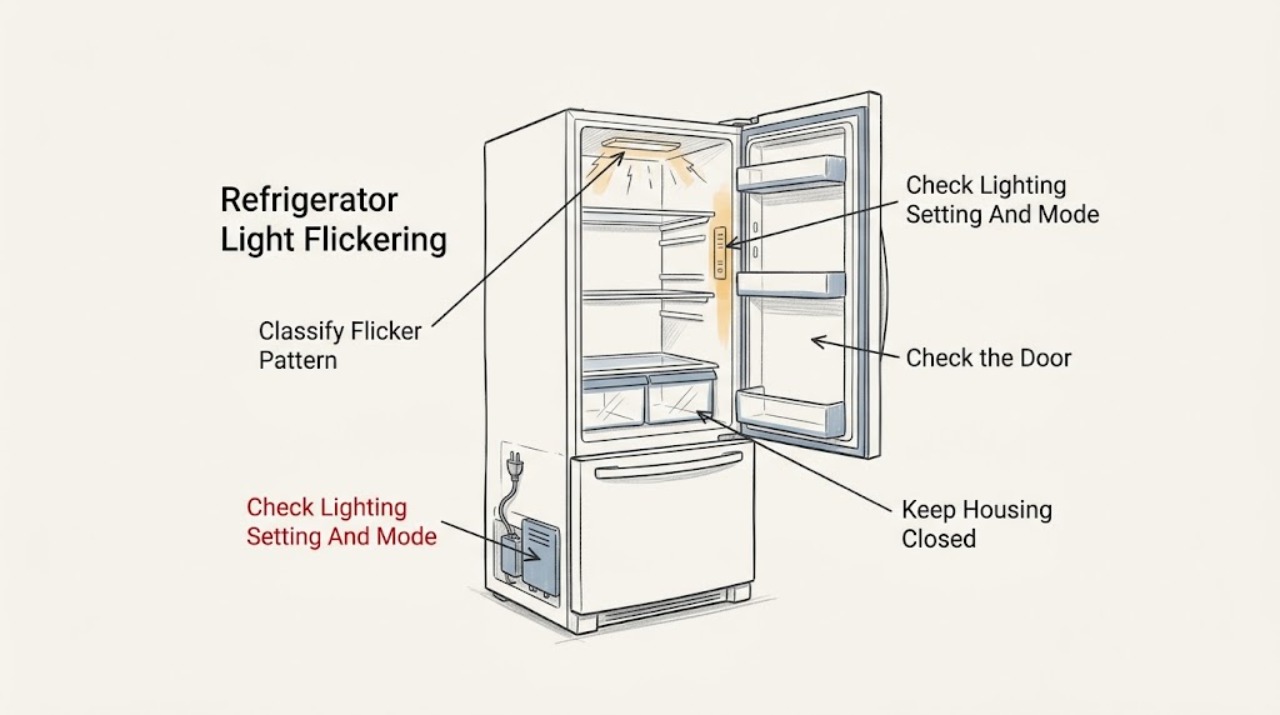
First determine whether only the interior light flickers, whether the control-panel lights also flicker, and whether the change happens when a particular door moves. Gaggenau requires the exact appliance number (E-Nr) to retrieve the correct manual, and its refrigerator manuals differ in lighting menus and modes. On the KFF96-family manual, interior lighting can be switched off or adjusted for brightness, and Rest mode switches interior lighting off; on the RVB477790 manual, Sabbath mode also switches it off. Those are model-specific settings, not a universal explanation for flickering. Check the documented lighting setting and mode, close the door normally, and compare the symptom with the display and cooling behavior. A light that is completely out is not an owner-replaceable bulb on the cited Gaggenau manuals: one manual says different causes are possible and directs the owner to customer service. If the light flickers with control-panel changes, the display resets, a power connection is hot or damaged, the cabinet has smoke or burning odor, or the appliance is wet or repeatedly losing power, stop using it and isolate power only from a safe dry location. Do not remove a light cover, probe wiring, bypass a door sensor, or stare into a bright LED while testing.
Before you begin
Safety first
- The user may identify the E-Nr/FD, observe the light and display, check documented user settings and modes, close doors normally, and inspect visible cord or receptacle conditions without touching a hazard. Qualified personnel must handle LED replacement, door-sensing or harness work, control and power electronics, internal wiring, live measurements, door disassembly, and any repair after smoke, water, heat, or repeated power loss.
Work through in order
Diagnostic checks
Use only checks that match the exact appliance or system and its official guide.
-
Check 1
With the refrigerator operating normally, observe from a safe position and record which light flickers, whether the control panel or display flickers too, whether cooling and alarms remain stable, and whether the symptom appears only as a door opens, closes, or reaches a particular position. Record the E-Nr and FD from the rating plate before looking up instructions.
Expected result: Only one interior zone flickers; several interior zones flicker together; the display/control panel also flickers or resets; the change follows door movement; or the light flickers independently while all other functions remain stable.
Next step: Use the single-light, door-related, setting/mode, or whole-appliance power branch that matches the pattern. Do not remove trim or test the light circuit.
Stop if: Stop immediately for smoke, burning odor, sparks, abnormal heat, a hot or damaged cord or connection, water near electricity, repeated power loss, or exposed wiring; isolate power only from a safe dry location.
Why this matters
Why: A single-zone symptom points more toward that light assembly or its local sensing/connection, while simultaneous lighting and display changes make power or control electronics more likely. A door-position correlation makes door sensing or a closure-related connection worth professional evaluation, but the observation does not identify a part.
-
Check 2
Open the exact E-Nr Use and Care manual and inspect the documented interior-lighting setting, brightness setting, and any Rest, Sabbath, showroom, or similar mode visible on the normal user interface. Return only an accidentally selected user mode to its documented normal state; do not copy a sequence from another family.
Expected result: The interior-lighting setting is off or at a low documented brightness; Rest or Sabbath mode is active; the model has no user lighting setting; settings are normal; or the light still flickers after one documented change.
Next step: Use only the exact manual's user menu to restore normal lighting once, then observe without repeatedly toggling it. If the symptom persists or the control is not responsive, arrange service.
Stop if: Do not enter an undocumented service menu, repeatedly change brightness, force a door sensor, or continue if the display is resetting or an electrical hazard is present.
Why this matters
Why: An off or low setting or mode can explain consistently reduced or absent light on applicable models. A persistent irregular flicker after normal settings makes a local LED, door-sensing, power, or control fault more likely; a setting check cannot prove which component failed.
-
Check 3
Close each refrigerator and freezer door normally and inspect only visible edges, gaskets, shelves, bins, and door-opening hardware for an obstruction that prevents full closure. Observe whether the light changes only when the door is moved or when the door alarm appears. Do not remove the door, door pillar, trim, or lighting cover.
Expected result: A container blocks closure; the door does not align or seal; the light flickers at a repeatable door position; the door alarm appears; or the door and visible seal appear normal while flicker continues.
Next step: Remove only an obvious obstruction and close the door normally once. If flicker follows door movement, the door will not close, or alarm and light behavior disagree, keep the appliance intact and arrange model-specific service.
Stop if: Do not force the door, adjust hinges, open the door pillar manually, wedge a sensor, or reach behind the door liner.
Why this matters
Why: An obstruction or door-position correlation makes a closure or sensing issue more likely than a general mains fault, but a normal visible gasket does not rule out an internal switch, harness, or control issue. A door alarm is evidence that the appliance is detecting door state, not proof that the light circuit is healthy.
-
Check 4
Compare the interior-light flicker with the refrigerator's display, control-panel illumination, audible alarms, cooling, and any recent power interruption. Check the accessible plug, receptacle, and cord visually without moving a built-in appliance or touching a wet connection. Do not unplug and reconnect repeatedly to chase the flicker.
Expected result: Only the interior LED changes; the display and panel also blink or reset; the refrigerator loses cooling or alarms; the plug or receptacle is hot or damaged; or there was a recent outage with otherwise stable operation.
Next step: If the appliance is cool, dry, and hazard-free, follow one exact-model documented power-recovery instruction only when the manual provides one. For recurring resets, unstable cooling, or a supply concern, stop using the appliance and arrange qualified appliance or electrical service.
Stop if: Do not use an extension or adapter, touch a wet or hot receptacle, repeatedly reset a breaker, or continue operation after smoke, odor, sparks, or a repeat trip.
Why this matters
Why: A whole-appliance change makes a supply or electronic-control issue more likely than an isolated LED. A recent outage can explain a one-time reset, but repeated flicker or a damaged, hot, or wet connection requires qualified attention.
-
Check 5
If the light still flickers after the exact-model setting, mode, door, and safe power observations, record whether the refrigerator is cooling normally and whether a D/E-style electronics message or other model-specific fault appears. Keep the doors closed as much as possible while arranging service; do not remove an LED module or control cover.
Expected result: Cooling and controls remain normal but the LED flickers; the LED becomes completely dark; a D/E message remains after the manual's one documented recovery; or the refrigerator also loses cooling or control response.
Next step: Keep the appliance intact and contact Gaggenau or qualified appliance service with the E-Nr/FD, flicker pattern, door correlation, mode/settings, display behavior, and cooling status. Use an electrician for a confirmed household receptacle or supply fault.
Stop if: Do not look directly into a bright LED for an extended period, perform live voltage tests, open the light/control area, bypass door sensing, or continue operation with heat, odor, smoke, water, or damaged power components.
Why this matters
Why: Persistent isolated flicker may involve a light assembly, local connection, door sensing, or control path. A completely dark LED is explicitly a customer-service condition in the KFF96-family manual, and a persistent electronics message shifts the problem toward qualified diagnosis; neither symptom selects a replacement part.
Use your observations
Decision map
Find the observation that best matches what you see, then follow the next safe action.
-
PATH 01Safety boundary
What you see
The exact manual exposes an interior-lighting setting, the light is off or at a documented low brightness, or a compatible Rest/Sabbath mode is active, with stable cooling and controls.
Do this next
Restore the documented normal lighting setting or mode once and observe. If the light continues to flicker, use the persistent-LED branch.
Why this path and its safety boundary
Why it matters: A user setting or mode is more likely than an immediate hardware failure, although it does not explain every irregular flicker pattern.
Safety stop: Do not use another model's menu sequence or keep toggling settings while the display or power is unstable.
-
PATH 02Safety boundary
What you see
The flicker occurs at a repeatable door position, a door does not close fully, a visible obstruction is present, or a door alarm changes with the symptom.
Do this next
Remove only a visible obstruction and close the door normally. If the pattern persists or the door does not align, keep the appliance intact and arrange service.
Why this path and its safety boundary
Why it matters: A closure, door-sensing, hinge, or door-side connection issue is more likely than a setting-only problem, but the internal component cannot be selected from the pattern.
Safety stop: Do not force, wedge, tape, or manually operate a door pillar or sensor, and do not remove door trim.
-
PATH 03Safety boundary
What you see
Only the interior light flickers, the display and control panel stay stable, door closure appears normal, and documented settings are normal.
Do this next
Keep the light housing and wiring untouched and arrange model-specific Gaggenau service. Provide the exact compartment, door position, frequency, and whether the light eventually goes dark.
Why this path and its safety boundary
Why it matters: A local LED assembly, connection, sensing path, or control output is more likely; the official KFF96-family manual treats a non-working LED as a service condition and does not identify a universal user repair.
Safety stop: Do not remove the LED cover, probe contacts, stare into the light, or continue if heat, odor, smoke, or exposed wiring appears.
-
PATH 04Safety boundary
What you see
Interior lights and the control panel flicker together, the display resets, cooling or alarms interrupt, a compatible D/E message remains, or a plug or receptacle is hot or damaged.
Do this next
Stop repeated operation. Isolate power only from a safe dry location and obtain qualified appliance service; use an electrician for the household supply. Preserve the display message and timing for diagnosis.
Why this path and its safety boundary
Why it matters: A supply or electronic-control problem is more likely than an isolated light module, and a hot, damaged, wet, or repeatedly tripping supply is a safety issue.
Safety stop: Do not reset repeatedly, use an adapter or extension, open the control area, or touch a wet or hot connection.
-
PATH 05Safety boundary
What you see
Smoke, burning odor, sparks, abnormal heat, exposed wiring, water near electricity, a damaged cord or receptacle, or repeated breaker trips accompany the flicker.
Do this next
Stop using the refrigerator and isolate power only from a safe dry location without touching the hazard. Arrange qualified appliance or electrical service and protect food using another safe cold source.
Why this path and its safety boundary
Why it matters: The appliance has crossed the safe owner-observation boundary; an internal electrical fault or household supply fault is possible.
Safety stop: Do not re-energize to reproduce the flicker, touch terminals, open covers, or continue operating.
Helpful context
Understand the symptom
Separate the light symptom from a power symptom
A flickering interior LED can be a user setting or mode issue, a door-related symptom, or an internal lighting/electronics fault. Note the pattern instead of guessing a bulb: does one compartment flicker, do all interior lights flicker together, do the control-panel lights also change, and does it happen only while opening or closing a door? Also note whether cooling, temperature display, alarms, and other functions remain stable. Gaggenau's Downloads page and product-service pages provide model-specific documentation, so a manual for another refrigerator family should not be treated as interchangeable.
Check documented lighting settings and modes
Some Gaggenau refrigerator manuals expose interior-lighting controls. The KFF96-family manual allows the light to be switched off or its brightness adjusted, and its Rest mode switches off interior lighting and other non-essential functions. The RVB477790 manual says Sabbath mode switches off interior lighting, alarms, and control-panel messages. These settings can explain a consistently dark interior or a mode-related change, but an irregular flicker is not automatically explained by a mode. Use only the menu path shown for your E-Nr, and do not use a service menu or repeatedly toggle settings while the symptom is occurring.
Use the professional boundary for LED and electronics faults
Gaggenau's KFF96-family troubleshooting table treats a non-working LED light as a condition with several possible causes and directs the owner to customer service. That supports a professional boundary for a flicker that persists after an exact-model setting check, especially if the display or other lights also reset. For an electronics message, use only the exact model's documented power recovery if the appliance is dry and there is no odor, heat, smoke, or damaged connection. Do not open the light housing or control area, make a live measurement, bypass a door sensor, or continue operating with electrical warning signs.
Safety boundary
Stop conditions
- Stop immediately for smoke, burning odor, sparks, abnormal heat, exposed wiring, water near electricity, a hot or damaged cord or receptacle, or repeated breaker trips; isolate power only from a safe dry location.
- Do not remove an interior-light diffuser, LED module, door trim, control cover, or rear panel, and do not perform live electrical tests.
- Do not bypass or wedge a door sensor, force the door or door pillar, use an extension or adapter, or move a built-in refrigerator to reach its connection.
- Do not stare directly into a bright LED while reproducing the symptom or repeatedly toggle lighting modes and power to chase a flicker.
- If the light flicker is accompanied by display resets, loss of cooling, a persistent electronics message, or an unexplained repeat, keep the appliance off and arrange qualified service.
When checks do not resolve it
Need a professional?
Arrange Gaggenau or qualified appliance service when an interior LED continues flickering after the exact-model setting and mode check, the symptom follows door movement, the LED becomes completely dark, a D/E-style electronics message remains, or the display, cooling, or controls also reset. Use an electrician for a hot, damaged, wet, loose, or repeatedly tripping household supply. Stop immediately for smoke, burning odor, sparks, abnormal heat, exposed wiring, or water near electricity; isolate power only from a safe dry location. Provide the complete E-Nr, FD, and where applicable Z-Nr, plus the light zone, door correlation, mode, display behavior, and cooling status.
Safety scope: The user may identify the E-Nr/FD, observe the light and display, check documented user settings and modes, close doors normally, and inspect visible cord or receptacle conditions without touching a hazard. Qualified personnel must handle LED replacement, door-sensing or harness work, control and power electronics, internal wiring, live measurements, door disassembly, and any repair after smoke, water, heat, or repeated power loss.
Common questions
FAQ
Can a Gaggenau refrigerator setting make the interior light appear off?
Yes, on applicable models. The KFF96-family manual allows interior lighting to be switched off or its brightness adjusted, and says Rest mode switches interior lighting off. The RVB477790 manual says Sabbath mode switches interior lighting off. Check the exact E-Nr manual before changing a setting; those documented modes do not automatically explain an irregular flicker.
What if the light flickers when I open or close the refrigerator door?
Record whether the flicker occurs at the same door position and whether the door alarm or display changes. Remove only a visible obstruction and close the door normally. If the pattern persists, the door-sensing or lighting path needs model-specific service; do not bypass a sensor or remove door trim.
Can I replace the Gaggenau refrigerator LED myself?
Do not assume that you can. The KFF96-family troubleshooting table says different causes are possible when LED lighting does not work and directs the owner to customer service. Keep the light housing closed and arrange qualified service for persistent flicker or a dark LED.
What does it mean if the refrigerator display flickers with the interior light?
Simultaneous display and light changes make a supply or electronic-control issue more likely than an isolated LED, especially if cooling or alarms also interrupt. If an exact-model D/E-style message remains after the manual's one documented power recovery, call service; do not repeatedly reset the appliance.
When is a flickering Gaggenau refrigerator light unsafe?
Stop immediately for smoke, burning odor, sparks, abnormal heat, exposed wiring, water near electricity, a hot or damaged cord or receptacle, or repeated breaker trips. Isolate power only from a safe dry location and arrange qualified appliance or electrical service. Do not reproduce the flicker with the cover removed or by touching wiring.
Read the exact guide
Official sources
- Gaggenau RY295350 Fridge-Freezer User ManualGaggenau · Applies to the RY295350/KFF96-family manual represented by this document; do not transfer its menu sequence or mode behavior to another E-Nr.
- Use and Care Manual RVB477790Gaggenau · Applies directly to RVB477790; its Sabbath mode, display-message, and power-recovery steps are model-specific examples.
- Service Assistance - RC462700/01Gaggenau · Supports the need for exact model documentation and qualified service for Gaggenau refrigeration; it is not a universal flicker diagnosis.
- DownloadsGaggenau · Applies to locating the correct Gaggenau refrigerator manual; it does not establish a universal lighting menu or flicker diagnosis.
Community feedback
Share a repair observation
Share a plain-text repair observation. Accepted observations are published automatically; this page may take a moment to update.