
On this page
Start here
Quick answer
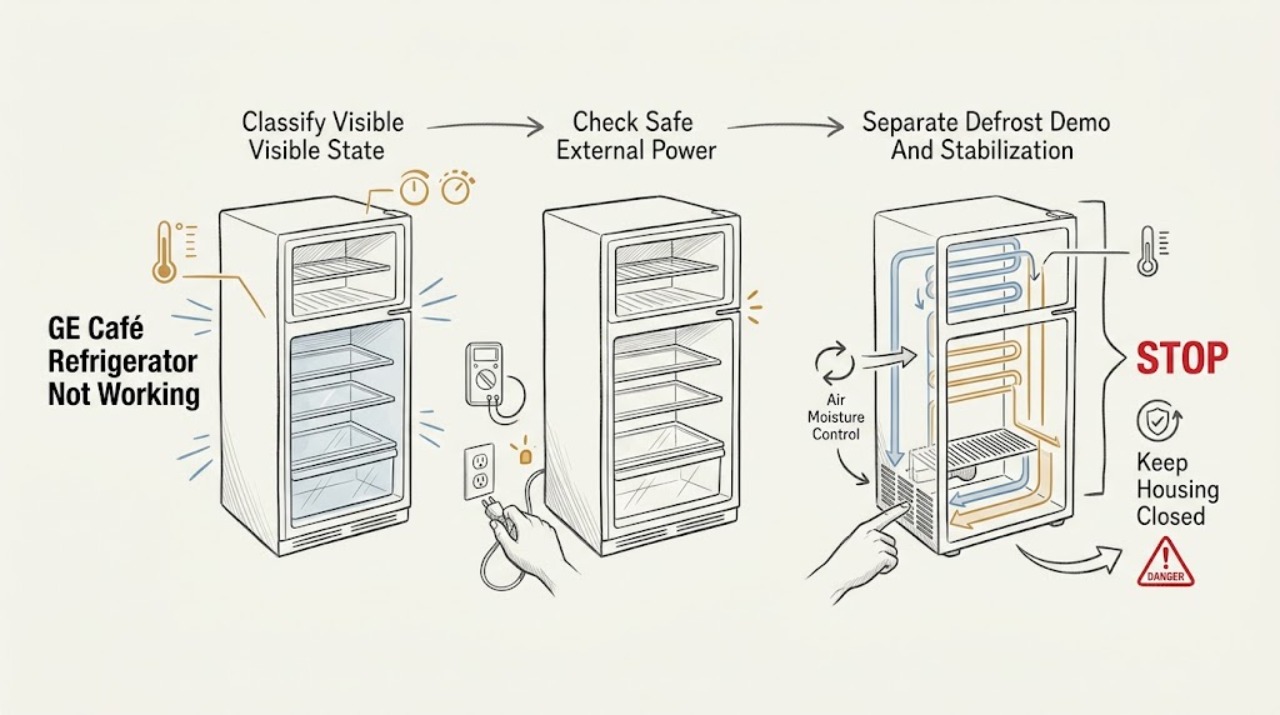
First separate a completely dark refrigerator from a powered refrigerator that is warm. From a dry, safe position, check whether the interior light and display work, note the exact GE Café model, and record any outage, recent installation, code, odor, or water. If everything is dark, check the plug and outlet only without touching damaged or wet equipment; a hot outlet, damaged cord, smoke, sparks, or a breaker that trips again means stop and call electrical service. If lights or controls work, make sure the temperature controls are not Off, rule out Demo/Showroom mode only with the exact model manual, and check doors and visible airflow. A new refrigerator may need about 24 hours to stabilize, and the compressor can pause during a normal model-dependent defrost cycle. If the cabinet remains warm, an internal fan, compressor, defrost, control, or sealed-system fault needs qualified appliance service. If only ice or water is affected, use the separate model-specific dispenser or icemaker path rather than treating the whole refrigerator as dead.
Before you begin
Safety first
- The owner may record the model and display, observe lights, controls, temperatures, doors, visible airflow, and accessible ice/water conditions, and follow only exact-manual user steps. Qualified appliance or electrical service must handle panels, wiring, control assemblies, fans, defrost components, icemaker removal, compressors, sealed refrigeration, live testing, and diagnostic-mode repairs.
Work through in order
Diagnostic checks
Use only checks that match the exact appliance or system and its official guide.
-
Check 1
From a dry, stable position, record the complete GE Café model number and serial information if accessible. Observe whether the interior light, temperature display, and control response are all absent, or whether they work while the cabinet is warm. Note the exact time the symptom started, any outage or recent installation, unusual odor/noise, visible frost or water, and whether only the icemaker or dispenser is affected.
Expected result: The refrigerator is completely dark, the display/light works but food is warm, the compressor/fans are temporarily quiet, or only an ice/water function has failed.
Next step: Use the matching branch below and the exact model's GE support page/manual. Keep a written record rather than clearing a code or repeatedly changing controls.
Stop if: Stop if there is smoke, sparking, burning odor, water near electrical equipment, a hot/damaged cord or outlet, or an unsafe need to move the appliance.
Why this matters
Why: The light and display are useful external clues for separating a power problem from a cooling or convenience-function problem. The full Café model is needed because controls and features differ.
-
Check 2
If the light and display are absent, inspect only the accessible plug, cord, outlet, and household breaker from a dry position. Confirm the plug is seated and check whether another small appliance works at the outlet only when doing so is safe. If lights work, confirm the temperature control is not Off; do not remove panels or test internal wiring.
Expected result: The plug is loose, the outlet has no power, a breaker is tripped, the outlet/cord is hot or damaged, or the refrigerator has power but the controls are Off or unresponsive.
Next step: Secure a loose plug only if dry and undamaged. Have an electrician check a dead, hot, damaged, wet, smoking, sparking, or repeatedly tripping outlet/circuit. For a powered but unresponsive refrigerator, arrange GE appliance service.
Stop if: Do not touch wet equipment, open an outlet, replace a breaker with a higher rating, use an extension cord, or restore power after smoke, sparks, heat damage, or repeated trips.
Why this matters
Why: GE directs owners to check the plug/outlet and control setting for a refrigerator that is not running. A protection event or damaged electrical equipment is not an invitation to keep resetting or to replace a larger breaker.
-
Check 3
If the controls and light work, check the exact model manual for Demo/Showroom mode and compare the observed display with that manual; never use a different Café model's button sequence. Note whether the refrigerator was just installed or had a recent outage, and whether the compressor/fans have been quiet only briefly. Do not enter diagnostic mode.
Expected result: The exact manual identifies Demo/Showroom mode, the unit is newly installed, a recent outage occurred, or the compressor/fans are quiet during a short interval with no warming evidence.
Next step: Follow only the exact manual's user-level Demo-mode instruction. For a new installation, allow the manual's stabilization period while monitoring temperatures. If the unit remains warm, the code returns, or the pause is not explained by the manual, arrange service.
Stop if: Do not guess hidden key combinations, repeatedly power-cycle to force a restart, defeat a door or temperature sensor, or remove a panel to watch the compressor or fan.
Why this matters
Why: GE says Demo mode can leave lights and controls available while cooling is disabled. GE also describes model-dependent defrost pauses and says a new unit may need about 24 hours to stabilize. These observations do not prove a failed compressor or control.
-
Check 4
For a powered refrigerator that is warm, check externally that doors close fully, gaskets are not visibly folded or obstructed, large items are not blocking visible air outlets, and the installation area is within the exact manual's temperature and clearance requirements. If the model manual permits condenser cleaning, disconnect power first and clean only the accessible area it identifies; do not remove a cover.
Expected result: A door remains ajar, the gasket is visibly displaced, airflow is blocked, the unit is installed too close to a wall or in an unsuitable temperature environment, or no external cause is found.
Next step: Correct only the visible loading, door, clearance, or manual-approved cleaning issue, then monitor with the model's temperature guidance. If the cabinet remains warm or frost/heat is abnormal, book qualified appliance service.
Stop if: Do not chip ice with a sharp tool, use a heat gun, dismantle the rear, access refrigerant tubing, or perform live fan/compressor measurements.
Why this matters
Why: GE lists door closure/gaskets, blocked airflow, installation temperature, air clearance, and model-authorized condenser maintenance among checks for insufficient cooling. A clear exterior does not rule out an internal cooling-system fault.
-
Check 5
If the cabinet and freezer are cold but ice or water is not working, use the exact Café manual to identify whether the feature is enabled and inspect only the accessible bin, dispenser area, filter status, or visible supply connection the manual permits. If the whole refrigerator remains warm, or the symptom persists after safe external checks, document the result for GE or qualified service.
Expected result: Cooling is normal and only a convenience function fails, a filter/bin/setting issue is visibly identified, or the refrigerator is persistently warm or unresponsive with no safe external cause.
Next step: Follow the model-specific user instructions for an accessible setting or filter/bin check. Otherwise arrange service with the model, symptom timeline, temperatures, display behavior, and all safe observations.
Stop if: Do not remove the icemaker, bypass a feeler arm or door switch, force a dispenser, disconnect internal tubing, or perform live testing.
Why this matters
Why: GE's refrigerator support separates cooling, water, and icemaker questions. A dispenser or icemaker symptom does not identify a valve, motor, sensor, board, or wiring fault, and persistent no-cooling symptoms require internal diagnosis.
Use your observations
Decision map
Find the observation that best matches what you see, then follow the next safe action.
-
PATH 01Safety boundary
What you see
The interior light and display are both dark and the refrigerator gives no normal response.
Do this next
Perform only the safe external plug/outlet/breaker check. Use an electrician for a dead, hot, wet, damaged, smoking, sparking, or repeatedly tripping circuit; use appliance service for a safe outlet with an unresponsive refrigerator.
Why this path and its safety boundary
Why it matters: This pattern is more consistent with a supply, outlet, plug, breaker, or appliance power-input issue than with a simple temperature setting, but observation alone cannot identify the failed component.
Safety stop: Stop immediately for electrical damage, water near the connection, smoke, sparks, burning odor, or repeated breaker trips.
-
PATH 02Safety boundary
What you see
The light or display works, but fresh food or freezer contents are warming.
Do this next
Use the exact Café manual and the external checks above. Protect perishable food and arrange service if temperatures do not recover within the model's guidance or if a code/beeping returns.
Why this path and its safety boundary
Why it matters: The refrigerator has some power, so inspect controls, Demo/Showroom mode, doors, airflow, installation conditions, and recent installation/outage before assuming a sealed-system, fan, defrost, or control fault.
Safety stop: Do not open the rear, probe wiring, repeatedly reset the unit, or continue relying on it when food temperatures are unsafe.
-
PATH 03Safety boundary
What you see
The refrigerator is temporarily quiet after a recent outage or during a period that the exact manual identifies as defrost, without clear evidence of rising temperature.
Do this next
Keep doors closed, follow the exact manual's monitoring guidance, and escalate if the pause becomes persistent, food warms, or a code or repeated alarm appears.
Why this path and its safety boundary
Why it matters: GE notes that compressor and fans can stop during defrost and that a compressor may cycle after a short power interruption while the system equalizes. A temporary pause is not by itself proof of a failed motor.
Safety stop: Do not force a restart, enter service diagnostics, or treat a normal pause as permission to open the sealed or electrical system.
-
PATH 04Safety boundary
What you see
Lights and controls operate but cooling is disabled, and the exact Café manual identifies Demo or Showroom mode.
Do this next
Use only the exact model manual's user-level exit procedure. If the mode cannot be confirmed or cooling does not return, protect food and contact GE appliance service.
Why this path and its safety boundary
Why it matters: GE's Not Running guidance describes Demo Mode as a possible reason a refrigerator appears powered but does not cool. The controls for leaving that mode are model-dependent.
Safety stop: Do not copy a button sequence from another Café model, open the control panel, bypass a sensor, or repeatedly reset the appliance.
-
PATH 05Safety boundary
What you see
The cabinet is cold but only the icemaker/dispenser fails, or the refrigerator remains warm/unresponsive after the safe external checks.
Do this next
Use the model-specific Café support path for an accessible bin, filter, or setting check. Arrange qualified appliance service for persistent warmth, internal access, a returning code, or any uncertain condition.
Why this path and its safety boundary
Why it matters: An isolated convenience-function failure is not the same intent as a dead refrigerator. Persistent no-work or no-cooling symptoms may involve internal controls, fans, defrost, compressor, or sealed refrigeration, none of which can be identified safely from visible checks.
Safety stop: Do not dismantle the icemaker/dispenser, disconnect tubing, handle refrigerant, replace a board from a symptom alone, or run live tests.
Helpful context
Understand the symptom
Not working describes several different failures
A GE Café refrigerator with no light or display has a different first question from one whose display works but whose food is warm. A quiet compressor may be normal during defrost, while a cabinet that stays warm needs service. If only ice or water fails, the refrigerator itself may still be cooling normally. Classify the observable state before changing settings or ordering a part.
Café instructions are model-specific
GE's Café support pages cover different refrigerator layouts and link to the corresponding owner's manual. The CNS23SSHSS page identifies a Café Series French-door refrigerator with an internal dispenser, but that example does not prove that every Café model uses the same controls, display behavior, or service procedure. Record the full model number before using any sequence or setting.
Protect food and electrical safety while diagnosing
Keep refrigerator and freezer doors closed when temperatures are rising and move perishable food according to applicable food-safety guidance. Do not remove covers, probe wiring, handle a sealed refrigeration circuit, or keep resetting a breaker. Water, heat, smoke, sparks, burning odor, or a damaged cord/outlet changes the problem to an electrical or appliance-service call.
Only after diagnosis
Potential parts
- model-matched power-input or control component
Consider only after an electrician or qualified appliance technician confirms that the outlet and cord are safe and the refrigerator's persistent no-power or no-response symptom originates inside the appliance.
Café refrigerator power and control assemblies vary by model; confirm the complete model number and official fit information before any replacement. - model-matched fan, defrost, or temperature-sensing component
Consider only when a qualified technician has connected a persistent warm-cabinet symptom to a specific internal component after safe external checks.
A warm refrigerator, defrost pause, or display symptom does not identify a part number; do not order a fan, heater, sensor, or control from the symptom alone. - model-matched compressor or sealed-system component
Consider only after qualified refrigeration service confirms a sealed-system or compressor diagnosis; owners must not access refrigerant tubing or perform live tests.
Café configurations and refrigeration systems differ by model, and sealed-system parts require professional fitment and service.
When checks do not resolve it
Need a professional?
Call qualified GE appliance service when the refrigerator remains warm, the display or controls are unresponsive despite safe power, Demo/Showroom mode cannot be confirmed or cooling does not return, the symptom persists beyond the model's stabilization/defrost guidance, or an internal fan, defrost, compressor, control, icemaker, or sealed-system check would be needed. Use electrical service for a hot/damaged cord or outlet, smoke, sparks, water near electrical equipment, or a protection event that trips again. Protect food and keep doors closed while temperatures rise. Do not open panels, handle refrigerant, bypass sensors, enter diagnostics, or repeatedly reset power.
Safety scope: The owner may record the model and display, observe lights, controls, temperatures, doors, visible airflow, and accessible ice/water conditions, and follow only exact-manual user steps. Qualified appliance or electrical service must handle panels, wiring, control assemblies, fans, defrost components, icemaker removal, compressors, sealed refrigeration, live testing, and diagnostic-mode repairs.
Common questions
FAQ
Why is my GE Café refrigerator completely dark?
Check the accessible plug, outlet, and breaker only from a dry, safe position. If the outlet or cord is hot, wet, damaged, smoking, sparking, or trips again, stop and use electrical service. If the outlet is safe but the refrigerator remains dark, arrange appliance service rather than opening the appliance.
Why do the lights work but my GE Café refrigerator is not cooling?
Confirm the temperature controls are on, check the exact model's Demo/Showroom mode, and inspect door closure, gaskets, visible airflow, installation temperature, and clearance. A new unit may need about 24 hours to stabilize. Persistent warming needs qualified service.
Can a quiet compressor mean my GE Café refrigerator is broken?
Not always. GE says compressor and fans can pause during a defrost cycle, and a short power interruption can cause temporary cycling while the system equalizes. Escalate when the pause is persistent, food warms, or the exact manual identifies a fault.
How do I take a GE Café refrigerator out of Demo mode?
Find the exact Café model manual first. GE describes Demo/Showroom mode as model-dependent, so do not use a button sequence from another refrigerator. If Demo mode cannot be confirmed or cooling does not return after the exact user-level instruction, protect food and call service.
What if only the icemaker or water dispenser stopped working?
If the refrigerator and freezer remain cold, treat this as an isolated convenience-function symptom. Use the exact model's support path for an accessible setting, filter, bin, or dispenser check. Do not remove the icemaker, disconnect tubing, bypass a switch, or infer a failed valve or board from the symptom alone.
Read the exact guide
Official sources
- Refrigerator - Does Not Run or CoolGE Appliances · GE refrigerator does-not-run-or-cool distinction between interior-light power, controls, defrost, and post-outage compressor behavior
- Refrigerator - Not RunningGE Appliances · GE refrigerator not-running triage, plug/outlet, controls, Demo/Showroom mode, and model-dependent defrost guidance
- Troubleshooting for CNS23SSHSSGE Appliances · GE Café CNS23SSHSS refrigerator identity, owner's manual, and model-specific troubleshooting
- Refrigerator - Not Cooling EnoughGE Appliances · GE refrigerator insufficient-cooling checks for controls, doors, gaskets, airflow, installation temperature, clearance, and model-authorized maintenance
- Refrigerator and Freezer Troubleshooting and SupportGE Appliances · GE refrigerator and freezer troubleshooting, model-specific support, cooling, water, and icemaker questions
Community feedback
Share a repair observation
Share a plain-text repair observation. Accepted observations are published automatically; this page may take a moment to update.