
On this page
Start here
Quick answer
First determine whether the GE air conditioner is completely dark, has a lit display but no airflow, starts and stops, or shows a code. Check the direct, properly grounded wall connection, the selector or power control, thermostat/mode setting, and whether the outlet has power. If the cord has a current-interrupter TEST/RESET device and the cord and outlet are dry and undamaged, use the model's normal reset procedure once; do not use an extension cord, surge protector, or multi-outlet adapter. After a power outage, GE says some room units need about two minutes before restarting. A portable unit showing `FL` may have water in its base and must be drained only through the model's manual; a remote may fail because of batteries, range, or an obstructed receiver. If a breaker or cord protector trips again, a plug/outlet is hot, smoke or burning odor appears, the cord is damaged, or a display code remains, stop and arrange qualified service. Do not bypass protection, open the cabinet, live-test wiring, or work on the compressor or refrigerant circuit.
Before you begin
Safety first
- Owner checks stop at dry accessible power connections, normal controls, remote batteries, visible filter and airflow, and model-authorized delay or condensate procedures. Qualified service must handle internal wiring, controls, motors, capacitors, compressors, refrigerant circuits, cabinet access, and live testing.
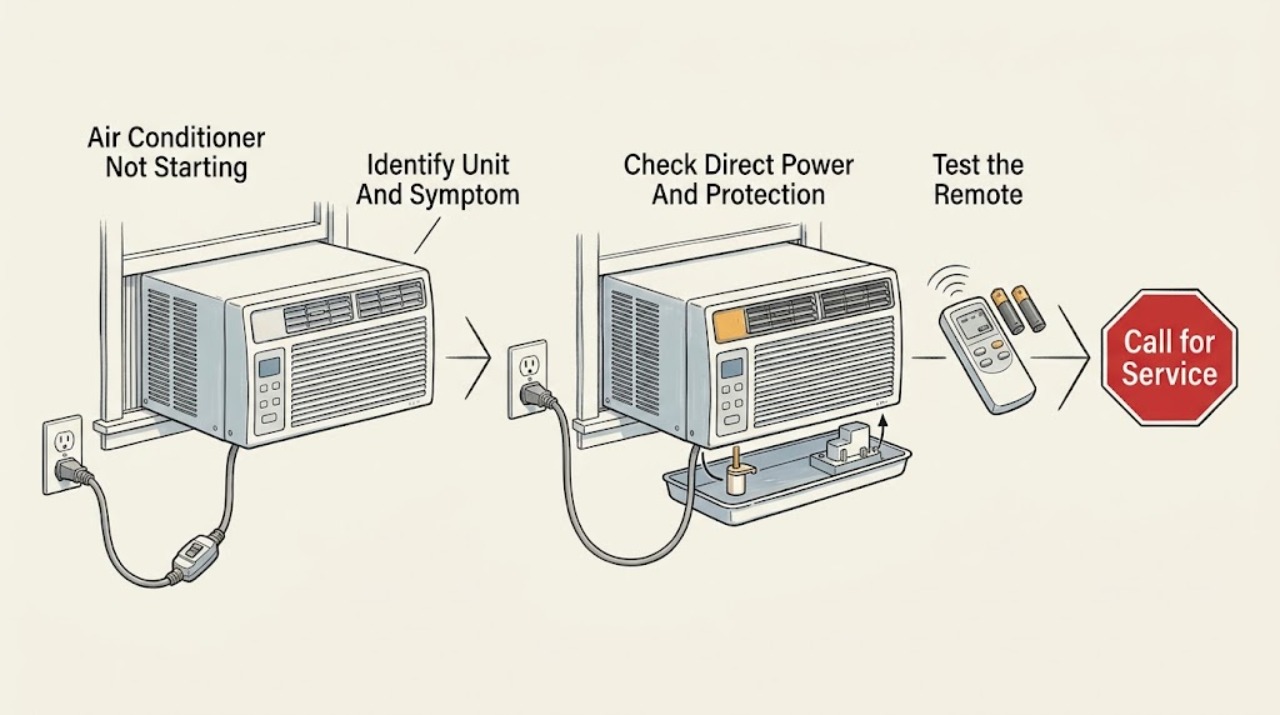
Work through in order
Diagnostic checks
Use only checks that match the exact appliance or system and its official guide.
-
Check 1
Record the exact GE model, whether it is window, portable, built-in, or Zoneline, and what happens when you press the normal power control: no lights or sound, display on with no airflow, fan only, a brief attempt then stop, or a displayed code. Note any recent outage, move, cleaning, or water accumulation.
Expected result: The unit is completely dark; the display is lit; a code such as EP or another fault appears; the portable display shows FL; or the unit type/model is unknown.
Next step: Continue with the branch that matches the observation and obtain the exact owner's manual before changing a mode, draining, or resetting.
Stop if: Do not remove trim or panels to identify a component or code.
Why this matters
Why: Darkness sends the diagnosis to the power branch. A lit display narrows the issue to controls, a start delay, condensate protection, or an internal fault. GE does not publish a universal meaning for every code, and FL is a portable-model water condition only when that model uses it.
-
Check 2
From a dry, safe position, verify that the plug is fully seated in the correct grounded wall outlet and that the cord is not cut, crushed, hot, or wet. If another appliance is used to check the outlet, use only a safe low-load check; inspect the household breaker or fuse without opening electrical equipment. If the GE cord has a TEST/RESET current interrupter, follow the cord's normal reset once while it remains plugged in and undamaged.
Expected result: The outlet is dead, the breaker/fuse is open, the cord protector is tripped, the plug or receptacle is hot/damaged, an extension or surge protector is in use, or power appears normal.
Next step: Correct only a loose dry plug or remove an extension/power strip using the model's proper wall outlet. Have a qualified electrician assess a circuit or receptacle problem; arrange appliance service if the unit remains dead with verified safe power.
Stop if: Do not repeatedly reset a breaker or current interrupter, replace a fuse with a larger one, use an adapter, or touch a wet connection.
Why this matters
Why: A dead outlet, open circuit, or tripped cord protector can prevent any start. A hot or damaged connection is an electrical hazard. GE requires direct grounded wall connection and prohibits extension cords and surge protectors; normal power leaves controls, delay, water protection, or an internal fault possible.
-
Check 3
Use the unit's own normal control panel if available. Confirm the selector is on, the thermostat or target temperature calls for operation, and the selected mode is appropriate. If using a remote, install the exact manual-specified fresh batteries, aim directly at the receiver, remove obstructions, and try the panel control to distinguish remote failure from unit failure.
Expected result: The selector is off, the target does not call for cooling, the remote works after battery/aim changes, the panel starts the unit but the remote does not, or neither control starts it.
Next step: Correct the documented mode or remote condition and try once. If neither panel nor remote starts a powered unit, continue to delay/condensate and service branches.
Stop if: Do not open the remote or control panel, short contacts, bypass a keypad, or enter an undocumented service mode.
Why this matters
Why: A control setting or remote signal problem can look like a dead appliance. GE says remote range, receiver obstructions, and battery installation affect operation; a panel that also fails with normal power points beyond the remote.
-
Check 4
If the unit was running during a power outage or was just switched off, wait the model's documented restart interval before trying again. For a portable model, read the display for FL or another water-full indication and drain the base only through the manual's accessible drain procedure, with power isolated as the manual requires.
Expected result: The unit restarts after the delay; the portable model shows FL or visible water at its documented drain; no delay or water condition is present; or the unit stops again immediately.
Next step: Allow the documented delay or complete only the exact portable drain procedure, then try one start. If the code or shutdown returns, arrange service and report the code.
Stop if: Do not tip a window or built-in unit, remove a drain plug not identified by the manual, spill water near the outlet, or run the unit with a defeated protection.
Why this matters
Why: GE documents a two-minute post-outage wait for room air conditioners. On portable models, FL can mean water has accumulated in the base and the unit shuts down until the manual-authorized drain is completed. Immediate repeat shutdown after a normal procedure needs service rather than repeated cycling.
-
Check 5
If the display responds or the fan attempts to run but the unit stops, inspect only the accessible air filter and front/rear airflow openings as the model manual permits. Remove curtains, furniture, or visible debris from the front and confirm a portable exhaust hose is not kinked or extended beyond the manual; do not reach into coils or fans.
Expected result: The filter is dirty, an opening is blocked, the portable hose is kinked or improperly extended, the unit has ice, or accessible airflow is clear.
Next step: Clean or reinstall the filter and correct only accessible airflow according to the exact manual. If the unit still will not start, fan operation is abnormal, or ice returns, stop and arrange service.
Stop if: Do not remove coil covers, scrape ice, use heat, reach into a fan, or spray cleaner into the cabinet.
Why this matters
Why: Restricted airflow can cause poor operation or protective cycling, but it does not explain a completely dark unit. GE says filter location varies by model and that a portable hose is designed for its supplied length; ice or internal coil/fan problems require model-specific care or service.
-
Check 6
Prepare a service record with model and unit type, display state/code, outlet and cord-protection result, controls/remote result, outage timing, portable water status if applicable, filter/airflow condition, and any sound, odor, heat, moisture, or breaker symptom.
Expected result: Safe power and controls are normal but there is no start, the fan or compressor only clicks/hums, a code returns, water cannot be drained safely, or a breaker/cord protector trips again.
Next step: Stop at external checks and arrange qualified GE appliance service; use an electrician for a confirmed household circuit or receptacle issue. Keep the unit off when a hazard or repeated protection trip is present.
Stop if: Do not bypass a protector, live-test wiring, open the cabinet, replace a capacitor or board, or work on refrigerant components.
Why this matters
Why: The remaining possibilities include the control, fan, compressor start circuit, sensor, internal protection, or sealed refrigeration. GE routes persistent codes and unresolved no-run symptoms to trained service; the symptom does not identify a compatible part.
Use your observations
Decision map
Find the observation that best matches what you see, then follow the next safe action.
-
PATH 01Safety boundary
What you see
There are no lights, display, fan, or sound, and the outlet is dead, the breaker/fuse is open, or the cord current interrupter is tripped.
Do this next
Restore only a safe, correctly connected supply or follow the cord's single normal reset. Escalate a circuit, outlet, damaged cord, or repeat trip to qualified electrical/appliance service.
Why this path and its safety boundary
Why it matters: The supply or cord-protection path is more likely than a thermostat or compressor fault.
Safety stop: No repeated resets, adapters, extension cords, wet handling, or open electrical work.
-
PATH 02Safety boundary
What you see
The display is lit, but the unit starts only from the panel, only from the remote, or from neither control despite normal power.
Do this next
Use the exact mode and remote procedure, then arrange service if both controls fail or the display is abnormal.
Why this path and its safety boundary
Why it matters: Mode, thermostat, remote batteries/range, or a control-interface issue is more likely than a house power outage.
Safety stop: Do not short keypad contacts or enter hidden service menus.
-
PATH 03Safety boundary
What you see
The unit was interrupted by an outage or recent shutdown, or a portable model displays FL/water-full and will not start.
Do this next
Wait the documented interval or drain only through the model manual, then try once. Escalate a returning code or immediate repeat shutdown.
Why this path and its safety boundary
Why it matters: A documented compressor restart delay or portable condensate protection can temporarily prevent operation.
Safety stop: Do not tip an installed unit, defeat a float, or spill water toward the outlet.
-
PATH 04Safety boundary
What you see
The fan attempts to run or the unit stops after starting, while a filter, front opening, exhaust hose, ice condition, or room/outdoor temperature is outside the model guidance.
Do this next
Correct only accessible filter, obstruction, hose, or documented setting issues. Arrange service for abnormal fan behavior, recurring ice, or continued no-start.
Why this path and its safety boundary
Why it matters: Airflow or an operating condition may be causing protective cycling or inability to run normally; it does not prove a failed motor.
Safety stop: No coil/fan access, ice scraping, direct heat, or live testing.
-
PATH 05Safety boundary
What you see
A code returns, safe power and controls are normal but the unit remains off, or smoke, burning odor, hot plug/outlet, water near electrical parts, cord damage, or repeated trips occur.
Do this next
Stop use and arrange qualified GE service or electrical service. Provide the model, code, and event history; do not re-energize to reproduce the symptom.
Why this path and its safety boundary
Why it matters: An internal control, motor, compressor-start, protection, or electrical fault is possible; a hazard overrides further troubleshooting.
Safety stop: No bypass, panel removal, live test, repeated reset, capacitor/board replacement, or refrigerant work.
Helpful context
Understand the symptom
Not starting has several different meanings
A totally dark unit has a power path problem until proven otherwise. A lit display with no fan movement may be a mode, thermostat, protection delay, water-full condition on some portable models, or an internal fault. A fan that runs without cooling is a different symptom from no operation at all. Record the unit type—window, portable, built-in, or Zoneline—before applying a model-specific instruction.
Do not bypass the electrical or condensate protection
Keep owner checks to a dry, accessible plug and outlet, normal controls, remote batteries, visible filter/airflow, and the exact manual's drain or reset procedure. Do not remove the ground pin, defeat a current interrupter, use an extension cord or power strip, bypass a float or door/interlock, open the cabinet, or perform a live voltage test. If the cord or plug is damaged, the outlet is hot, water reaches electrical parts, a breaker or plug protection trips again, or smoke or burning odor appears, stop using the unit and arrange qualified appliance or electrical service.
When checks do not resolve it
Need a professional?
Safety scope: Owner checks stop at dry accessible power connections, normal controls, remote batteries, visible filter and airflow, and model-authorized delay or condensate procedures. Qualified service must handle internal wiring, controls, motors, capacitors, compressors, refrigerant circuits, cabinet access, and live testing.
Common questions
FAQ
Why is my GE air conditioner completely dead?
Check the direct wall connection, selector, thermostat, outlet, breaker/fuse, and any current-interrupter reset on the cord. GE prohibits extension cords and surge protectors. A hot or damaged plug/outlet, repeated trip, or verified power with no response needs qualified service.
What does FL mean when my GE portable air conditioner will not start?
On GE portable air conditioner guidance, FL can indicate water has accumulated in the base and the unit has shut down. Drain it only through the exact Use and Care Manual, then try once; a returning code needs service.
How long should I wait before restarting a GE air conditioner after an outage?
GE's room-air-conditioner outage guidance says to wait two minutes after power is restored before starting a unit that was running when the outage occurred. Follow the exact model manual if it gives a different instruction.
Why does my GE air conditioner remote not start the unit?
Aim directly at the receiver, remove obstructions, and install fresh batteries of the type specified by the remote or manual. Try the unit's own panel; if the panel works but the remote does not, the remote path is more likely. Do not open or short the controls.
Should I use an extension cord to start my GE air conditioner?
No. GE says room air conditioners must connect directly to a properly grounded three-prong wall outlet and should not use an extension cord, surge protector, or multi-outlet adapter. Have an electrician assess an unsuitable outlet or circuit.
When should I stop troubleshooting a GE air conditioner that will not start?
Stop for a hot or damaged plug/outlet, smoke, burning odor, water near electrical parts, damaged cord, repeated breaker or current-interrupter trips, persistent code, or a unit that remains off after safe power and model-authorized control checks. Do not open the cabinet or live-test it.
Read the exact guide
Official sources
- Air Conditioner - Error, Fault or Function CodesGE Appliances · GE air conditioner code handling and service escalation
- Air Conditioner - Use of Extension Cord or Surge ProtectorGE Appliances · GE air conditioner extension-cord and surge-protector prohibition
- Air Conditioner - Power CordGE Appliances · GE room air conditioner power cords, grounding, and current-interrupter devices
- Room Air Conditioner Power Outage TipsGE Appliances · GE room air conditioner post-outage restart delay
- Air Conditioners Unit Is Not RunningGE Appliances · GE room air conditioner no-run checks
- Air Conditioner - Not Cooling Well / Running ConstantlyGE Appliances · GE room air conditioner airflow, ambient conditions, filter, coil, and control checks
- Portable Air Conditioner - FAQsGE Appliances · GE portable air conditioner no-start, FL, base-water, outlet, and hose behavior
- Air Conditioner - Remote Control Operation and TroubleshootingGE Appliances · GE portable, built-in, and some window air conditioner remote operation
- Air Conditioners Proper GroundingGE Appliances · GE room air conditioner grounding and three-prong safety
Community feedback
Share a repair observation
Share a plain-text repair observation. Accepted observations are published automatically; this page may take a moment to update.