
On this page
Start here
Quick answer
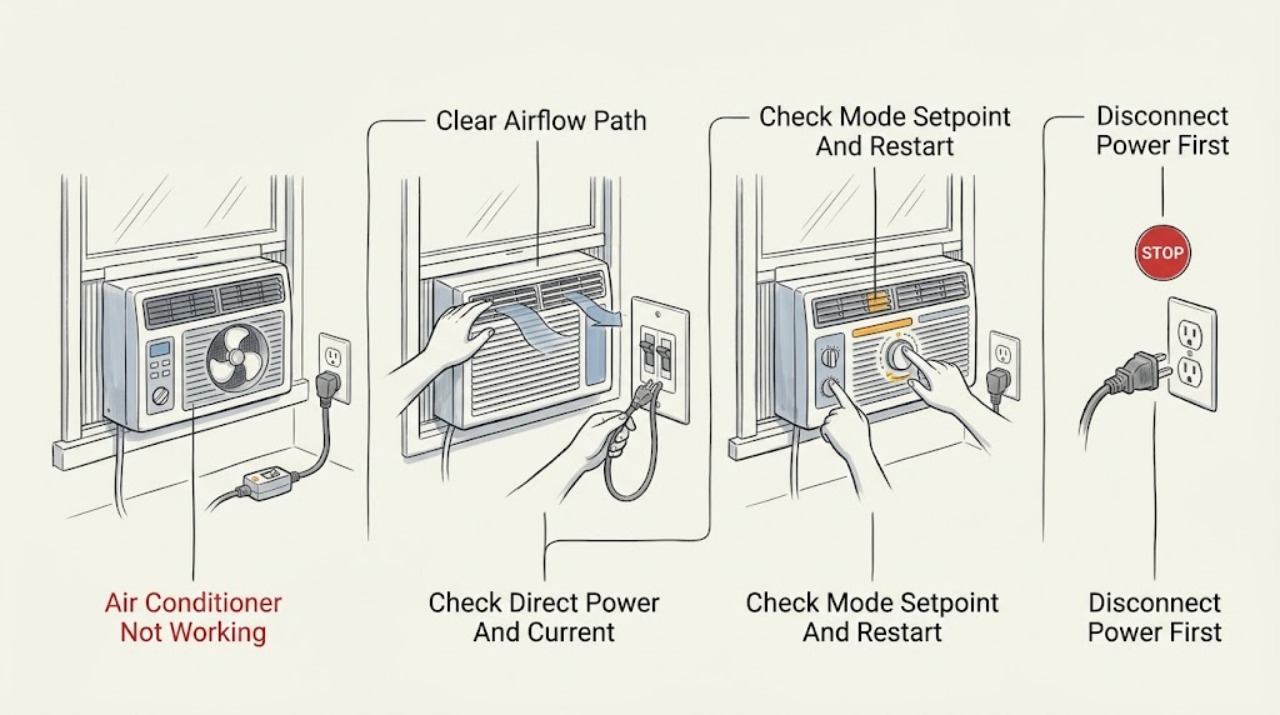
First separate a dead unit with no display or airflow from a unit that runs the fan but does not cool. For no operation, confirm the selector is on, the unit is plugged directly into a properly grounded wall outlet, and—if fitted—the power-cord current interrupter is reset; do not use an extension cord, surge protector, or multi-outlet adapter. For a fan that runs without cooling, select COOL rather than FAN, set the thermostat below the room temperature, allow the model-specific startup delay, and check the filter and front/rear airflow while the unit is off. GE notes that a dirty filter, blocked airflow, open windows, an unusually hot room, an outdoor temperature at or below 70°F, or an iced coil can all change cooling behavior; these are not proof of a failed compressor. If the cord or receptacle is hot or damaged, there is smoke, a burning odor, water near electricity, repeated tripping, or internal service is needed, stop using the unit and arrange qualified service.
Before you begin
Safety first
- The user may operate documented controls, inspect a dry plug and outlet, perform the exact TEST/RESET action on a fitted current interrupter, clean an owner-accessible filter while unplugged, clear visible airflow obstructions, and allow ice to thaw naturally. Qualified personnel must handle cabinet access, live measurements, capacitors, wiring, fan or compressor parts, coils, refrigerant, sealed-system work, and repairs near water or heat.
Work through in order
Diagnostic checks
Use only checks that match the exact appliance or system and its official guide.
-
Check 1
With the unit in its normal user controls, note whether the display or indicator responds, whether any air moves, whether the fan runs continuously or intermittently, and whether the air becomes cooler after the documented startup period. Record the exact model and whether it is window, built-in, or a GE Profile smart room unit.
Expected result: There is no display or airflow; the display works but the fan is silent; the fan runs but air is not cool; cooling starts after a delay; or the unit stops and later restarts.
Next step: Follow the no-power, settings, airflow, or normal-restart branch matching the observation. Use the exact model manual for control names and timing.
Stop if: Stop immediately for smoke, burning odor, sparks, a hot or damaged cord or receptacle, water near electricity, exposed wiring, or repeated breaker/current-interrupter trips.
Why this matters
Why: No response favors a power or control path. Fan-only operation favors mode, setpoint, airflow, temperature load, icing, or an internal cooling fault. A documented delay or periodic restart can be normal on applicable models.
-
Check 2
With dry hands and no visible damage, confirm the factory cord is fully seated in a properly grounded wall outlet and that no extension cord, surge protector, or multi-outlet adapter is in use. If the cord has a current-interrupter TEST/RESET device, follow GE's documented sequence: press TEST, then RESET while it remains plugged in. If safe, use another appliance to see whether the receptacle has power; do not remove covers or use test instruments on energized parts.
Expected result: The plug was loose, an adapter or extension was present, the current interrupter resets and stays set, the outlet is dead, the interrupter will not reset, or the cord/receptacle is hot, wet, loose, or damaged.
Next step: Correct only the visible plug/adapter issue. Have an electrician address the receptacle, breaker, or household wiring; arrange appliance service for a cord or unit fault.
Stop if: Do not bypass the current interrupter, use an extension or adapter, touch a wet or hot connection, or repeatedly reset a device that trips.
Why this matters
Why: A correct connection or reset can explain a no-start condition. A dead outlet points to household supply; a current interrupter that will not stay reset or a hot/damaged connection is a safety fault, not a troubleshooting invitation.
-
Check 3
Use the exact model's control instructions to select COOL rather than FAN, set the thermostat below the room temperature, and confirm no timer, sleep, energy-saver, lock, or smart-control state is preventing a call for cooling. After a restart, wait only the model-documented interval before judging the compressor; do not rapidly cycle power.
Expected result: The unit was in FAN or had a high setpoint; a timer/lock/smart control was active; cooling starts after the manual's delay; the fan runs but the compressor never starts; or the controls remain unresponsive.
Next step: Restore only documented user settings and wait once. If the exact model's manual does not identify the timing or the compressor remains inactive, stop repeated cycling and arrange service.
Stop if: Do not hold or bypass controls, open the cabinet, or attempt live electrical tests.
Why this matters
Why: An incorrect mode, setpoint, schedule, or model-specific delay can look like failure. Persistent fan-only operation after the documented wait shifts toward airflow, icing, temperature load, or internal service; unresponsive controls point toward control or power diagnosis.
-
Check 4
Turn the air conditioner off and unplug it before removing or cleaning the filter, only if the exact model manual permits owner access. Check the front grille and any accessible rear airflow for curtains, furniture, dust, or obstruction; close nearby windows and doors and note whether the room is unusually hot or the outdoor temperature is at or below GE's published cooling threshold. If ice is visible, leave the unit off to thaw naturally and do not scrape it or apply heat.
Expected result: The filter is dirty or overdue, airflow is blocked, windows are open, the room is still heat-soaked, the outdoor temperature is at or below 70°F, the coil is iced, or airflow and conditions are normal.
Next step: Clean or replace the filter as the exact manual directs, restore clear airflow, close openings, allow natural thawing, and retest once. Arrange service if ice returns or cooling remains poor.
Stop if: Do not run with a severely iced coil, scrape fins or ice, use a heat gun, spray liquid into the cabinet, or continue if water reaches electrical parts.
Why this matters
Why: A dirty filter, obstruction, open window, heavy room load, low outdoor temperature, or ice can reduce or prevent cooling without identifying a failed part. Normal airflow and conditions after correction make an internal cooling fault more likely if the room remains warm.
-
Check 5
After the safe power, settings, airflow, and natural-thaw checks, stop if the unit still will not operate or cool. Give the technician the exact model, installation type, power symptoms, control mode, restart timing, filter condition, ice or water observations, and whether the fan or compressor ever ran. Do not remove the cabinet or attempt refrigerant, capacitor, compressor, fan, control, or live-wiring diagnosis.
Expected result: The unit remains dead with a known-good supply, repeatedly ices, has normal airflow but no cooling, makes an abnormal electrical/mechanical sound, leaks, trips protection, or has damaged wiring.
Next step: Keep the unit off when unsafe or when protection repeatedly trips, and arrange qualified air-conditioner service; use an electrician for a household outlet, breaker, or wiring problem.
Stop if: Stop for smoke, burning odor, sparks, a hot cord, water near electricity, exposed wiring, refrigerant/oily residue, or repeated trips.
Why this matters
Why: These patterns can involve an internal fan, capacitor, compressor, control, coil, drain, sealed-system, or electrical fault. The symptom alone cannot select a replacement part.
Use your observations
Decision map
Find the observation that best matches what you see, then follow the next safe action.
-
PATH 01Safety boundary
What you see
The display or indicator is dark and there is no fan or other response, or the controls do not respond.
Do this next
Perform the dry direct-outlet and model-specific TEST/RESET checks once. Escalate household supply issues to an electrician and persistent unit faults to qualified appliance service.
Why this path and its safety boundary
Why it matters: A plug, outlet, breaker, current interrupter, selector, thermostat, or control path is more likely than a cooling-only fault.
Safety stop: Do not use an extension or adapter, bypass a current interrupter, or touch a hot, wet, loose, or damaged connection.
-
PATH 02Safety boundary
What you see
The fan moves air, but the air does not become cool after COOL mode, the setpoint call, and the model's documented restart period.
Do this next
Check the de-energized filter, visible airflow, windows, room conditions, and ice branch. If conditions are normal and the symptom persists, arrange service.
Why this path and its safety boundary
Why it matters: Mode/setpoint, blocked airflow, a dirty filter, room load, low outdoor temperature, icing, or an internal cooling fault are possible; this pattern does not prove a compressor failure.
Safety stop: Do not open the cabinet, scrape ice, apply heat, or perform live tests.
-
PATH 03Safety boundary
What you see
The compressor starts after a model-documented delay, or the unit pauses and restarts while the fan or thermostat behavior matches its manual.
Do this next
Use the exact model manual and avoid rapid cycling. Escalate only if the wait exceeds the documented behavior or cooling never returns.
Why this path and its safety boundary
Why it matters: Some GE room units use restart protection or automatic restart timing; older manuals and newer electronic models do not establish one universal delay.
Safety stop: Stop for overheating, smoke, burning odor, repeated trips, or a damaged cord.
-
PATH 04Safety boundary
What you see
Airflow is weak, the filter or grille is blocked, the room has open windows or heavy heat load, or ice is visible on the coil.
Do this next
Unplug, clean or replace the filter per the manual, clear only visible obstructions, close openings, and let ice thaw naturally before one retest.
Why this path and its safety boundary
Why it matters: Airflow and operating conditions are more likely contributors than an immediately proven compressor failure; recurring ice after correction needs service.
Safety stop: Do not run severely iced, scrape fins or ice, use a heat tool, or continue when thaw water reaches electrical parts.
-
PATH 05Safety boundary
What you see
The cord or receptacle is hot or damaged, protection repeatedly trips, there is smoke/odor/water near electricity, or safe checks leave the unit dead or not cooling.
Do this next
Stop using the unit, isolate power only from a safe dry location, and arrange qualified appliance service or an electrician as appropriate.
Why this path and its safety boundary
Why it matters: A household supply hazard or internal electrical, fan, compressor, control, coil, or sealed-system fault is possible and is outside user-level checks.
Safety stop: Do not reset repeatedly, remove the cabinet, bypass safety devices, or perform live measurements.
Helpful context
Understand the symptom
Classify what “not working” means
A GE air conditioner may be completely dead, powered with no airflow, blowing room-temperature air, cooling weakly, or stopping and restarting normally. Record whether the display or indicator responds, whether the fan moves air, whether the compressor sound ever starts, and whether the room temperature changes. A fan-only result does not by itself prove a compressor failure, and a dark display does not prove the appliance is defective until the model's power-cord and outlet checks are complete. GE's support site asks owners to use the model and serial information because controls and features differ across models.
Power and cooling are separate paths
A dead unit points first toward the outlet, breaker, plug, selector, thermostat, or cord current interrupter. A running fan with no cooling shifts attention to COOL mode, setpoint, airflow, filter, room load, outdoor temperature, icing, and only then possible internal cooling faults. On some GE models the compressor is intentionally delayed after startup or after its protection timer runs; use the exact manual rather than repeatedly cycling the control. A window or built-in installation can also change where the cord and airflow obstructions are located.
Keep user checks visible and de-energized
The safe user boundary is limited to controls, a dry plug and receptacle, the documented TEST/RESET action on a fitted current interrupter, visible airflow, and a filter that the exact manual says the owner may remove. Turn the unit off and unplug it before cleaning the filter. Do not scrape ice, open the cabinet, probe live terminals, bypass a safety device, or handle a hot or wet cord. Persistent no-cooling, damaged wiring, inaccessible coils, refrigerant work, and fan, compressor, or control diagnosis belong to qualified service.
Safety boundary
Stop conditions
- Stop immediately for smoke, burning odor, sparks, exposed wiring, a hot or damaged cord or receptacle, water near electricity, or repeated breaker/current-interrupter trips; isolate power only from a safe dry location.
- Do not use an extension cord, surge protector, or multi-outlet adapter, and do not bypass or repeatedly reset the factory current interrupter.
- Do not remove the cabinet, perform live electrical tests, handle capacitors or refrigerant, or repair fan, compressor, control, coil, or sealed-system components.
- Do not scrape ice, apply a heat gun, spray liquid into the unit, or keep operating when thaw water reaches electrical parts.
- If the unit cannot cool after the exact model's safe checks, keep it off when unsafe and arrange qualified service rather than guessing at a part.
When checks do not resolve it
Need a professional?
Arrange qualified air-conditioner service when the unit remains dead with a verified safe supply, the fan runs but cooling does not return after the exact model's settings, airflow, filter, and natural-thaw checks, ice repeatedly returns, an internal fan/compressor/control/coil or sealed-system fault is suspected, or the model-specific controls cannot be identified. Use an electrician for a dead, hot, loose, wet, damaged, or repeatedly tripping household outlet, breaker, or wiring. Stop immediately for smoke, burning odor, sparks, exposed wiring, water near electricity, a hot cord, or repeated protection trips. Provide the exact model and serial information, installation type, symptom classification, control mode and setpoint, restart timing, filter and airflow observations, icing or water location, and safe steps attempted.
Safety scope: The user may operate documented controls, inspect a dry plug and outlet, perform the exact TEST/RESET action on a fitted current interrupter, clean an owner-accessible filter while unplugged, clear visible airflow obstructions, and allow ice to thaw naturally. Qualified personnel must handle cabinet access, live measurements, capacitors, wiring, fan or compressor parts, coils, refrigerant, sealed-system work, and repairs near water or heat.
Common questions
FAQ
Why is my GE air conditioner completely unresponsive?
Start with the selector and thermostat, then confirm the factory cord is directly in a properly grounded wall outlet. If the cord has a current-interrupter device, follow its TEST/RESET procedure once. A dead outlet, a device that will not stay reset, or a hot or damaged connection needs an electrician or qualified service rather than repeated resets.
Why does my GE air conditioner blow air but not cool?
Confirm COOL mode and a setpoint below room temperature, then wait for the exact model's startup behavior. With the unit off and unplugged, check the owner-accessible filter and visible airflow; close windows and account for a heat-soaked room, low outdoor temperature, or ice. Persistent no-cooling after those checks needs service.
How long should I wait before deciding a GE air conditioner is not cooling?
There is no universal GE delay for every model. GE describes an approximately eight-minute restart timer on some electronic room units, while an older compatible manual documents about three minutes after restart. Use the exact manual and do not rapidly cycle the control.
Can a dirty filter make a GE air conditioner stop cooling?
Yes. GE lists a dirty filter and blocked airflow among possible causes of poor cooling and recommends checking or cleaning the filter on the model's schedule; an older compatible manual says at least every 30 days. Turn the unit off and unplug it before cleaning, and do not infer a compressor failure from a dirty filter alone.
When should I stop troubleshooting a GE air conditioner?
Stop for smoke, burning odor, sparks, a hot or damaged cord or receptacle, water near electricity, exposed wiring, or repeated breaker/current-interrupter trips. Stop cabinet-level work as well: recurring ice, persistent no-cooling, fan/compressor/control problems, coils, and sealed-system work require qualified service.
Read the exact guide
Official sources
- 49-7405-3GE Appliances · Only an older compatible GE room-air-conditioner manual; do not generalize its exact control labels or three-minute restart timing to every GE model.
- Support for GE Air ConditionersGE Appliances · Applies to GE air conditioners; product support and control features are selected by exact model.
- Air Conditioner - Power CordGE Appliances · Applies to GE room air conditioners with the described factory cord; cord location and current-interrupter features vary by model and installation.
- Air Conditioner - Automatic Restart FeatureGE Appliances · Only applicable to GE models that include the described electronic thermostat or automatic-restart feature; it is not a universal timing rule.
- Air Conditioners Unit Is Not RunningGE Appliances · Applies to GE air conditioners; exact controls and cord protection vary by model.
- Air Conditioner - Not Cooling Well / Running ConstantlyGE Appliances · Applies to GE air conditioners; exact filter access, controls, installation, and temperature behavior vary by model.
Community feedback
Share a repair observation
Share a plain-text repair observation. Accepted observations are published automatically; this page may take a moment to update.