
On this page
Start here
Quick answer
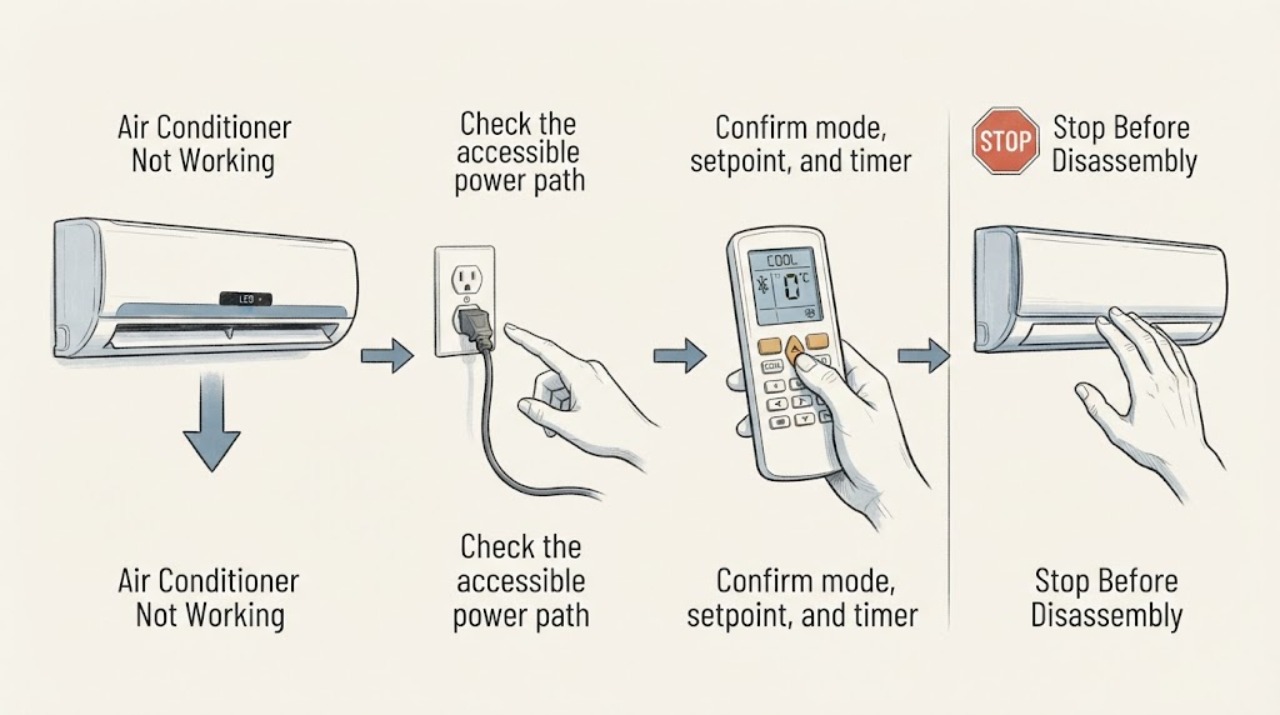
When an air conditioner is not working, separate no power, a control or timer setting, blocked airflow, and a true HVAC fault. Daikin’s official manual starts with the plug, timer, doors/windows, and air inlets/outlets, then directs persistent faults to the installer or dealer; refrigerant work is not a user check.
Work through in order
Diagnostic checks
Use only checks that match the exact appliance or system and its official guide.
-
Check 1
Check the accessible power path.
Expected result: Confirm the plug or disconnect is secure, the dedicated breaker is on, and the display responds; do not repeatedly reset a tripping breaker.
Next step: Restore a breaker once only when no hazard is visible; escalate if it trips again.
Why this matters
Why: No display suggests supply or control power; a live display moves the check toward mode, timer, airflow, or equipment fault.
-
Check 2
Confirm mode, setpoint, and timer.
Expected result: Verify Cool mode, a setpoint below room temperature, fan setting, and that ON/OFF or sleep timers are not holding the unit off.
Next step: Correct settings using the remote/manual and wait through the model’s normal compressor delay.
Why this matters
Why: A wrong mode, timer, or setpoint can look like failure while the unit is waiting for a command or delay.
-
Check 3
Check airflow and room conditions.
Expected result: Clear visible inlet/outlet obstructions, close doors/windows as appropriate, and inspect the user-accessible filter according to the model guide.
Next step: Clean only user-removable parts and do not touch coils or wiring.
Why this matters
Why: Blocked airflow or open room conditions reduce performance and can trigger protection; they do not identify a refrigerant component.
-
Check 4
Check for refrigerant and safety boundaries.
Expected result: Observe ice, oil residue, water, unusual noise, burning odor, smoke, or a persistent fault code without opening the circuit.
Next step: Stop operation and request qualified HVAC service.
Why this matters
Why: Daikin says suspected refrigerant leakage and persistent faults belong with the dealer/serviceman; these cannot be confirmed safely by a user.
Use your observations
Decision map
Find the observation that best matches what you see, then follow the next safe action.
-
PATH 01Next step
What you see
The unit starts after correcting power, mode, timer, or airflow and produces normal airflow.
Do this next
Monitor the temperature and use the exact manual for maintenance.
Why this path and its safety boundary
Why it matters: The issue was likely an accessible control, supply, or airflow condition.
-
PATH 02Next step
What you see
The unit has power and commands but remains off, blows warm air, or repeats a fault after safe checks.
Do this next
Contact the installer or qualified HVAC service; do not add refrigerant.
Why this path and its safety boundary
Why it matters: An internal control, fan, compressor, sensor, or refrigerant issue is more likely.
-
PATH 03Next step
What you see
Smoke, burning odor, water on electrical parts, damaged wiring, or repeated breaker trips is observed.
Do this next
Turn the system off, isolate power if safe, and obtain qualified service.
Why this path and its safety boundary
Why it matters: The symptom is an electrical or equipment safety hazard.
Helpful context
Understand the symptom
Separate power, controls, and airflow
Record whether the indoor unit has a display, fan, airflow, cooling, and any error or timer indicator. A silent unit and an operating unit with warm air follow different checks.
When checks do not resolve it
Need a professional?
Use qualified HVAC service when the unit remains off or warm after power, setting, timer, and airflow checks, or when a compressor, refrigerant, control, or sensor fault is suspected.
Common questions
FAQ
Can I add refrigerant if the air conditioner is not cooling?
No. Daikin directs suspected refrigerant leaks and repairs to the dealer or service staff. Refrigerant work requires qualified equipment.
How long should I wait after changing the setpoint?
Use the model manual and allow its normal compressor protection delay; do not repeatedly change settings or cycle power during the delay.
Read the exact guide
Official sources
- Daikin Air Conditioner Operation ManualDaikin Comfort Technologies · This is official manufacturer support; exact model-specific behavior and parts remain limited to the named product or manual.
- Cool On Flashing on Thermostat - CarrierCarrier Corporation · This is official manufacturer support; exact model-specific behavior and parts remain limited to the named product or manual.
Community feedback
Share a repair observation
Share a plain-text repair observation. Accepted observations are published automatically; this page may take a moment to update.