
On this page
Start here
Quick answer
‘Not working’ is too broad to diagnose on a Samsung air conditioner: the unit may have no power, may not cool, may not respond to the remote, or may stop with an indicator or error. Identify the failed function first, then check the matching supply, remote, setting, filter, and airflow conditions. Persistent faults, recurring codes, repeat breaker trips, or electrical damage require Samsung or qualified professional service.
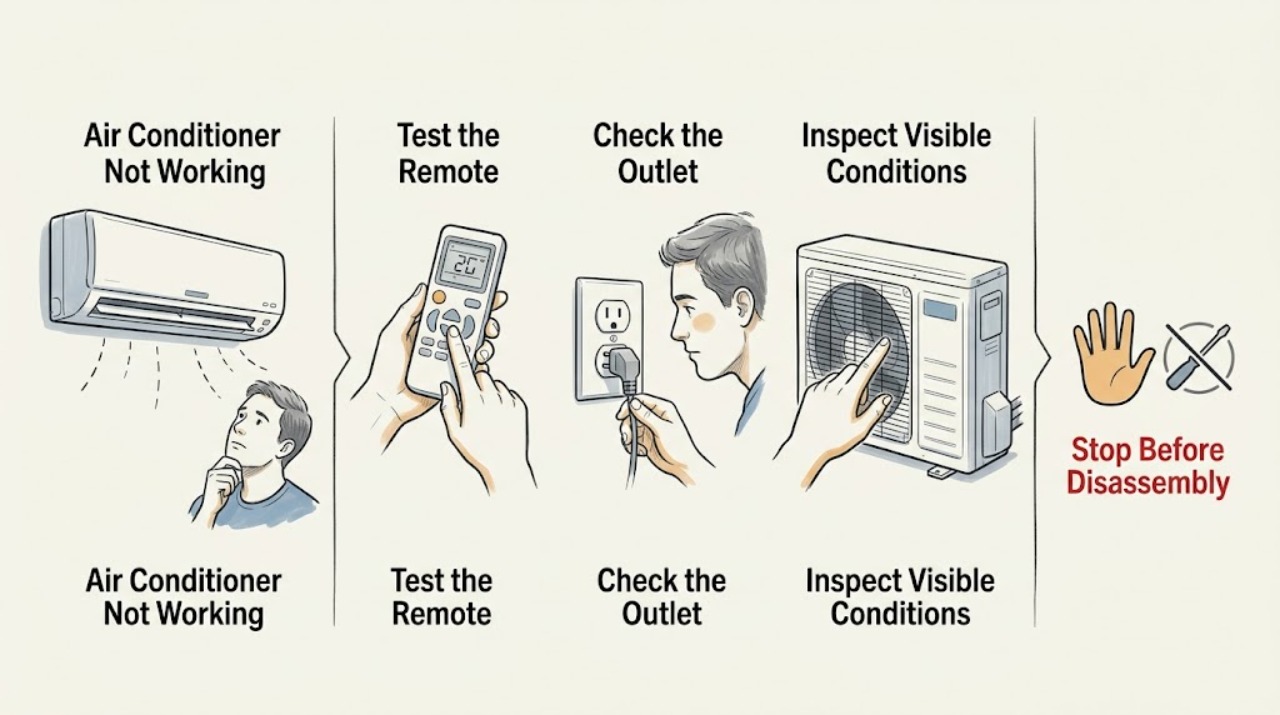
Work through in order
Diagnostic checks
Use only checks that match the exact appliance or system and its official guide.
-
Check 1
Describe what failed: no display or fan, no cooling, remote-only response, water, unusual noise, or an error indicator. Note whether the problem affects the indoor unit, outdoor unit, or one function only.
Expected result: The whole unit is dark, the unit runs but does not cool, or only the remote/control function fails.
Next step: Follow the matching check below and change one condition at a time so the result remains meaningful.
Why this matters
Why: A dark unit points first to power or control; running without cooling points to mode, filter, airflow, capacity, or service conditions; one control symptom is narrower than total failure.
-
Check 2
For a dark or silent unit, check the outlet or isolator, plug, and dedicated breaker from a dry position; test the outlet only with a safe known-working device and do not touch exposed wiring.
Expected result: The outlet is dead, the breaker trips or will not stay on, visible cord damage exists, or the supply is normal.
Next step: Reset a breaker only once if safe and permitted. Leave repeat trips or damaged wiring to qualified service and do not open the AC.
Why this matters
Why: A dead or unstable supply is an electrical problem; a normal supply with no AC response makes the remote, local control, or internal fault more likely.
-
Check 3
For a running unit that does not cool, confirm Cool mode and a suitable set temperature, inspect the accessible filter for dust, and look for blocked indoor or outdoor airflow without reaching into a fan.
Expected result: The mode or temperature is unsuitable, the filter is blocked, airflow is obstructed, or those external conditions are normal.
Next step: Correct only the accessible setting, filter, or obstruction and allow the unit to reassess. Contact service if cooling remains poor or refrigerant work may be needed.
Why this matters
Why: Samsung identifies settings, dirty filters, power, and airflow/installation conditions as common cooling problems; normal external conditions leave an internal or sealed-system fault possible.
-
Check 4
Replace remote batteries and observe the indoor display or indicator while issuing one command. Record any code or blinking pattern exactly, including whether it returns after one restart.
Expected result: The unit responds after battery replacement, an error appears, an indicator blinks, or there is no response with a normal supply.
Next step: Retain the model and code/pattern for Samsung support. Do not bypass a door/control interlock, probe wiring, or repeatedly cycle power.
Why this matters
Why: A battery response supports a remote issue; a returning code or blink can indicate protection or component trouble, while no response at a normal supply needs service-level diagnosis.
Use your observations
Decision map
Find the observation that best matches what you see, then follow the next safe action.
-
PATH 01Next step
What you see
The unit is dark and the outlet or breaker is abnormal
Do this next
Leave the AC off and arrange qualified electrical service if power will not remain stable or any cord/outlet damage is visible.
Why this path and its safety boundary
Why it matters: Incoming power or electrical protection is more likely than a cooling-setting issue.
-
PATH 02Next step
What you see
The fan runs but cooling is poor and the filter or airflow path is visibly restricted
Do this next
Clean the accessible filter when fully powered off and clear only safe external obstructions; request service if cooling does not recover.
Why this path and its safety boundary
Why it matters: A maintenance, setting, or airflow condition is supported, but persistent poor cooling can still require professional diagnosis.
-
PATH 03Next step
What you see
Settings, filter, supply, and remote checks are normal but the unit remains unresponsive or a code returns
Do this next
Stop repeated trials, note the exact symptom and code, and arrange Samsung-trained service.
Why this path and its safety boundary
Why it matters: An internal control, sensor, fan, or sealed-system fault remains possible and cannot be identified safely from the exterior.
When checks do not resolve it
Need a professional?
Arrange qualified Samsung or electrical service for a persistent broad failure after the matching safe checks, a returning error or blinking indicator, low cooling that may involve refrigerant, repeat breaker trips, smoke, burning odor, water near electricity, or damaged wiring.
Common questions
FAQ
What does ‘not working’ mean on a Samsung air conditioner?
Classify the symptom first: no power, no cooling, no remote response, water, noise, or an error. Each points to a different safe first check, so a general part replacement is not justified.
When should I stop troubleshooting a Samsung AC?
Stop for service when a breaker repeats a trip, an error returns, cooling remains poor after settings/filter/airflow checks, or any smoke, burning odor, water near electricity, or wiring damage appears.
Read the exact guide
Official sources
- Why does my Samsung AC have no power?Samsung Gulf · Samsung AC no-power and no-response symptoms
- How to solve error codes on your Samsung indoor air conditionerSamsung India · Samsung indoor AC alarm and protection states
- How to fix a Samsung AC that is not coolingSamsung Gulf · Samsung AC poor-cooling and operating-performance symptoms
Community feedback
Share a repair observation
Share a plain-text repair observation. Accepted observations are published automatically; this page may take a moment to update.