
On this page
Start here
Quick answer
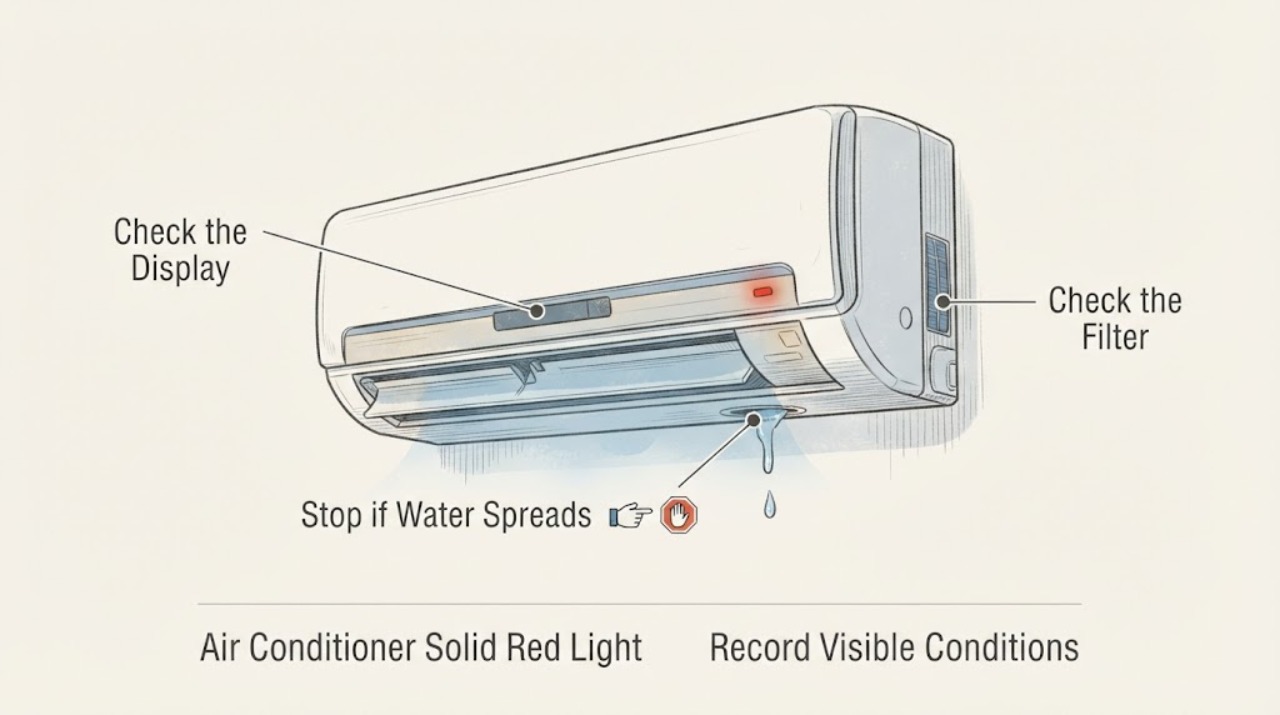
A solid red light on some GE Smart window air conditioners is the WiFi module status light and, by itself, does not explain reduced cooling. Separate the water symptom before troubleshooting performance: water dripping on the outdoor side can be normal, while water dripping into the room is not. For an indoor leak, turn the unit off if water is near electrical parts, then check the model's installation slope and a clean, dry filter. For reduced cooling, confirm the correct mode and setting, clear the front grille, check the filter and accessible rear coil, and look for ice or unsuitable outdoor conditions. If the red light is a control indicator rather than the WiFi LED, the model is unknown, the leak continues inside, or cooling stays poor after these checks, use the exact Owner's Manual and arrange qualified GE or HVAC service.
Work through in order
Diagnostic checks
Use only checks that match the exact appliance or system and its official guide.
-
Check 1
From a dry, safe position, record the exact GE model, where the solid red light appears, whether it is behind the filter, behind the control panel, on a control, or on a display, and whether it stays on or changes. Also record whether water is dripping outdoors or into the room, whether airflow is weak, and whether the discharged air feels cool.
Expected result: The unit is a GE Smart window air conditioner with a red light behind the filter or control panel; the light is associated with a button or display; the model is unknown; water is outside; water is inside; or cooling is reduced.
Next step: Find the exact Owner's Manual using the model information. Continue with the matching light and leak branch only when there is no electrical hazard; keep the unit off if water reaches electrical parts or the cord.
Stop if: Do not remove the cabinet, reach through the grille, handle a wet connection, or continue operating for smoke, burning odor, sparking, a hot or damaged cord, or water near electrical parts.
Why this matters
Why: GE identifies the red light as a WiFi status indicator only for some Smart models and locations. GE also gives different interpretations for outdoor and indoor water. These distinctions determine whether the first branch is an indicator explanation, a drainage or installation check, or a cooling check.
-
Check 2
If the model is a GE Smart window unit and the red light is behind the filter or control panel without being tied to a button or feature, compare that location with GE's WiFi-status guidance. Do not cover, reset, or change the light until the manual confirms its function; if the light is on a control or display, use that model's indicator instructions instead.
Expected result: The light matches GE's described WiFi-module location and the unit otherwise operates normally; it is on a control or display; it is accompanied by a fault message; or the model does not have the matching Smart feature.
Next step: Treat a matching WiFi light as a separate observation and continue with the water and cooling checks. For any other light, follow the exact manual and arrange service if the manual identifies a fault or the light is accompanied by abnormal operation.
Stop if: Do not open the control panel, disconnect the WiFi module, bypass an indicator, or operate the unit when an electrical or water hazard is present.
Why this matters
Why: A matching WiFi status light indicates module operation and is not, by itself, evidence of a cooling or leak fault. A different light location or an associated fault message is outside that limited explanation.
-
Check 3
If water is dripping into the room, turn the air conditioner off when water is near the outlet, cord, or controls. Once the area is dry and the unit is safe to inspect, check from outside the cabinet that the installation is level or slopes slightly toward the outdoors and that the accessible filter is clean, dry, correctly installed, and not damaged. Do not drill a drain hole or hose the unit.
Expected result: Water is only dripping outdoors; water is entering the room; the unit slopes inward; the filter is dirty or damp; or the installation and accessible filter appear correct while indoor leaking continues.
Next step: Follow the exact installation and filter instructions for the model. Do not move a heavy or built-in unit alone. If the indoor leak persists, stop using the unit and arrange qualified service before continuing cooling tests.
Stop if: Do not run the air conditioner with water near electrical parts, remove the cabinet, bend coil tubing, drill the base pan, or use forced water or heat to clear a suspected blockage.
Why this matters
Why: GE describes outdoor dripping as a normal condensate path in many window units, but says indoor dripping is not normal. GE identifies inward slope and a dirty filter as possible indoor-leak contributors. A continuing indoor leak after those external checks needs model-specific diagnosis.
-
Check 4
With the leak controlled and no safety symptom present, check the cooling setup from outside the cabinet: use the model's cooling mode, use the appropriate thermostat setting for its control type, clear curtains or furniture from the front grille, close windows, and clean the accessible filter as the manual directs. Look for visible ice or heavy dirt on the accessible rear coil without touching the coil.
Expected result: The mode or setting was wrong, the front grille or filter was blocked, windows were open, ice is visible, the rear coil is heavily dirty, or the accessible airflow and settings are correct but discharged air remains warm.
Next step: Correct only the accessible setting or obstruction and allow the unit to defrost naturally if ice is present. If cooling remains poor, the leak recurs, or the coil needs professional cleaning, stop repeated tests and arrange qualified service.
Stop if: Do not chip ice, apply flame or concentrated heat, bend coil fins, open the cabinet, live-test, add refrigerant, or operate with a damp or missing filter.
Why this matters
Why: GE lists settings, blocked airflow, open windows, outdoor conditions, ice, coil dirt, and filter condition as causes of poor cooling. These checks can explain reduced cooling independently of a WiFi status light; visible ice or a continuing indoor leak changes the safe next step.
-
Check 5
After any safe external correction, observe one normal cooling period and record whether the red light remains, whether water appears outdoors or indoors, whether the fan moves air, whether the discharged air is cooler than the room, and whether ice or water returns. Keep the exact model and the observations for service if the pattern persists.
Expected result: The light remains but cooling and drainage are normal; cooling returns and water stays outdoors; water continues inside; ice returns; the fan runs but the air is not cool; or the unit cycles abnormally.
Next step: Keep the unit off for recurring indoor leaks, persistent poor cooling, ice that returns, or abnormal electrical behavior. Give GE or a qualified HVAC/appliance technician the model, light location, leak direction, cooling observations, and the checks already completed.
Stop if: Stop immediately for smoke, burning odor, sparking, hot or damaged wiring, water near electricity, or an uncontrolled leak.
Why this matters
Why: A persistent red WiFi status light can be normal when it matches GE's Smart-unit description, while recurring indoor water or poor cooling after external checks points to a model-specific installation, airflow, fan, control, or sealed-system issue. The combined symptom does not identify one safe replacement part.
Use your observations
Decision map
Find the observation that best matches what you see, then follow the next safe action.
-
PATH 01Next step
What you see
The red light is behind the filter or control panel on a GE Smart window air conditioner, is not tied to a control, and cooling and drainage otherwise behave normally.
Do this next
Leave the indicator interpretation to the exact manual and investigate any reduced cooling or leak as a separate symptom.
Why this path and its safety boundary
Why it matters: GE identifies this location and model context as the internal WiFi-module status light, which indicates that the module is functioning and is not itself a cooling fault.
-
PATH 02Next step
What you see
Water drips on the outdoor side while the unit is cooling, and there is no water near indoor electrical parts.
Do this next
Do not add a drain hole or remove a drain plug unless the exact model instructions require it. Continue with the reduced-cooling checks only if the indoor side is dry.
Why this path and its safety boundary
Why it matters: GE describes condensate collecting in the base pan and dripping outside as normal operation for room air conditioners in appropriate conditions.
-
PATH 03Next step
What you see
Water drips into the room, the installation slopes inward, the filter is dirty or damp, or water returns after the accessible installation and filter checks.
Do this next
Keep the unit off until the area is dry and the exact installation instructions or qualified service have addressed the leak. Do not continue cooling tests with water near electrical parts.
Why this path and its safety boundary
Why it matters: GE says indoor dripping is not normal and identifies inward installation slope and a dirty filter as possible causes. A recurring indoor leak can damage the room or reach electrical parts, and it should not be treated as a harmless red-light condition.
-
PATH 04Next step
What you see
The red light is associated with a control or fault display, cooling remains reduced after correct settings and clear airflow, ice returns, or water and cooling problems persist together.
Do this next
Stop repeated operation and arrange GE or qualified HVAC/appliance service with the model, light behavior, leak direction, cooling result, and check history. Do not select a compressor, fan, control, filter, or other part from the symptoms alone.
Why this path and its safety boundary
Why it matters: The WiFi-status explanation does not cover this pattern. GE's cooling guidance makes settings, airflow, filter, ice, outdoor conditions, and coil condition the accessible checks; persistence after those checks needs model-specific diagnosis.
-
PATH 05Next step
What you see
Smoke, burning odor, sparking, a hot or damaged cord, water near the outlet or control area, an uncontrolled leak, or repeated breaker operation is present.
Do this next
Stop using the unit and isolate power only from a dry, safe position. Arrange qualified appliance or electrical service, and use local emergency guidance for active fire or immediate danger.
Why this path and its safety boundary
Why it matters: This is an electrical, fire, water, or equipment hazard outside routine indicator, drainage, and cooling checks.
Helpful context
Understand the symptom
The red light may be unrelated to cooling
GE says some Smart window air conditioners have a red light behind the filter or control panel that belongs to the internal WiFi module and indicates that the module is functioning. That explanation applies only when the light is in that location and the appliance has the corresponding Smart feature. A red light on a button, display, or different model needs the exact manual rather than a WiFi assumption.
Classify the leak before judging cooling
GE explains that condensate normally collects in the base pan and can drip on the outdoor side. Water inside the room is not normal; GE points to an installation that slopes inward or a dirty filter as possible causes. Keep the water away from the outlet, cord, and controls, and use the exact model instructions for installation and filter access.
When checks do not resolve it
Need a professional?
Arrange GE or qualified HVAC/appliance service when water continues to drip inside, the red light is a control or fault indicator rather than the documented Smart-unit WiFi LED, cooling remains poor after the correct settings, clear airflow, clean dry filter, and natural defrost, or diagnosis would require cabinet access. Provide the exact model, light location and behavior, leak direction, cooling observations, and all safe checks completed. Do not drill a drain hole, open the cabinet, live-test, add refrigerant, or order a fan, control, compressor, or other part from the combined symptoms alone. Stop immediately for smoke, burning odor, sparking, hot or damaged electrical parts, water near electricity, an uncontrolled leak, or repeated breaker operation.
Common questions
FAQ
What does a solid red light mean on a GE window air conditioner?
On some GE Smart window air conditioners, a red light behind the filter or control panel is the internal WiFi-module status light and indicates that the module is functioning. Confirm the model and location because a light on a control or display may have a different meaning.
Is water leaking from a GE air conditioner normal?
Water dripping on the outdoor side can be normal as condensate leaves the base pan. Water dripping into the room is not normal; GE points to an inward installation slope or a dirty filter as possible causes and says to use the exact model instructions.
Can the red light cause my GE air conditioner to cool less?
A matching WiFi status light is not, by itself, evidence of a cooling problem. Check the cooling mode and setting, blocked airflow, filter, ice, outdoor conditions, and visible coil condition separately; persistent poor cooling needs service diagnosis.
When should I stop using the GE air conditioner?
Stop for a recurring indoor leak, water near electrical parts, smoke, burning odor, sparking, a hot or damaged cord, an uncontrolled leak, or repeated breaker operation. Also stop repeated cooling tests when the correct external checks do not restore operation.
Read the exact guide
Official sources
- Air Conditioner - Not Cooling Well / Running ConstantlyGE Appliances · GE room air conditioners that are not cooling well or run continuously; exact model instructions control filter access and installation.
- Air Conditioner - Water Dripping Inside RoomGE Appliances · GE room air conditioners with water dripping inside the room; the page identifies inward installation slope and a dirty filter as possible contributors and directs owners to the model manual.
- Air Conditioner - Red Light Behind Filter or Control PanelGE Appliances · Some GE Smart window air conditioners with a red light behind the filter or control panel; it does not establish the meaning of a red control or display indicator on another model.
- Air Conditioner - Normal NoisesGE Appliances · GE room air conditioners where outdoor water dripping, airflow noise, thermostat clicks, or installation vibration needs to be separated from a fault.
Community feedback
Share a repair observation
Share a plain-text repair observation. Accepted observations are published automatically; this page may take a moment to update.