
On this page
Start here
Quick answer
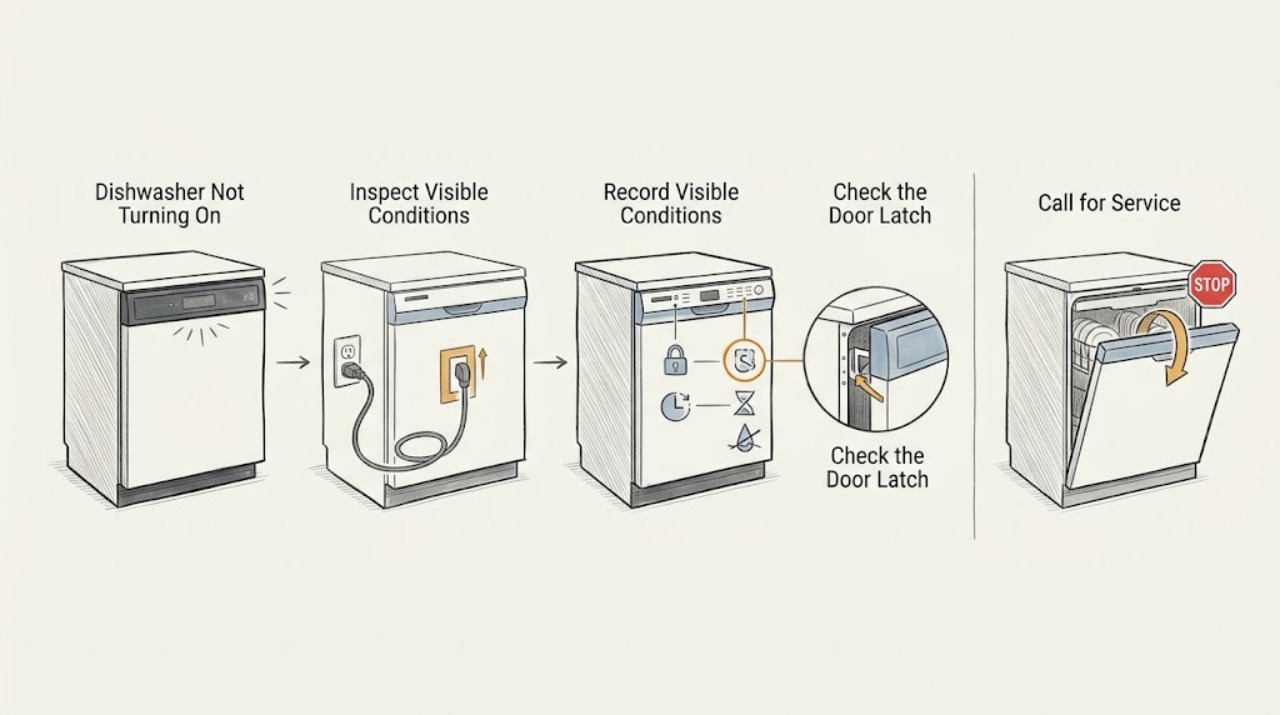
First separate a GE dishwasher with no lights or sounds from one that has power but will not start. For a completely dark, non-responsive unit, close and latch the door, then check the dishwasher breaker or fuse, an accessible GFCI receptacle, an adjacent-cabinet power cord if the model uses one, and any wall switch that controls the appliance. For lights or sounds without a cycle, check the model-specific Control Lock, Delay Start, Demo or Sleep/Sabbath settings and make sure the door latch is fully engaged. A leak-protection indication, an unexplained fault code, repeated breaker operation, burning odor, heat, water near electrical parts, or a dishwasher that stays dead after one safe power reset needs qualified service. GE says features and code meanings vary by model, so use the exact Owner's Manual rather than guessing at a button combination.
Before you begin
Safety first
- The owner may inspect accessible supply controls from a dry position, check an accessible cord and wall switch, close the door, and read model-specific controls and codes. A qualified electrician must assess household wiring and live supply conditions; a qualified appliance technician must assess the latch, flood float, controls, pump, wiring, and internal parts.
Work through in order
Diagnostic checks
Use only checks that match the exact appliance or system and its official guide.
-
Check 1
From a dry, safe position, note whether the dishwasher has any display, status light, interior light, or button sound. Look for smoke, burning odor, unusual heat, a damaged cord or receptacle, water near electrical parts, or a breaker/GFCI that has operated. Do not touch wet electrical equipment.
Expected result: The panel is completely dark and silent; the panel lights or beeps but a cycle does not begin; or a visible electrical or water hazard is present.
Next step: If a hazard is present, leave the dishwasher isolated and arrange qualified electrical or appliance service. If there is no hazard, follow the no-power or powered-no-start branch without repeatedly restoring power.
Stop if: Do not touch wet cords or outlets, restore power to create an arc, or open the dishwasher to look for the cause.
Why this matters
Why: A dark panel routes the diagnosis toward supply or a hidden sleep mode, while lights or sounds show that at least some control power is present and shift attention to start permissions. A hazard is an immediate stop-use condition.
-
Check 2
For a dark and silent dishwasher, close the door firmly and check the supply from accessible points only: the dishwasher breaker or fuse, an adjacent-cabinet receptacle if the model has a cord, the reset button on an accessible GFCI receptacle, and any wall switch that controls the dishwasher. If this is a new installation, record that fact.
Expected result: The breaker or GFCI is tripped, the wall switch is off, the accessible cord is loose, the receptacle is dead, or all accessible supply points appear normal.
Next step: Restore an accessible breaker, GFCI, or wall switch only once and only if there is no hazard; do not keep resetting a device that trips again. Have a new installation checked by the installer, and arrange qualified service if supply is normal but the dishwasher stays dark.
Stop if: Do not remove outlet covers, alter wiring, use an extension cord, replace a fuse with another rating, or test the receptacle live.
Why this matters
Why: A tripped protective device, switched-off supply, loose plug, or failed receptacle can explain a completely dark panel. If the supply is present but the dishwasher remains dead, the appliance's internal power path or controls become more likely and are not an owner repair.
-
Check 3
If the display or buttons respond, inspect the closed-door path without disassembly. Remove only an obvious item that prevents the rack or door from closing, then latch the door firmly. Check the display for a Lock indicator, a Delay Start value such as a number followed by H, or a model-specific Demo or Sleep/Sabbath indication.
Expected result: The latch does not engage, a rack or pan interferes, Lock is illuminated, a delay countdown is shown, or the panel responds normally but still will not begin.
Next step: Clear only the visible door obstruction and use the exact Owner's Manual to unlock controls or cancel Delay Start. Do not guess at a Demo, Sleep, or Sabbath sequence; if the latch or controls remain unresponsive, arrange service.
Stop if: Do not defeat the door switch, tape the latch closed, force the door, or remove the control panel.
Why this matters
Why: The dishwasher will not receive a start signal until its door switch is engaged. Control Lock can make pads inoperative, and Delay Start intentionally postpones washing; the exact unlock or cancel procedure is model-specific. A normal latch and controls shift concern toward protection, code, or internal control diagnosis.
-
Check 4
Record any displayed code, blinking pattern, beep timing, or leak-protection message before resetting anything. Compare it with the exact GE model manual or GE's code guidance; do not infer a code from a similar-looking model.
Expected result: The display shows a number plus H, LEAK DETECTED, 999, H2O, PrS, PF, or another model-specific code; Start/Reset blinks; the door beeps periodically; or there is no code.
Next step: Follow only the model-specific correction listed by GE, such as canceling a delay or documenting a power-failure indication. For leak messages, recurring codes, or an unexplained pattern, stop and arrange qualified service rather than bypassing protection.
Stop if: Do not clear a leak indication by opening panels, force a cycle with an error active, or assume that a code has the same meaning on every GE dishwasher.
Why this matters
Why: GE associates number-plus-H with Delay Start, LEAK DETECTED and some 999 displays with leak protection on applicable models, PF with a power failure, and H2O or PrS with model-dependent water or sensor conditions. GE also notes that blinking and beep meanings vary by model; a leak-protection state may prevent starting and needs service.
-
Check 5
If there is no hazard and the model manual permits a power reset, turn off the dishwasher's breaker or remove its fuse, wait the interval specified by GE, and restore it once. Observe whether the panel returns and whether the same no-start symptom or protective-device operation immediately returns.
Expected result: The controls recover and a cycle can be selected; the panel remains dark; the same code or lockout returns; or the breaker/GFCI trips again.
Next step: If the reset does not restore normal operation, leave the dishwasher isolated and arrange qualified service. If it trips again, do not reset it again; give the technician the timing, device type, code, and model.
Stop if: Do not repeatedly cycle power, increase breaker size, bypass a GFCI/AFCI, or use a live electrical meter test.
Why this matters
Why: A single reset can clear a transient electronic state or power-surge indication, but a persistent dark panel, recurring code, or repeated trip points to a supply, protection, control, latch, or internal fault requiring diagnosis.
-
Check 6
If the dishwasher has lights or sounds, the door latches, the lock and delay are cleared per the manual, and no code explains the failure, stop owner troubleshooting. Record the exact model, whether the unit is hardwired or cord-connected, the last normal cycle, and any hum, water, leak, or breaker event for the service provider.
Expected result: The unit remains powered but will not start, makes only a slight hum, shows a stuck-float or leak symptom, or is completely dead despite a confirmed supply.
Next step: Keep the appliance out of use if it leaks, hums abnormally, heats, or trips protection, and arrange qualified GE dishwasher service. Provide the model and the recorded symptom pattern rather than requesting a generic part.
Stop if: Do not add water to the tub as a generic test, access the flood float under panels, bypass a latch, or perform energized component tests.
Why this matters
Why: A powered no-start can involve the latch switch, flood float, pump, leak protection, control, or another model-specific component. A confirmed supply with no response can involve the internal power path. These conditions require service and should not be separated by bypassing safety devices.
Use your observations
Decision map
Find the observation that best matches what you see, then follow the next safe action.
-
PATH 01Next step
What you see
The panel is dark and silent, and the dishwasher has no visible hazard.
Do this next
Restore one accessible supply control only once if safe. If the device trips, will not reset, or the panel stays dark with supply present, leave it isolated and arrange qualified service.
Why this path and its safety boundary
Why it matters: The first pattern supports a supply interruption. Normal accessible supply with a dead panel shifts concern to the appliance's internal power path or to a model-specific sleep mode.
-
PATH 02Next step
What you see
Lights or sounds are present, but pressing Start does not begin a cycle.
Do this next
Clear a visible door obstruction and follow the exact model instructions for Lock and Delay Start. Escalate a normal-latching but idle dishwasher rather than forcing the controls.
Why this path and its safety boundary
Why it matters: Door engagement, Control Lock, or Delay Start is more likely than a total power loss. If those are cleared according to the model manual, protection or internal control diagnosis becomes more likely.
-
PATH 03Next step
What you see
A code, leak indication, blinking pattern, or recurring beep accompanies the no-start condition.
Do this next
Use the exact Owner's Manual and GE code guidance. Treat leak protection, recurring codes, and unexplained patterns as service conditions; do not bypass or repeatedly reset them.
Why this path and its safety boundary
Why it matters: The code or pattern may identify delayed start, leak protection, power interruption, water sensing, or a control fault, but GE says not all codes appear on all models.
-
PATH 04Next step
What you see
The dishwasher is powered, the door latches, settings are correct, and it only hums or does not run.
Do this next
Stop before internal access and arrange qualified service with the model and symptom timing. Keep the unit isolated for water, heat, odor, or electrical symptoms.
Why this path and its safety boundary
Why it matters: A pump seal, flood float, leak protection, latch signal, or internal component may be involved. GE gives some model-series-specific guidance, so a generic test cannot establish the cause.
-
PATH 05Next step
What you see
A single safe power reset restores operation and no hazard or repeated protective-device trip occurs.
Do this next
Monitor without repeated resets if it remains normal. If the symptom returns, leave it isolated and arrange service with the recorded code and timing.
Why this path and its safety boundary
Why it matters: Recovery supports a transient control or power event but does not prove the appliance is repaired. An immediate recurrence points to an unresolved supply, protection, latch, or control fault.
Helpful context
Understand the symptom
“Not turning on” has two different starting points
A dark panel and a panel that lights up but ignores Start are not the same diagnosis. Begin by noting whether any display, indicator, interior light, or button sound is present. This single observation determines whether to follow the supply path or the start-permission path.
GE protection features are model-dependent
Control Lock, Delay Start, Demo Mode, Sleep or Sabbath Mode, and leak protection can all make a dishwasher appear not to start, but they are not present or operated the same way on every GE model. Read the exact Owner's Manual and treat a leak indication as a service boundary, not as a setting to bypass.
Only external, de-energized checks belong here
It is reasonable to inspect an accessible breaker, GFCI reset, wall switch, cord connection, door clearance, and displayed status. Do not remove the toe-kick or control panel, probe a live receptacle, bypass the latch or flood float, or work on internal wiring. Stop for water near electrical parts, heat, smoke, burning odor, or repeated protective-device operation.
Safety boundary
Stop conditions
- Stop using the dishwasher for smoke, burning odor, unusual heat, visible damage, water near electrical parts, a hot or damaged cord or receptacle, or a breaker/GFCI that trips again.
- Do not repeatedly reset a breaker or dishwasher, bypass a door latch, Control Lock, flood float, or leak-protection feature, or change household wiring or protective-device ratings.
- Do not remove the toe-kick or control panel, probe live wiring, open a hardwired junction, or perform energized component tests.
- Use the exact GE Owner's Manual for lock, delay, demo, sleep/sabbath, code, and model-series instructions; persistent no-power or powered-no-start symptoms require qualified service.
Only after diagnosis
Potential parts
- door latch or door-latch switch assembly
Consider only if a qualified diagnosis finds that the door closes correctly but the latch signal is not reaching the control on the exact model.
Latch assemblies vary by GE model; confirm the model-specific part and do not bypass the switch to test operation. - electronic control or user-interface assembly
Consider only after supply, door closure, Control Lock, Delay Start, and model-specific protection or code checks are cleared and qualified diagnosis identifies a control fault.
Control and user-interface assemblies are model-specific and may require configuration; do not order from a no-start symptom alone or replace them yourself. - flood float or leak-detection component
Consider only when the exact model supports an owner-serviceable or technician-replaceable float or leak-detection component and diagnosis confirms it is involved.
GE describes different guidance by model series; confirm the exact model and service procedure before any part decision.
When checks do not resolve it
Need a professional?
Arrange qualified electrical service when the breaker, GFCI, receptacle, wall switch, or wiring is damaged, will not reset, or trips again. Arrange qualified dishwasher service when accessible supply is normal but the panel stays dead, when the door latches and controls respond but the dishwasher will not start, or when a leak-protection message, recurring code, flood-float symptom, hum, water, heat, or odor is present. Keep the appliance isolated for any electrical or water hazard.
Safety scope: The owner may inspect accessible supply controls from a dry position, check an accessible cord and wall switch, close the door, and read model-specific controls and codes. A qualified electrician must assess household wiring and live supply conditions; a qualified appliance technician must assess the latch, flood float, controls, pump, wiring, and internal parts.
Common questions
FAQ
Why is my GE dishwasher completely dead?
If there are no lights or sounds, check the accessible breaker or fuse, GFCI receptacle, wall switch, and adjacent-cabinet cord if the model uses one. Close and latch the door as well. If accessible supply is normal but the panel stays dark, or a protective device trips again, leave it isolated and arrange service.
Why does my GE dishwasher have lights but not start?
Check that the door closes and latches, Control Lock is off, Delay Start is not active, and any Demo or Sleep/Sabbath setting is cleared according to the model manual. A leak-protection indication or persistent powered no-start condition needs qualified service.
Can I reset a GE dishwasher that will not turn on?
GE documents one breaker or fuse reset as a possible electronic reset: turn off the supply, wait the interval specified by GE or the manual, and restore it once if there is no hazard. Do not keep resetting a breaker or dishwasher that remains dead, shows a leak condition, or trips again.
What does a GE dishwasher 1H or 2H display mean?
GE's general code guidance associates a number followed by H with Delay Start on applicable models. Use the exact Owner's Manual to cancel it; do not assume the display or button sequence is identical across GE dishwasher models.
What should I do if a GE dishwasher says LEAK DETECTED?
Treat the message as a protection state, not a control lock to bypass. GE says the cycle can be cancelled on models with leak detection and directs unresolved leak-protection indications to service. Keep water away from electrical parts and do not open the dishwasher to defeat the detection circuit.
Read the exact guide
Official sources
- Dishwasher - Will Not Start or Run but Has Lights or SoundGE Appliances · Use for the powered-but-no-start branch; model series and exact manual determine available features and procedures.
- Dishwasher - Won't Run and Has No PowerGE Appliances · Use for the no-display/no-response branch; exact model controls and protections remain model-specific.
- Dishwasher - Control Lockout FeatureGE Appliances · Use to explain why controls can be inoperative and why the exact model manual is required; do not generalize one button sequence.
- Dishwasher - Reset Circuit BreakerGE Appliances · Use for one model-agnostic supply reset when no electrical hazard is present; do not use as repeated testing.
- Dishwasher - Error, Fault or Function CodesGE Appliances · Use for listed examples such as Delay Start, leak indications, PF, H2O, and PrS only where the exact model supports them.
- Dishwasher - Blinking Lights or Beeping SoundsGE Appliances · Use for timing and display observations; exact beep and blink meanings remain model-specific.
- Troubleshooting for GSD3100NBBGE Appliances · Use only as evidence that GE provides model-specific manuals and troubleshooting; it is not a universal specification for every GE dishwasher.
Community feedback
Share a repair observation
Share a plain-text repair observation. Accepted observations are published automatically; this page may take a moment to update.