
On this page
Start here
Quick answer
A particularly damp load is a timing clue, not proof that a fuse, motor, control, or moisture sensor failed. The exact user report for GE DPSE810EG5WT says the display and countdown appeared, but pressing Start produced no drum movement or heat. GE's Owner Center identifies the DPSE810EGWT family as an electric dryer and its no-start guidance begins with a closed door, the selected cycle and fully pressed Start control, and the household breaker or fuse; an electric dryer needs both sides of its dedicated supply. Remove the load and check for smoke, burning odor, a hot or damaged cord, a door that will not latch, a blocked visible lint or exhaust path, and a partially tripped breaker from the outside only. Do not open the terminal block, bypass the door switch, perform live tests, or keep restarting after an overheat or electrical warning. If the display counts down but the drum never starts, the door and external power checks are normal, or the breaker trips again, stop and arrange qualified appliance or electrical service.
Before you begin
Safety first
- Do not open the rear terminal block or cabinet, perform live voltage or continuity tests, bypass the door switch, change breaker size, reset a repeatedly tripping circuit, run a dryer with a burning odor or restricted exhaust, or select a fuse, motor, control, or thermal part from the damp-load sequence alone. Stop immediately for smoke, sparking, a hot cord or outlet, water near electrics, or visible fire or heat damage.
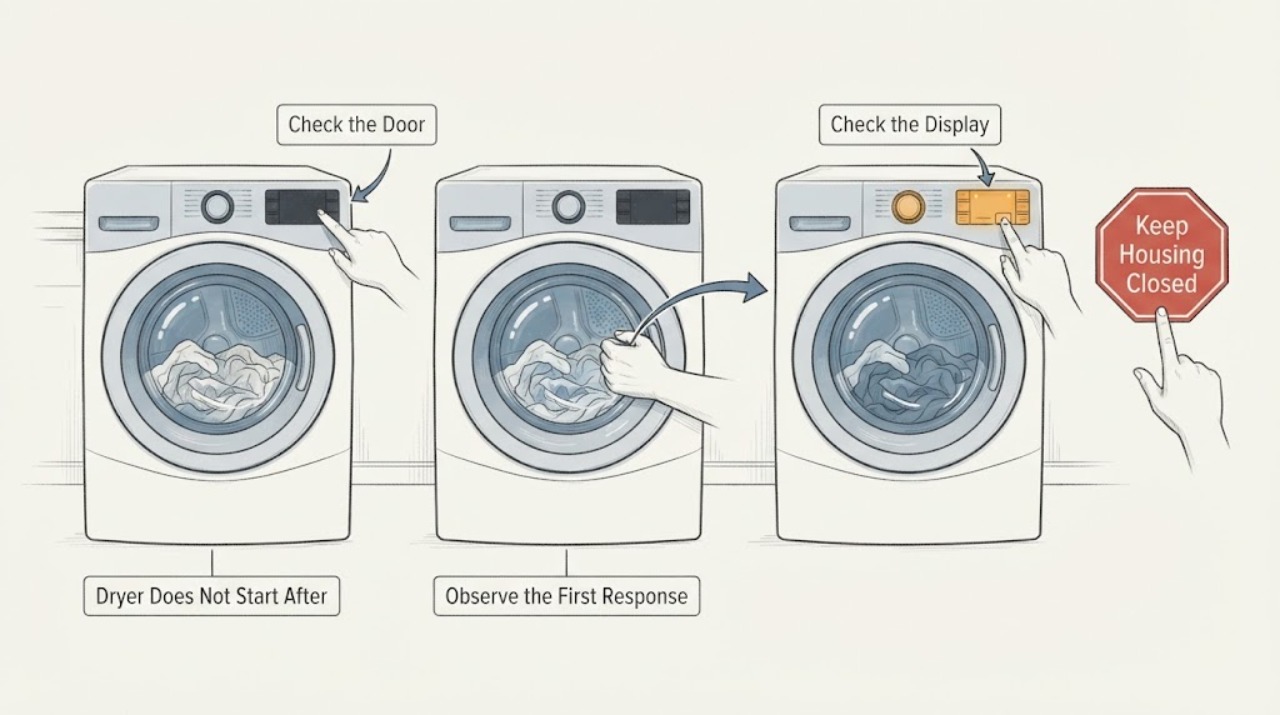
Work through in order
Diagnostic checks
Use only checks that match the exact appliance or system and its official guide.
-
Check 1
Remove the damp load only after the drum is stopped and check from outside for smoke, burning or electrical odor, a hot or damaged plug or cord, water on or under the appliance, a blocked exhaust opening, or sharp or broken door material. Do not restart the dryer to see whether it has cooled, and isolate power only from a dry, safely reachable position if a hazard is present.
Expected result: There is no hazard and the dryer is intact, or smoke, odor, heat, water, cord damage, or visible damage is present.
Next step: Keep the dryer out of service and arrange qualified appliance or electrical assessment for a hazard. If it is intact, continue with external door and control checks.
Stop if: Do not touch damaged wiring, operate with water near electrics, or repeatedly start a hot or abnormal dryer.
Why this matters
Why: The damp load may have exposed an existing overheating, electrical, or mechanical problem, but it does not identify the failed part. Any hazard takes priority over a start test.
-
Check 2
With the drum empty and the dryer off, inspect the accessible door gasket, strike, latch area, and cabinet lip for lint or clothing that prevents a flush closure. Close the door gently and note whether it latches without force. Do not press the switch with a tool or bypass it.
Expected result: An accessible obstruction is removed and the door latches, or the door remains loose, springs back, sits out of alignment, or the visible switch is scorched or pushed in.
Next step: If the door now latches normally and there is no hazard, continue to the control check. If it will not latch or the switch looks damaged, leave the dryer unused and arrange service.
Stop if: Do not hold the door switch closed, force the latch, or remove the front panel.
Why this matters
Why: GE lists a tightly closed door and a damaged or displaced door switch among no-start conditions. A door that will not latch is a door/interlock service path, not evidence of a failed motor or thermal fuse.
-
Check 3
Confirm that the panel wakes, the intended dry cycle and fabric or temperature setting are selected, and the Start control is fully actuated as the model guide describes. Check for any visible lock or delayed-start indication without entering an undocumented setting or repeatedly pressing Start.
Expected result: The controls respond and the dryer starts, the display counts down but the drum and heat remain absent, or the panel does not respond.
Next step: If it starts, monitor one attended cycle and stop for abnormal sound or heat. If it remains inactive, make only the external power check and then stop repeated attempts.
Stop if: Do not remove the console, change settings by guesswork, or bypass an interlock.
Why this matters
Why: A responsive countdown with no motor or heat is the exact report's key distinction: the Start command was accepted but operation did not begin. An unresponsive panel leaves power, control, or switch paths open; neither observation names a part.
-
Check 4
From the user-accessible household panel, look for a tripped breaker or fuse affecting the dedicated electric-dryer circuit. A breaker may look partly on; reset it only once and only when there is no smell, heat, water, or visible damage. Leave any suspected rear terminal or wiring fault to a qualified person.
Expected result: The breaker or fuse is interrupted and the dryer resumes after the safe reset, the breaker trips again, or the circuit appears normal but the dryer remains inactive.
Next step: For a repeat trip or suspected circuit problem, call a qualified electrician. If the circuit is stable but the dryer still will not start, arrange qualified appliance service.
Stop if: Do not change breaker size, remove a cover, reconnect wires, or keep resetting a tripping circuit.
Why this matters
Why: GE states that electric dryers use a dedicated two-sided supply and that a partially tripped breaker can produce abnormal operation. A repeat trip or normal-looking breaker with no start requires electrical or appliance diagnosis, not a larger fuse or repeated reset.
-
Check 5
With the dryer off, clean only the accessible lint filter and inspect the visible exhaust outlet and room-side front clearance for lint accumulation, a crushed visible duct, or blockage. Do not pull the dryer out, dismantle the duct inside the cabinet, or run a cycle to test airflow after an overheat concern.
Expected result: The lint filter or visible outlet is restricted, the front is blocked, the duct appears crushed, or the visible airflow path looks clear.
Next step: Correct only a safely accessible lint or clearance issue and leave the dryer off if it had overheating signs. Have a qualified person assess hidden ducting or internal protection.
Stop if: Do not reach into the blower housing, remove panels, or restart a dryer with a damaged or inaccessible exhaust path.
Why this matters
Why: GE recommends lint-filter and exhaust-duct maintenance, and warns that restricted airflow or a blocked front can contribute to overheating. This can be a contributing condition, but it does not prove that a thermal protector, motor, heater, or control failed.
-
Check 6
If the dryer is intact, the door latches, the circuit is stable, and no heat or burning warning exists, make at most one attended normal start check from outside. Record whether the display responds, the drum turns, a motor hum or click occurs, heat begins, or the control returns to idle. Do not reproduce the damp-load condition or run repeated cycles.
Expected result: The dryer starts normally, the display counts down with no drum movement, it hums or clicks without starting, or it remains completely unresponsive.
Next step: Stop after this single observation and give service the exact model, damp-load timing, power result, door result, and display behavior. Keep it off for persistent no-start or abnormal sound.
Stop if: Do not open the cabinet, test a motor or thermal device live, bypass the door switch, or order a fuse, motor, or board from the sequence alone.
Why this matters
Why: A normal start after the external correction supports a door, control-setting, or supply condition. Persistent countdown-without-motion or complete no-start leaves internal motor, switch, control, or protection paths for service; a sound alone cannot select one.
Use your observations
Decision map
Find the observation that best matches what you see, then follow the next safe action.
-
PATH 01Next step
What you see
The load was unusually damp but there is no odor, heat, water, damage, or recurrence; the door latches, controls respond, and the dryer starts after a single safe external correction.
Do this next
Monitor one attended cycle and stop if the dryer overheats, makes an abnormal noise, or fails to start again. Record the event for service if it recurs.
Why this path and its safety boundary
Why it matters: The dampness is a timing clue rather than evidence of a failed part. A transient door, cycle, or supply condition is more plausible than a proven motor or control failure.
-
PATH 02Next step
What you see
The display accepts Start or counts down, but the drum never turns and there is no heat, with a secure door and stable external circuit.
Do this next
Keep the dryer out of service and arrange qualified GE appliance service. Provide the full label, the damp-load timing, and the no-drum/no-heat observation.
Why this path and its safety boundary
Why it matters: This matches the exact-model report's symptom sequence. It is an internal start or protection branch, but the observation does not distinguish motor, switch, control, or another component.
-
PATH 03Next step
What you see
The dryer has no panel response, the dedicated breaker is tripped, or the breaker trips again after one safe reset.
Do this next
Do not reset again; arrange qualified electrical assessment for the circuit and appliance. Do not open the terminal block or test live voltage.
Why this path and its safety boundary
Why it matters: An external supply or electrical safety path takes priority. A partially tripped breaker can affect an electric dryer, but repeated trips must not be treated as a reset problem.
-
PATH 04Next step
What you see
The door does not latch flush, the visible switch is scorched or pushed in, the exhaust path is visibly damaged or blocked, or the dryer shows an overheat warning.
Do this next
Leave the dryer off and arrange qualified appliance service; use an electrician for a damaged cord, outlet, or circuit. Do not move the dryer or dismantle its duct.
Why this path and its safety boundary
Why it matters: The dryer is not safe for a start experiment. Door/interlock or airflow conditions can prevent operation or create fire risk, but neither points to a specific replacement part without service assessment.
-
PATH 05Next step
What you see
The model label is not DPSE810EG5WT, the suffix differs from the GE support record, or the next step would require the cabinet, terminal block, thermal protection, motor, control, or a live measurement.
Do this next
Use the complete label to obtain the matching GE manual and request qualified service with the recorded symptoms. Until identity and safety are confirmed, limit work to stopping and external observation.
Why this path and its safety boundary
Why it matters: The exact platform and internal diagnosis are not established at the safe owner-observation level. Closely named GE dryer families must not be treated as interchangeable.
Helpful context
Understand the symptom
Do not let the damp load choose the failed part
The report's important sequence is that an unusually damp load was followed by a no-start condition; it does not establish that moisture damaged a specific component. First decide whether the dryer is unsafe, whether the panel responds, and whether the drum is being prevented from starting by the door or by lost power. Only then does the no-drum/no-heat observation justify a service branch.
Confirm the older electric-dryer identity
The exact GE user report gives DPSE810EG5WT, while GE's opened Owner Center page displays the closely related DPSE810EGWT family and describes it as an electric dryer manufactured in the older period. Read the model and serial label behind the door and use the matching manual; do not transfer a model-specific wiring or component procedure from a different suffix.
The outside checks come before the cabinet
GE's no-start guidance starts with the plug, tightly closed door, selected cycle, Start control, door-switch condition, and household breakers or fuses. Its electric-dryer guidance also explains that a dryer can have partial supply and still need the full dedicated circuit for normal operation. None of this authorizes opening the rear terminal cover or measuring live voltage; a damaged connection belongs with an electrician or appliance technician.
When checks do not resolve it
Need a professional?
Arrange qualified GE appliance service when the display counts down without drum movement, the door or switch will not latch normally, the no-start remains after safe external checks, the model suffix or manual is uncertain, or diagnosis would require cabinet, terminal, motor, control, or protection access. Use a qualified electrician for the dedicated circuit, outlet, cord, or repeated breaker-trip problem.
Safety scope: Do not open the rear terminal block or cabinet, perform live voltage or continuity tests, bypass the door switch, change breaker size, reset a repeatedly tripping circuit, run a dryer with a burning odor or restricted exhaust, or select a fuse, motor, control, or thermal part from the damp-load sequence alone. Stop immediately for smoke, sparking, a hot cord or outlet, water near electrics, or visible fire or heat damage.
Have this ready
- Provide the complete model and serial label photo, the damp-load timing, whether the panel and countdown respond, door-latch observations, breaker result, visible lint or exhaust condition, any motor click or hum, whether the drum or heat began, and every odor, heat, water, or damage warning.
Common questions
FAQ
Did the very damp load burn out my GE dryer?
The timing alone cannot show that. It may have exposed an existing start, power, door, airflow, or protection problem. Check for hazards, the door, controls, external breaker, and visible lint or exhaust conditions; do not infer a failed part from the wetness.
Why does the timer count down but the dryer does not move?
That means the control accepted a Start command, but it does not identify whether the door signal, motor path, control, or protection is at fault. The exact DPSE810EG5WT report describes this sequence. Stop after one safe outside observation and arrange service if it persists.
Can I reset the dryer breaker?
Only from the user-accessible panel, once, and only when there is no smell, heat, water, or visible damage. GE notes that electric dryers use a dedicated two-sided supply. If it trips again, leave it off and call a qualified electrician; never change the breaker size.
Should I test the thermal fuse or motor?
Not as a first-time owner check. That requires cabinet access or electrical testing and the symptom does not identify which part is involved. Give service the exact model, damp-load timing, display behavior, door result, breaker result, and whether the drum moved.
Read the exact guide
Official sources
- Dryer - Will Not Run or StartGE Appliances · Official GE no-start guidance opened for the assigned dryer symptom; it covers plug, door, cycle/Start, door switch, breaker/fuse, and model-specific configuration without proving an internal part.
- Electric Dryer - Has No PowerGE Appliances · Official GE electric-dryer power article opened for the assigned electric platform; it confirms the dedicated outlet and breaker context and a single safe breaker reset, not live testing.
- User Manual & Care for DPSE810EGWT | GE AppliancesGE Appliances · The opened GE Owner Center identifies the closely related DPSE810EGWT family as a GE Profile electric dryer and links its owner manual, service, and exhaust/lint maintenance resources; confirm the exact DPSE810EG5WT label before model-specific work.
- GE dryer doesn't turn onReddit r/appliancerepair · Exact Reddit post opened for the assigned model and sequence. It is a lived-experience report with speculative replies and no confirmed repair, so it supports symptom timing only.
- Dryer - Timer Stops During the CycleGE Appliances · Official GE dryer guidance opened for the airflow/overheat branch; it says a blocked front can contribute to overheating and recommends service when checks do not resolve the concern.
Community feedback
Share a repair observation
Share a plain-text repair observation. Accepted observations are published automatically; this page may take a moment to update.